


- Posts: 2
- Thank you received: 0
3 Post Moderation Rule for New Boarders (25 Jan 2021)
New boarders will have their posts moderated - Don't worry if you cannot see your post immediately.
Keyframing text size
09 Jun 2014 08:04 #47514
by MichV
Keyframing text size was created by MichV
Hello,
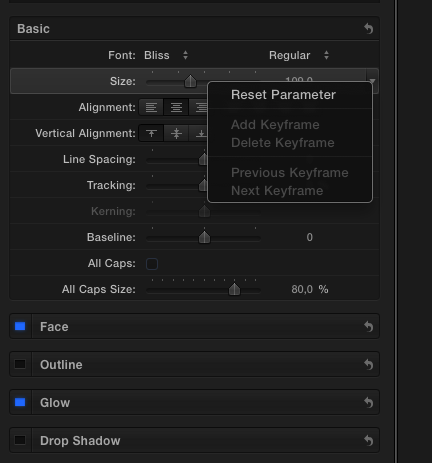
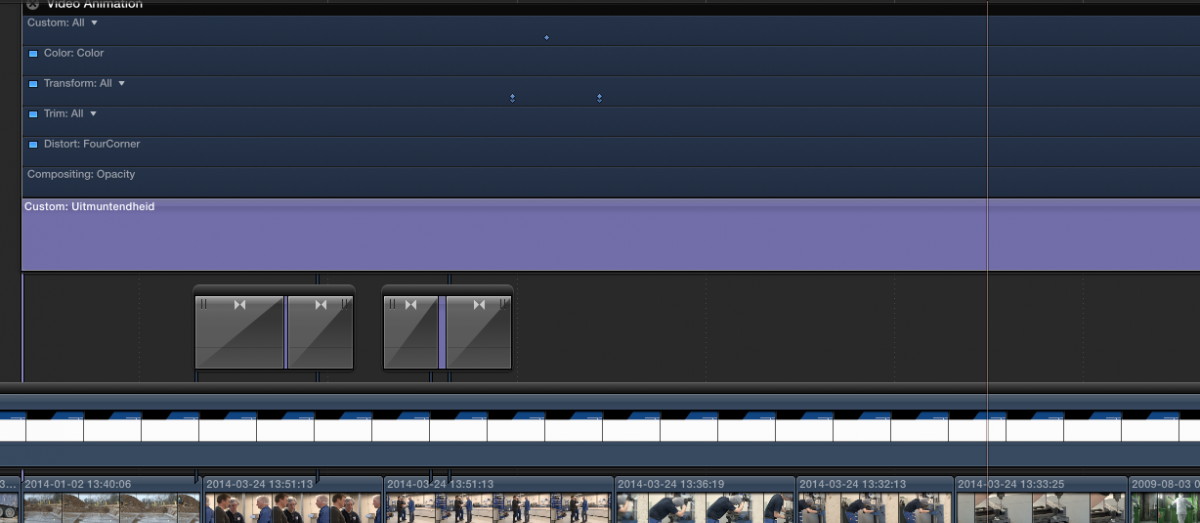
I don't know if it's the newest version of fcpx 10.1.1 or am I doing something wrong but i can't seem to keyframe the font size or any other basic settings of my text files. I can only keyframe the transform options in the video tab. Before i could transform the font sizes easily. I just want my font size to appear in one value and end in an other position but in another font size value. How do you guys do this?.
I don't want to use the rescale in the video tab because that makes it too complex.
It is so weird. It's like i never had problems before with this and now all of a sudden i can't seem to find a way to increase and decrease the font size. The most stupid command. Like i forgot how to edit with FCPX and i m doing this for ages.
Can anyone help me ?
I don't know if it's the newest version of fcpx 10.1.1 or am I doing something wrong but i can't seem to keyframe the font size or any other basic settings of my text files. I can only keyframe the transform options in the video tab. Before i could transform the font sizes easily. I just want my font size to appear in one value and end in an other position but in another font size value. How do you guys do this?.
I don't want to use the rescale in the video tab because that makes it too complex.
It is so weird. It's like i never had problems before with this and now all of a sudden i can't seem to find a way to increase and decrease the font size. The most stupid command. Like i forgot how to edit with FCPX and i m doing this for ages.
Can anyone help me ?
Please Log in to join the conversation.
- Andreas Kiel
-

- Offline
- Platinum Member
-

Less
More
- Posts: 1077
- Thank you received: 189
09 Jun 2014 11:47 #47518
by Andreas Kiel
Replied by Andreas Kiel on topic Keyframing text size
I'm not at a machine with any version of FCP X installed, so the answer is somehow from memory.
Depending on the title effect you may not be able to animate the parameters like size in the text tab of the effect but in the title tab.
With the Basic one I think when you switch to the title tab you get the published parameters which can be animated.
Give it a try.
- Andreas
Depending on the title effect you may not be able to animate the parameters like size in the text tab of the effect but in the title tab.
With the Basic one I think when you switch to the title tab you get the published parameters which can be animated.
Give it a try.
- Andreas
Please Log in to join the conversation.
09 Jun 2014 11:58 #47519
by MichV
Replied by MichV on topic Keyframing text size
Hello Andreas,
Thank you for your reply!
I tried it but i can't seem to get it to work with any text title (not even the basic title).
I can't even change a font's color to any other color. Is anyone having similar issues?
greetings,
Michael
Thank you for your reply!
I tried it but i can't seem to get it to work with any text title (not even the basic title).
I can't even change a font's color to any other color. Is anyone having similar issues?
greetings,
Michael
Please Log in to join the conversation.
- Tom Wolsky
-

- Offline
- Moderator
-

09 Jun 2014 13:13 #47523
by Tom Wolsky
Replied by Tom Wolsky on topic Keyframing text size
Text size can't be keyframed in almost none of the titles. I know there's a keyframe button. Only very few titles can keyframe text size, only parameters like text size that appear in the Title inspector, only those will have functional keyframing. Otherwise you're just keyframing the slider, which does nothing.
Please Log in to join the conversation.
- Andreas Kiel
-
- Offline
- Platinum Member
-
Less
More
- Posts: 1077
- Thank you received: 189
09 Jun 2014 14:54 - 09 Jun 2014 15:11 #47533
by Andreas Kiel
Replied by Andreas Kiel on topic Keyframing text size
So I'm back to a FCP X machine.
As I said in the Text tab nothing can be animated with the examples I looked at. In the Title tab dependent on the template things can be animated.
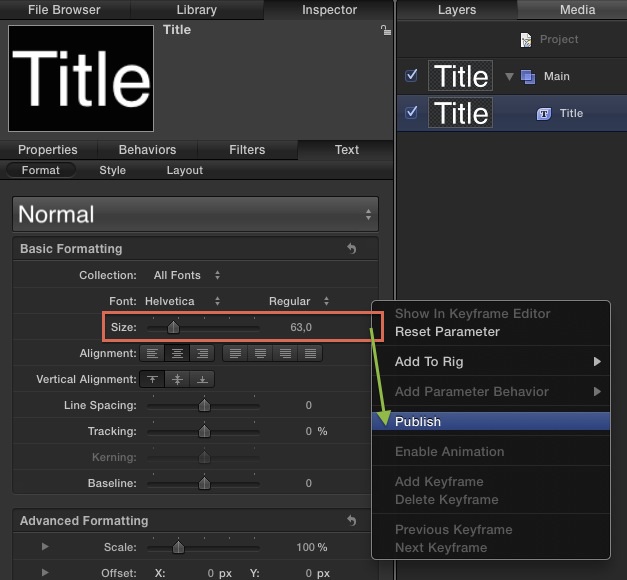
You used the Basic Title. Open a copy in Motion. Select the Title layer. Go to Inspector -> Text -> Format. Select the Size entry and publish + any other parameter you want to publish. Save the copy.
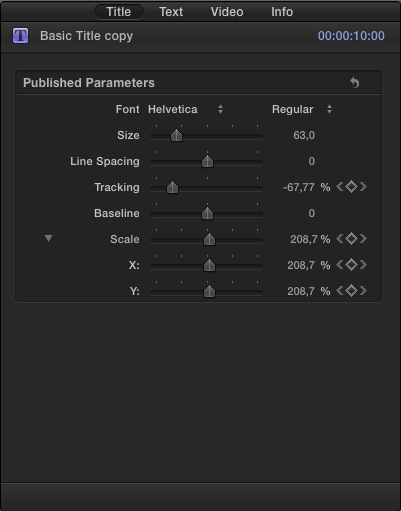
In FCP X now you can keyframe the parameters.
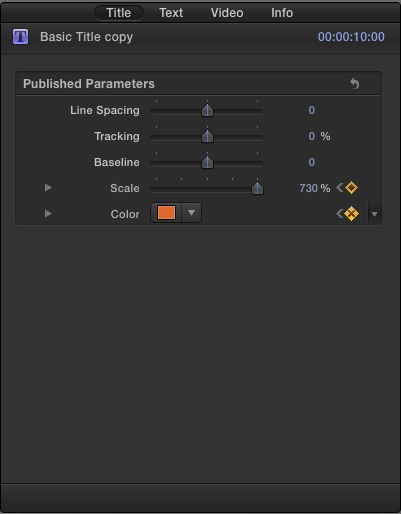
- Andreas
As I said in the Text tab nothing can be animated with the examples I looked at. In the Title tab dependent on the template things can be animated.
You used the Basic Title. Open a copy in Motion. Select the Title layer. Go to Inspector -> Text -> Format. Select the Size entry and publish + any other parameter you want to publish. Save the copy.
In FCP X now you can keyframe the parameters.
- Andreas
Last edit: 09 Jun 2014 15:11 by Andreas Kiel.
Please Log in to join the conversation.
