


- Posts: 56
- Thank you received: 0
3 Post Moderation Rule for New Boarders (25 Jan 2021)
New boarders will have their posts moderated - Don't worry if you cannot see your post immediately.
audio is not being shon with video but as separate clip and adjusting is difficult
03 Jun 2014 03:23 - 03 Jun 2014 03:27 #47165
by cb2014
audio is not being shon with video but as separate clip and adjusting is difficult was created by cb2014
I am new to FCP and trying to adjust audio in the middle of a clip but
the video clip doesn't show the audio adjustments like I see in demos...
just a separate clip....I can only adjust the volume of the whole clip?
I am trying to add keyframes to make adjustment points but seem to be missing something>
Thanks for any help
the video clip doesn't show the audio adjustments like I see in demos...
just a separate clip....I can only adjust the volume of the whole clip?
I am trying to add keyframes to make adjustment points but seem to be missing something>
Thanks for any help
Last edit: 03 Jun 2014 03:27 by cb2014.
Please Log in to join the conversation.
- ronny courtens
-

- Offline
- Moderator
-

Less
More
- Posts: 4455
- Thank you received: 962
03 Jun 2014 06:40 #47170
by ronny courtens
Replied by ronny courtens on topic audio is not being shon with video but as separate clip and adjusting is difficult
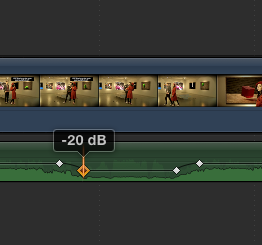
Press ALT and click on the volume bar of the audio clip to add a keyframe, then add more keyframes wherever you want and drag on the volume bar to change the volume of the audio.
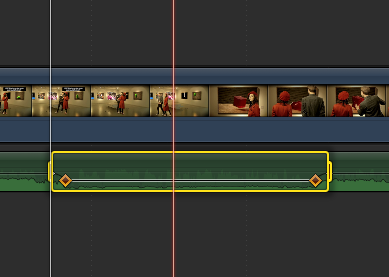
Or press "R" to select the Range tool and drag with your cursor on the audio clip to select a range. Then just drag the volume bar inside the range to adjust the volume and 4 keyframes will be automatically created.
- Ronny
Or press "R" to select the Range tool and drag with your cursor on the audio clip to select a range. Then just drag the volume bar inside the range to adjust the volume and 4 keyframes will be automatically created.
- Ronny
Please Log in to join the conversation.
