


3 Post Moderation Rule for New Boarders (25 Jan 2021)
New boarders will have their posts moderated - Don't worry if you cannot see your post immediately.
Backing Up
Love to hear people's workflows on not only backing up their projects but also their media.
Especially when one chooses to have a "Managed Library"
Carbon Copy Cloner, Back Ups for Final Cut Pro?
What's your workflow?
Sean Lander - Editing since 1982 - AVID 1991 - FCP 1999 - FCPX 2011
Please Log in to join the conversation.
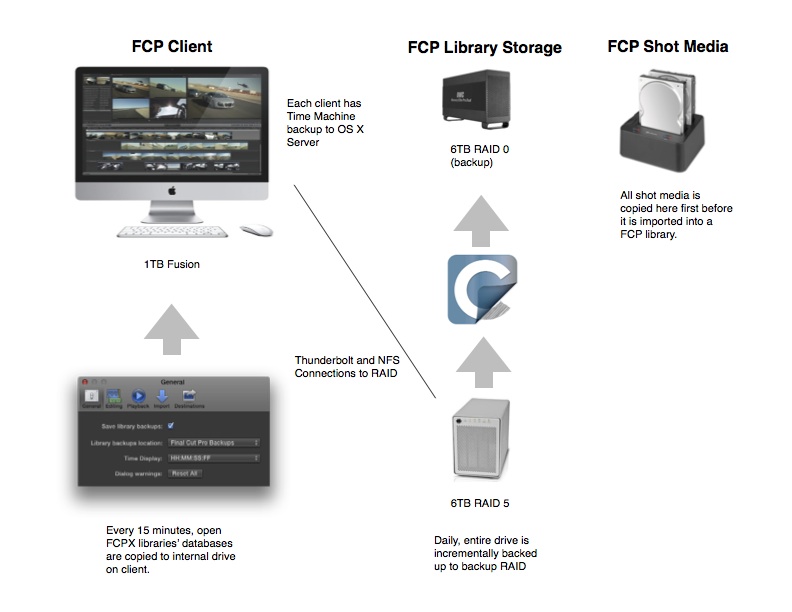
 So here are the components of our backup process.
1. Shot Media Drives - (Original Media) As we shoot media we copy all original media by project onto a "Shot Media" drive in USB docks. Once we fill one up, I dupe it and then keep the copy offsite, leaving the first copy connected to our media server.
2. Working RAID 5 with FCP Libraries - (First copy of Media, Original Libraries) 99% of the time we used managed media and therefore copy the media to the FCP Library. This now provides two copies of the media, and allows anyone on our network to open any library.
3. Backup of woking RAID - (Second copy of Media, First Copy of Libraries) Daily I have a scheduled task in Carbon Copy Cloner set to copy all contents to a DIY RAID. It does an incremental backup, so it leaves old copies in case we need them. The scheduled task also mounts and unmounts the drive only during the clone process so we aren't confused with multiple copies of Libraries showing up in Spotlight. This cloned backup gives us fast access to open a library from the day before, in case we accidentally hosed a timeline.
4. FCPX database backups - (First copy of Library databases) we leave FCPX defaults on to copy the databases to the client Movie folder every 15 minutes. We have needed it a couple of times and it has been God sent.
5. Time Machine on Client Macs - (Second copy of Library databases) - We run Time Machine server on OS X sever and each clients internal drive is backed up giving us additional copies of our database backups.
6. Travel Drives - when we move a library to a external drive for editing out of the office, we copy the entire library and then on the Raid we placed the original library in a folder marked "Checked Out Library".
7. Archive Drives - when a project is closed we copy the FCP Library and a copy of our current Motion Templates folder to a job folder on an archive drive. The Job folder also contains any output masters and other job documents. (I'm toying with the idea of copying the FCP database backup folder there too, just for extra good measure.) We have two copies of the archive drive, one offsite and one onsite connected to our media server.
Here is a diagram showing the basics (I posted this previously in another workflow post)
Please Log in to join the conversation.
Sean Lander - Editing since 1982 - AVID 1991 - FCP 1999 - FCPX 2011
Please Log in to join the conversation.

"CCC treats bundles as folders, it won't recopy the entire bundle if just one item within it has changed, it will only copy the changed item. It sounds like the bundle has been renamed on the source, though. If you rename those bundles on the destination, CCC will not recopy items within the bundle that are already up to date. If the bundles have different names on the source and destination, though, then CCC will see them as completely different items and will copy the entire bundle."
I've one RAID 6 backup array. CCC is automated to backup my working P2 RAID 5 and my nMP system drive to it at 2am every night. I have it set so that any file on my backup that is no longer on the source volume is deleted, and only incremental backups are done. So, 15 minutes max over the past couple of years.
- Every night, automatic backups of everything.
- Once a week I verify all my drive's used and available space. Run Disk Utility to repair all drives.
- Once a month I run Disk Warrior on all drives to repair the directories.
I only have serious issues (outside of software bugs, not much to do about that) ever few years on any of the Macs I and my studio have owned for many, many, many years. With this maintenance and backup routine, we tend to catch things before they get out of hand and cost us too much time and money. Regular maintenance is at least as important as a regular backup. And if you're making a living with this hardware, Apple Care is SO worth it. Saved our butts a few times, pays for itself.
Please Log in to join the conversation.


Other then that, our footage gets immediately backed up to RAID 1 OEM drives via a Drive dock before it's logged-in for anything. Those serve as our "master tapes".
Then as we need to make room on the SAN, projects and their footage are archived to a different set of RAID 1 OEM drives. I go through these OEM drives every few months to spin them up and check that they still work. So far we've not lost anything. (we buy the HGSTs which are known for better reliability) But OS X's software RAID 1 can be finicky. I have had to rebuild many a RAID 1 because the two drives didn't' mount at the same time– mostly due to human error– and they became "degraded", though the dives themselves are fine.
When that happens, I copy the entire contents of the archive to the SAN again before attempting to rebuild the RAID 1. Delete the temp copy when the rebuild is successful. This process could take a few days.
FCP X Workstations are backed up via local Time Machines. Except for their "scratch disk" which isn't backed up at all.
I set up a Time Machine Server for all our office-based iMacs, (and our Xsan server Mac minis, but not the Xsan volumes) and that works really well!
Our Xsan Mac mini servers also get a SuperDuper! smart clone update every morning to a LaCie drive via a Sparsebundle. And when there is an OS X or Server.app change, a new SuperDuper sparse bundle is created immediately after updating, in case we need to back-track, so the previous good version doesn't get overwritten. I keep a few versions back.
Finally we've got a general department File Server, and this one gets a RAID 1 Time Machine since many of the files on there are vital. We've often found file corruption months after it happened and thank goodness we could go back in time to locate the known-good original. So we decided a RAID 1 Time Machine was warranted.
We mostly keep general documents on there, but we also keep each version of FCP X and other software installers on that volume.
Oh, one more thing that isn't really for backup, but for troubleshooting– I have a iMac dedicated to test out beta software that also happens to run a Netinstall Server. On there I've got a few "NetAdmin" Netboot images that I can boot up to over the network to troubleshoot a misbehaving Mac from anywhere in our department. That's been really helpful.
Please Log in to join the conversation.
I've been combining that with Final Cut Library Manager to clean the projects prior to final archiving to LTO tapes.
GoodSync : www.goodsync.com/lp?frm=gsp-008&affid=rd...TG2b4CFSGWtAodHlIAIA
Final Cut Library Manager : www.arcticwhiteness.com/finalcutlibrarymanager/
Please Log in to join the conversation.
I've been playing with Back Ups for Final Cut Pro and it does work really well doing incremental media that is inside a library.
My workflow is usually: Copy data from cards to external Drive. Import from into FCP X if going Managed, or copy media to my RAID if using external.
Create or ingest footage into Library and then back up all of that content to another external drive.
Send cards back to the field. Take back up of camera files off site to another location or keep it with me if it's a small amount of media. <2TB.
Sean Lander - Editing since 1982 - AVID 1991 - FCP 1999 - FCPX 2011
Please Log in to join the conversation.
Seanus wrote: Great industrial strength workflows there guys. What about the single person operators?
Actually there are only 2 of us editors at my place, and we are not full time at that.
Your workflow sounds good, but one thing I think would be helpful for you is to do whatever you are doing consistently. Only when you do something over and over the same way can you really find ways to refine it. Plus the more consistent you can be the better organized you'll be also.
So I'm curious why would you used external media if you are not sharing projects?
Please Log in to join the conversation.
Seanus wrote: Great industrial strength workflows there guys. What about the single person operators?
I've been playing with Back Ups for Final Cut Pro and it does work really well doing incremental media that is inside a library.
My workflow is usually: Copy data from cards to external Drive. Import from into FCP X if going Managed, or copy media to my RAID if using external.
Create or ingest footage into Library and then back up all of that content to another external drive.
Send cards back to the field. Take back up of camera files off site to another location or keep it with me if it's a small amount of media. <2TB.
That's why GoodSync works so well for me - similar situation - need to backup all files for a library/event/project and all other things that go with it - like project notes, credits lists etc. While you can use dedicated software, more generic software like GoodSync works across the board and does a great job, whether you're using a manager or unmanaged library, additional files from Motion / After Effects etc. I just point GoodSync and the root folder and we're good to go - incremental backs as needed with ability to ignore things like render files if needed.
Please Log in to join the conversation.
- Darren Roark
-

- Offline
- Platinum Member
-

I maintain an Xsan RAID for my department, (there are 8 of us) and our Xsan volumes are one thing I don't yet have a backup for. (I really don't want to go with LTO tape. yuk.)
I was of the same mind, but I was demoing this LTO drive from mLogic at an event changed my mind:
www.mlogic.com/products/mtape
It works just like a hard drive, you can even (sorta) play prores files from it, which is pretty insane if you think about it.
Right now, every six months or a year, I have to take out all my drives 'for a walk' so they don't seize up from sitting idle. It's a pain to say the least.
Until a non electronic and mechanical media format comes out that is reliable for archiving, this is currently one of the best solutions.
The cartridges go for around $50 each and fit 2.5TB natively, (Don't be fooled by the 6TB compressed on the box) even making two copies at $100 is still much cheaper than buying a 2TB drive that will eventually bite the dust. Them being much lighter and smaller than a hard drive is just a bonus.
Please Log in to join the conversation.
Please Log in to join the conversation.
Thanks for the info, I'm not yet convinced we want to invest in such a thing, though I never say never and I do try to keep an open mind on everything. What would you estimate to be your total initial cost for setting this up?
Please Log in to join the conversation.
tpayton wrote:
So I'm curious why would you used external media if you are not sharing projects?Seanus wrote: Great industrial strength workflows there guys. What about the single person operators?
I started off keeping everything in a managed library but found it to be a real pain.
It's very tricky to relink, things go wrong a lot more it seems when copying from other libraries, restoring from back ups or even copying a pasting from Snapshots.
With External media I just feel I have much more control over everything. I can create separate folders for Stills, Music, Animations etc.
I only use Managed Libraries for my personal work like family videos.
And Thanks Dave_EP I'll check out GoodSync.
Sean Lander - Editing since 1982 - AVID 1991 - FCP 1999 - FCPX 2011
Please Log in to join the conversation.
Great industrial strength workflows there guys. What about the single person operators?
Work drive is a LACIe TB RAID 0, backup drive a DROBO FS.
1. Ingest data into FCP (main cameras: Canon XF, Pana GH2 - sometimes still Canon XL)
2. Create camera archive
3. SD/CF cards are burnt to BD
4. Backup RAID to DROBO twice a day via TimeMachine
5. Backup DROBO to college server once a week
6. Run Disk Utility once a week
However, video is only about ⅓ of my job. The other two thirds are inDesign, Photoshop/Pixelmator, Keynote and Aperture
Please Log in to join the conversation.

Please Log in to join the conversation.
I have 3, two single docks and a USB3 dual dock that I raid together as RAID0 or can use as separate drives as needed. They work very well.
Apparently there's now a 4 drive dock as well : www.techpowerup.com/forums/threads/orico...a-drive-dock.164889/
Just search for USB3 HDD Dock ( tinyurl.com/lsu4uu3 )
Now if only they made that 4 bay as a thunderbolt unit I could throw some SSDs in - I'd be a really happy bunny.
OK - so, one gotcha with the docks. Toaster is probably a good term for them, because you are relying on natural cooling of the HDDs as they sit in the dock, by their very nature there is no fan. This means the HDDs do run a lot hotter, though still within their tolerances. I've not experienced any issues to date, though you have to wonder if running them hard when this much hotter will eventually shorten their useful working lives. I'm up to more than 29,000 hours on a couple of the HDDs in a dock and no problems yet.
Please Log in to join the conversation.
I’m still new to editing and I’m trying to upgrade my setup to take on my first paying freelance.
If I understand this correctly from the photo diagram.
Media is copied into the “Toaster” setup then imported into the RAID 5 setup (that’s the working setup) and backed up to the RAID 0 setup (plus any offsite backup such as Crashplan).
What is the best way to swap “raw" video files with a client who is PC based?
Excuse me for my lack of terminology.
Please Log in to join the conversation.
inkeye wrote: What is the best way to swap “raw" video files with a client who is PC based?
HDD formatted to ExFAT since both Mac OS and Windows can read/write ExFAT and it allows for huge files.
Please Log in to join the conversation.
Please Log in to join the conversation.
- Darren Roark
-
- Offline
- Platinum Member
-
I think I was asked about the LTO backup cost.
It's $3500, and $50 per 2.5TB. Considering many jobs come with a pair of GRAID's from the client that cost around $800, it can pay for itself by less hard drives needed.
I wonder if somewhere rents these, it's something that could be done every couple months or so, back up drives, reuse drives, one LTO copy goes to bonded storage.
Please Log in to join the conversation.
