


- Posts: 9
- Thank you received: 0
3 Post Moderation Rule for New Boarders (25 Jan 2021)
New boarders will have their posts moderated - Don't worry if you cannot see your post immediately.
Rotating text
- alexandreperei
-
 Topic Author
- Offline
- New Member
-

Less
More
30 May 2014 09:37 #46977
by alexandreperei
Rotating text was created by alexandreperei
hi everyone, can anyone tell if it's possible do an intro with rotating text, something like this:
Please Log in to join the conversation.
- Videopixels
-
- Offline
- Premium Member
-

Less
More
- Posts: 119
- Thank you received: 2
30 May 2014 10:21 #46980
by Videopixels
Replied by Videopixels on topic Rotating text
Use Motion or AE and make your TEXT 3D. There is an option in Motion 5 to extrude text and you can first give that a show so you don't push your system too much.
Please Log in to join the conversation.
- ronny courtens
-

- Offline
- Moderator
-

Less
More
- Posts: 4455
- Thank you received: 962
30 May 2014 10:41 - 30 May 2014 11:01 #46982
by ronny courtens
Replied by ronny courtens on topic Rotating text
You can do this inside FCP X, with regular text or with extruded text or graphics. You will need to download one free plugin to perform the 3D flip rotation effect, and another one if you also want to extrude your titles or graphics.
1. To extrude text or graphics files:
blog.alex4d.com/2012/07/19/extrude-free-fcpx-effect/
This free plugin offers much more than extrusion. You will see a lot of examples on the page and you can download the plugin at the bottom of the page. Just follow the instructions. You only need this plugin if you want your titles or graphics to be extruded.
2. To perform a 3D flip rotation between titles or graphics:
www.mikeybouchereau.com/flip-transitions/
As you can see in the video on that page the plugin does exactly what is shown in the video you have linked to. Press the Download button, double-click the Installer and just press Install.
Then launch FCP X and you will find the "Graphics Flip" transition in the Transitions browser under "Made My Mikey". Just drop it between two titles or graphics and enjoy:
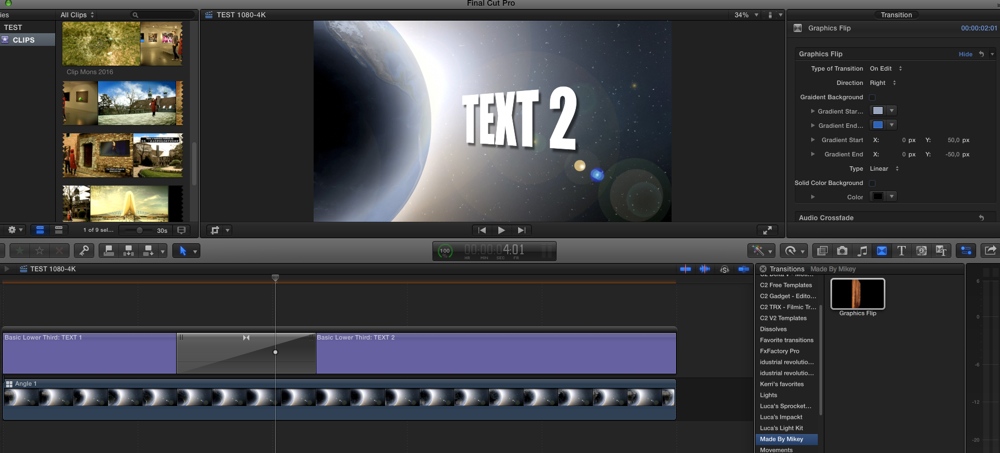
Both plugins were made for earlier versions of FCP X, but I've just tested them and both still work with the latest OS and FCP X versions.
- Ronny
1. To extrude text or graphics files:
blog.alex4d.com/2012/07/19/extrude-free-fcpx-effect/
This free plugin offers much more than extrusion. You will see a lot of examples on the page and you can download the plugin at the bottom of the page. Just follow the instructions. You only need this plugin if you want your titles or graphics to be extruded.
2. To perform a 3D flip rotation between titles or graphics:
www.mikeybouchereau.com/flip-transitions/
As you can see in the video on that page the plugin does exactly what is shown in the video you have linked to. Press the Download button, double-click the Installer and just press Install.
Then launch FCP X and you will find the "Graphics Flip" transition in the Transitions browser under "Made My Mikey". Just drop it between two titles or graphics and enjoy:
Both plugins were made for earlier versions of FCP X, but I've just tested them and both still work with the latest OS and FCP X versions.
- Ronny
Last edit: 30 May 2014 11:01 by ronny courtens.
Please Log in to join the conversation.

31 May 2014 05:27 #47029
by BenB
Replied by BenB on topic Rotating text
Of if you really want to get into it, mObject.
Please Log in to join the conversation.
- alexandreperei
-
Topic Author
- Offline
- New Member
-
Less
More
- Posts: 9
- Thank you received: 0
31 May 2014 10:11 #47033
by alexandreperei
Thanks Ronny
Replied by alexandreperei on topic Rotating text
ronny courtens wrote: You can do this inside FCP X, with regular text or with extruded text or graphics. You will need to download one free plugin to perform the 3D flip rotation effect, and another one if you also want to extrude your titles or graphics.
1. To extrude text or graphics files:
blog.alex4d.com/2012/07/19/extrude-free-fcpx-effect/
This free plugin offers much more than extrusion. You will see a lot of examples on the page and you can download the plugin at the bottom of the page. Just follow the instructions. You only need this plugin if you want your titles or graphics to be extruded.
2. To perform a 3D flip rotation between titles or graphics:
www.mikeybouchereau.com/flip-transitions/
As you can see in the video on that page the plugin does exactly what is shown in the video you have linked to. Press the Download button, double-click the Installer and just press Install.
Then launch FCP X and you will find the "Graphics Flip" transition in the Transitions browser under "Made My Mikey". Just drop it between two titles or graphics and enjoy:
Both plugins were made for earlier versions of FCP X, but I've just tested them and both still work with the latest OS and FCP X versions.
- Ronny
Thanks Ronny
Please Log in to join the conversation.
