


3 Post Moderation Rule for New Boarders (25 Jan 2021)
New boarders will have their posts moderated - Don't worry if you cannot see your post immediately.
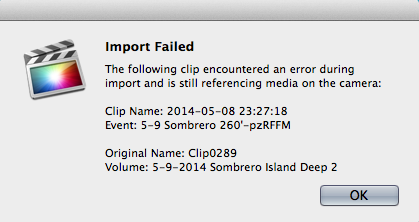
Error: Import Failed, Over and over!
- elliottjessup
-
 Topic Author
- Offline
- New Member
-

- Those who say it cannot be done... should get out of the way of those who are already doing it.
Less
More
29 May 2014 23:22 #46957
by elliottjessup
Error: Import Failed, Over and over! was created by elliottjessup
Any insight on the following import failed error? I keeps repeating it over and over again... Is there some way to just confirm and re-import? I moved the event to the trash, but it keeps trying to import!
Please Log in to join the conversation.

30 May 2014 00:47 - 30 May 2014 00:50 #46960
by BenB
Replied by BenB on topic Error: Import Failed, Over and over!
OH man, I got those a lot with my old HPX-170 and P2/DVCPRO-HD clips. But that was many versions ago.
-What version of FCPX are you running?
-What camera is this stuff importing off of?
Move the Library to the trash if you can, quit FCPX, get Preference Manager (free) from Digital Rebellion, and trash prefs. See what happens.
If can, quit FCPX (force quit if you must) and trash the whole Library, unless that would mess you up too much.
-What version of FCPX are you running?
-What camera is this stuff importing off of?
Move the Library to the trash if you can, quit FCPX, get Preference Manager (free) from Digital Rebellion, and trash prefs. See what happens.
If can, quit FCPX (force quit if you must) and trash the whole Library, unless that would mess you up too much.
Last edit: 30 May 2014 00:50 by BenB.
Please Log in to join the conversation.
- elliottjessup
-
Topic Author
- Offline
- New Member
-
- Those who say it cannot be done... should get out of the way of those who are already doing it.
30 May 2014 00:56 #46963
by elliottjessup
Replied by elliottjessup on topic Error: Import Failed, Over and over!
10.1.1 and shooting a Sony Z100 in 4k
I moved the event to the trash, kept getting the errors, but they seem to have stopped now. Strange...
I moved the event to the trash, kept getting the errors, but they seem to have stopped now. Strange...
Please Log in to join the conversation.
- elliottjessup
-
Topic Author
- Offline
- New Member
-
- Those who say it cannot be done... should get out of the way of those who are already doing it.
30 May 2014 04:48 #46969
by elliottjessup
Replied by elliottjessup on topic Error: Import Failed, Over and over!
Actually, never mind, it keeps coming back. Strange.
Please Log in to join the conversation.
- Hovercraft
-

- Offline
- New Member
-
Less
More
- Posts: 3
- Thank you received: 0
18 Oct 2014 16:36 #54378
by Hovercraft
Replied by Hovercraft on topic Error: Import Failed, Over and over!
elliottjessup, I have been encountering this same error a lot. Did you ever find a way around it?
10.1.3 on OS X 10.9.5, iMac late 2013 27 inch
10.1.3 on OS X 10.9.5, iMac late 2013 27 inch
Please Log in to join the conversation.
- elliottjessup
-
Topic Author
- Offline
- New Member
-
- Those who say it cannot be done... should get out of the way of those who are already doing it.
20 Oct 2014 17:50 #54474
by elliottjessup
Replied by elliottjessup on topic Error: Import Failed, Over and over!
I'm not sure if I found an actual solution, but what I did do is dedicate one external drive to the raw files, and one external drive to a library, which seemed to fix whatever the issue was.
Please Log in to join the conversation.
- Hovercraft
-
- Offline
- New Member
-
Less
More
- Posts: 3
- Thank you received: 0
21 Oct 2014 02:28 #54509
by Hovercraft
Replied by Hovercraft on topic Error: Import Failed, Over and over!
Just curious, what kind of drives? Because I had the library on a Thunderbolt drive and the raw footage on a USB drive, and was getting those errors.
Please Log in to join the conversation.
- elliottjessup
-
Topic Author
- Offline
- New Member
-
- Those who say it cannot be done... should get out of the way of those who are already doing it.
21 Oct 2014 04:00 #54512
by elliottjessup
Replied by elliottjessup on topic Error: Import Failed, Over and over!
All usb 3.0, with far too slow spin drives. It will be nice when high capacity solid state storage is easily accessible!
Please Log in to join the conversation.
