


3 Post Moderation Rule for New Boarders (25 Jan 2021)
New boarders will have their posts moderated - Don't worry if you cannot see your post immediately.
Can hear Audio in Project but can not see it!
- finalbug.net
-
 Topic Author
- Offline
- Platinum Member
-

- Absence of Quality is the essence of squareness.
Less
More
28 May 2014 08:56 - 28 May 2014 09:05 #46895
by finalbug.net
Can hear Audio in Project but can not see it! was created by finalbug.net
Hi, hi
Possibly really stupid but this has me stumped!
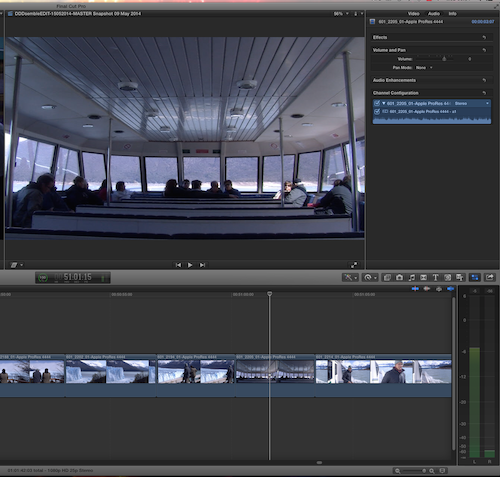
I can hear Audio in Project but can not see it (the waveforms)
Please see screen shot!
I have been editing Video and Audio in all along...
I can see the Audio waveforms in the Browser!
I can see the Audio waveforms in the Inspector!
any body got any ideas
Editing Pro Res 4444 from Compresor in FCPX 10.1.1
thanks in advance.
Paul
Possibly really stupid but this has me stumped!
I can hear Audio in Project but can not see it (the waveforms)
Please see screen shot!
I have been editing Video and Audio in all along...
I can see the Audio waveforms in the Browser!
I can see the Audio waveforms in the Inspector!
any body got any ideas
Editing Pro Res 4444 from Compresor in FCPX 10.1.1
thanks in advance.
Paul
Last edit: 28 May 2014 09:05 by finalbug.net.
Please Log in to join the conversation.
- Daniel Rutledge
-

- Offline
- Premium Member
-

- Those that know don't tell, and those that tell don't know.
28 May 2014 13:54 #46903
by Daniel Rutledge
Replied by Daniel Rutledge on topic Can hear Audio in Project but can not see it!
When this has happened to me, it usually is a bug with FCPX not loading the waveforms. Generally it goes away if I make some small change to the audio or just zoom in and out from the timeline. My next move is to restart FCPX. After that, if I trash render files, it forces FCPX to make new ones and then they appear. Or maybe it is something else entirely.
I hope this helps.
I hope this helps.
Please Log in to join the conversation.

28 May 2014 16:11 #46907
by BenB
Replied by BenB on topic Can hear Audio in Project but can not see it!
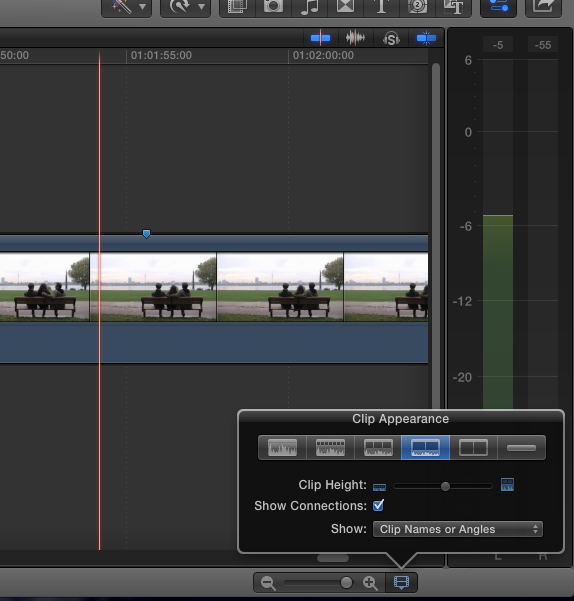
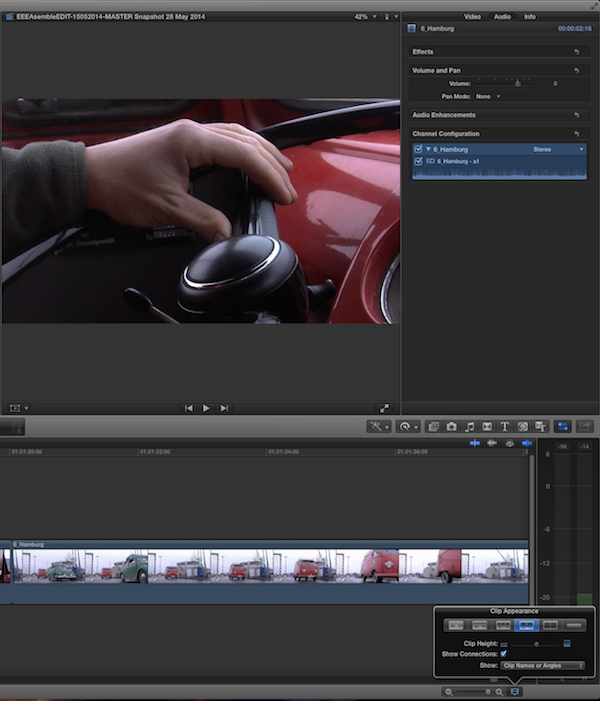
Can we see a screen shot of your Timeline "clip appearance" settings (bottom right of timeline pane)?
Please Log in to join the conversation.
- finalbug.net
-
Topic Author
- Offline
- Platinum Member
-
- Absence of Quality is the essence of squareness.
28 May 2014 21:02 - 28 May 2014 21:05 #46922
by finalbug.net
Replied by finalbug.net on topic Can hear Audio in Project but can not see it!
Hello and thanks for the responses
I suspect that I need to trash my preferences. Multiple restarts do not help.
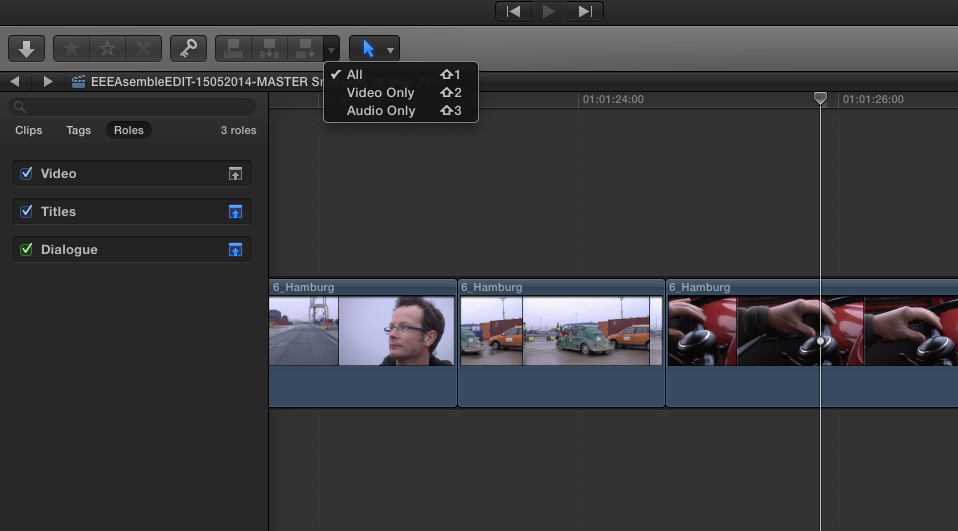
It just is not logical what is happening (see first screen shot)!
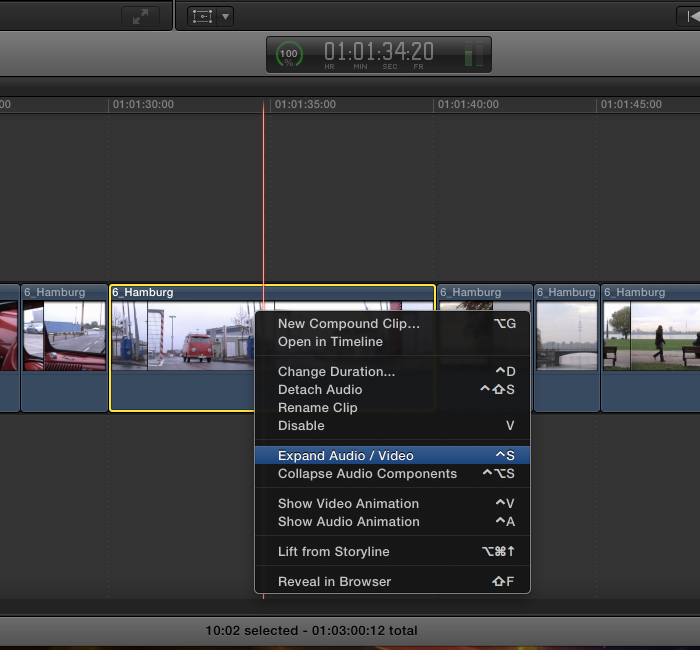
I can not even separate my Audio from video (see second screen shot) and the option is not even greyed out!
weird :ohmy:
Paul
I suspect that I need to trash my preferences. Multiple restarts do not help.
It just is not logical what is happening (see first screen shot)!
I can not even separate my Audio from video (see second screen shot) and the option is not even greyed out!
weird :ohmy:
Paul
Last edit: 28 May 2014 21:05 by finalbug.net.
Please Log in to join the conversation.
29 May 2014 02:57 #46928
by BenB
Replied by BenB on topic Can hear Audio in Project but can not see it!
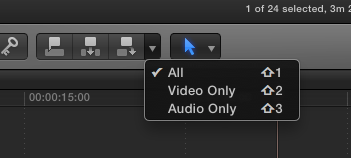
OK, that would indicate there is no audio on those clips. Verify you're set to edit in both video and audio to the timeline. And verify that when you select one of those clips in the timeline, you can see both a Video and Audio section in the Inspector.
Also, open the Timeline Index, go to Roles, Make sure the little box to the far right of any and all audio Roles is NOT blue, but gray.
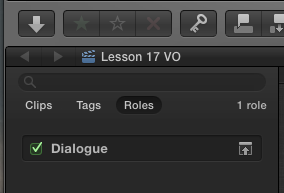
Also, open the Timeline Index, go to Roles, Make sure the little box to the far right of any and all audio Roles is NOT blue, but gray.
Please Log in to join the conversation.
- finalbug.net
-
Topic Author
- Offline
- Platinum Member
-
- Absence of Quality is the essence of squareness.
29 May 2014 04:52 #46931
by finalbug.net
Replied by finalbug.net on topic Can hear Audio in Project but can not see it!
Hi Ben
Everything is OK. Theoretically. Really. It can only be the preferences that are screwed. Will trash and report back over the weekend. :woohoo:
thanks
Paul
Everything is OK. Theoretically. Really. It can only be the preferences that are screwed. Will trash and report back over the weekend. :woohoo:
thanks
Paul
Please Log in to join the conversation.
- ronny courtens
-

- Offline
- Moderator
-

Less
More
- Posts: 4455
- Thank you received: 962
29 May 2014 05:11 - 29 May 2014 05:11 #46932
by ronny courtens
Replied by ronny courtens on topic Can hear Audio in Project but can not see it!
It's either your user preferences or your waveform cache. Both can be trashed and refreshed.
- Ronny
- Ronny
Last edit: 29 May 2014 05:11 by ronny courtens.
Please Log in to join the conversation.
29 May 2014 13:11 - 29 May 2014 13:13 #46946
by BenB
Replied by BenB on topic Can hear Audio in Project but can not see it!
In your screen shot, the Dialog Role expand/collapse button is blue, that is incorrect, as Blue hides (collapses) the waveforms, Gray shows (expands) them.
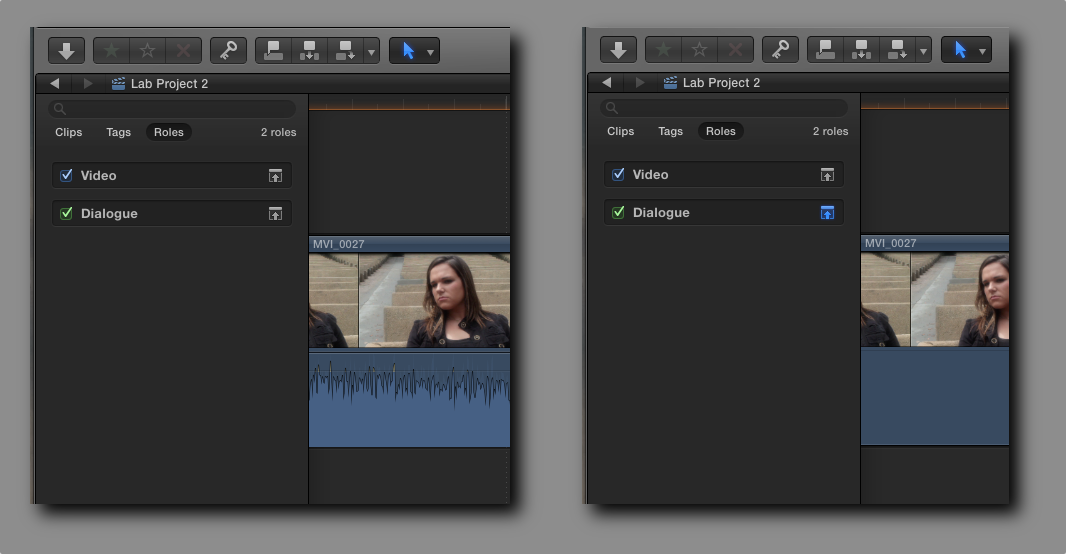
Last edit: 29 May 2014 13:13 by BenB.
Please Log in to join the conversation.
- finalbug.net
-
Topic Author
- Offline
- Platinum Member
-
- Absence of Quality is the essence of squareness.
30 May 2014 05:30 #46970
by finalbug.net
Replied by finalbug.net on topic Can hear Audio in Project but can not see it!
oh dearie me that did the trick, thanks Ben. :oops:
Thanks to every one else for their suggestions.
best
Paul
Thanks to every one else for their suggestions.
best
Paul
Please Log in to join the conversation.
