


- Posts: 786
- Thank you received: 21
3 Post Moderation Rule for New Boarders (25 Jan 2021)
New boarders will have their posts moderated - Don't worry if you cannot see your post immediately.
Editing audio- two channels.
- Jonathan Levin
-
 Topic Author
- Offline
- Platinum Member
-

Less
More
27 May 2014 15:59 #46823
by Jonathan Levin
Editing audio- two channels. was created by Jonathan Levin
Am I doing this right?
Doing a test recording simulating interviewee and interviewer. Using two mics going into mixer. I have panned one mic hard left and one hard right, left and right output from mixer to camera.
Just using Quicktime, the audio test comes out as expected: one voice right and the other voice(mic) left.
My first question is on import: It seems like I want to check the box in the import window "Separate mono and group stereo audio" since after a few ttys this was the way I got a left and right channel to edit in X.
Oddly, I had to re-pan everything unless I am doing something wrong.
Any suggestions on how you would deal with a two person interview, one person left, the other right?
I know that I want to be able to edit out silent parts of one channel while the other person is speaking: checkerboard the audio edit.
Thanks.
Jonathan
Doing a test recording simulating interviewee and interviewer. Using two mics going into mixer. I have panned one mic hard left and one hard right, left and right output from mixer to camera.
Just using Quicktime, the audio test comes out as expected: one voice right and the other voice(mic) left.
My first question is on import: It seems like I want to check the box in the import window "Separate mono and group stereo audio" since after a few ttys this was the way I got a left and right channel to edit in X.
Oddly, I had to re-pan everything unless I am doing something wrong.
Any suggestions on how you would deal with a two person interview, one person left, the other right?
I know that I want to be able to edit out silent parts of one channel while the other person is speaking: checkerboard the audio edit.
Thanks.
Jonathan
Please Log in to join the conversation.
27 May 2014 16:01 #46825
by Dave_EP
Replied by Dave_EP on topic Editing audio- two channels.
Select the clip in the event browser, then in the inspector choose the audio tab, then select dual mono instead of stereo. then you can do what you want with it.
Please Log in to join the conversation.

27 May 2014 16:37 - 27 May 2014 16:59 #46831
by artofoe
Replied by artofoe on topic Editing audio- two channels.
hi, Jonathan.
1 If you have only 2 speakers, you can only hear stereo, but can not hear 5.1 correctly.
2 so you can set your timeline to stereo.
3 then what you hear and what you see at the audio meters in the timeline is exactly what you export the timeline (export all audio channels to stereo)
4 and if you set the stereo to 2 mono channels, then you need to add audio phase to separately to the 2 channels (one way is: use "apple+shift+G" to divide the stereo into 2 channels, choose the 1st, then choose pan mode-stereo left/right, set pan amount to -100, choose 2nd, set pan amount to 100)
5. then you will get the right results, and can edit them separately and get what you hear and what see in the audio metres of the timeline exactly what you export.
1 If you have only 2 speakers, you can only hear stereo, but can not hear 5.1 correctly.
2 so you can set your timeline to stereo.
3 then what you hear and what you see at the audio meters in the timeline is exactly what you export the timeline (export all audio channels to stereo)
4 and if you set the stereo to 2 mono channels, then you need to add audio phase to separately to the 2 channels (one way is: use "apple+shift+G" to divide the stereo into 2 channels, choose the 1st, then choose pan mode-stereo left/right, set pan amount to -100, choose 2nd, set pan amount to 100)
5. then you will get the right results, and can edit them separately and get what you hear and what see in the audio metres of the timeline exactly what you export.
Jonathan Levin wrote: Am I doing this right?
Doing a test recording simulating interviewee and interviewer. Using two mics going into mixer. I have panned one mic hard left and one hard right, left and right output from mixer to camera.
Just using Quicktime, the audio test comes out as expected: one voice right and the other voice(mic) left.
My first question is on import: It seems like I want to check the box in the import window "Separate mono and group stereo audio" since after a few ttys this was the way I got a left and right channel to edit in X.
Oddly, I had to re-pan everything unless I am doing something wrong.
Any suggestions on how you would deal with a two person interview, one person left, the other right?
I know that I want to be able to edit out silent parts of one channel while the other person is speaking: checkerboard the audio edit.
Thanks.
Jonathan
Last edit: 27 May 2014 16:59 by artofoe.
Please Log in to join the conversation.
- Jonathan Levin
-
Topic Author
- Offline
- Platinum Member
-
Less
More
- Posts: 786
- Thank you received: 21
27 May 2014 16:39 - 27 May 2014 16:41 #46832
by Jonathan Levin
Replied by Jonathan Levin on topic Editing audio- two channels.
Thanks Dave and artofoe.
Here is a screen shot of my test:
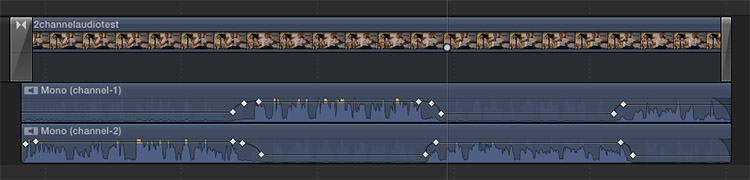
Here is a screen shot of my test:
Last edit: 27 May 2014 16:41 by Jonathan Levin.
Please Log in to join the conversation.
27 May 2014 17:03 - 27 May 2014 17:07 #46837
by artofoe
Replied by artofoe on topic Editing audio- two channels.
Your audio should hear like left source on the left, right source on the right.
If you don't set the "pan amount", you will lose the phase information ,and mix down the 2 channels when you play timeline.
If you don't set the "pan amount", you will lose the phase information ,and mix down the 2 channels when you play timeline.
Jonathan Levin wrote: Thanks Dave and artofoe.
Here is a screen shot of my test:
Last edit: 27 May 2014 17:07 by artofoe.
Please Log in to join the conversation.
- Jonathan Levin
-
Topic Author
- Offline
- Platinum Member
-
Less
More
- Posts: 786
- Thank you received: 21
27 May 2014 17:38 #46842
by Jonathan Levin
Replied by Jonathan Levin on topic Editing audio- two channels.
Thanks artofoe.
Even though I recorded my audio with the hard pan left and right, two channels, when imported into the timeline, the audio defaults to center.
So I guess I need to re-pan in the inspector in X so that right is right and left is left.
Again this is all test stuff, but I'm glad I'm testing this all out now.
Even though I recorded my audio with the hard pan left and right, two channels, when imported into the timeline, the audio defaults to center.
So I guess I need to re-pan in the inspector in X so that right is right and left is left.
Again this is all test stuff, but I'm glad I'm testing this all out now.
Please Log in to join the conversation.
27 May 2014 17:50 - 27 May 2014 17:50 #46844
by Dave_EP
Replied by Dave_EP on topic Editing audio- two channels.
Mono channels are just that, mono and centered. If you want them to be anything other than centred you need to set that channel's pan position within the stereo (or 5.1) output.
If you want to retain the panning position you would need to retain them as stereo (which has left and right) but then lose the ability to edit the channels independently. You can't have it both ways
If you want to retain the panning position you would need to retain them as stereo (which has left and right) but then lose the ability to edit the channels independently. You can't have it both ways
Last edit: 27 May 2014 17:50 by Dave_EP.
Please Log in to join the conversation.

27 May 2014 18:02 #46846
by Soundwise
Replied by Soundwise on topic Editing audio- two channels.
Why on earth you want to hard pan those tracks? Does not give a pleasent listening experience. All dialog should be heard on both monitors, which means two mono tracks panned to center, which is the default setup with dual mono.
Stereo means a signal recorded with a stereo mike, pair of identical mikes in a stereo setup or a M/S stereo setup.
Stereo means a signal recorded with a stereo mike, pair of identical mikes in a stereo setup or a M/S stereo setup.
Please Log in to join the conversation.
27 May 2014 18:14 #46847
by artofoe
Replied by artofoe on topic Editing audio- two channels.
It because the op said :
"I have panned one mic hard left and one hard right, left and right output from mixer to camera."
So, his audio has phase information, and should be set as stereo.
but he wants to edit the L and the R separately.
"I have panned one mic hard left and one hard right, left and right output from mixer to camera."
So, his audio has phase information, and should be set as stereo.
but he wants to edit the L and the R separately.
Soundwise wrote: Why on earth you want to hard pan those tracks? Does not give a pleasent listening experience. All dialog should be heard on both monitors, which means two mono tracks panned to center, which is the default setup with dual mono.
Stereo means a signal recorded with a stereo mike, pair of identical mikes in a stereo setup or a M/S stereo setup.
Please Log in to join the conversation.
27 May 2014 18:38 #46850
by Seanus
I'm with Soundwise on this one. Would love to know why the panning is desired?
Sean Lander - Editing since 1982 - AVID 1991 - FCP 1999 - FCPX 2011
Replied by Seanus on topic Editing audio- two channels.
Soundwise wrote: Why on earth you want to hard pan those tracks? Does not give a pleasent listening experience. All dialog should be heard on both monitors, which means two mono tracks panned to center, which is the default setup with dual mono.
Stereo means a signal recorded with a stereo mike, pair of identical mikes in a stereo setup or a M/S stereo setup.
I'm with Soundwise on this one. Would love to know why the panning is desired?
Sean Lander - Editing since 1982 - AVID 1991 - FCP 1999 - FCPX 2011
Please Log in to join the conversation.

27 May 2014 18:51 #46857
by Rob Mills
Replied by Rob Mills on topic Editing audio- two channels.
I am also with soundwise, I do this everyday editing corporate interviews . There is no reason to pan the tracks, I always use dual mono.
Please Log in to join the conversation.
- Jonathan Levin
-
Topic Author
- Offline
- Platinum Member
-
Less
More
- Posts: 786
- Thank you received: 21
27 May 2014 18:59 #46863
by Jonathan Levin
Replied by Jonathan Levin on topic Editing audio- two channels.
Dave-EP,
Thanks, that explains a bit more to me.
Soundwise, I am doing the the extreme just to put FCP X through it's paces, and that I can clearly hear what's going on. Yes, In real world editing, I'd have the two voices/channels much closer to center.
Seanus and Artofoe,
I guess I am trying to figure out the best workflow for working with, as an example, my two person test.
I think I see now that the way to edit those two channels is to convert from stereo to dual mono, do my key framing, fades, etc to each of the two tracks.
Although, now that I think about it, it could be done with a "single" stereo track, provided there is no overlapping dialog that might need adjusting.
And one last thing from my original post: Do you guys select (check) the "Separate mono and group stereo audio" in the import window, or does that not matter.
Thanks for all your help.
Jonathan
Thanks, that explains a bit more to me.
Soundwise, I am doing the the extreme just to put FCP X through it's paces, and that I can clearly hear what's going on. Yes, In real world editing, I'd have the two voices/channels much closer to center.
Seanus and Artofoe,
I guess I am trying to figure out the best workflow for working with, as an example, my two person test.
I think I see now that the way to edit those two channels is to convert from stereo to dual mono, do my key framing, fades, etc to each of the two tracks.
Although, now that I think about it, it could be done with a "single" stereo track, provided there is no overlapping dialog that might need adjusting.
And one last thing from my original post: Do you guys select (check) the "Separate mono and group stereo audio" in the import window, or does that not matter.
Thanks for all your help.
Jonathan
Please Log in to join the conversation.
27 May 2014 19:03 #46864
by Dave_EP
If I remember, I could do it, but if I don't remember it's as simple as selecting the dual mono / stereo setting in the inspector later on. It only makes a difference if your source material is flagged as mono / stereo, FCPX can't guess based on the content (as far as I know).
Replied by Dave_EP on topic Editing audio- two channels.
Jonathan Levin wrote: And one last thing from my original post: Do you guys select (check) the "Separate mono and group stereo audio" in the import window, or does that not matter.
If I remember, I could do it, but if I don't remember it's as simple as selecting the dual mono / stereo setting in the inspector later on. It only makes a difference if your source material is flagged as mono / stereo, FCPX can't guess based on the content (as far as I know).
Please Log in to join the conversation.
- Jonathan Levin
-
Topic Author
- Offline
- Platinum Member
-
Less
More
- Posts: 786
- Thank you received: 21
27 May 2014 20:01 #46870
by Jonathan Levin
Replied by Jonathan Levin on topic Editing audio- two channels.
Thanks Dave.
I guess what's confusing to me is this:
In FCP 7, if you brought a clip to a sequence, you would immediately see one video track, and then the left and right audio tracks.
With X, It is one stereo track, and in order to get to the two channels, you have to do a little clicking around. I wish there was an option that defaulted to the separate channels. It would also be great if there was a way to re-hide those tracks so that they are one with the video track for house-keeping purposes.
And don't get me started on Detach audio, which then can not be re-attached.
I guess what's confusing to me is this:
In FCP 7, if you brought a clip to a sequence, you would immediately see one video track, and then the left and right audio tracks.
With X, It is one stereo track, and in order to get to the two channels, you have to do a little clicking around. I wish there was an option that defaulted to the separate channels. It would also be great if there was a way to re-hide those tracks so that they are one with the video track for house-keeping purposes.
And don't get me started on Detach audio, which then can not be re-attached.
Please Log in to join the conversation.
27 May 2014 20:27 #46873
by Soundwise
You can "re-hide" the audio tracks from view easily by dbl clicking or with a kb shortcut.
Replied by Soundwise on topic Editing audio- two channels.
One of the best features of FCP X in my opinion is that it keeps all audio tracks visually within video and when I need to work on audio I can expand all the audio tracks.Jonathan Levin wrote: It would also be great if there was a way to re-hide those tracks so that they are one with the video track for house-keeping purposes.
You can "re-hide" the audio tracks from view easily by dbl clicking or with a kb shortcut.
Please Log in to join the conversation.
27 May 2014 20:34 #46874
by Rob Mills
Replied by Rob Mills on topic Editing audio- two channels.
Control S to separate audio (NOT DETACH)
Please Log in to join the conversation.
- Jonathan Levin
-
Topic Author
- Offline
- Platinum Member
-
Less
More
- Posts: 786
- Thank you received: 21
27 May 2014 20:58 #46877
by Jonathan Levin
Replied by Jonathan Levin on topic Editing audio- two channels.
Soundwise and Rob.
The more I fiddle with this, the more it makes sense.
I also like the control-option-S keyboard SC too. That reveals both channels.
Still thinking about when I would need or use just control-s to edit audio, unless it is a single person dialog or something similar.
The more I fiddle with this, the more it makes sense.
I also like the control-option-S keyboard SC too. That reveals both channels.
Still thinking about when I would need or use just control-s to edit audio, unless it is a single person dialog or something similar.
Please Log in to join the conversation.
- haysoos123
-

- Offline
- Platinum Member
-
Less
More
- Posts: 402
- Thank you received: 72
28 May 2014 05:59 #46885
by haysoos123
Replied by haysoos123 on topic Editing audio- two channels.
Hi Jonathan,
In actuality, it's very common practice for interviews to put the lav mic on one channel, and the boom on the other, and have it be dual mono. In most cases, the sound recorder will have something capable of recording at least four tracks, so if you have an interviewer that needs to be mic'd, he/she should also have lav and boom on separate tracks. This is for safety reasons, and in practice, I have on occasion had to go to the alt audio because of a glitch or skip, etc.
I agree that it's actually neater to have the audio attached visually by default. My main rule is to detach the audio only when it's really needed, and you can always match-frame and recut it in if you need to reattach (although I agree there should be a command to do so).
Ctrl-S just expands it, but it's very useful because you often need to massage the audio between cuts. It lets you do small cross-fades between cuts, and the sub-frame accuracy of trimming the audio will let you do dialogue cutting very nicely (removing ums or cutting a sentence short or replacing a word or any number of audio surgeries).
In general, if your audio is set up correctly, where each person is using only the lav or only the boom, you'll just use Ctrl-S 90% of the time for that interview. You'll just have one or the other track disabled unless you really need it, and the dialogue track will be mono for each person.
In actuality, it's very common practice for interviews to put the lav mic on one channel, and the boom on the other, and have it be dual mono. In most cases, the sound recorder will have something capable of recording at least four tracks, so if you have an interviewer that needs to be mic'd, he/she should also have lav and boom on separate tracks. This is for safety reasons, and in practice, I have on occasion had to go to the alt audio because of a glitch or skip, etc.
I agree that it's actually neater to have the audio attached visually by default. My main rule is to detach the audio only when it's really needed, and you can always match-frame and recut it in if you need to reattach (although I agree there should be a command to do so).
Ctrl-S just expands it, but it's very useful because you often need to massage the audio between cuts. It lets you do small cross-fades between cuts, and the sub-frame accuracy of trimming the audio will let you do dialogue cutting very nicely (removing ums or cutting a sentence short or replacing a word or any number of audio surgeries).
In general, if your audio is set up correctly, where each person is using only the lav or only the boom, you'll just use Ctrl-S 90% of the time for that interview. You'll just have one or the other track disabled unless you really need it, and the dialogue track will be mono for each person.
Please Log in to join the conversation.
