


- Posts: 11
- Thank you received: 0
3 Post Moderation Rule for New Boarders (25 Jan 2021)
New boarders will have their posts moderated - Don't worry if you cannot see your post immediately.
Moving from FCP 10 to 10.1 (would like to screen-share to resolve file management questions)
26 May 2014 14:19 #46737
by Timeliner
Moving from FCP 10 to 10.1 (would like to screen-share to resolve file management questions) was created by Timeliner
Hello,
I'm a non-pro user of Final Cut that just upgraded to 10.1.1. Since updating the appearance and behavior of the items in the Libraries Pane has left me scratching my head for a few different reasons, including the absence of a project I just worked on for two days. I'm hoping someone having a good understanding of the new 10.1 file management system would be willing to screen-share with me using Apple Messages, Skype, or some other preferred tool— to help me get things working as they should. I'd be willing to pay a few bucks for the help.
If this isn't the best place to post such an appeal, I'd be most appreciative of any leads to other resources.
Thanks VERY much!!
I'm a non-pro user of Final Cut that just upgraded to 10.1.1. Since updating the appearance and behavior of the items in the Libraries Pane has left me scratching my head for a few different reasons, including the absence of a project I just worked on for two days. I'm hoping someone having a good understanding of the new 10.1 file management system would be willing to screen-share with me using Apple Messages, Skype, or some other preferred tool— to help me get things working as they should. I'd be willing to pay a few bucks for the help.
If this isn't the best place to post such an appeal, I'd be most appreciative of any leads to other resources.
Thanks VERY much!!
Please Log in to join the conversation.
- Tom Wolsky
-

- Offline
- Moderator
-

26 May 2014 14:34 #46738
by Tom Wolsky
Replied by Tom Wolsky on topic Moving from FCP 10 to 10.1 (would like to screen-share to resolve file management questions)
The project should be in one of the events. They appear at the top of the event. If it's not there, is it possible you used the open in timeline function and edited inside a clip?
Please Log in to join the conversation.

26 May 2014 14:51 #46739
by tpayton
Replied by tpayton on topic Moving from FCP 10 to 10.1 (would like to screen-share to resolve file management questions)
Sorry you are having trouble. I think theses videos might help you a lot, they were released along with the fcp 10.1 update. Takes a half hour to watch them all:
www.rippletraining.com/fcpx-features.html
Let us know how it goes.
www.rippletraining.com/fcpx-features.html
Let us know how it goes.
Please Log in to join the conversation.
26 May 2014 14:52 #46740
by Timeliner
Replied by Timeliner on topic Moving from FCP 10 to 10.1 (would like to screen-share to resolve file management questions)
Happy Memorial Day, Tom. You've responded to a question or two of mine in recent years... much appreciated.
Anything is possible, but I don't recall using the open in timeline function... though I may have? Not sure how to check or reverse it if I did?
As an alternative to screen-sharing can I prepare a Screenflow video of my FCP UI and upload that for review? I see an attachment option here... anyone know the max file size for attachments?
Anything is possible, but I don't recall using the open in timeline function... though I may have? Not sure how to check or reverse it if I did?
As an alternative to screen-sharing can I prepare a Screenflow video of my FCP UI and upload that for review? I see an attachment option here... anyone know the max file size for attachments?
Please Log in to join the conversation.
- Tom Wolsky
-
- Offline
- Moderator
-
26 May 2014 15:06 #46741
by Tom Wolsky
Replied by Tom Wolsky on topic Moving from FCP 10 to 10.1 (would like to screen-share to resolve file management questions)
You can make a screen capture using the QuickTime player and upload it to WeTransfer or similar and post the link here.
Please Log in to join the conversation.
26 May 2014 15:18 #46742
by Timeliner
Replied by Timeliner on topic Moving from FCP 10 to 10.1 (would like to screen-share to resolve file management questions)
Ok, I'm headed out for the day right now but I'll whip-up a screen capture to share as soon as I can.
Thanks!
Thanks!
Please Log in to join the conversation.
26 May 2014 15:23 #46743
by Timeliner
Replied by Timeliner on topic Moving from FCP 10 to 10.1 (would like to screen-share to resolve file management questions)
Thank you, tpayton.
I have a reasonably good understanding of the new file management approaches in 10.1, it's just that after having gone through the update process things in the library pane appear a bit whacky to me. I think I've watched the videos you shared but I'll have a second look, in addition to uploading a screen capture video explaining my situation when I can.
I have a reasonably good understanding of the new file management approaches in 10.1, it's just that after having gone through the update process things in the library pane appear a bit whacky to me. I think I've watched the videos you shared but I'll have a second look, in addition to uploading a screen capture video explaining my situation when I can.
Please Log in to join the conversation.
26 May 2014 15:29 #46744
by tpayton
Replied by tpayton on topic Moving from FCP 10 to 10.1 (would like to screen-share to resolve file management questions)
Great a screen capture would be good.
So you watched the 3rd video:
And your event library doesn't look like the ones they showed?
So you watched the 3rd video:
And your event library doesn't look like the ones they showed?
Please Log in to join the conversation.
27 May 2014 03:02 #46771
by Timeliner
Replied by Timeliner on topic Moving from FCP 10 to 10.1 (would like to screen-share to resolve file management questions)
Yep, watched all three. Thanks again for providing the links.
Please Log in to join the conversation.
27 May 2014 03:05 #46772
by Timeliner
Replied by Timeliner on topic Moving from FCP 10 to 10.1 (would like to screen-share to resolve file management questions)
Here's a link to a screen capture video I prepared to better explain what I'm seeing on my end.
www.dropbox.com/s/ils7ahmc9kag8zv/ScreenFlow.mp4
Thanks in advance to anyone having the time to take a 3 minute look-see.
www.dropbox.com/s/ils7ahmc9kag8zv/ScreenFlow.mp4
Thanks in advance to anyone having the time to take a 3 minute look-see.
Please Log in to join the conversation.
27 May 2014 05:02 #46774
by tpayton
Replied by tpayton on topic Moving from FCP 10 to 10.1 (would like to screen-share to resolve file management questions)
That was a great screencast you posted. Thanks.
Actually all the behavior is completely normal. All updated projects will be put in a new event, see part 3 video at about 1:30. And yes you could move them just as Mark and Steve describe at about 1:40, into the corresponding events, or you could in fact leave them in "updated projects" event if you wish.
FCPX 10.1 can update a single drive or all the drives on your system. It will name the new libraries with the name of the drive. (It can actually update a folder also, but it is typically only on a XSAN)
Regarding the keyword collections. Those are created to correspond to the folders of your original projects. If you didn't have any folders then it would simply be the name of the project. As far as moving a keyword/smart collection to another event, simply dragging the icon will move just the container not the contents of the keyword/smart collection. You need to move the clips/projects themselves and the keywords assigned will move with them.
Also, clicking on a library will display all the events and clips they contain, just like clicking on an event shows all the media in that event, regardless of keyword collection.
I would give that part 3 another watch and see if it helps. Also if you are a reader, the Final Cut team wrote up a white paper regarding the new library model here:
images.apple.com/final-cut-pro/docs/Media_Management.pdf
Also when you choose File > Update Projects & Events you will see this:
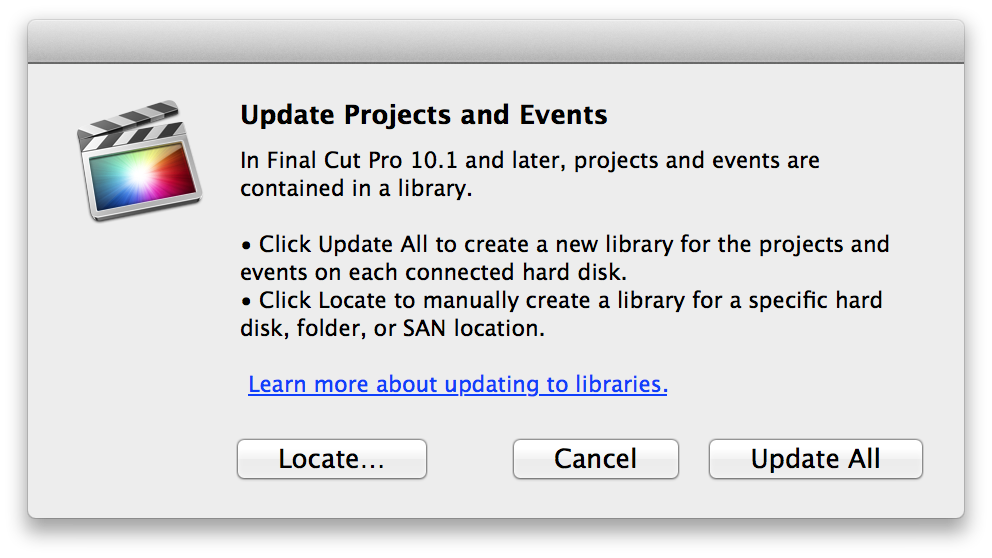
Click on the link for more information and you will get a good breakdown in the Help on exactly what will happen when you update.
Let me know if you need more help.
Actually all the behavior is completely normal. All updated projects will be put in a new event, see part 3 video at about 1:30. And yes you could move them just as Mark and Steve describe at about 1:40, into the corresponding events, or you could in fact leave them in "updated projects" event if you wish.
FCPX 10.1 can update a single drive or all the drives on your system. It will name the new libraries with the name of the drive. (It can actually update a folder also, but it is typically only on a XSAN)
Regarding the keyword collections. Those are created to correspond to the folders of your original projects. If you didn't have any folders then it would simply be the name of the project. As far as moving a keyword/smart collection to another event, simply dragging the icon will move just the container not the contents of the keyword/smart collection. You need to move the clips/projects themselves and the keywords assigned will move with them.
Also, clicking on a library will display all the events and clips they contain, just like clicking on an event shows all the media in that event, regardless of keyword collection.
I would give that part 3 another watch and see if it helps. Also if you are a reader, the Final Cut team wrote up a white paper regarding the new library model here:
images.apple.com/final-cut-pro/docs/Media_Management.pdf
Also when you choose File > Update Projects & Events you will see this:
Click on the link for more information and you will get a good breakdown in the Help on exactly what will happen when you update.
Let me know if you need more help.
Please Log in to join the conversation.
27 May 2014 18:02 #46845
by Timeliner
Replied by Timeliner on topic Moving from FCP 10 to 10.1 (would like to screen-share to resolve file management questions)
Thanks for the great coaching, tpayton. I'm almost there. If you're up for it, please check out this screen capture question:
www.dropbox.com/s/pjfeerzl1yo9e87/ScreenFlow%202.mp4
Thank you!
Thank you!
Please Log in to join the conversation.
27 May 2014 19:31 #46866
by tpayton
Replied by tpayton on topic Moving from FCP 10 to 10.1 (would like to screen-share to resolve file management questions)
Again very clear screencast. Thanks.
Re the missing project, if you click on the Library name itself, you will see all your projects listed at the top of the browser. See if you can see it listed there. If you do, drag it to the appropriate event.
Re where projects are stored. Projects will appear as folders inside an event in the Finder. For example here you can see the projects which are "My Big Simple Opportunity Video V1" and "My Big Simple Opportunity Video V2".
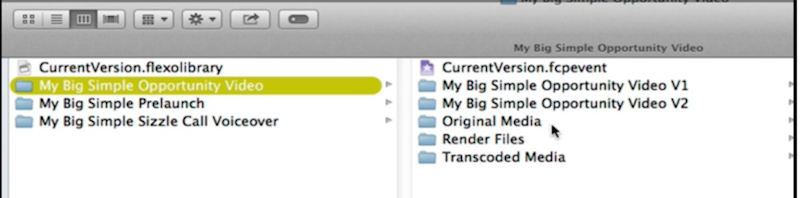
FCPX won't let you name a project something that is conflicting with the folders that should be there. Generally you don't ever need to dive into Libraries, but it is good to know where it is.
Re the missing project, if you click on the Library name itself, you will see all your projects listed at the top of the browser. See if you can see it listed there. If you do, drag it to the appropriate event.
Re where projects are stored. Projects will appear as folders inside an event in the Finder. For example here you can see the projects which are "My Big Simple Opportunity Video V1" and "My Big Simple Opportunity Video V2".
FCPX won't let you name a project something that is conflicting with the folders that should be there. Generally you don't ever need to dive into Libraries, but it is good to know where it is.
Please Log in to join the conversation.
27 May 2014 20:50 #46876
by Timeliner
Replied by Timeliner on topic Moving from FCP 10 to 10.1 (would like to screen-share to resolve file management questions)
I appear to have tackled it, though I couldn't talk you through the seemingly 1000+ clicks and moves it took me to do so! It involved grabbing the goods I needed from my backup volume, mounting and unmounting volumes, launching FCPX and closing it, etc... along with some finger-crossing.
Thanks SO MUCH for your fast, knowledgeable, and kind responses to my inquiries, tpayton... and thank you as well, Tom. The generosity expressed on forums such as this never ceases to amaze me and also simultaneously reaffirms the goodness of people in general.
Thank you!
Thanks SO MUCH for your fast, knowledgeable, and kind responses to my inquiries, tpayton... and thank you as well, Tom. The generosity expressed on forums such as this never ceases to amaze me and also simultaneously reaffirms the goodness of people in general.
Thank you!
Please Log in to join the conversation.
