


- Posts: 3790
- Thank you received: 718
3 Post Moderation Rule for New Boarders (25 Jan 2021)
New boarders will have their posts moderated - Don't worry if you cannot see your post immediately.
adding sourceTC to a Project still not avail in vers.10.1, right?
- Karsten Schlüter
-
 Topic Author
- Offline
- Moderator
-

Less
More
25 May 2014 10:08 #46666
by Karsten Schlüter
Am I correct - there WAS a TC-reader/generator for v.10.03 which was able to print the sources TC into a project... but the actual vers.10.1 doesn't?
... I'd like to create a 'title', which automatically shows at what time of a match a scene was recorded... most sport reports I know have a line like "...22nd minute of the match: now the other team did...." - so, my request seems for my standards not that exotic..
Doing this manually (reading out the source' TC + setting generators off-set) is .. painstaking. :blush:
... I'd like to create a 'title', which automatically shows at what time of a match a scene was recorded... most sport reports I know have a line like "...22nd minute of the match: now the other team did...." - so, my request seems for my standards not that exotic..
Doing this manually (reading out the source' TC + setting generators off-set) is .. painstaking. :blush:
Please Log in to join the conversation.

25 May 2014 11:25 #46667
by ianstubbs
Replied by ianstubbs on topic adding sourceTC to a Project still not avail in vers.10.1, right?
You can add a TC reader to the source clips and, when edited into a project timeline, they will show source timecode.
Right click on the source clip in the event browser and select Open in Timeline. Add and customise your reader and then copy it to the clipboard if you have further clips to do.
Skimming the clip in the event browser will now show BITC and it will be there on the clip whenever it is edited into the project.
Repeat for other clips - pasting your customised TC reader into each.
You could also do this with compound clips but this works just as well.
Ian.
Right click on the source clip in the event browser and select Open in Timeline. Add and customise your reader and then copy it to the clipboard if you have further clips to do.
Skimming the clip in the event browser will now show BITC and it will be there on the clip whenever it is edited into the project.
Repeat for other clips - pasting your customised TC reader into each.
You could also do this with compound clips but this works just as well.
Ian.
Please Log in to join the conversation.
- Russ Haskell
-

- Offline
- Elite Member
-

Less
More
- Posts: 176
- Thank you received: 24
25 May 2014 15:05 #46683
by Russ Haskell
Replied by Russ Haskell on topic adding sourceTC to a Project still not avail in vers.10.1, right?
Ian, Just to clarify: If I were to add the Time Code generator to a clip in its timeline, it would as you said , display the source timecode. And if I continued to edit in the clip timeline it would display that clip's source TC.
However – and correct me if I'm wrong – if I were to use that same clip in a project timeline, the displayed TC would revert to project TC.
The alternative you mentioned of making the clip into a compound and then editing that to a project timeline does display the source TC.
Russ
However – and correct me if I'm wrong – if I were to use that same clip in a project timeline, the displayed TC would revert to project TC.
The alternative you mentioned of making the clip into a compound and then editing that to a project timeline does display the source TC.
Russ
Please Log in to join the conversation.
- Andreas Kiel
-
- Offline
- Platinum Member
-

Less
More
- Posts: 1077
- Thank you received: 189
25 May 2014 15:45 - 25 May 2014 16:10 #46684
by Andreas Kiel
Replied by Andreas Kiel on topic adding sourceTC to a Project still not avail in vers.10.1, right?
A source TCR simply doesn't exist (I think since 10.0.6 - may be earlier)
Even the CC trick fails since 10.1 when clips are are split into several parts
You can create one in Motion and publish the offset, but this requires that your project start TC is at 0 or at least below any TC of any clip in the project. And it requires a LOT of manual work.
- Andreas
Edit:
I normally don't use harsh words but this TCR generator in Motion is a real big piece of crap and it would be better if the remove it. Would be better to say say something is missing rather then to say something is there but is bullshit.
Even the CC trick fails since 10.1 when clips are are split into several parts
You can create one in Motion and publish the offset, but this requires that your project start TC is at 0 or at least below any TC of any clip in the project. And it requires a LOT of manual work.
- Andreas
Edit:
I normally don't use harsh words but this TCR generator in Motion is a real big piece of crap and it would be better if the remove it. Would be better to say say something is missing rather then to say something is there but is bullshit.
Last edit: 25 May 2014 16:10 by Andreas Kiel.
Please Log in to join the conversation.
25 May 2014 15:55 #46685
by ianstubbs
Replied by ianstubbs on topic adding sourceTC to a Project still not avail in vers.10.1, right?
Russ,
You are quite right - the TC reader inside a clip will read the project TC. When I tested it the clip and project TC both started at 00:00:00:00 so it wasn't obvious - my mistake.
The good news, however, is that the Compound Clip approach does work:
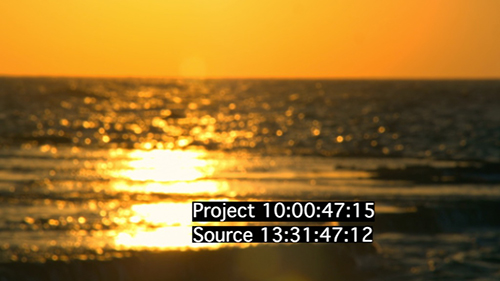
Just make each of your source clips into a Compound Clip in the Event Browser and add the TC generator as previously described. Then use the CCs instead of the original clips for your edit.
Ian.
You are quite right - the TC reader inside a clip will read the project TC. When I tested it the clip and project TC both started at 00:00:00:00 so it wasn't obvious - my mistake.
The good news, however, is that the Compound Clip approach does work:
Just make each of your source clips into a Compound Clip in the Event Browser and add the TC generator as previously described. Then use the CCs instead of the original clips for your edit.
Ian.
Please Log in to join the conversation.
25 May 2014 16:01 #46686
by ianstubbs
Replied by ianstubbs on topic adding sourceTC to a Project still not avail in vers.10.1, right?
I haven't tried cutting the CC up as Andreas describes so it may well fall apart under those conditions...
Ian.
Ian.
Please Log in to join the conversation.
- Karsten Schlüter
-
Topic Author
- Offline
- Moderator
-
Less
More
- Posts: 3790
- Thank you received: 718
26 May 2014 07:04 - 26 May 2014 07:09 #46723
by Karsten Schlüter
Replied by Karsten Schlüter on topic adding sourceTC to a Project still not avail in vers.10.1, right?
Thanks everybody for your helpful hints & tests ...
In use here: multi-cam; I applied my Motion-made title, incl. a TC-reader (I chopped off the 'frames'-counter .. not needed), to my 'main' cam track - and indeed: in the Project it shows the 'game time', not timeline time - awesome!
but ...
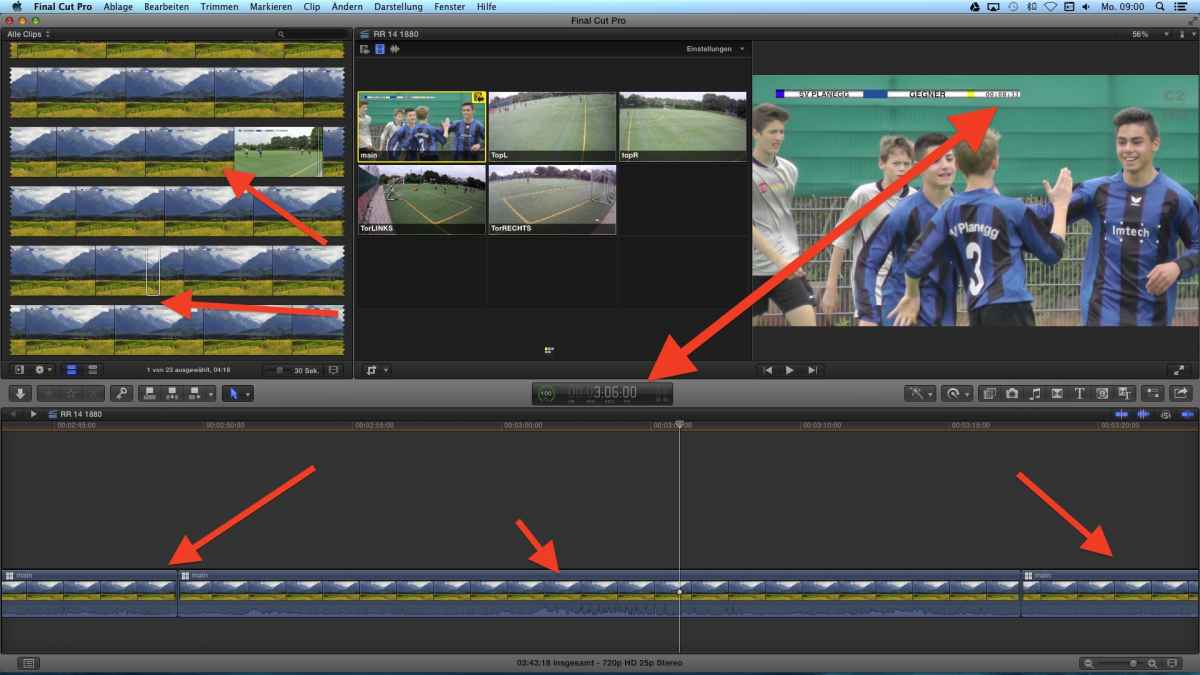
The title/TC is applied to the #1 track of a Multicam - an now the Events-Browser shows the generic 'title icon' only. The Project-Timeline too ... the Camera Angle shows correctly the tracks, Preview too, Export shows the game .. but not the Timeline nor the Event ... weird!
back to the drawing board ... :lol: :lol: :lol:
In use here: multi-cam; I applied my Motion-made title, incl. a TC-reader (I chopped off the 'frames'-counter .. not needed), to my 'main' cam track - and indeed: in the Project it shows the 'game time', not timeline time - awesome!
but ...
The title/TC is applied to the #1 track of a Multicam - an now the Events-Browser shows the generic 'title icon' only. The Project-Timeline too ... the Camera Angle shows correctly the tracks, Preview too, Export shows the game .. but not the Timeline nor the Event ... weird!
back to the drawing board ... :lol: :lol: :lol:
Last edit: 26 May 2014 07:09 by Karsten Schlüter.
Please Log in to join the conversation.
