


- Posts: 12
- Thank you received: 0
3 Post Moderation Rule for New Boarders (25 Jan 2021)
New boarders will have their posts moderated - Don't worry if you cannot see your post immediately.
Import XML (Canon XF100) to FCPX
- Beaton2322
-
 Topic Author
- Offline
- New Member
-

Less
More
25 May 2014 03:01 #46639
by Beaton2322
Import XML (Canon XF100) to FCPX was created by Beaton2322
Hey there, I'm not a camera expert, so bear with me please.
I have a Canon XF100 for work.
When I go to import the files from the camera to FCPX, it won't recognize the XML files as importable.
I used to be able to put these files into iMovie, then import the iMovie project into FCPX, but now iMovie won't even recognize them like I swear it used to.
Can anybody help me? I"ve found nothing online telling me how to do it.
I understand the basics and know I'm not doing anything blatantly wrong, but I cannot figure this out.
I've gone to File -> Import, then I get to the "browse," but all the files on the camera are un "clickable."
Thanks everyone.
Will
I have a Canon XF100 for work.
When I go to import the files from the camera to FCPX, it won't recognize the XML files as importable.
I used to be able to put these files into iMovie, then import the iMovie project into FCPX, but now iMovie won't even recognize them like I swear it used to.
Can anybody help me? I"ve found nothing online telling me how to do it.
I understand the basics and know I'm not doing anything blatantly wrong, but I cannot figure this out.
I've gone to File -> Import, then I get to the "browse," but all the files on the camera are un "clickable."
Thanks everyone.
Will
Please Log in to join the conversation.
- ronny courtens
-

- Offline
- Moderator
-

Less
More
- Posts: 4455
- Thank you received: 962
25 May 2014 05:14 #46642
by ronny courtens
Replied by ronny courtens on topic Import XML (Canon XF100) to FCPX
Hi Will,
I think you mean FCP X won't recognize the MXF files from he camera?
FCP X works perfectly with MXF. But for certain types of Canon cameras you need to install the Canon XF plugin for Final Cut Pro X, which you can find here:
usa.canon.com/cusa/professional/products...0#DriversAndSoftware
It works with Mavericks and FCP X 10.1.1. Once the plugin is installed you should be able to import your XF100 files without any issues.
- Ronny
I think you mean FCP X won't recognize the MXF files from he camera?
FCP X works perfectly with MXF. But for certain types of Canon cameras you need to install the Canon XF plugin for Final Cut Pro X, which you can find here:
usa.canon.com/cusa/professional/products...0#DriversAndSoftware
It works with Mavericks and FCP X 10.1.1. Once the plugin is installed you should be able to import your XF100 files without any issues.
- Ronny
Please Log in to join the conversation.

25 May 2014 06:23 #46647
by ddixon
Replied by ddixon on topic Import XML (Canon XF100) to FCPX
...with the added caveat that even with the plugin, it will not import the "raw" clips. The entire memory card structure is required. OTOH, I wasn't aware that iMovie would ever import these, and definitely will not with the current version.
For what it's worth, my XF100/FCPX workflow is to use the Canon XF Utility that comes with the camera and is also found at the link Ronny provided. I create a Virtual Media backup of each card and just drag clips into that, excluding any junk or unneeded ones. Then I import to FCPX from that Virtual Backup rather than from the camera or card reader.
For what it's worth, my XF100/FCPX workflow is to use the Canon XF Utility that comes with the camera and is also found at the link Ronny provided. I create a Virtual Media backup of each card and just drag clips into that, excluding any junk or unneeded ones. Then I import to FCPX from that Virtual Backup rather than from the camera or card reader.
Please Log in to join the conversation.
- Beaton2322
-
Topic Author
- Offline
- New Member
-
Less
More
- Posts: 12
- Thank you received: 0
25 May 2014 16:22 #46687
by Beaton2322
Replied by Beaton2322 on topic Import XML (Canon XF100) to FCPX
Thanks for the responses. And, okay, that is what I must mean about the MXF files
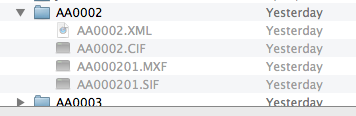
I'm still having trouble. I have both utilities installed and the virtual media backup created, but no matter where I try to find the files when I go to "import" in FCPX, the files are still unselectable — even from the Virtual Media
There's gotta be something I'm doing wrong still.
Any other ideas?
Thanks again.
I'm still having trouble. I have both utilities installed and the virtual media backup created, but no matter where I try to find the files when I go to "import" in FCPX, the files are still unselectable — even from the Virtual Media
There's gotta be something I'm doing wrong still.
Any other ideas?
Thanks again.
Please Log in to join the conversation.
25 May 2014 16:51 - 25 May 2014 17:16 #46689
by ddixon
Replied by ddixon on topic Import XML (Canon XF100) to FCPX
Use the import command from within FCPX...
The attachment shows the Import Window. Just find your Virtual Backups and twirl down the one you want. Individual clips are listed, and you can even skim thru and only import what you want.
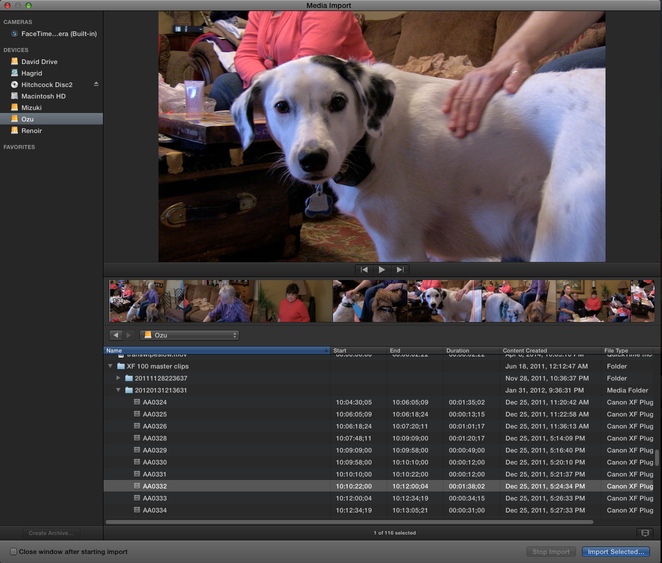
The attachment shows the Import Window. Just find your Virtual Backups and twirl down the one you want. Individual clips are listed, and you can even skim thru and only import what you want.
Last edit: 25 May 2014 17:16 by ddixon.
Please Log in to join the conversation.
- Beaton2322
-
Topic Author
- Offline
- New Member
-
Less
More
- Posts: 12
- Thank you received: 0
25 May 2014 17:18 - 25 May 2014 17:19 #46690
by Beaton2322
Replied by Beaton2322 on topic Import XML (Canon XF100) to FCPX
Man, I'm still just not gettin' it. When you say "twirl down," do you mean click on the little arrows to dive into the folders of each clip to find the MXF? When I do that, the clips in the bottom still are unselectable.
I tried Commands -> Import as well. When I do that and delve into the folders to find the MXF, they are clickable, and a dialogue box says 'Success', but no clips are imported anywhere, so I'm thinking that's something else (?).
Other than that, the camera doesn't appear in the "Import from Camera" list (though it appears just fine when I have iMovie open and doing the same thing).
When I try Import Files and scroll through the folders to find the files I want, none of them are clickable.
I have both Canon XF Utility and Canon Plugin for FCPX installed, I followed the directions in their manuals, and still, nothing is importable, it seems.
With the Virtual Media creator thing, I've backed up my CF card to its own little event, but when I try to Import -> Files and zoom into those local folders, they are also unclickable.
(Just want to say again that I'm very grateful you're trying to help me out)
EDIT: Okay, my screen hasn't been able to look liek yours above. I see what you mean by the difference from the Import Window to what yours looks like, but my files don't appear within FCP somehow... Still looking.
I tried Commands -> Import as well. When I do that and delve into the folders to find the MXF, they are clickable, and a dialogue box says 'Success', but no clips are imported anywhere, so I'm thinking that's something else (?).
Other than that, the camera doesn't appear in the "Import from Camera" list (though it appears just fine when I have iMovie open and doing the same thing).
When I try Import Files and scroll through the folders to find the files I want, none of them are clickable.
I have both Canon XF Utility and Canon Plugin for FCPX installed, I followed the directions in their manuals, and still, nothing is importable, it seems.
With the Virtual Media creator thing, I've backed up my CF card to its own little event, but when I try to Import -> Files and zoom into those local folders, they are also unclickable.
(Just want to say again that I'm very grateful you're trying to help me out)
EDIT: Okay, my screen hasn't been able to look liek yours above. I see what you mean by the difference from the Import Window to what yours looks like, but my files don't appear within FCP somehow... Still looking.
Last edit: 25 May 2014 17:19 by Beaton2322.
Please Log in to join the conversation.
- Beaton2322
-
Topic Author
- Offline
- New Member
-
Less
More
- Posts: 12
- Thank you received: 0
25 May 2014 17:23 - 25 May 2014 17:25 #46691
by Beaton2322
Replied by Beaton2322 on topic Import XML (Canon XF100) to FCPX
Okay, this is what my Import From Camera screen looks like. My Canon isn't showing up. iMovie has a similar screen, on on that, the Canon does show up, but the files there are unclickable.
Any idea why? I swear I have everything connected properly.
Any idea why? I swear I have everything connected properly.
Last edit: 25 May 2014 17:25 by Beaton2322.
Please Log in to join the conversation.
25 May 2014 17:23 - 25 May 2014 17:26 #46692
by ddixon
Replied by ddixon on topic Import XML (Canon XF100) to FCPX
To get to that Import Window I just click the arrow at the left of the FCPX window...
Your graphic showing your Import window is not showing up. Can you try again to attach that? I had to make mine smaller before it would work.
Your graphic showing your Import window is not showing up. Can you try again to attach that? I had to make mine smaller before it would work.
Last edit: 25 May 2014 17:26 by ddixon.
Please Log in to join the conversation.
- Beaton2322
-
Topic Author
- Offline
- New Member
-
Less
More
- Posts: 12
- Thank you received: 0
25 May 2014 17:30 - 25 May 2014 17:31 #46693
by Beaton2322
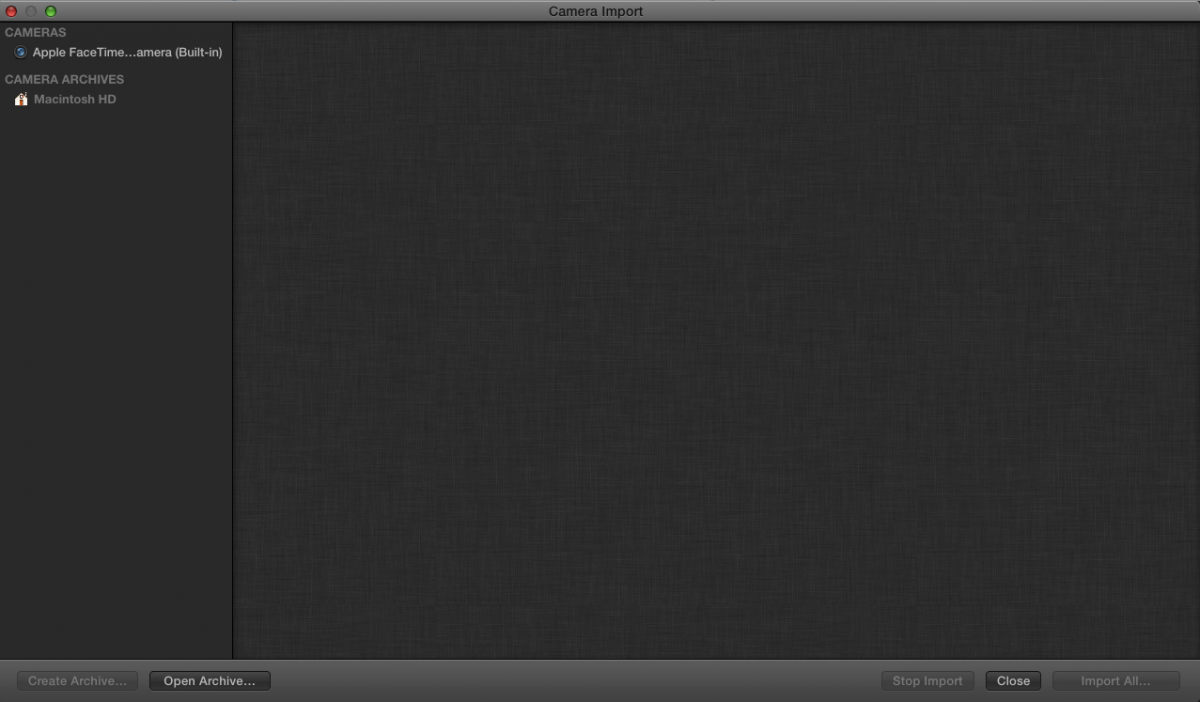
This is what my Import from Camera screen looks like. Clicking on Open an Archive brings me to the external sort of Import Window which is all unclickable.
Is there something else you're referring to?
Replied by Beaton2322 on topic Import XML (Canon XF100) to FCPX
This is what my Import from Camera screen looks like. Clicking on Open an Archive brings me to the external sort of Import Window which is all unclickable.
Is there something else you're referring to?
Last edit: 25 May 2014 17:31 by Beaton2322.
Please Log in to join the conversation.
25 May 2014 17:37 - 25 May 2014 17:38 #46694
by ddixon
Replied by ddixon on topic Import XML (Canon XF100) to FCPX
Well, it's only showing your Cameras and Camera Archives. It should be showing all your connected volumes so you can then navigate either to the card or to the backup created by XF Utility. If you select Macintosh HD what does it show?
Last edit: 25 May 2014 17:38 by ddixon.
Please Log in to join the conversation.
- Beaton2322
-
Topic Author
- Offline
- New Member
-
Less
More
- Posts: 12
- Thank you received: 0
25 May 2014 17:40 #46695
by Beaton2322
Replied by Beaton2322 on topic Import XML (Canon XF100) to FCPX
The button "Macintosh HD" is unclickable, but clicking on Open Archive brings me to that standard looking import "browse" screen. Once there, none of the clips I need are "clickable."
But ya know what, I'm seeing that the version of this software we have here at my work is 10.0.
The latest is 10.1, correct? I bet now that an update would fix this. Think so?
But ya know what, I'm seeing that the version of this software we have here at my work is 10.0.
The latest is 10.1, correct? I bet now that an update would fix this. Think so?
Please Log in to join the conversation.
25 May 2014 17:42 #46696
by ddixon
Replied by ddixon on topic Import XML (Canon XF100) to FCPX
Umm, as in 10.0.0??? Yes, that would be the problem - we're now at 10.1.1.
Please Log in to join the conversation.
- Beaton2322
-
Topic Author
- Offline
- New Member
-
Less
More
- Posts: 12
- Thank you received: 0
25 May 2014 17:43 #46697
by Beaton2322
Replied by Beaton2322 on topic Import XML (Canon XF100) to FCPX
Haha, as soon as I noticed that, I figure we had a problem.
Thanks a lot; I'm gonna get on that now.
I appreciate your help.
Thanks a lot; I'm gonna get on that now.
I appreciate your help.
Please Log in to join the conversation.
25 May 2014 17:46 #46698
by ddixon
Replied by ddixon on topic Import XML (Canon XF100) to FCPX
It's especially true in this case, because that Canon plug in was not even released until FCPX had been out for about six months so it probably requires 10.0.6 or something at least to even work. Good luck - I never even thought of that possibility.
Please Log in to join the conversation.

25 May 2014 19:17 #46701
by Dave_EP
Replied by Dave_EP on topic Import XML (Canon XF100) to FCPX
We never ever import directly from the XF100, but instead plug the cards in to a card reader and then import footage. Works fine every time! Just imported almost 10 hours of footage from XF100 card without a hitch!
So, just to be clear, upgrade to 10.1.1 (just so you're on the latest!) download and install the latest Canon plug in and then plug the card in to a card reader, hit the import footage button and you should be good to go!
You can also create cameras archives if you want - and import from there.
Also, you could just copy the entire card contents (including the top / root folder) to a folder on your hard disk and import from there instead, but you do need the entire card folder structure.
Something that's been a little strange to me with the XF100 / Canon plug-in is that on my MacPro (and MacBookPro & MacMini!) I can't slow down footage and have optical flow work - it just repeats the frames to fill the space, yet on my new iMac 27" (4GB GPU) it works perfectly. Hmmm..... < scratching head >
So, just to be clear, upgrade to 10.1.1 (just so you're on the latest!) download and install the latest Canon plug in and then plug the card in to a card reader, hit the import footage button and you should be good to go!
You can also create cameras archives if you want - and import from there.
Also, you could just copy the entire card contents (including the top / root folder) to a folder on your hard disk and import from there instead, but you do need the entire card folder structure.
Something that's been a little strange to me with the XF100 / Canon plug-in is that on my MacPro (and MacBookPro & MacMini!) I can't slow down footage and have optical flow work - it just repeats the frames to fill the space, yet on my new iMac 27" (4GB GPU) it works perfectly. Hmmm..... < scratching head >
Please Log in to join the conversation.

26 May 2014 00:54 - 26 May 2014 00:55 #46707
by BenB
Replied by BenB on topic Import XML (Canon XF100) to FCPX
"Import From Camera" was the giveaway. That command hasn't been around for a long time. Had I gotten here sooner, I'd have pointed that out. Glad it's cleared up.
Last edit: 26 May 2014 00:55 by BenB.
Please Log in to join the conversation.
-

- New Member
-
Less
More
- Thank you received: 0
10 Jul 2014 09:06 #49586
by
Replied by on topic Import XML (Canon XF100) to FCPX
Canon XF plugin is the solution for you. If it still doesn't help you out, transcode MXF to ProRes with a 3rd party MXF converter if you have to.
If you need, I shall give you a link.
If you need, I shall give you a link.
Please Log in to join the conversation.
- Videopixels
-
- Offline
- Premium Member
-

Less
More
- Posts: 119
- Thank you received: 2
10 Jul 2014 12:07 #49592
by Videopixels
Replied by Videopixels on topic Import XML (Canon XF100) to FCPX
It sounds like you deleted the index file which is horrible. You can use a program like Pavtube (not free) to transcode the MXF files.
Keeping the file structure always untouched is the best.
Also to bear in mind FCP X also sees some camera file types as native and already optimised so you can't transcode those to Prores which will become a problem if you are sending projects from FCP X to FCP 7 for whatever reason.
Keeping the file structure always untouched is the best.
Also to bear in mind FCP X also sees some camera file types as native and already optimised so you can't transcode those to Prores which will become a problem if you are sending projects from FCP X to FCP 7 for whatever reason.
Please Log in to join the conversation.
- Beaton2322
-
Topic Author
- Offline
- New Member
-
Less
More
- Posts: 12
- Thank you received: 0
14 Jul 2014 12:55 #49878
by Beaton2322
Replied by Beaton2322 on topic Import XML (Canon XF100) to FCPX
Thanks everyone; it turns out it was the lack of an update messing with everything.
Step one from now on: make sure I'm up to date.
Step one from now on: make sure I'm up to date.
Please Log in to join the conversation.
