


- Posts: 238
- Thank you received: 20
3 Post Moderation Rule for New Boarders (25 Jan 2021)
New boarders will have their posts moderated - Don't worry if you cannot see your post immediately.
Using Garageband SFX in FCPX
- Squamish ed
-
 Topic Author
- Offline
- Elite Member
-

Less
More
25 May 2014 01:43 #46638
by Squamish ed
Ed
Using Garageband SFX in FCPX was created by Squamish ed
I want to use some sound effects that came with GB in an FCPX project. This brings up 2 questions:
1. Where are these files stored? I've looked around with Finder and can't locate them.
2. Is there an easy way to use these SFX in FCPX? All I've been able to figure out is to create a GB project with the SFX, save and export it and then import the result into FCPX. That seems like a very convoluted way of doing it. I'm hoping I'm missing something obvious - another senior moment perhaps?
I'd appreciate your suggestions.
1. Where are these files stored? I've looked around with Finder and can't locate them.
2. Is there an easy way to use these SFX in FCPX? All I've been able to figure out is to create a GB project with the SFX, save and export it and then import the result into FCPX. That seems like a very convoluted way of doing it. I'm hoping I'm missing something obvious - another senior moment perhaps?
I'd appreciate your suggestions.
Ed
Please Log in to join the conversation.
- ronny courtens
-

- Offline
- Moderator
-

Less
More
- Posts: 4455
- Thank you received: 962
25 May 2014 05:36 #46643
by ronny courtens
Replied by ronny courtens on topic Using Garageband SFX in FCPX
Hi Ed,
Go to:
/Library/Audio/Apple Loops/Apple/iLife Sound Effects
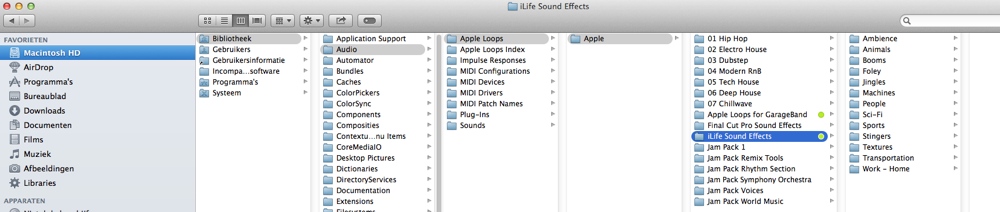
If you want to see these SFX permanently in your FCP X Music Browser you can drag the "iLife Sound Effects" folder from the Finder onto your FCP X browser window. This will add a new folder called "Folders" to the browser, and inside this folder you will find your SFX files.
There are also a few different ways you can use external music and audio files in FCP X, as you can read here:
www.fcp.co/forum/4-final-cut-pro-x-fcpx/...effects-to-the-fcp-x
- Ronny
Go to:
/Library/Audio/Apple Loops/Apple/iLife Sound Effects
If you want to see these SFX permanently in your FCP X Music Browser you can drag the "iLife Sound Effects" folder from the Finder onto your FCP X browser window. This will add a new folder called "Folders" to the browser, and inside this folder you will find your SFX files.
There are also a few different ways you can use external music and audio files in FCP X, as you can read here:
www.fcp.co/forum/4-final-cut-pro-x-fcpx/...effects-to-the-fcp-x
- Ronny
Please Log in to join the conversation.

25 May 2014 11:53 - 25 May 2014 12:00 #46669
by BenB
Replied by BenB on topic Using Garageband SFX in FCPX
iLife files show up in FCPX automatically.
GarageBand sound effects do not, and are not in that directory. In fact, I can't find them anywhere. "Abstract Atmosphere" for example.
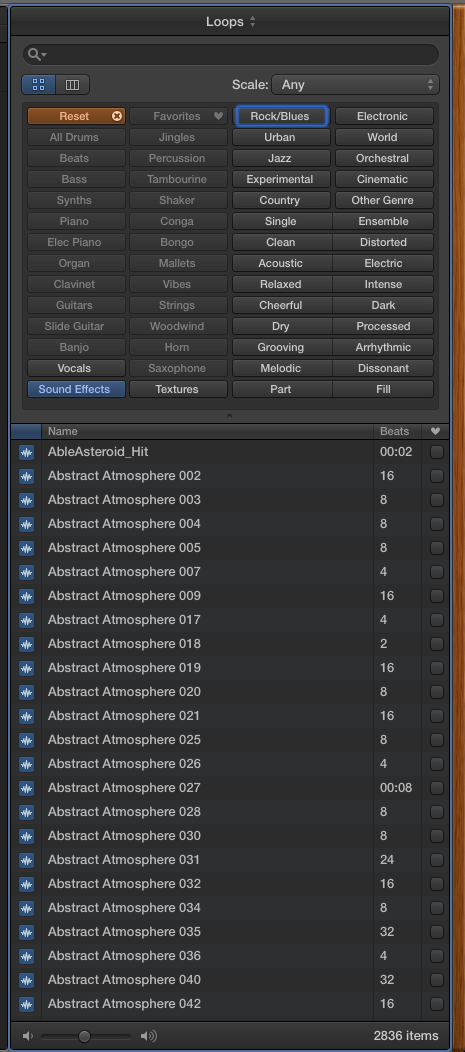
GarageBand sound effects do not, and are not in that directory. In fact, I can't find them anywhere. "Abstract Atmosphere" for example.
Last edit: 25 May 2014 12:00 by BenB.
Please Log in to join the conversation.
- sbecker777
-
- Offline
- Junior Member
-

Less
More
- Posts: 21
- Thank you received: 5
25 May 2014 14:03 #46678
by sbecker777
Replied by sbecker777 on topic Using Garageband SFX in FCPX
GarageBand effects (including Abstract Atmosphere) are here: /Library/Audio/Apple Loops/Apple/Jam Pack 1. Drag it onto the FCPX Browser window like Ronny says. They show up for me.
Steve
Steve
Please Log in to join the conversation.
25 May 2014 16:26 #46688
by BenB
Replied by BenB on topic Using Garageband SFX in FCPX
Ah, there they are! Little bastards! Seem FCPX, and all of those apps that share this library, should be able to see the WHOLE library.
Please Log in to join the conversation.
- Squamish ed
-
Topic Author
- Offline
- Elite Member
-
Less
More
- Posts: 238
- Thank you received: 20
25 May 2014 20:05 #46702
by Squamish ed
Ed
Replied by Squamish ed on topic Using Garageband SFX in FCPX
Ronny, Ben and Steve - thank you all. Despite having used FCPX for a while now I still find I get lost sometimes. I'm grateful to you and the rest of the folks here on FCP.Co for the help! 
Ben, like you I looked everywhere I could think of and the little darlings remained hidden. I now know it wasn't just me being obtuse.
Ben, like you I looked everywhere I could think of and the little darlings remained hidden. I now know it wasn't just me being obtuse.
Ed
Please Log in to join the conversation.
- Squamish ed
-
Topic Author
- Offline
- Elite Member
-
Less
More
- Posts: 238
- Thank you received: 20
26 May 2014 01:16 #46710
by Squamish ed
Ed
Replied by Squamish ed on topic Using Garageband SFX in FCPX
I'm still having problems!
When I follow the steps suggested I get /Library/Audio/Apple Loops/User Loops/Single files. Neither User Loops or Single files appear to have any content that I can see.
I did find and drag the Jam Pack 1 folder after I used Spotlight to find it. I can't get it to reveal itself in the normal file listing as it does in the image you attached Ronny. This is odd because when I do the search the path shown at the bottom of the listing is correct.
After dragging in Jam Pack 1 as suggested it created the Folders mentioned and it was in there but oddly there are only 66 items. In Garage Band the full directory of sounds lists 3843 items and the subset sound effects lists 1338.
By searching for Jam Pack (no number) with Spotlight I found several more of them (Jam Pack World Music, Jam Pack Remix Tools etc) and also an Apple Loops for Garageband folder that has ~1200 items like 'guitar noodling'. All of these dragged into the FCPX Music Browser successfully. That's getting me where I'm trying to go but I still can't find any sound effects folder(s).
Somewhere there must be a folder or folders that hold the 1338 sound effects listed in GB.
So I'm confused - any idea what's happening? :S
When I follow the steps suggested I get /Library/Audio/Apple Loops/User Loops/Single files. Neither User Loops or Single files appear to have any content that I can see.
I did find and drag the Jam Pack 1 folder after I used Spotlight to find it. I can't get it to reveal itself in the normal file listing as it does in the image you attached Ronny. This is odd because when I do the search the path shown at the bottom of the listing is correct.
After dragging in Jam Pack 1 as suggested it created the Folders mentioned and it was in there but oddly there are only 66 items. In Garage Band the full directory of sounds lists 3843 items and the subset sound effects lists 1338.
By searching for Jam Pack (no number) with Spotlight I found several more of them (Jam Pack World Music, Jam Pack Remix Tools etc) and also an Apple Loops for Garageband folder that has ~1200 items like 'guitar noodling'. All of these dragged into the FCPX Music Browser successfully. That's getting me where I'm trying to go but I still can't find any sound effects folder(s).
Somewhere there must be a folder or folders that hold the 1338 sound effects listed in GB.
So I'm confused - any idea what's happening? :S
Ed
Please Log in to join the conversation.
- Squamish ed
-
Topic Author
- Offline
- Elite Member
-
Less
More
- Posts: 238
- Thank you received: 20
26 May 2014 01:24 - 26 May 2014 01:25 #46711
by Squamish ed
Ed
Replied by Squamish ed on topic Using Garageband SFX in FCPX
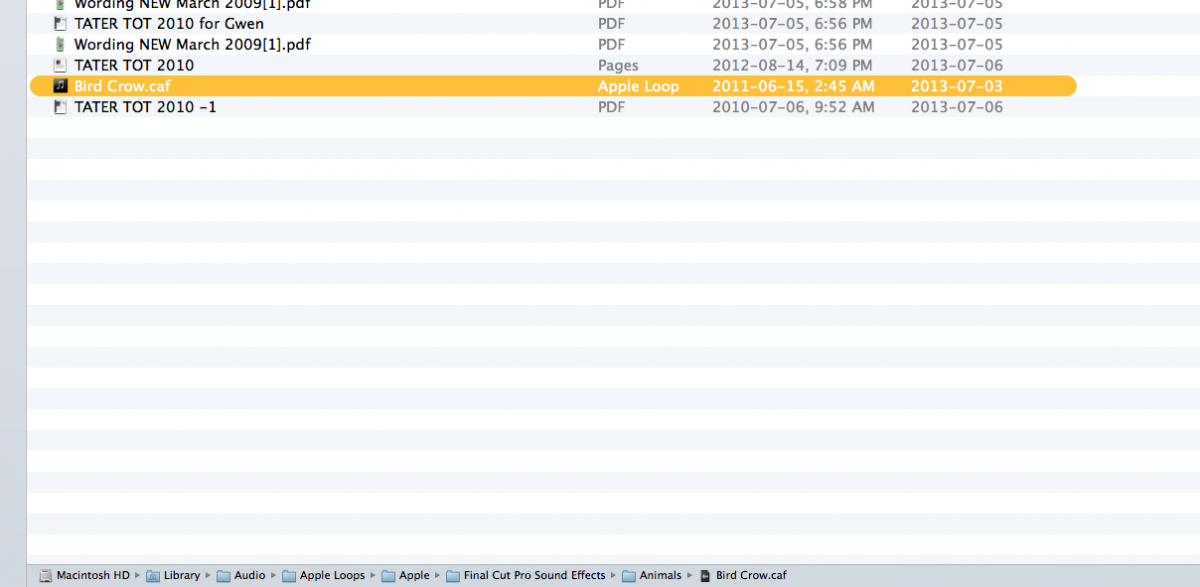
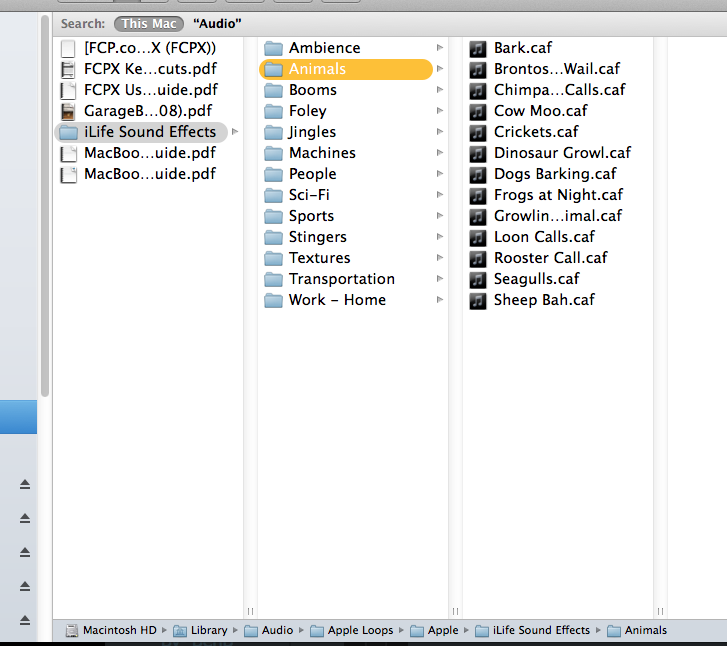
Here's an example screen capture of what's happening. In Spotlight if I search for 'Bird Crow' I get the Bird Crow.caf and the path indicates that it's located in Animals. When I do the listing of Animals as in the attachment there's no Bird Crow.caf listed. Bird Crow does show up in Garageband.
Ed
Last edit: 26 May 2014 01:25 by Squamish ed. Reason: attachment didn't show
Please Log in to join the conversation.
- Squamish ed
-
Topic Author
- Offline
- Elite Member
-
Less
More
- Posts: 238
- Thank you received: 20
26 May 2014 01:27 - 26 May 2014 01:52 #46712
by Squamish ed
Ed
Replied by Squamish ed on topic Using Garageband SFX in FCPX
Oops - the attachment didn't show. Trying again.
Fingers crossed that it worked this time! :silly:
Fingers crossed that it worked this time! :silly:
Ed
Last edit: 26 May 2014 01:52 by Squamish ed.
Please Log in to join the conversation.
- Squamish ed
-
Topic Author
- Offline
- Elite Member
-
Less
More
- Posts: 238
- Thank you received: 20
26 May 2014 01:55 #46713
by Squamish ed
Ed
Replied by Squamish ed on topic Using Garageband SFX in FCPX
Seems it did work that time. I did find the Bird Crow.caf file by using Spotlight. Once again the regular file listing wouldn't get me there. This time it doesn't show iLife - BUT when I search with Spotlight it shows the file and the path includes iLife. I'm still confused!
Ed
Please Log in to join the conversation.
- ronny courtens
-
- Offline
- Moderator
-
Less
More
- Posts: 4455
- Thank you received: 962
26 May 2014 05:23 - 26 May 2014 05:24 #46720
by ronny courtens
Replied by ronny courtens on topic Using Garageband SFX in FCPX
That's quite logical. The iLife Sound Effects folder that contains SFX for iLife apps such as Garageband and iMovie has a similar subfolder structure as the Final Cut Pro Sound Effects folder that contains standard SFX for FCP X.
So you wil find an Ambiance subfolder, an Animals subfolder, a Foley subfolder, a Transportation subfolder etc... both inside the iLife SFX folder AND in the FCP SFX folder. The sound effects inside these subfolders are different.


- Ronny
So you wil find an Ambiance subfolder, an Animals subfolder, a Foley subfolder, a Transportation subfolder etc... both inside the iLife SFX folder AND in the FCP SFX folder. The sound effects inside these subfolders are different.
- Ronny
Last edit: 26 May 2014 05:24 by ronny courtens.
Please Log in to join the conversation.
