


- Posts: 69
- Thank you received: 0
3 Post Moderation Rule for New Boarders (25 Jan 2021)
New boarders will have their posts moderated - Don't worry if you cannot see your post immediately.
Multichannel audio import inconsistent
23 May 2014 20:51 #46573
by mindbend
Multichannel audio import inconsistent was created by mindbend
Here's a video showing the problem:
A have a new JCV camcorder (GY-HM850U). It records four channels of audio. Depending on how I import it into FCPX, I get different results.
Scenario 1: Import from SD card
Result: Only one audio channel is accessible (a1) when "expand audio components" is performed
This happens whether or not I select "separate mono and group sterio audio) in the import dialog
Scenario 2: Import from files copied form SD card to hard drive
Result: All four audio channels are accesible (a1-a4) when "expand audio components" is performed
So this is obviously a big problem if I can't depend on importing directly from the SD card.
Any thoughts?
A have a new JCV camcorder (GY-HM850U). It records four channels of audio. Depending on how I import it into FCPX, I get different results.
Scenario 1: Import from SD card
Result: Only one audio channel is accessible (a1) when "expand audio components" is performed
This happens whether or not I select "separate mono and group sterio audio) in the import dialog
Scenario 2: Import from files copied form SD card to hard drive
Result: All four audio channels are accesible (a1-a4) when "expand audio components" is performed
So this is obviously a big problem if I can't depend on importing directly from the SD card.
Any thoughts?
Please Log in to join the conversation.

23 May 2014 21:03 - 23 May 2014 21:03 #46574
by tpayton
Replied by tpayton on topic Multichannel audio import inconsistent
First of all great video. It shows clearly the problem.
A couple of questions. What happens in the import dialog if you show the "audio channel count" column (right click on the header row and select it)
Also what if you show the same column in the FCPX browser. What does it show for each one of your clips?
What does the inspector show for audio for both of these clips?
A couple of questions. What happens in the import dialog if you show the "audio channel count" column (right click on the header row and select it)
Also what if you show the same column in the FCPX browser. What does it show for each one of your clips?
What does the inspector show for audio for both of these clips?
Last edit: 23 May 2014 21:03 by tpayton.
Please Log in to join the conversation.
23 May 2014 21:31 #46576
by tpayton
Replied by tpayton on topic Multichannel audio import inconsistent
By the way, that is a very interesting camera as it records in so many formats. I don't know if you saw but FCP is seeing your card as a camera, and thereby I can see why it would be interpreting it differently.
Can you also let me know what it says in the "codecs" column also, in both import and the event browser?
Also tell me a bit about your workflow. Are you trying to edit while still importing?
Can you also let me know what it says in the "codecs" column also, in both import and the event browser?
Also tell me a bit about your workflow. Are you trying to edit while still importing?
Please Log in to join the conversation.

23 May 2014 21:36 - 23 May 2014 21:37 #46577
by BenB
Replied by BenB on topic Multichannel audio import inconsistent
I used to work with P2/DVCPRO-HD footage a lot, 4 channel audio, was never really a problem.
1st, leave the audio analysis stuff UN-checked.
2nd, you're getting the same thing, just different audio channel configurations. Select the video portion of the clip (as you're doing), Expand Audio Components (as your doing).
- Open the Inspector, bottom of the Audio section, Channel Configuration.
- Open all of that up and you'll see the channels re-configure in the timeline as you change them in the Inspector.
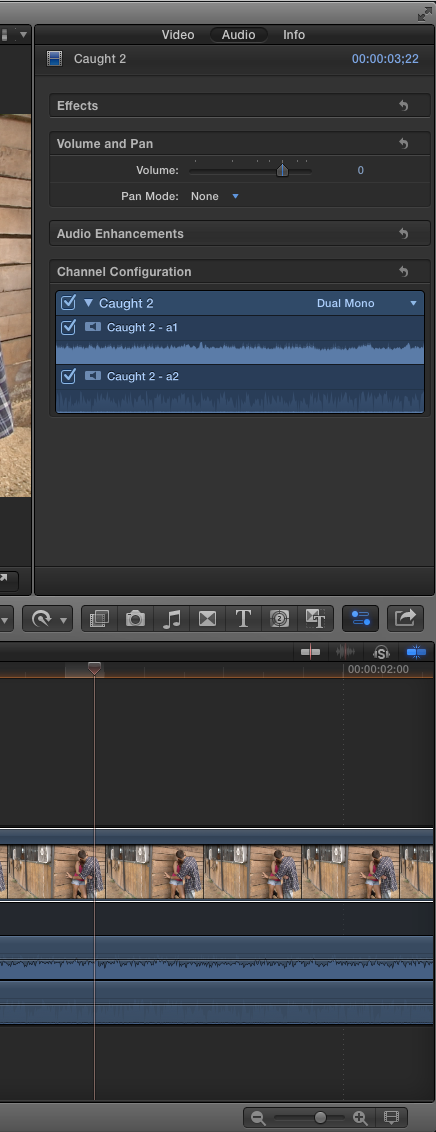
1st, leave the audio analysis stuff UN-checked.
2nd, you're getting the same thing, just different audio channel configurations. Select the video portion of the clip (as you're doing), Expand Audio Components (as your doing).
- Open the Inspector, bottom of the Audio section, Channel Configuration.
- Open all of that up and you'll see the channels re-configure in the timeline as you change them in the Inspector.
Last edit: 23 May 2014 21:37 by BenB.
Please Log in to join the conversation.
23 May 2014 22:20 #46585
by mindbend
Replied by mindbend on topic Multichannel audio import inconsistent
Thanks for the replies, guys. Here's my follow up video:
In short:
Shows 6 channels or 1 depending on how it was brought in
Codecs: h.264, Linear PCM
Channel config doesn't show what I expect.
---
On a side note, it IS a very interesting camera. The specs are quite impressive actually. I just wish it had a 1/2" or better sensor and a faster, more accurate auto-focus. Also, if you change the camera's record mode, you can only review clips shot using that mode. If you want to review clips shot in other modes, you have to change the camera settings. Kind of a pain. Audio sounds pretty clean to me though, which is nice. I was tired of having to rig up our 5Diii with audio equipment for simple point and shoot video. The 5Diii destroys the JVC aesthetically though, but you'd expect that from full frame sensor.
In short:
Shows 6 channels or 1 depending on how it was brought in
Codecs: h.264, Linear PCM
Channel config doesn't show what I expect.
---
On a side note, it IS a very interesting camera. The specs are quite impressive actually. I just wish it had a 1/2" or better sensor and a faster, more accurate auto-focus. Also, if you change the camera's record mode, you can only review clips shot using that mode. If you want to review clips shot in other modes, you have to change the camera settings. Kind of a pain. Audio sounds pretty clean to me though, which is nice. I was tired of having to rig up our 5Diii with audio equipment for simple point and shoot video. The 5Diii destroys the JVC aesthetically though, but you'd expect that from full frame sensor.
Please Log in to join the conversation.
23 May 2014 22:36 #46587
by tpayton
Replied by tpayton on topic Multichannel audio import inconsistent
Totally weird, it is seeing surround sound. Would you mind repeating that same test but this time show us what is happening with the inspector on the import you did from the Finder.
Also if you want email me at my fcp.co username and then my company which is onecreative and then dot net. Maybe we can talk and screen share.
Also if you want email me at my fcp.co username and then my company which is onecreative and then dot net. Maybe we can talk and screen share.
Please Log in to join the conversation.
23 May 2014 23:22 - 24 May 2014 04:52 #46592
by tpayton
Replied by tpayton on topic Multichannel audio import inconsistent
By the way, while you are having trouble, take a look at my workflow here:
www.fcp.co/forum/4-final-cut-pro-x-fcpx/...what-do-you-do#46427
I frankly just never use the import window to grab things directly from a card. Exact same results, but the clips are not renamed.
www.fcp.co/forum/4-final-cut-pro-x-fcpx/...what-do-you-do#46427
I frankly just never use the import window to grab things directly from a card. Exact same results, but the clips are not renamed.
Last edit: 24 May 2014 04:52 by tpayton.
Please Log in to join the conversation.
24 May 2014 00:39 #46602
by BenB
Replied by BenB on topic Multichannel audio import inconsistent
I'd like to verify the settings in your camera you're using. What codec are you recording to? Since there are only two inputs, from what I know of this camera, it should be set to 2ch recording. But, anyway, what is the format/codec you're recording? Cause this is weird.
Please Log in to join the conversation.
