


- Posts: 78
- Thank you received: 6
3 Post Moderation Rule for New Boarders (25 Jan 2021)
New boarders will have their posts moderated - Don't worry if you cannot see your post immediately.
Moving from the old to the new
23 May 2014 10:05 #46537
by martinX
Moving from the old to the new was created by martinX
I'm on the cusp of updating my editing gear at work. I'm going from an iMac running 10.6.8 and Final Cut Studio 2 (FCP6 etc) to a new iMac running Mavericks, FCP X etc.
What's the best way to do the move? One other thing: MPEG Streamclip is a deadset must have. I create WMVs with it from DVDs on a regular basis. To do this, I obviously need QuickTime Pro and the MPEG 2 component coming over from the old Mac. What will happen to the WMV export side of it?
Can I migrate everything from my Time Machine backup to the new iMac and be able to run FCP6 (I believe that LiveType doesn't work under Mavericks)? Word on the street is that FCP6 runs OK on Mavericks.
Is it possible to partition the new iMac hard drive and boot into 10.6.8? Is it desirable?
Is the best possible solution to get '7 to X' and move heaps of projects over to X?
Or will I be stuck keeping the old iMac around?
(Tech details: I'm getting a 27" i7 iMac, 3TB fusion drive, 24 GB RAM, 24" Asus PA248Q ProArt monitor, two 4 TB WD USB3 drives for Time Machine, one WD Velociraptor 2TB drive for editing, M-Audio AV40 speakers and a new Sony NX3. Good bye DV tapes and tape deck, hello high def files.)
What's the best way to do the move? One other thing: MPEG Streamclip is a deadset must have. I create WMVs with it from DVDs on a regular basis. To do this, I obviously need QuickTime Pro and the MPEG 2 component coming over from the old Mac. What will happen to the WMV export side of it?
Can I migrate everything from my Time Machine backup to the new iMac and be able to run FCP6 (I believe that LiveType doesn't work under Mavericks)? Word on the street is that FCP6 runs OK on Mavericks.
Is it possible to partition the new iMac hard drive and boot into 10.6.8? Is it desirable?
Is the best possible solution to get '7 to X' and move heaps of projects over to X?
Or will I be stuck keeping the old iMac around?
(Tech details: I'm getting a 27" i7 iMac, 3TB fusion drive, 24 GB RAM, 24" Asus PA248Q ProArt monitor, two 4 TB WD USB3 drives for Time Machine, one WD Velociraptor 2TB drive for editing, M-Audio AV40 speakers and a new Sony NX3. Good bye DV tapes and tape deck, hello high def files.)
Please Log in to join the conversation.


23 May 2014 11:30 #46541
by BenB
Replied by BenB on topic Moving from the old to the new
I have always had great success with Migration Assistant. Some folks will tell you to not touch it. Eh, depends on the health of your system. Although fresh app installs are always best.
Forget LiveType, learn the basics of Motion. Much easier to learn than you may think, and way more powerful.
I'd simply finish up anything you have in-progress on the old Mac before moving. Once you move, forget legacy FCP, and just learn X. macProVideo.com and Ripple Training are the best online video training. Just do it, don't look back, avoid confusion and headaches.
7toX works pretty well, but I'd only use that if you absolutely must.
Forget LiveType, learn the basics of Motion. Much easier to learn than you may think, and way more powerful.
I'd simply finish up anything you have in-progress on the old Mac before moving. Once you move, forget legacy FCP, and just learn X. macProVideo.com and Ripple Training are the best online video training. Just do it, don't look back, avoid confusion and headaches.
7toX works pretty well, but I'd only use that if you absolutely must.
Please Log in to join the conversation.
- ronny courtens
-

- Offline
- Moderator
-

Less
More
- Posts: 4455
- Thank you received: 962
23 May 2014 12:18 #46544
by ronny courtens
Replied by ronny courtens on topic Moving from the old to the new
Hey Martin,
1. General thoughts:
Yes FCP runs fine on Mavericks and you could partition your new boot drive, but I would not do that. If FCP is running fine on the old iMac I would keep it in case you need to dig up some old FCP project again. Use the new iMac exclusively for FCP X/Mavericks and forget about FCP as fast as you can. FCP won't run any better on the new iMac because it cannot use the extra RAM, it cannot use the accelerated GPU rendering and it cannot tap into the Mavericks OS. Furthermore transferring FCP projects to FCP X is not always a smooth experience, so for simple modifications to an FCP project it's better to stay within FCP on your existing system. If you need to completely rework a long FCP project you can use 7toX to port the project over to FCP X on the new system.
Keep your new system as clean and lean as possible and FCP X will run much smoother. As Ben said: don't transfer any settings from your older system onto the new one unless you are absolutely sure that your old system is perfectly healthy and clean. To avoid slowdowns and crashes people have experienced due to corrupt or conflicting old user preferences it is IMO better to reinstall from scratch.
2. MPEG Streamclip/QT7/Flip4Mac
You can install QT7 on your new iMac without any issues. You will need to download and install QT 7.6.6, which you can find here: support.apple.com/kb/DL923
When QT7 is installed you may need to re-enter your registration code for QT PRO and after doing this you will have QT7 Pro running perfectly on Mavericks
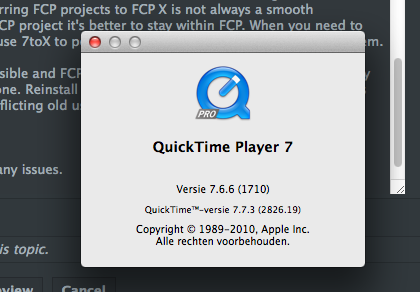
Although MPEG-2 playback functionality is built into QuickTime X and does not require the QT7 MPEG2 playback component anymore, Mpeg Streamclip still needs this component. They have included the component in the 1.9.3b8 beta version: www.squared5.com/svideo/mpeg-streamclip-mac.html
The Flip4Mac WMV component works fine in Mavericks, this should not be an issue. Do make sure to update Flip4Mac to the latest version. There may be a new update coming now that Mavs has been updated to 9.3.
You have a very nice new setup, I'm sure you will enjoy your new way of editing. FCP X is fast, fun and easy to learn as long as you follow the basic rules of learning any new program:
1. Get some good basic training to get familiar with the new terminology and the new workflow
2. Embrace the new way of working and don't try to work against it or to make it work like your previous program. That's a recipe for disaster.
- Ronny
1. General thoughts:
Yes FCP runs fine on Mavericks and you could partition your new boot drive, but I would not do that. If FCP is running fine on the old iMac I would keep it in case you need to dig up some old FCP project again. Use the new iMac exclusively for FCP X/Mavericks and forget about FCP as fast as you can. FCP won't run any better on the new iMac because it cannot use the extra RAM, it cannot use the accelerated GPU rendering and it cannot tap into the Mavericks OS. Furthermore transferring FCP projects to FCP X is not always a smooth experience, so for simple modifications to an FCP project it's better to stay within FCP on your existing system. If you need to completely rework a long FCP project you can use 7toX to port the project over to FCP X on the new system.
Keep your new system as clean and lean as possible and FCP X will run much smoother. As Ben said: don't transfer any settings from your older system onto the new one unless you are absolutely sure that your old system is perfectly healthy and clean. To avoid slowdowns and crashes people have experienced due to corrupt or conflicting old user preferences it is IMO better to reinstall from scratch.
2. MPEG Streamclip/QT7/Flip4Mac
You can install QT7 on your new iMac without any issues. You will need to download and install QT 7.6.6, which you can find here: support.apple.com/kb/DL923
When QT7 is installed you may need to re-enter your registration code for QT PRO and after doing this you will have QT7 Pro running perfectly on Mavericks
Although MPEG-2 playback functionality is built into QuickTime X and does not require the QT7 MPEG2 playback component anymore, Mpeg Streamclip still needs this component. They have included the component in the 1.9.3b8 beta version: www.squared5.com/svideo/mpeg-streamclip-mac.html
The Flip4Mac WMV component works fine in Mavericks, this should not be an issue. Do make sure to update Flip4Mac to the latest version. There may be a new update coming now that Mavs has been updated to 9.3.
You have a very nice new setup, I'm sure you will enjoy your new way of editing. FCP X is fast, fun and easy to learn as long as you follow the basic rules of learning any new program:
1. Get some good basic training to get familiar with the new terminology and the new workflow
2. Embrace the new way of working and don't try to work against it or to make it work like your previous program. That's a recipe for disaster.
- Ronny
Please Log in to join the conversation.

23 May 2014 12:35 #46545
by Seanus
Sean Lander - Editing since 1982 - AVID 1991 - FCP 1999 - FCPX 2011
Replied by Seanus on topic Moving from the old to the new
The bad news. If you were using QT7 Pro because it came with FCP Studio then you will need to install it on your new system as there is no code for Pro.
Invest in training material or give yourself a project that can run long to learn the ins and outs of FCP X.
If you are adept with FCP Studio then I reckon you'll need a good 2 weeks before the "ah ha!" moment, when you truly get it.
After that you'll wonder how you ever cut on anything else...
Invest in training material or give yourself a project that can run long to learn the ins and outs of FCP X.
If you are adept with FCP Studio then I reckon you'll need a good 2 weeks before the "ah ha!" moment, when you truly get it.
After that you'll wonder how you ever cut on anything else...
Sean Lander - Editing since 1982 - AVID 1991 - FCP 1999 - FCPX 2011
Please Log in to join the conversation.
23 May 2014 15:21 #46558
by VidGreg
Replied by VidGreg on topic Moving from the old to the new
Hi Martin,
Congratulations on the new set-up. I'm sure you are going to enjoy it.
I'm one of those who recommends that you do not use Migration Assistant unless you absolutely have to. There can be lots of issues and it always brings a ton of crud into your new machine. It is also basically, an all or nothing proposition. I wish Apple would allow you to be much more selective with what gets migrated.
I bet you have had the previous machine for awhile. Most of the underlying code has been changed and this can really mess up permissions etc… If at all possible, Go clean/new. Get your computer, update the OS, fix permissions, add applications, fix permissions again and enjoy without worries. "It just works", right Ha-ha.
If you don't want to keep the older iMac, one other possibility is to pull out your HDD in the old iMac to keep it, replace with a blank drive. That way you have all the original files and you don't have to worry about securely erasing the old drive. While Time Machine is great in it's own way, the original or cloned drive is still a good idea. Then if you need something off the old drive, plunk it into a bay dock, drag and drop or copy the files you need or just use the old drive. iFixit has step by step instructions on how to replace HDDs. Otherwise I recommend that in addition to Time Machine you clone your current drive with Carbon Copy Cloner.
Unless you have reason to migrate all your old projects, don't bother. If you need to, then 7toX used along with Event Manager X is a great way to migrate. If moving a lot of projects I suggest you read this article by Philip Hodgetts…http://www.philiphodgetts.com/2013/12/upgrade-your-events-and-project-to-fcp-x-10-1-libraries-the-better-way/ You'll end up better organized.
Be aware that not everything will translate perfectly and you will need to redo some effects/titles etc… in FCPX.
From what I hear, 7toX works fine with FCP6 as well, but I never bothered with 6. (Anyone used it with FCP6?)
Develop a meta data / tagging system that works for you. Way faster and better file/project management in FCPX.
Hope this helps, Greg
Congratulations on the new set-up. I'm sure you are going to enjoy it.
I'm one of those who recommends that you do not use Migration Assistant unless you absolutely have to. There can be lots of issues and it always brings a ton of crud into your new machine. It is also basically, an all or nothing proposition. I wish Apple would allow you to be much more selective with what gets migrated.
I bet you have had the previous machine for awhile. Most of the underlying code has been changed and this can really mess up permissions etc… If at all possible, Go clean/new. Get your computer, update the OS, fix permissions, add applications, fix permissions again and enjoy without worries. "It just works", right Ha-ha.
If you don't want to keep the older iMac, one other possibility is to pull out your HDD in the old iMac to keep it, replace with a blank drive. That way you have all the original files and you don't have to worry about securely erasing the old drive. While Time Machine is great in it's own way, the original or cloned drive is still a good idea. Then if you need something off the old drive, plunk it into a bay dock, drag and drop or copy the files you need or just use the old drive. iFixit has step by step instructions on how to replace HDDs. Otherwise I recommend that in addition to Time Machine you clone your current drive with Carbon Copy Cloner.
Unless you have reason to migrate all your old projects, don't bother. If you need to, then 7toX used along with Event Manager X is a great way to migrate. If moving a lot of projects I suggest you read this article by Philip Hodgetts…http://www.philiphodgetts.com/2013/12/upgrade-your-events-and-project-to-fcp-x-10-1-libraries-the-better-way/ You'll end up better organized.
Be aware that not everything will translate perfectly and you will need to redo some effects/titles etc… in FCPX.
From what I hear, 7toX works fine with FCP6 as well, but I never bothered with 6. (Anyone used it with FCP6?)
Develop a meta data / tagging system that works for you. Way faster and better file/project management in FCPX.
Hope this helps, Greg
Please Log in to join the conversation.
23 May 2014 23:35 #46594
by martinX
Replied by martinX on topic Moving from the old to the new
I didn't mention that I've had FCP X on my home Mac (similar specs to the new work one) and I've cut a few things to try and get me up to speed (I just love multi cam). That particular move seemed to go OK but I was able to leave Final Cut (Express, in this case) behind completely. I don't intend using FCP Legacy again if I can avoid it. FCP X is just so quick, I couldn't go back. I've opened up FC Express on my home machine and thought "this was cutting edge?" then closed it again.
It's not practical for me to pull the HD out of the old Mac.
It is practical for me to finish off current projects and draw a line under them. Almost all of the requests I get to re-visit projects are to re-burn them or make a different format, so I will spend some time making sure I have a full quality QT export and maybe a folder full of VOBs of each and every one.
BenB: I know you love Motion and I have tried to get into it, but every time I open it I feel like Vincent Vega when he opened up the suitcase in Pulp Fiction: awed and over-whelmed. Since what I need is a titler, I'll see if I can get a hold of NewBlueFX Titler Pro 3. It's not very Mac-like, but then again neither is LiveType and it gets my job done.
I've just checked and Flip4Mac works fine in MPEG Streamclip on the home one. IIRC, my QT Pro registration carried across OK at home, I just had to re-locate the MPEG2 plugin.
I really can't wait to get going with FCP X at work. Awesome app.
It's not practical for me to pull the HD out of the old Mac.
It is practical for me to finish off current projects and draw a line under them. Almost all of the requests I get to re-visit projects are to re-burn them or make a different format, so I will spend some time making sure I have a full quality QT export and maybe a folder full of VOBs of each and every one.
BenB: I know you love Motion and I have tried to get into it, but every time I open it I feel like Vincent Vega when he opened up the suitcase in Pulp Fiction: awed and over-whelmed. Since what I need is a titler, I'll see if I can get a hold of NewBlueFX Titler Pro 3. It's not very Mac-like, but then again neither is LiveType and it gets my job done.
I've just checked and Flip4Mac works fine in MPEG Streamclip on the home one. IIRC, my QT Pro registration carried across OK at home, I just had to re-locate the MPEG2 plugin.
I really can't wait to get going with FCP X at work. Awesome app.
Please Log in to join the conversation.
24 May 2014 00:33 #46600
by BenB
Replied by BenB on topic Moving from the old to the new
Don't let Motion 5 intimidate you. Do a good course on it. macProVideo or Ripple Training. It is easier than you think. You can do it! You can do it all night long!
Please Log in to join the conversation.
24 May 2014 01:12 #46603
by martinX
Replied by martinX on topic Moving from the old to the new
The first time I opened FCP3, I stared at it for a minute and went straight back to iMovie. It wasn't until I did a 3 day course that I felt comfortable with FCP (version 6 by that stage). Incidentally, I love the FCP X magnetic timeline which is at least partially adapted from the original iMovie's behaviour.
While I respect what Motion can do, most of my needs are for relatively simple titling. I'll see if I can squeeze in yet another course for Motion this year...
While I respect what Motion can do, most of my needs are for relatively simple titling. I'll see if I can squeeze in yet another course for Motion this year...
Please Log in to join the conversation.
24 May 2014 02:26 #46604
by VidGreg
Replied by VidGreg on topic Moving from the old to the new
Martin,
Have you tried using the Title effects in FCPX? Actually pretty good. Much easier/better than Live Type IMHO.
You can edit directly in the Viewer, or in the Inspector pane. For more control, after selecting the Text clip in Timeline, open up the Inspector pane where you can do a lot of alterations. This will also give you a beginning feel for how Motion5 works.
It is nice to be able to create Titles directly in FCPX without export/import to another program.
If you don't find the exact animation you want check out the "Custom" title. It allows you to create some amazing titles.
Be aware you can also bring .png files including text, graphics, etc…into FCPX and they have a transparency to them so when placed above the video clip, they appear on top with video showing through. Sticking a png file into "Custom" allows you a lot of possibilities without even opening up Motion.
Having said this, Motion5 is awesome! Motion5 has Title projects that when published will be available in FCPX along with all the controls that you included/used. Not quite round trip, which would be nice, but ok.
Love magnetic timeline. No more out of sync issues. If needed you can always create a slug using the P (position) key.
Hope this helps, Greg
p.s. You are aware that any programs that you buy in the App Store can be installed on multiple computers. You do not have to re-purchase for each user/computer.
Have you tried using the Title effects in FCPX? Actually pretty good. Much easier/better than Live Type IMHO.
You can edit directly in the Viewer, or in the Inspector pane. For more control, after selecting the Text clip in Timeline, open up the Inspector pane where you can do a lot of alterations. This will also give you a beginning feel for how Motion5 works.
It is nice to be able to create Titles directly in FCPX without export/import to another program.
If you don't find the exact animation you want check out the "Custom" title. It allows you to create some amazing titles.
Be aware you can also bring .png files including text, graphics, etc…into FCPX and they have a transparency to them so when placed above the video clip, they appear on top with video showing through. Sticking a png file into "Custom" allows you a lot of possibilities without even opening up Motion.
Having said this, Motion5 is awesome! Motion5 has Title projects that when published will be available in FCPX along with all the controls that you included/used. Not quite round trip, which would be nice, but ok.
Love magnetic timeline. No more out of sync issues. If needed you can always create a slug using the P (position) key.
Hope this helps, Greg
p.s. You are aware that any programs that you buy in the App Store can be installed on multiple computers. You do not have to re-purchase for each user/computer.
Please Log in to join the conversation.

