


- Posts: 190
- Thank you received: 0
3 Post Moderation Rule for New Boarders (25 Jan 2021)
New boarders will have their posts moderated - Don't worry if you cannot see your post immediately.
Blend Modes, text not appearing in shape.
22 May 2014 20:25 #46512
by Seany
Blend Modes, text not appearing in shape. was created by Seany
So I've got my background stacked on a circle shape which is stacked on text because I want to have the text in the shape over the background video, I've changed the background to blend mode 'Behind' the shape to blend mode 'Alpha Stencil' but the text is not appearing in the shape over the video background, what could I be doing wrong?
S
S
Please Log in to join the conversation.


23 May 2014 02:49 #46523
by dgwvideo
Creating history....one edit at a time !
Replied by dgwvideo on topic Blend Modes, text not appearing in shape.
If I understand your description, you have the background on top of the circle which is on top of the text, vertically speaking, in the timeline. This is backwards. Place the circle shape above the background and then the text above the circle. The topmost layer has priority for being displayed. The compositing functions should be left as normal until you get the layering arrangement correct. You may not need any blending.
Creating history....one edit at a time !
Please Log in to join the conversation.
23 May 2014 09:40 #46533
by Seany
Replied by Seany on topic Blend Modes, text not appearing in shape.
Ok thanks, strange I had been following a tutorial which said to do it the way I have it. I'll try that now.
S
S
Please Log in to join the conversation.
23 May 2014 10:01 #46536
by Seany
Replied by Seany on topic Blend Modes, text not appearing in shape.
Tried that but cant get the text into the shape now, also how do I modify the shape and move the shape, Ive tried transform and distort but no dice.
S
S
Please Log in to join the conversation.

23 May 2014 11:12 - 23 May 2014 11:15 #46540
by BenB
Replied by BenB on topic Blend Modes, text not appearing in shape.
First, remember that a Blend Mode effects how the pixels in that clip interact with the matching pixels in the clip BELOW it, not above it.
When you're stacked correctly, be sure your text is a color you can see. Apply "Stencil Luma" to the shape, make it white.
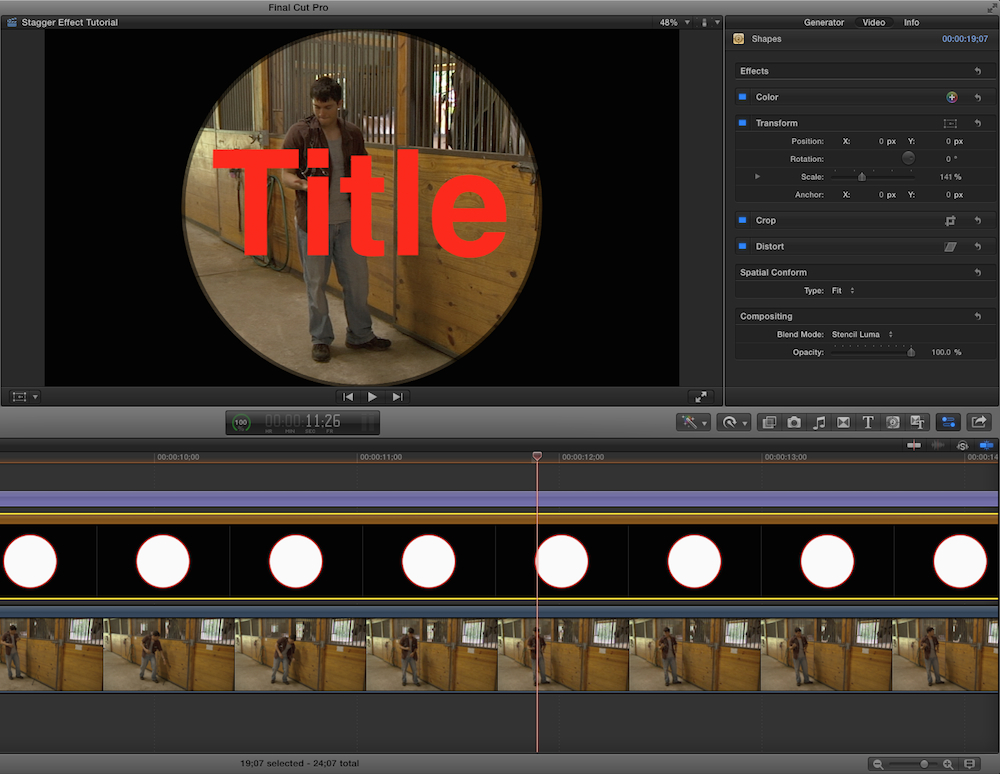
See how I have it here. Is this what you're going for?
Also, check out this free tutorial video, it may help give you some ideas to get more complex, also.
www.artbeats.com/video_tutorials/51
As for resizing and moving the circle shape around, use the Transform tools in the Inspector. Scale and X/Y parameters. Both are also available in the Viewer by turning on the interface (bottom left button/menu).
When you're stacked correctly, be sure your text is a color you can see. Apply "Stencil Luma" to the shape, make it white.
See how I have it here. Is this what you're going for?
Also, check out this free tutorial video, it may help give you some ideas to get more complex, also.
www.artbeats.com/video_tutorials/51
As for resizing and moving the circle shape around, use the Transform tools in the Inspector. Scale and X/Y parameters. Both are also available in the Viewer by turning on the interface (bottom left button/menu).
Last edit: 23 May 2014 11:15 by BenB.
Please Log in to join the conversation.
23 May 2014 12:48 #46546
by Seany
Replied by Seany on topic Blend Modes, text not appearing in shape.
Yes thanks but I also have a video in the background stacked at the very bottom which is blend mode 'behind' correct? Also it does not seem to be possible to move the video inside the shape to another part of the screen, the shape moves but only to a different part of the video underneath, I want to move the shape and video it is on to another part of the video underneath all this, I hope that makes sense??
Please Log in to join the conversation.
- Tom Wolsky
-

- Offline
- Moderator
-

23 May 2014 12:52 #46547
by Tom Wolsky
Replied by Tom Wolsky on topic Blend Modes, text not appearing in shape.
Combine the shape and video into a compound clip.
Please Log in to join the conversation.
23 May 2014 15:27 - 23 May 2014 15:44 #46561
by BenB
Replied by BenB on topic Blend Modes, text not appearing in shape.
I move the video around inside of the shape by selecting that clip in the Timeline, using the Transform controls in the Inspector, very easy. In fact, I did just that to get the man in the center.
Like Tom said, put the shape, video in the shape, and title in a Compound, put the background below that.
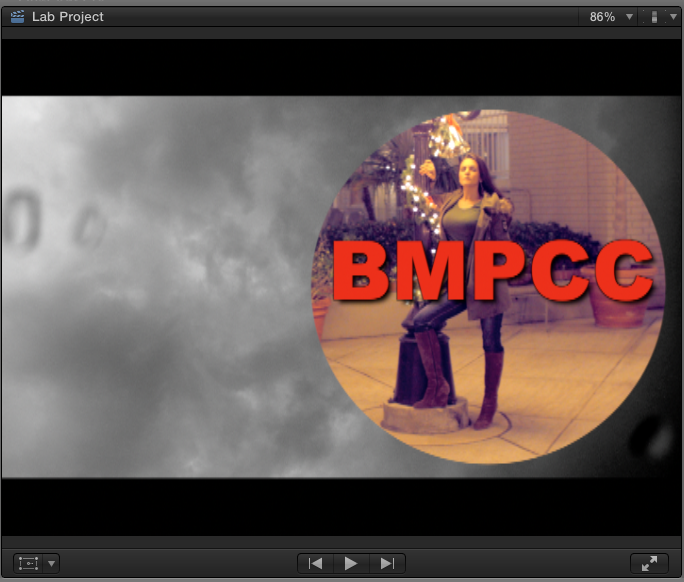
Look at the video I posted the link to,k as it shows how to do exactly what you're looking for. Plus some other tricks.
www.artbeats.com/video_tutorials/51
Like Tom said, put the shape, video in the shape, and title in a Compound, put the background below that.
Look at the video I posted the link to,k as it shows how to do exactly what you're looking for. Plus some other tricks.
www.artbeats.com/video_tutorials/51
Last edit: 23 May 2014 15:44 by BenB.
Please Log in to join the conversation.
