


- Posts: 786
- Thank you received: 21
3 Post Moderation Rule for New Boarders (25 Jan 2021)
New boarders will have their posts moderated - Don't worry if you cannot see your post immediately.
Moving multiple title tracks in viewer.
- Jonathan Levin
-
 Topic Author
- Offline
- Platinum Member
-

Less
More
21 May 2014 22:13 #46446
by Jonathan Levin
Moving multiple title tracks in viewer. was created by Jonathan Levin
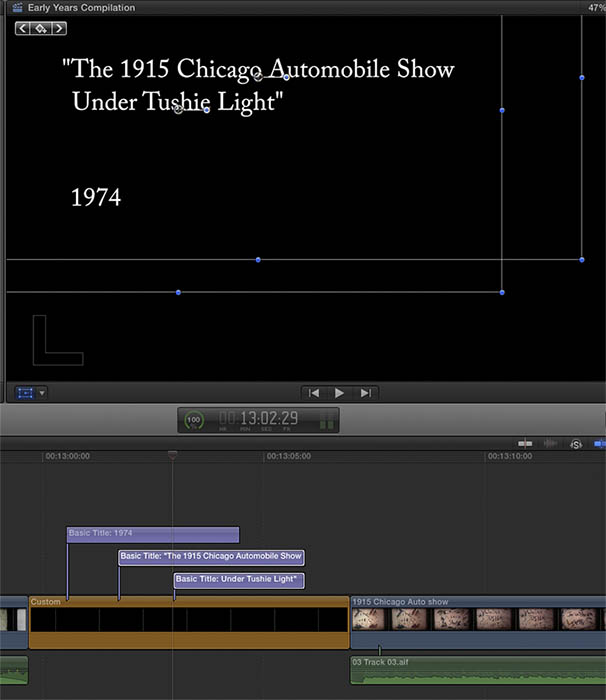
Can someone tell me how I can move multiple title tracks simultaneously in the viewer for positioning?
I have three title tracks: one in the storyline, and two above that. I want to select two of those, and then reposition in the viewer in a different place in the frame. I have transform activated.
I know I can do this individually, but how do you select and move two titles together? I thought that holding command or shift would do it, but alas.
Thanks.
Jonathan.
I have three title tracks: one in the storyline, and two above that. I want to select two of those, and then reposition in the viewer in a different place in the frame. I have transform activated.
I know I can do this individually, but how do you select and move two titles together? I thought that holding command or shift would do it, but alas.
Thanks.
Jonathan.
Please Log in to join the conversation.

21 May 2014 22:33 #46449
by plysat
Can't sleep? Try this: fcpxpert.net ;-)
Replied by plysat on topic Moving multiple title tracks in viewer.
select them both and then use the x/y position adjustments in the inspector...
Can't sleep? Try this: fcpxpert.net ;-)
Please Log in to join the conversation.
21 May 2014 22:40 - 21 May 2014 22:43 #46450
by Seanus
Sean Lander - Editing since 1982 - AVID 1991 - FCP 1999 - FCPX 2011
Replied by Seanus on topic Moving multiple title tracks in viewer.
- DELETED. Thought you meant move the track not the text.
Sean Lander - Editing since 1982 - AVID 1991 - FCP 1999 - FCPX 2011
Last edit: 21 May 2014 22:43 by Seanus.
Please Log in to join the conversation.
- Jonathan Levin
-
Topic Author
- Offline
- Platinum Member
-
Less
More
- Posts: 786
- Thank you received: 21
22 May 2014 17:03 #46489
by Jonathan Levin
Replied by Jonathan Levin on topic Moving multiple title tracks in viewer.
Thanks Plysat.
I just tried to use the position x/y in the inspector and it does indeed move both titles, but...
I hate working with x/y!!!!
I wish there was a left-right-up-down slider. In FCP7, you could elect more than one track and in the viewer you could drag to reposition those objects.
Is there another way in X to do this?
Jonathan
I just tried to use the position x/y in the inspector and it does indeed move both titles, but...
I hate working with x/y!!!!
I wish there was a left-right-up-down slider. In FCP7, you could elect more than one track and in the viewer you could drag to reposition those objects.
Is there another way in X to do this?
Jonathan
Please Log in to join the conversation.
- Jonathan Levin
-
Topic Author
- Offline
- Platinum Member
-
Less
More
- Posts: 786
- Thank you received: 21
22 May 2014 17:07 #46490
by Jonathan Levin
Replied by Jonathan Levin on topic Moving multiple title tracks in viewer.
Here's a screen shot:
Please Log in to join the conversation.
22 May 2014 17:10 #46491
by plysat
Can't sleep? Try this: fcpxpert.net ;-)
Replied by plysat on topic Moving multiple title tracks in viewer.
I know what you mean and, as far as I know (which could be totally wrong) you need to do it in the inspector. Send a feature request to Apple! 
Can't sleep? Try this: fcpxpert.net ;-)
Please Log in to join the conversation.
22 May 2014 21:28 #46514
by Seanus
Sean Lander - Editing since 1982 - AVID 1991 - FCP 1999 - FCPX 2011
Replied by Seanus on topic Moving multiple title tracks in viewer.
The only other I can think of would be to comp the two layers together and then move that.
Sean Lander - Editing since 1982 - AVID 1991 - FCP 1999 - FCPX 2011
Please Log in to join the conversation.
- Jonathan Levin
-
Topic Author
- Offline
- Platinum Member
-
Less
More
- Posts: 786
- Thank you received: 21
22 May 2014 23:36 #46520
by Jonathan Levin
Replied by Jonathan Levin on topic Moving multiple title tracks in viewer.
Thanks plysat and seanus. I'll send a feature request if I can remember how to do that.
JL
JL
Please Log in to join the conversation.

22 May 2014 23:59 #46521
by Bobbyco
Replied by Bobbyco on topic Moving multiple title tracks in viewer.
Please Log in to join the conversation.
- Jonathan Levin
-
Topic Author
- Offline
- Platinum Member
-
Less
More
- Posts: 786
- Thank you received: 21
23 May 2014 01:16 #46522
by Jonathan Levin
Replied by Jonathan Levin on topic Moving multiple title tracks in viewer.
Feature request sent.
Please Log in to join the conversation.

23 May 2014 02:55 - 23 May 2014 02:55 #46524
by dgwvideo
Creating history....one edit at a time !
Replied by dgwvideo on topic Moving multiple title tracks in viewer.
I am not where I can test this right now, but try selecting both title tracks in the timeline and then in the inspector select the transform rectangle icon which allows you to freely position with the mouse. Even before doing that, try selecting both titles and see if you can grab them in the viewer to move them together. This works with any single title, I'm just not sure about multiple titles.
Creating history....one edit at a time !
Last edit: 23 May 2014 02:55 by dgwvideo.
Please Log in to join the conversation.
- Jonathan Levin
-
Topic Author
- Offline
- Platinum Member
-
Less
More
- Posts: 786
- Thank you received: 21
23 May 2014 03:26 #46528
by Jonathan Levin
Replied by Jonathan Levin on topic Moving multiple title tracks in viewer.
Dgwvideo
That's exactly what I've been trying to do, but can't.
See my attachment above, you'll see the two titles "selected" in the project, and transform is active in viewer.
That's exactly what I've been trying to do, but can't.
See my attachment above, you'll see the two titles "selected" in the project, and transform is active in viewer.
Please Log in to join the conversation.
23 May 2014 03:33 #46529
by dgwvideo
Creating history....one edit at a time !
Replied by dgwvideo on topic Moving multiple title tracks in viewer.
I saw that but wasn't sure if you were trying to grab them in the viewer. Good to at least know it does not work. Maybe you can place a grid above your text to get things properly aligned and then delete it. There are a few in the free templates section of this forum.
Creating history....one edit at a time !
Please Log in to join the conversation.
