


- Posts: 929
- Thank you received: 131
3 Post Moderation Rule for New Boarders (25 Jan 2021)
New boarders will have their posts moderated - Don't worry if you cannot see your post immediately.
Workflow Survey - Ingest, rendering and export. What do you do?
20 May 2014 18:33 #46355
by tpayton
This is just a bit of sharing what is swirling around in my head today - I had to pull up a 2009 project from Final Cut Pro legacy today. I was reminded of the mess and lack of organization of the project. I remember having to convert all transcode all my Canon 7d media to something edit friendly, and then taking the time to use plural eyes for syncing my double system sound, and the time it would take to export a project for ultimate delivery.
FCPX has made many of these steps completely unnecessary, and yet I ran into a fellow a couple of weeks ago who had just switched from 7 and he was still transcoding his Canon DLSR media to ProRes. Just today I was helping a fellow in these forums who said he was exporting to ProRes before transcoding to his delivery format. I see on twitter and instagram quite often folks lamenting that they are waiting for FCPX to render. Of course folks are free to do these steps but at my shop they have become unnecessary and have saved us countless hours and complication in our workflow.
So I'm curious to know about other folks workflows here and perhaps we can learn something from one another. Specifically in to these areas:
Import
- How are you handling import. Do you transcode? Rename clips in the finder? Use external media?
Render
- Do you generally leave background rendering on? Do you wait for a project to render to play it back, or export? Have you tested this against not rendering?
Export
- Do you export straight to the delivery format, or to a intermediate (i.e. ProRes) and then transcode using compressor or other app? How have you found ways to save time on export?
FCPX has made many of these steps completely unnecessary, and yet I ran into a fellow a couple of weeks ago who had just switched from 7 and he was still transcoding his Canon DLSR media to ProRes. Just today I was helping a fellow in these forums who said he was exporting to ProRes before transcoding to his delivery format. I see on twitter and instagram quite often folks lamenting that they are waiting for FCPX to render. Of course folks are free to do these steps but at my shop they have become unnecessary and have saved us countless hours and complication in our workflow.
So I'm curious to know about other folks workflows here and perhaps we can learn something from one another. Specifically in to these areas:
Import
- How are you handling import. Do you transcode? Rename clips in the finder? Use external media?
Render
- Do you generally leave background rendering on? Do you wait for a project to render to play it back, or export? Have you tested this against not rendering?
Export
- Do you export straight to the delivery format, or to a intermediate (i.e. ProRes) and then transcode using compressor or other app? How have you found ways to save time on export?
Please Log in to join the conversation.
- ronny courtens
-

- Offline
- Moderator
-

Less
More
- Posts: 4455
- Thank you received: 962
20 May 2014 21:15 #46372
by ronny courtens
Replied by ronny courtens on topic Workflow Survey - Ingest, rendering and export. What do you do?
A quick reply before I sign off:
Import
- We always optimize to ProRes, which is our de facto working format. Only exception: when using native R3D clips on short-form productions that are graded inside FCP X..
- We never rename clips in the finder after they have been imported. You can get fired at our shop for doing this
- We always use external media (we're collaborating over XSAN)
Render
- I never have Background rendering on.
- Most of the times we don't render, except when playing back complex comps.
- Exporting without rendering first is in most cases much faster than rendering + exporting.
Export
- Exporting to a ProRes master is standard procedure in our setup. Then we send the master file to a dedicated system for software or hardware based conversion to create the final delivery formats.
- For sending client viewing copies from work in progress we export straight from FCP X to VIMEO or whatever.
- Ronny
Import
- We always optimize to ProRes, which is our de facto working format. Only exception: when using native R3D clips on short-form productions that are graded inside FCP X..
- We never rename clips in the finder after they have been imported. You can get fired at our shop for doing this
- We always use external media (we're collaborating over XSAN)
Render
- I never have Background rendering on.
- Most of the times we don't render, except when playing back complex comps.
- Exporting without rendering first is in most cases much faster than rendering + exporting.
Export
- Exporting to a ProRes master is standard procedure in our setup. Then we send the master file to a dedicated system for software or hardware based conversion to create the final delivery formats.
- For sending client viewing copies from work in progress we export straight from FCP X to VIMEO or whatever.
- Ronny
Please Log in to join the conversation.
20 May 2014 21:59 - 20 May 2014 22:00 #46377
by tpayton
Replied by tpayton on topic Workflow Survey - Ingest, rendering and export. What do you do?
That's great info. Thanks!
I should have clarified. Do you transcode or rename clips in the finder BEFORE you import into FCPX?
ronny courtens wrote: A quick reply before I sign off:
Import
- We always optimize to ProRes, which is our de facto working format. Only exception: when using native R3D clips on short-form productions that are graded inside FCP X..
- We never rename clips in the finder after they have been imported. You can get fired at our shop for doing this
I should have clarified. Do you transcode or rename clips in the finder BEFORE you import into FCPX?
Last edit: 20 May 2014 22:00 by tpayton.
Please Log in to join the conversation.

20 May 2014 22:31 - 20 May 2014 22:35 #46378
by innlens
Replied by innlens on topic Workflow Survey - Ingest, rendering and export. What do you do?
Import:
- never change the filenames in Finder anymore. All this can be done easier and batched (with metadata if needed) within FCPX much easier
- I don´t transcode. XDCam and XFCam are re-wrapped by FCPX, DSLR footage is playing fine as h.264 on my 2011 MacBook and 2012 iMac
Render:
- Background render is OFF. CTRL-R renders a selection and SHIFT-CTRL-R renders ALL when needed (complex comps or titles)
Export:
it depends, what the true distribution is. Usually I need a Master and at least one h.264 version.
a) If I need a ProRes Master I go ProRes. This especially when I use Roles and Multi-Track Quicktimes on broadcast jobs.
b) If I then start editing another job and am in a hurry I will send this through Compressor, but usually I use one of my Compressor Settings within FCPX to render the h.264 (I have presets for SD to 1080p in fast encode and multi pass and various bitrates). I am sure this gives better quality, because it is one generation less. But h.264s look fine either way.
c) For 2 regular clients I have bundles set up: ProResHQ, 720pFast mp4 and 1080p multi pass mp4 all with one button.
d) for client approval I send to vimeo straight from my timeline (password protected). I then get a mail from vimeo when it is there and forward that to my client. Everyone can play vimeo, even most Windows Users behind weird Firewalls. No more "this does´t´play on my machine" when they have no quicktime installed.
Export Tipp: Use roles on your titles. If you want a clean master you just turn of the titles-role. No need for another timeline.
One more Export tipp: I use COPY.com and GoogleDrive and have Folders shared with several clients. I can render into these folders and they can pull their clips on their desk without me doing anything - maybe a message when it is close to a deadline. This saves a ton of time. I can be shopping or pick up the kids while FCPX and the cloud out there do the rest
- never change the filenames in Finder anymore. All this can be done easier and batched (with metadata if needed) within FCPX much easier
- I don´t transcode. XDCam and XFCam are re-wrapped by FCPX, DSLR footage is playing fine as h.264 on my 2011 MacBook and 2012 iMac
Render:
- Background render is OFF. CTRL-R renders a selection and SHIFT-CTRL-R renders ALL when needed (complex comps or titles)
Export:
it depends, what the true distribution is. Usually I need a Master and at least one h.264 version.
a) If I need a ProRes Master I go ProRes. This especially when I use Roles and Multi-Track Quicktimes on broadcast jobs.
b) If I then start editing another job and am in a hurry I will send this through Compressor, but usually I use one of my Compressor Settings within FCPX to render the h.264 (I have presets for SD to 1080p in fast encode and multi pass and various bitrates). I am sure this gives better quality, because it is one generation less. But h.264s look fine either way.
c) For 2 regular clients I have bundles set up: ProResHQ, 720pFast mp4 and 1080p multi pass mp4 all with one button.
d) for client approval I send to vimeo straight from my timeline (password protected). I then get a mail from vimeo when it is there and forward that to my client. Everyone can play vimeo, even most Windows Users behind weird Firewalls. No more "this does´t´play on my machine" when they have no quicktime installed.
Export Tipp: Use roles on your titles. If you want a clean master you just turn of the titles-role. No need for another timeline.
One more Export tipp: I use COPY.com and GoogleDrive and have Folders shared with several clients. I can render into these folders and they can pull their clips on their desk without me doing anything - maybe a message when it is close to a deadline. This saves a ton of time. I can be shopping or pick up the kids while FCPX and the cloud out there do the rest
Last edit: 20 May 2014 22:35 by innlens.
Please Log in to join the conversation.

21 May 2014 01:12 - 21 May 2014 01:33 #46388
by canelson
--
Matias Canelson
www.canelson.us
Replied by canelson on topic Workflow Survey - Ingest, rendering and export. What do you do?
Import
- I have a folder structure that I like to manage myself, so I import leaving the originals in place. No renaming of any camera generated file.
- If the project is going to be big I transcode everything to proxy in the background while I create the keyword collections, add metadata, etc. I transcode to optimized at night or later in the editing process when we are one or two days before the client presentation in the edit room start. The only problem with this workflow is when I get media with alpha channel.
- If it´s a fast project (start-to-finish the same week) with H.264 media, I edit everything in H264 and before color grading I select the project, go to “File”, “Transcode media…” and transcode only the used media to optimized. Then presentations, grade and delivery.
Renders
- I have background render turned ON, but set to 120 seconds just in case I leave my Mac for some reason so I don´t waste that time. But my muscle memory makes my render very often (damn you FCP7!)
- I render everything before export. Just because if I export without rendering first, my project gets exported but the timeline doesn´t save the render.
Export
- Always export to an Apple ProRes master file and convert from there to other formats for delivery.
- Export for clients to review online is a 720p H264 Stereo quicktime.
- Every file gets exported to its own “current date” folder (YYMMDD) if I have many review during the day I create a “time folder” inside the date folder.
Hope it helps!
- I have a folder structure that I like to manage myself, so I import leaving the originals in place. No renaming of any camera generated file.
- If the project is going to be big I transcode everything to proxy in the background while I create the keyword collections, add metadata, etc. I transcode to optimized at night or later in the editing process when we are one or two days before the client presentation in the edit room start. The only problem with this workflow is when I get media with alpha channel.
- If it´s a fast project (start-to-finish the same week) with H.264 media, I edit everything in H264 and before color grading I select the project, go to “File”, “Transcode media…” and transcode only the used media to optimized. Then presentations, grade and delivery.
Renders
- I have background render turned ON, but set to 120 seconds just in case I leave my Mac for some reason so I don´t waste that time. But my muscle memory makes my render very often (damn you FCP7!)
- I render everything before export. Just because if I export without rendering first, my project gets exported but the timeline doesn´t save the render.
Export
- Always export to an Apple ProRes master file and convert from there to other formats for delivery.
- Export for clients to review online is a 720p H264 Stereo quicktime.
- Every file gets exported to its own “current date” folder (YYMMDD) if I have many review during the day I create a “time folder” inside the date folder.
Hope it helps!
--
Matias Canelson
www.canelson.us
Last edit: 21 May 2014 01:33 by canelson.
Please Log in to join the conversation.

21 May 2014 04:26 #46393
by 5thwall
Michael Garber
www.garbershop.com
Replied by 5thwall on topic Workflow Survey - Ingest, rendering and export. What do you do?
Hey T!
Everything I've worked on in FCP X over the last year has been delivered via FTP. Everything I've cut in FCP 7 has been delivered via tape or via Prores files. With that said...
Import
I always import from cards, files, etc... I work on a 2013 iMac and a 2012 rMBPr (both fully spec'd out). I usually start working without transcoding, but I generally find playback, shuttling, and rendering to be slower than I'd prefer. Depending on the original import codec, I'll transcode to Prores to speed those up during the edit.
If I know I'm working on my laptop or a portable drive, I will make proxies. Knowing that the transcodes are usually so quick, I'll start transcoding them while logging.
I don't rename the clips in the finder since I'm using FCP to import.
I do use external media a lot. But sometimes I'll create an internal media library - usually if I'm working on a one-off project or just messing around with some footage to test something out. It keeps things neat and compact so if I wish to trash it (which is usually the point of why I would work this way), it's an easy thing to do.
Render
I leave background rendering off 98% of the time. I turn it on the other 2% because of a render bug. When I use CoreMelt plugins, FCP tends to lose the renders. Setting the timeline to "render all" doesn't work - it'll render a few clips then hits 100%. Then I have to start the render again. The workaround is to turn background rendering on. Every time it hits 100% it just starts right back up again.
Export
I have started to use FCP to do more exports. I'll also use FCP to export using a pre-built Compressor setting. That isn't to say that I don't use Compressor.
The export codec depends entirely on client delivery. One corporate client always wants MP4s and sometimes WMVs. A broadcast news outlet I work with will accept H264s, Prores, or XDCAM. Since my internet speeds are a bit slow, I try to upload the highest compressed codec I can get away with.
If anyone has any inside connections with Google Fiber, tell them to put L.A. (specifically Hollywood) on their list!
Everything I've worked on in FCP X over the last year has been delivered via FTP. Everything I've cut in FCP 7 has been delivered via tape or via Prores files. With that said...
Import
I always import from cards, files, etc... I work on a 2013 iMac and a 2012 rMBPr (both fully spec'd out). I usually start working without transcoding, but I generally find playback, shuttling, and rendering to be slower than I'd prefer. Depending on the original import codec, I'll transcode to Prores to speed those up during the edit.
If I know I'm working on my laptop or a portable drive, I will make proxies. Knowing that the transcodes are usually so quick, I'll start transcoding them while logging.
I don't rename the clips in the finder since I'm using FCP to import.
I do use external media a lot. But sometimes I'll create an internal media library - usually if I'm working on a one-off project or just messing around with some footage to test something out. It keeps things neat and compact so if I wish to trash it (which is usually the point of why I would work this way), it's an easy thing to do.
Render
I leave background rendering off 98% of the time. I turn it on the other 2% because of a render bug. When I use CoreMelt plugins, FCP tends to lose the renders. Setting the timeline to "render all" doesn't work - it'll render a few clips then hits 100%. Then I have to start the render again. The workaround is to turn background rendering on. Every time it hits 100% it just starts right back up again.
Export
I have started to use FCP to do more exports. I'll also use FCP to export using a pre-built Compressor setting. That isn't to say that I don't use Compressor.
The export codec depends entirely on client delivery. One corporate client always wants MP4s and sometimes WMVs. A broadcast news outlet I work with will accept H264s, Prores, or XDCAM. Since my internet speeds are a bit slow, I try to upload the highest compressed codec I can get away with.
If anyone has any inside connections with Google Fiber, tell them to put L.A. (specifically Hollywood) on their list!
Michael Garber
www.garbershop.com
Please Log in to join the conversation.
21 May 2014 14:04 #46408
by timfo
Replied by timfo on topic Workflow Survey - Ingest, rendering and export. What do you do?
Import
We shoot on a mix of Canons and a FS700. I want all my clips structured in the same way (maybe a bit neurotic) so we ClipWrap the Sony's AVCHD into individual ProRes clips before importing.
I keep all original media outside of the Library, but in a common Project folder that contains the Library itself and all assets. The only media inside the Library is proxy media.
Render
Background render is off. It was a fun feature back when FCPX was first introduced, but starting with some GFX heavy projects a year or so ago, I started turning it off and it has stayed off since.
Export
For client review of projects, I'll export the standard Youtube 1080p setting, especially for shorter projects. Once all is approved, I'll export a Master from FCPX, and if I know the client is going to post online and doesn't have any in-house video experts, I'll also supply a version via a custom Compressor setting with a higher data rate. Broadcast is a headache sometimes (Extreme Reach's platform is especially frustrating), but a lot of clients I work with thankfully have a traffic person to deal with delivery.
We shoot on a mix of Canons and a FS700. I want all my clips structured in the same way (maybe a bit neurotic) so we ClipWrap the Sony's AVCHD into individual ProRes clips before importing.
I keep all original media outside of the Library, but in a common Project folder that contains the Library itself and all assets. The only media inside the Library is proxy media.
Render
Background render is off. It was a fun feature back when FCPX was first introduced, but starting with some GFX heavy projects a year or so ago, I started turning it off and it has stayed off since.
Export
For client review of projects, I'll export the standard Youtube 1080p setting, especially for shorter projects. Once all is approved, I'll export a Master from FCPX, and if I know the client is going to post online and doesn't have any in-house video experts, I'll also supply a version via a custom Compressor setting with a higher data rate. Broadcast is a headache sometimes (Extreme Reach's platform is especially frustrating), but a lot of clients I work with thankfully have a traffic person to deal with delivery.
Please Log in to join the conversation.
21 May 2014 18:01 #46427
by tpayton
Replied by tpayton on topic Workflow Survey - Ingest, rendering and export. What do you do?
Import:
Generally we shoot on different flavors of Canon DSLRs and Zoom H6 for Audio. In the Finder we drag and drop from the cards to a "shot media" drive either on set or at the office; organized into folders by card and date. We don't rename the Canon h264's but we add a timestamp to the audio files using Better Rename 9 on the app store.
When we have HDV or AVCHD material we create camera archives first to a "shot media" drive.
We always use managed media (I wish every app did this), and import and copy from our shot media drive to a Library for each job, divided by client and nob number, located on a NFS shared folder on a RAID 5. We edit in the native codec 99% of the time and only create proxies if we are passing something off to a freelance editor with a lower end machine. (We have the most recent iMacs, maxed out and MBPR)
We utilize quite a bit of stock and company imagery from clients and those are dragged into appropriated named events within the FCP job library. Our average Library size is about 100GB.
Rendering:
Background rendering is OFF. Only occasionally will we need to render a complicated composite or animation. If it the composite/animation is locked we will many times render out just that animation to lower the load on the machine.
Exporting:
We don't make ProRes masters before transcoding.
We proof to YouTube, typically 720p "faster". Export to the delivery specs within FCPX shares using custom compressor settings. 60% of our deliverables are for web (YouTube/Vimeo) which are exported directly from FCPX. The remainder are h264 for other purpose, DVD, BluRay, or ProRes for broadcast.
For DVDs & BluRay we always go "to hard drive" which create disk images first, and then burn as needed in Disk Utility.
We use x264 for 720p deliverables which exports in about quarter of the time of two pass h264. We also use copy.com with client folders so they can grab deliverables as needed.
We do make a copy of each deliverable in an "output folder" that is timestamped and placed in the client/job folder.
Other comments:
The other day we had to render something in Motion and I got up out of my chair to get something to drink and I realized that I haven't had to "wait" for a good year and a half i.e. a progress bar pops locking me out of my work. I used to wait for my files to import into FCP7 and transcoded to prores (this could easily take an hour per card), and then wait again as I needed to render a transition, and then once it was approved, waiting for the final render to finish, and then waiting for the prores to export and waiting for the h264 to be made from compressor. My workflow seemed to be more about waiting that working.
Needless to say, I'm continually impressed with FCPX's ability to save so much time in a basic workflow.
Someone asked about our backup scheme, so I thought I would include that too:
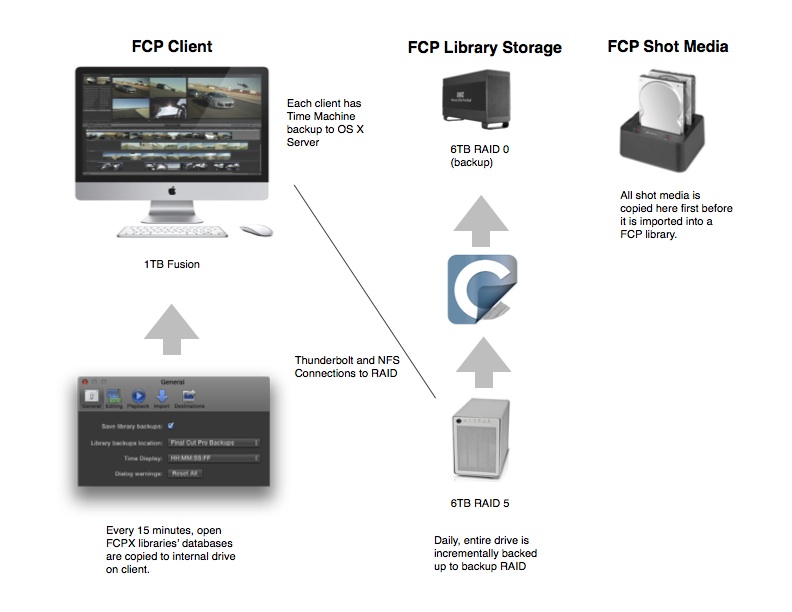
Generally we shoot on different flavors of Canon DSLRs and Zoom H6 for Audio. In the Finder we drag and drop from the cards to a "shot media" drive either on set or at the office; organized into folders by card and date. We don't rename the Canon h264's but we add a timestamp to the audio files using Better Rename 9 on the app store.
When we have HDV or AVCHD material we create camera archives first to a "shot media" drive.
We always use managed media (I wish every app did this), and import and copy from our shot media drive to a Library for each job, divided by client and nob number, located on a NFS shared folder on a RAID 5. We edit in the native codec 99% of the time and only create proxies if we are passing something off to a freelance editor with a lower end machine. (We have the most recent iMacs, maxed out and MBPR)
We utilize quite a bit of stock and company imagery from clients and those are dragged into appropriated named events within the FCP job library. Our average Library size is about 100GB.
Rendering:
Background rendering is OFF. Only occasionally will we need to render a complicated composite or animation. If it the composite/animation is locked we will many times render out just that animation to lower the load on the machine.
Exporting:
We don't make ProRes masters before transcoding.
We proof to YouTube, typically 720p "faster". Export to the delivery specs within FCPX shares using custom compressor settings. 60% of our deliverables are for web (YouTube/Vimeo) which are exported directly from FCPX. The remainder are h264 for other purpose, DVD, BluRay, or ProRes for broadcast.
For DVDs & BluRay we always go "to hard drive" which create disk images first, and then burn as needed in Disk Utility.
We use x264 for 720p deliverables which exports in about quarter of the time of two pass h264. We also use copy.com with client folders so they can grab deliverables as needed.
We do make a copy of each deliverable in an "output folder" that is timestamped and placed in the client/job folder.
Other comments:
The other day we had to render something in Motion and I got up out of my chair to get something to drink and I realized that I haven't had to "wait" for a good year and a half i.e. a progress bar pops locking me out of my work. I used to wait for my files to import into FCP7 and transcoded to prores (this could easily take an hour per card), and then wait again as I needed to render a transition, and then once it was approved, waiting for the final render to finish, and then waiting for the prores to export and waiting for the h264 to be made from compressor. My workflow seemed to be more about waiting that working.
Needless to say, I'm continually impressed with FCPX's ability to save so much time in a basic workflow.
Someone asked about our backup scheme, so I thought I would include that too:
Please Log in to join the conversation.
