


- Posts: 8
- Thank you received: 0
3 Post Moderation Rule for New Boarders (25 Jan 2021)
New boarders will have their posts moderated - Don't worry if you cannot see your post immediately.
Multicam Default Audio Angle Selection
19 May 2014 09:14 #46229
by leo
Multicam Default Audio Angle Selection was created by leo
I often edit weddings where I will have 4 or more audio tracks in the multicam all synced - host mic, dj audio, floor mic, groom mic etc. it varies. Plus the redundant on-camera audio as a backup.
For certain sections of the video I only need 2 of the audio tracks checked, example the host mic and the dj audio, with all other tracks unchecked. At the moment what happens is when I make a cut the audio switches to the on-camera audio for that angle, and the host mic and dj audio uncheck. Then I have to open inspector and uncheck that box and check the audio's I want. Eveytime I make a cut...
Is there a way to have the host mic and the dj audio activated by default for certain sections? And then for other sections e.g. the ceremony, only have the priest and groom mic activated?
In other words how do I set default audio angles?
Hope that is clear.
PS. If there is a better workflow RE: the multicam audio setup I'm doing, I would love to hear it..
For certain sections of the video I only need 2 of the audio tracks checked, example the host mic and the dj audio, with all other tracks unchecked. At the moment what happens is when I make a cut the audio switches to the on-camera audio for that angle, and the host mic and dj audio uncheck. Then I have to open inspector and uncheck that box and check the audio's I want. Eveytime I make a cut...
Is there a way to have the host mic and the dj audio activated by default for certain sections? And then for other sections e.g. the ceremony, only have the priest and groom mic activated?
In other words how do I set default audio angles?
Hope that is clear.
PS. If there is a better workflow RE: the multicam audio setup I'm doing, I would love to hear it..
Please Log in to join the conversation.

19 May 2014 12:41 #46237
by BenB
Replied by BenB on topic Multicam Default Audio Angle Selection
Very easy. You can configure and edit audio channels from any angle for any edited clip in a multiclip. Right-click a clip, Expand Audio Components, select the video portion, in the Inspector, under Audio, Channel Configuration, activate/deactivate what you want. In the Timeline, trim out any activated channel you want. Drag it out to start when you want, end when you want, keyframe, etc.
Maybe this article could help?
www.macprovideo.com/hub/final-cut/final-...channel-editing-1006
Maybe this article could help?
www.macprovideo.com/hub/final-cut/final-...channel-editing-1006
Please Log in to join the conversation.
19 May 2014 14:36 #46250
by leo
Replied by leo on topic Multicam Default Audio Angle Selection
Thanks Ben I think that's exactly what I need, will try in the morning back at the mac. So technically speaking is that creating a separate audio track under the main storyline ie a 2nd audio track, similar to a compound clip? Because for each cut I sometimes have to activate other channels I need for that particular cut...
You do mean inside angle editor ... right?
Unfortunately the link has a 404 at the moment..
Thanks again.
You do mean inside angle editor ... right?
Unfortunately the link has a 404 at the moment..
Thanks again.
Please Log in to join the conversation.
19 May 2014 18:11 - 19 May 2014 18:14 #46256
by BenB
Replied by BenB on topic Multicam Default Audio Angle Selection
I never said anything about a separate audio track.
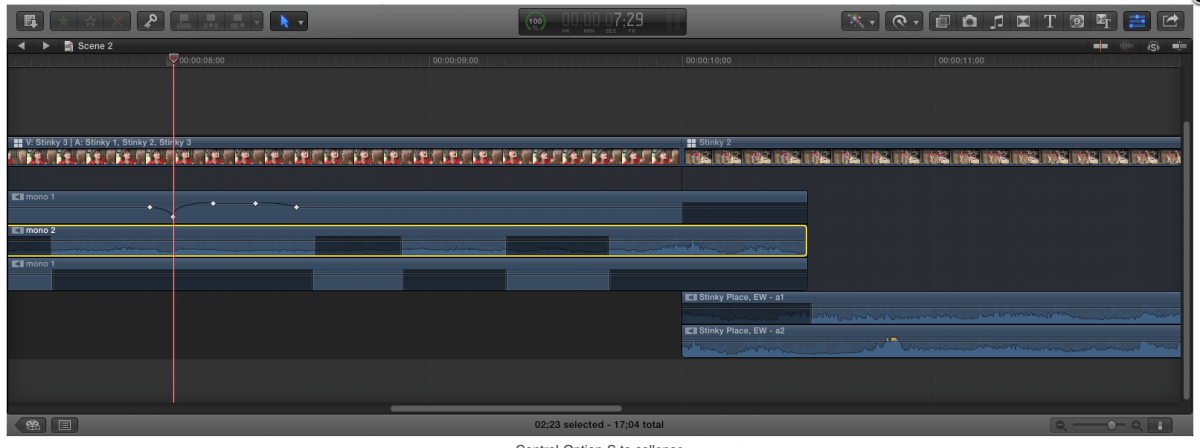
Right-click a clip in your Multiclip edit, in the Project Timeline, chose "Expand Audio Components".
Link is working fine for me.
Right-click a clip in your Multiclip edit, in the Project Timeline, chose "Expand Audio Components".
Link is working fine for me.
Last edit: 19 May 2014 18:14 by BenB.
Please Log in to join the conversation.
20 May 2014 05:04 #46311
by leo
Replied by leo on topic Multicam Default Audio Angle Selection
Thanks Ben, the link is working agein.
But that doesn't really help my situation. Keyframing and range selecting is pretty much the same as selecting channels in the inspector, but is more work. Take a look at a standard project, having to go over again to correct audio for each cut is not a viable workflow with time constraints..
I think how i have it set up now is the fastest workflow, although a keyboard shortcut mapped to an audio channel would speed things up considerably!
Cheers anyway, thanks for the tuts.
But that doesn't really help my situation. Keyframing and range selecting is pretty much the same as selecting channels in the inspector, but is more work. Take a look at a standard project, having to go over again to correct audio for each cut is not a viable workflow with time constraints..
I think how i have it set up now is the fastest workflow, although a keyboard shortcut mapped to an audio channel would speed things up considerably!
Cheers anyway, thanks for the tuts.

Please Log in to join the conversation.
21 May 2014 04:13 #46392
by leo
Replied by leo on topic Multicam Default Audio Angle Selection
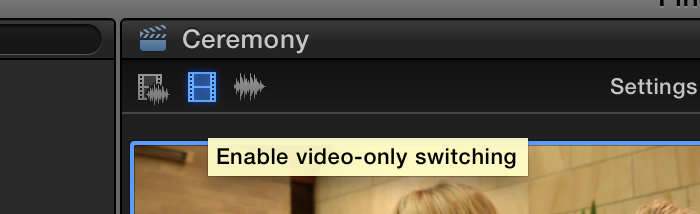
The Answer I was looking for is called "Enable video only switching" and can be found here in the screenshot, basically when you make a cut you can choose to keep the audio from the current clip, and only switch the video angle, as the control implies.
Please Log in to join the conversation.
