


- Posts: 379
- Thank you received: 6
3 Post Moderation Rule for New Boarders (25 Jan 2021)
New boarders will have their posts moderated - Don't worry if you cannot see your post immediately.
10.9.3/Users folder disappearing
- Marc Lucas
-
 Topic Author
- Offline
- Platinum Member
-

Less
More
16 May 2014 10:37 #46161
by Marc Lucas
10.9.3/Users folder disappearing was created by Marc Lucas
Here's a link to kind of remedy if you can't see your Users folder when importing into FCPX if you have updated to 10.9.3 and wondering where your users folder had gone.
www.macworld.com/article/2155980/os-x-10...b836e21638-425752101
www.macworld.com/article/2155980/os-x-10...b836e21638-425752101
Please Log in to join the conversation.
- Tom Wolsky
-

- Offline
- Moderator
-

16 May 2014 10:53 #46162
by Tom Wolsky
Replied by Tom Wolsky on topic 10.9.3/Users folder disappearing
Are you talking about the public beta version of the OS?
Please Log in to join the conversation.
- Marc Lucas
-
Topic Author
- Offline
- Platinum Member
-
Less
More
- Posts: 379
- Thank you received: 6
16 May 2014 11:00 #46163
by Marc Lucas
Replied by Marc Lucas on topic 10.9.3/Users folder disappearing
No 10.9.3 has just been released last night. Some users (like me) were affected by the invisible folder.
Please Log in to join the conversation.
- Tom Wolsky
-
- Offline
- Moderator
-
16 May 2014 11:13 #46164
by Tom Wolsky
Replied by Tom Wolsky on topic 10.9.3/Users folder disappearing
Thanks. Didn't know that. You don't see Users when you select the drive? That doesn't sound good.
Please Log in to join the conversation.
- Marc Lucas
-
Topic Author
- Offline
- Platinum Member
-
Less
More
- Posts: 379
- Thank you received: 6
16 May 2014 11:29 #46166
by Marc Lucas
Replied by Marc Lucas on topic 10.9.3/Users folder disappearing
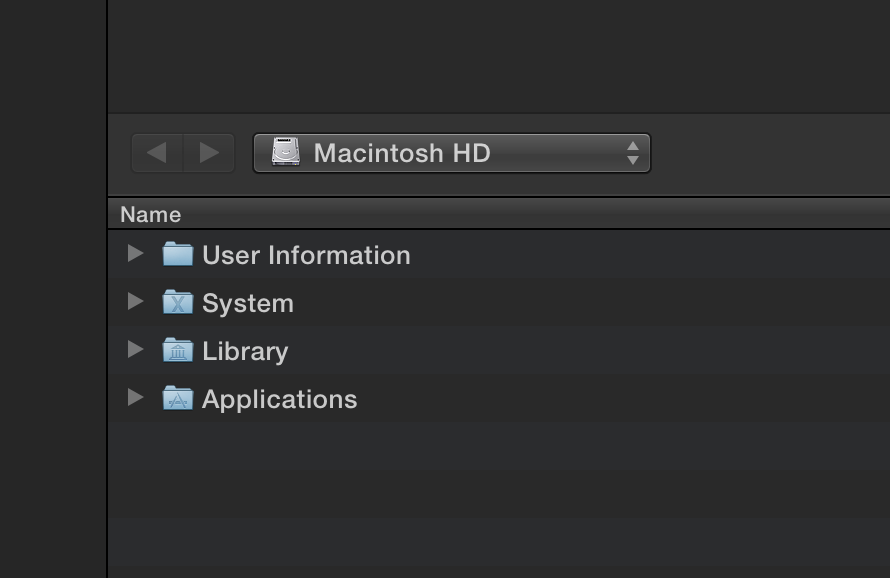
This is what you see when you try and import.
Please Log in to join the conversation.
16 May 2014 11:42 - 16 May 2014 12:21 #46167
by Makki
Replied by Makki on topic 10.9.3/Users folder disappearing
Here you find a solution (at the bottom)
discussions.apple.com/thread/6224031?start=15&tstart=0
Sorry Marc I did not read your post carefully enough.
Sorry Marc I did not read your post carefully enough.
Last edit: 16 May 2014 12:21 by Makki.
Please Log in to join the conversation.
- Tom Wolsky
-
- Offline
- Moderator
-
16 May 2014 11:48 #46168
by Tom Wolsky
Replied by Tom Wolsky on topic 10.9.3/Users folder disappearing
And I'll bet no Favorites.
What's User Information folder?
What's User Information folder?
Please Log in to join the conversation.
- DmitriZigany
-

- Offline
- Platinum Member
-
Less
More
- Posts: 730
- Thank you received: 26
16 May 2014 13:24 #46176
by DmitriZigany
Replied by DmitriZigany on topic 10.9.3/Users folder disappearing
It's gone for me as well.
Please Log in to join the conversation.
- Tom Wolsky
-
- Offline
- Moderator
-
16 May 2014 13:28 #46178
by Tom Wolsky
Replied by Tom Wolsky on topic 10.9.3/Users folder disappearing
Can you post a screen shot of the root level of your system drive?
Please Log in to join the conversation.
16 May 2014 14:29 #46179
by tpayton
Replied by tpayton on topic 10.9.3/Users folder disappearing
This is happening for me as well. I wonder if it is a "feature" of sandboxing?
Please Log in to join the conversation.
16 May 2014 14:35 #46180
by plysat
Can't sleep? Try this: fcpxpert.net ;-)
Replied by plysat on topic 10.9.3/Users folder disappearing
Definitely not a "feature". While it hasn't affected me, hopefully they fix it soon.
Can't sleep? Try this: fcpxpert.net ;-)
Please Log in to join the conversation.
- Tom Wolsky
-
- Offline
- Moderator
-
16 May 2014 14:37 #46181
by Tom Wolsky
Replied by Tom Wolsky on topic 10.9.3/Users folder disappearing
The OS issue seems to be having direct impact on the application.
Please Log in to join the conversation.

16 May 2014 14:55 #46183
by JasonP
Replied by JasonP on topic 10.9.3/Users folder disappearing
I had the user folder issue with 10.9.1
It kept making my preferences disappear/reset. I will not be upgrading to 10.9.3 anytime soon.
Thanks for the info.
It kept making my preferences disappear/reset. I will not be upgrading to 10.9.3 anytime soon.
Thanks for the info.
Please Log in to join the conversation.
- Russ Haskell
-
- Offline
- Elite Member
-

Less
More
- Posts: 176
- Thank you received: 24
16 May 2014 15:57 #46190
by Russ Haskell
Replied by Russ Haskell on topic 10.9.3/Users folder disappearing
I had this as well.
For me the solution was the command line that was in the article the initial post linked to as well as repairing permissions.
Russ
For me the solution was the command line that was in the article the initial post linked to as well as repairing permissions.
Russ
Please Log in to join the conversation.

16 May 2014 18:03 #46206
by smg669
Replied by smg669 on topic 10.9.3/Users folder disappearing
From MacRumors:
Update 10:30 AM PT: As noted by MacObserver, the issue may be caused by a combination of iTunes 11.2 and Find My Mac rather than OS X 10.9.3. The site tested each update released yesterday and found the /Users and /Users/Shared folders only disappeared after iTunes 11.2 was installed on a Mac with Find My Mac enabled.
Update 10:30 AM PT: As noted by MacObserver, the issue may be caused by a combination of iTunes 11.2 and Find My Mac rather than OS X 10.9.3. The site tested each update released yesterday and found the /Users and /Users/Shared folders only disappeared after iTunes 11.2 was installed on a Mac with Find My Mac enabled.
Please Log in to join the conversation.

16 May 2014 18:06 #46210
by BenB
Replied by BenB on topic 10.9.3/Users folder disappearing
Please Log in to join the conversation.
- Russ Haskell
-
- Offline
- Elite Member
-
Less
More
- Posts: 176
- Thank you received: 24
16 May 2014 18:23 #46218
by Russ Haskell
Replied by Russ Haskell on topic 10.9.3/Users folder disappearing
Just to say that for me - after running the command line and repairing permissions, the Users folder fix seems to be permanent.
Russ
Russ
Please Log in to join the conversation.
- Russ Haskell
-
- Offline
- Elite Member
-
Less
More
- Posts: 176
- Thank you received: 24
16 May 2014 18:29 #46219
by Russ Haskell
Replied by Russ Haskell on topic 10.9.3/Users folder disappearing
Also, I don't have Find My Mac enabled.
Russ
Russ
Please Log in to join the conversation.
