


- Posts: 244
- Thank you received: 12
3 Post Moderation Rule for New Boarders (25 Jan 2021)
New boarders will have their posts moderated - Don't worry if you cannot see your post immediately.
FCPX looking to the wrong event for sync'd and Multicam clips - how do I redirect it's attention?
- Doug Suiter
-
 Topic Author
- Offline
- Elite Member
-

Less
More
16 May 2014 08:56 - 16 May 2014 09:28 #46158
by Doug Suiter
FCPX looking to the wrong event for sync'd and Multicam clips - how do I redirect it's attention? was created by Doug Suiter
Hi folks - I have an issue where I've brought an XML of a project into a fresh FCPX library because the old project had offline media that refuses to relink despite being the correct media.
I have recreated all the MC and sync'd clips but when I import the XML the clips are still offline because FCPX is looking to the wrong event for these clips. I basically need to alter the Event location in the clip info panel - but it is not editable.
Confused? Here's a video that explains the situation:
Edit: Here's an image that clearly shows FCP X not recording the correct Event in the file information panel:
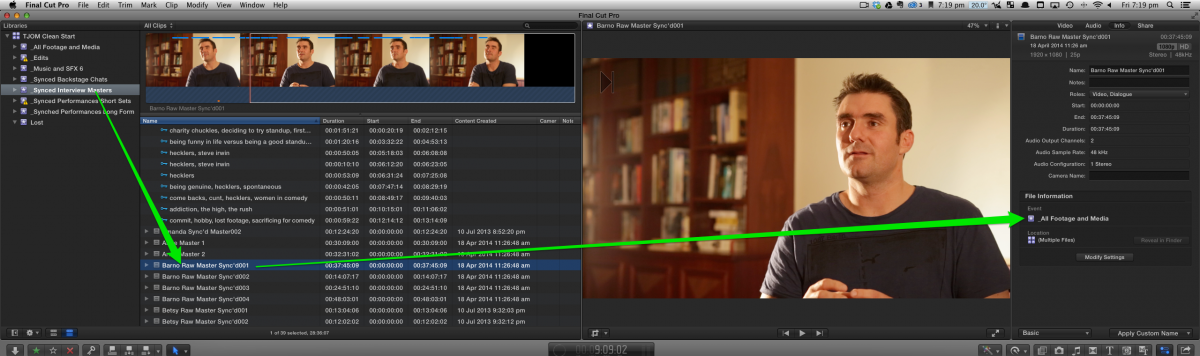
I have recreated all the MC and sync'd clips but when I import the XML the clips are still offline because FCPX is looking to the wrong event for these clips. I basically need to alter the Event location in the clip info panel - but it is not editable.
Confused? Here's a video that explains the situation:
Edit: Here's an image that clearly shows FCP X not recording the correct Event in the file information panel:
Last edit: 16 May 2014 09:28 by Doug Suiter.
Please Log in to join the conversation.
- ronny courtens
-

- Offline
- Moderator
-

Less
More
- Posts: 4455
- Thank you received: 962
16 May 2014 10:05 #46160
by ronny courtens
Replied by ronny courtens on topic FCPX looking to the wrong event for sync'd and Multicam clips - how do I redirect it's attention?
Hey Doug,
You could go into the XML and manually change the Event references for the problematic synched clips, but that's quite complicated to explain and a bit risky if you haven't done this before.
So just a quick idea: what happens when you actually drag one of the problematic synched clips from the "Synched Interview Masters" event onto the "All Footage and Media" event, copying the clip from one event onto the other? Do the instances on the timeline reconnect properly to the master clip in the All Footage and Media event?
- Ronny
You could go into the XML and manually change the Event references for the problematic synched clips, but that's quite complicated to explain and a bit risky if you haven't done this before.
So just a quick idea: what happens when you actually drag one of the problematic synched clips from the "Synched Interview Masters" event onto the "All Footage and Media" event, copying the clip from one event onto the other? Do the instances on the timeline reconnect properly to the master clip in the All Footage and Media event?
- Ronny
Please Log in to join the conversation.
- Doug Suiter
-
Topic Author
- Offline
- Elite Member
-
Less
More
- Posts: 244
- Thank you received: 12
20 May 2014 02:07 #46293
by Doug Suiter
Replied by Doug Suiter on topic FCPX looking to the wrong event for sync'd and Multicam clips - how do I redirect it's attention?
Sorry about the delay in responding - I was caught in the tcp.co outage.
Thanks for responding too
If I drag the problematic synched clip to "All footage and media" no, the instances do not reconnect.
Looking at the Info Panel , some of the clips in the "Synched Interview Masters" event show as "Synched Interview Masters" but many show instead as "All Footage and Media". If I move any of these clips between events the file information Panel does not change. That is, they show as "All Footage and Media" even tho they are clearly in the "Synched Interview Masters" event.
I found a clip that was in "Synched Interview Masters" and showed correctly in the Info Panel. I moved it to "All footage and media". All good. Then i moved it back to "Synched Interview Masters" and lo and behold the info panel says it's in "All footage and media". Restarting FCP X did not change this.
At this stage most of the clips say they are in the "All footage and media" despite which event they are actually in.
Thanks for responding too
what happens when you actually drag one of the problematic synched clips from the "Synched Interview Masters" event onto the "All Footage and Media" event, copying the clip from one event onto the other? Do the instances on the timeline reconnect properly to the master clip in the All Footage and Media event?
If I drag the problematic synched clip to "All footage and media" no, the instances do not reconnect.
Looking at the Info Panel , some of the clips in the "Synched Interview Masters" event show as "Synched Interview Masters" but many show instead as "All Footage and Media". If I move any of these clips between events the file information Panel does not change. That is, they show as "All Footage and Media" even tho they are clearly in the "Synched Interview Masters" event.
I found a clip that was in "Synched Interview Masters" and showed correctly in the Info Panel. I moved it to "All footage and media". All good. Then i moved it back to "Synched Interview Masters" and lo and behold the info panel says it's in "All footage and media". Restarting FCP X did not change this.
At this stage most of the clips say they are in the "All footage and media" despite which event they are actually in.
Please Log in to join the conversation.


20 May 2014 02:19 #46297
by plysat
Can't sleep? Try this: fcpxpert.net ;-)
Replied by plysat on topic FCPX looking to the wrong event for sync'd and Multicam clips - how do I redirect it's attention?
I'm sure you've tried this but... If you "reveal in browser" does it reveal the online clip? If so there's always SHIFT+F, OPTION+R over and over 'til it's all replaced?
Can't sleep? Try this: fcpxpert.net ;-)
Please Log in to join the conversation.
- Doug Suiter
-
Topic Author
- Offline
- Elite Member
-
Less
More
- Posts: 244
- Thank you received: 12
20 May 2014 02:25 - 20 May 2014 02:30 #46298
by Doug Suiter
The clips that need to be replaced are offline. So If I click "reveal in browser" it will reveal the offline clip in the browser. That means all I am left with is the following procedure for each and every edit:
1. Visually identify the offline clip by name in the project
2. Manually locate the online version of that clip in the event browser
3. Using the range tool with snapping on determine the in point timecode
4. Back in the browser type that timecode in by hand and set the in point
5. Back in the project perform a replace edit based on in point (option-r)
I've already been doing that and have completed 3x24 minute episodes.
Also remember that because these are synchronised clips I couldn't even begin this process until I had done the same process to all of the angles on the synched and multi cam clips.
The trouble is that when I bring in an xml of a project with offline clips into a new library FCPX brings the offline MC and Synchronised clips with it and there seems to be no way to say to FCP X "The clips you need are already in this library"
Replied by Doug Suiter on topic FCPX looking to the wrong event for sync'd and Multicam clips - how do I redirect it's attention?
I'm sure you've tried this but... If you "reveal in browser" does it reveal the online clip? If so there's always SHIFT+F, OPTION+R over and over 'til it's all replaced?
The clips that need to be replaced are offline. So If I click "reveal in browser" it will reveal the offline clip in the browser. That means all I am left with is the following procedure for each and every edit:
1. Visually identify the offline clip by name in the project
2. Manually locate the online version of that clip in the event browser
3. Using the range tool with snapping on determine the in point timecode
4. Back in the browser type that timecode in by hand and set the in point
5. Back in the project perform a replace edit based on in point (option-r)
I've already been doing that and have completed 3x24 minute episodes.
Also remember that because these are synchronised clips I couldn't even begin this process until I had done the same process to all of the angles on the synched and multi cam clips.
The trouble is that when I bring in an xml of a project with offline clips into a new library FCPX brings the offline MC and Synchronised clips with it and there seems to be no way to say to FCP X "The clips you need are already in this library"
Last edit: 20 May 2014 02:30 by Doug Suiter.
Please Log in to join the conversation.
20 May 2014 02:28 #46299
by plysat
Can't sleep? Try this: fcpxpert.net ;-)
Replied by plysat on topic FCPX looking to the wrong event for sync'd and Multicam clips - how do I redirect it's attention?
I figured it couldn't be that simple...  Is this the same Library that blew up a while ago? Something is seriously screwy in the database somewhere...
Is this the same Library that blew up a while ago? Something is seriously screwy in the database somewhere... Can't sleep? Try this: fcpxpert.net ;-)
Please Log in to join the conversation.
20 May 2014 02:49 #46300
by plysat
Can't sleep? Try this: fcpxpert.net ;-)
Replied by plysat on topic FCPX looking to the wrong event for sync'd and Multicam clips - how do I redirect it's attention?
Can't sleep? Try this: fcpxpert.net ;-)
Please Log in to join the conversation.
- Doug Suiter
-
Topic Author
- Offline
- Elite Member
-
Less
More
- Posts: 244
- Thank you received: 12
20 May 2014 02:49 #46301
by Doug Suiter
Replied by Doug Suiter on topic FCPX looking to the wrong event for sync'd and Multicam clips - how do I redirect it's attention?
It is the same Job but it is not the same database. All the media dropped off the last Library and refuses to reconnect even though I have all the media.
I have created a new FCPX library. The idea is that I bring across the existing MC and Synch'd clips which are offline and then i manually relink them to the freshly imported media. So far so good.
However - When I bring in the XML of an edit with missing media it brings the offline clips with it and creates Events full of offline clips that I don't want or need from the library I am trying to get the edit out of. I just want the edit (the project) to use the new freshly imported media and the new MC and Synch'd clips that i have manually linked to that freshly imported media. But it stubbornly brings across empty offline clips.
If I try to delete these from the new library in the hopes that FCP X will then see the correct newly imported media FCP X tells me that I "Cannot delete Multicam clips or synchronised clips that are in use".
I have created a new FCPX library. The idea is that I bring across the existing MC and Synch'd clips which are offline and then i manually relink them to the freshly imported media. So far so good.
However - When I bring in the XML of an edit with missing media it brings the offline clips with it and creates Events full of offline clips that I don't want or need from the library I am trying to get the edit out of. I just want the edit (the project) to use the new freshly imported media and the new MC and Synch'd clips that i have manually linked to that freshly imported media. But it stubbornly brings across empty offline clips.
If I try to delete these from the new library in the hopes that FCP X will then see the correct newly imported media FCP X tells me that I "Cannot delete Multicam clips or synchronised clips that are in use".
Please Log in to join the conversation.
- Doug Suiter
-
Topic Author
- Offline
- Elite Member
-
Less
More
- Posts: 244
- Thank you received: 12
20 May 2014 03:20 #46303
by Doug Suiter
Replied by Doug Suiter on topic FCPX looking to the wrong event for sync'd and Multicam clips - how do I redirect it's attention?
Thanks Plysat. I saw that a while back but it couldn't help me because at the time I was trying to deal with Evnts not Projects, but now that i have gone through and dealt with the event and now I am dealing with projects i had another look.
It's promising, but ultimately no faster than manually replacing each clip in FCPX as I have around 250 reference clips and FCPXchange requires you to manually select each clip without a search function - and the clips are in a seemingly random order so it's a case of pick an offline clip, trawl through a random list of 250 references until you see an online version of your clip and repeat for each offline clip.
It's promising, but ultimately no faster than manually replacing each clip in FCPX as I have around 250 reference clips and FCPXchange requires you to manually select each clip without a search function - and the clips are in a seemingly random order so it's a case of pick an offline clip, trawl through a random list of 250 references until you see an online version of your clip and repeat for each offline clip.
Please Log in to join the conversation.
- Doug Suiter
-
Topic Author
- Offline
- Elite Member
-
Less
More
- Posts: 244
- Thank you received: 12
20 May 2014 03:25 - 20 May 2014 03:31 #46304
by Doug Suiter
Replied by Doug Suiter on topic FCPX looking to the wrong event for sync'd and Multicam clips - how do I redirect it's attention?
I guess at the end of the day i can just go through and manually replace everything. What is most concerning to me now is weather or not I have larger issues with the database since the MC and Synch'd clips are showing as being in the wrong event in the Information Panel.
interesting final note: If I bring a clip into a project an select it, the information Panel shows the correct Event - the event that it is in fact a part of. But if I Match frame the information Panel displays the wrong Event despite it clearly being in the correct event.
interesting final note: If I bring a clip into a project an select it, the information Panel shows the correct Event - the event that it is in fact a part of. But if I Match frame the information Panel displays the wrong Event despite it clearly being in the correct event.
Last edit: 20 May 2014 03:31 by Doug Suiter.
Please Log in to join the conversation.
20 May 2014 04:37 - 20 May 2014 04:41 #46308
by plysat
Can't sleep? Try this: fcpxpert.net ;-)
Replied by plysat on topic FCPX looking to the wrong event for sync'd and Multicam clips - how do I redirect it's attention?
"But if I Match frame the information Panel displays the wrong Event despite it clearly being in the correct event."
What happens if you create a new project, then copy-paste the contents of the confused project into it? Same result?
edit: not exactly sure how the DB hierarchy works, but it seems like the project database is OK, but whatever database keeps track of where in the Library the projects' clip lives is confused.. If you make a new library and move a "fixed" project into it what happens when you reveal the clip? Does it bring the 'incorrect" events with it as well?
What happens if you create a new project, then copy-paste the contents of the confused project into it? Same result?
edit: not exactly sure how the DB hierarchy works, but it seems like the project database is OK, but whatever database keeps track of where in the Library the projects' clip lives is confused.. If you make a new library and move a "fixed" project into it what happens when you reveal the clip? Does it bring the 'incorrect" events with it as well?
Can't sleep? Try this: fcpxpert.net ;-)
Last edit: 20 May 2014 04:41 by plysat.
Please Log in to join the conversation.
- Doug Suiter
-
Topic Author
- Offline
- Elite Member
-
Less
More
- Posts: 244
- Thank you received: 12
20 May 2014 05:08 #46312
by Doug Suiter
Replied by Doug Suiter on topic FCPX looking to the wrong event for sync'd and Multicam clips - how do I redirect it's attention?
It seems that the behaviour is not consistent.
"interesting final note: If I bring a clip into a project an select it, the information Panel shows the correct Event - the event that it is in fact a part of. But if I Match frame the information Panel displays the wrong Event despite it clearly being in the correct event."
This is not working like this anymore since i wrote the above note.
Same result. Although it seems to be it is not an issue with the project - it is something to do with the library mislabelling the associated event in the information panel. A match frame reveals the clip in the correct event, but the information panel still says it's in another event.
However - i should mention that the components of the clips (they are MC and Synched clips) - are indeed in the event specified in the information panel.
So my first though is "Perhaps this is nothing more than FCP X telling me which event the component clips are in?"
But then i realise that can't be the case because i can find the occasional MC clip who's components
live do indeed reside in the "All media Event" but who's information panel displays the "Synched interview Masters" event.
"interesting final note: If I bring a clip into a project an select it, the information Panel shows the correct Event - the event that it is in fact a part of. But if I Match frame the information Panel displays the wrong Event despite it clearly being in the correct event."
This is not working like this anymore since i wrote the above note.
What happens if you create a new project, then copy-paste the contents of the confused project into it? Same result?
Same result. Although it seems to be it is not an issue with the project - it is something to do with the library mislabelling the associated event in the information panel. A match frame reveals the clip in the correct event, but the information panel still says it's in another event.
However - i should mention that the components of the clips (they are MC and Synched clips) - are indeed in the event specified in the information panel.
So my first though is "Perhaps this is nothing more than FCP X telling me which event the component clips are in?"
But then i realise that can't be the case because i can find the occasional MC clip who's components
live do indeed reside in the "All media Event" but who's information panel displays the "Synched interview Masters" event.
Please Log in to join the conversation.
- Doug Suiter
-
Topic Author
- Offline
- Elite Member
-
Less
More
- Posts: 244
- Thank you received: 12
20 May 2014 05:46 #46313
by Doug Suiter
Replied by Doug Suiter on topic FCPX looking to the wrong event for sync'd and Multicam clips - how do I redirect it's attention?
Ok here's a twist.
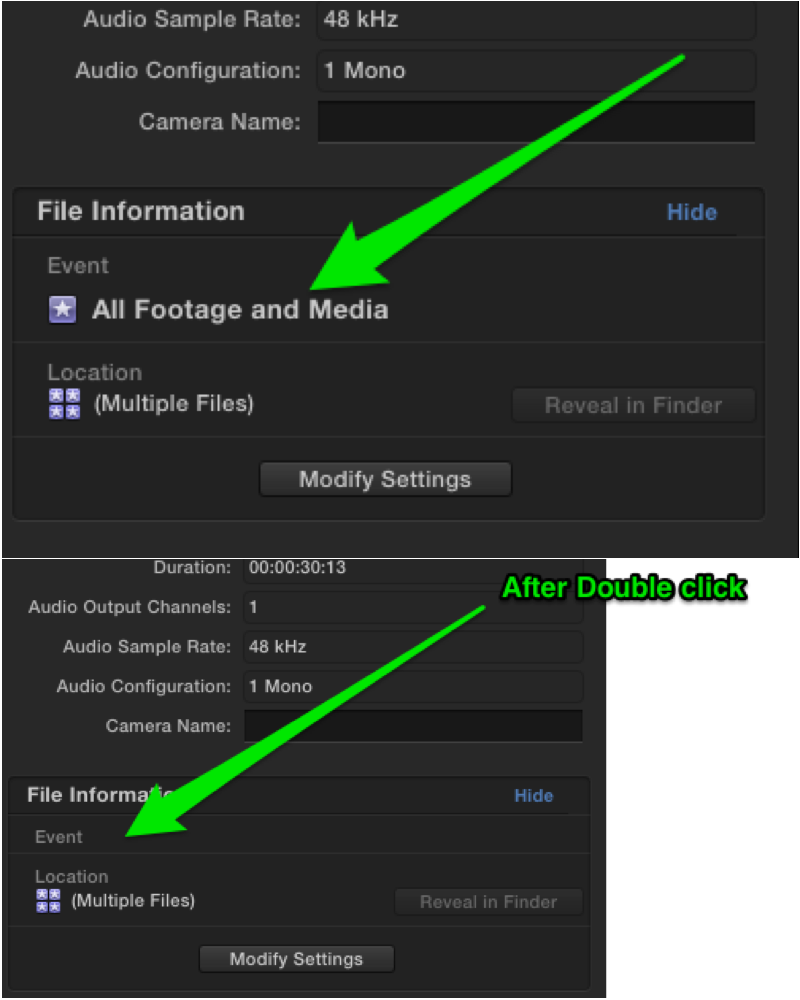
If i double click on the event icon in the Information Panel it disappears and will not re-appear.
I've tested this in another library (which has given me no issues) and it behaves the same. Anyone else?
If i double click on the event icon in the Information Panel it disappears and will not re-appear.
I've tested this in another library (which has given me no issues) and it behaves the same. Anyone else?
Please Log in to join the conversation.
20 May 2014 05:55 #46314
by plysat
Can't sleep? Try this: fcpxpert.net ;-)
Replied by plysat on topic FCPX looking to the wrong event for sync'd and Multicam clips - how do I redirect it's attention?
Happens here too, but closing/reopening the inspector window makes it come back...
Can't sleep? Try this: fcpxpert.net ;-)
Please Log in to join the conversation.
- Doug Suiter
-
Topic Author
- Offline
- Elite Member
-
Less
More
- Posts: 244
- Thank you received: 12
20 May 2014 05:56 #46315
by Doug Suiter
Replied by Doug Suiter on topic FCPX looking to the wrong event for sync'd and Multicam clips - how do I redirect it's attention?
Oh good - thanks for that. Sounds like a fairly harmless bug.
Please Log in to join the conversation.
- Doug Suiter
-
Topic Author
- Offline
- Elite Member
-
Less
More
- Posts: 244
- Thank you received: 12
20 May 2014 21:02 - 20 May 2014 21:03 #46368
by Doug Suiter
Replied by Doug Suiter on topic FCPX looking to the wrong event for sync'd and Multicam clips - how do I redirect it's attention?
Just discovered something interested and helpful.
Remember that the issue here is that I have MC and Synched clips that are offline which can't be relinked. I have manually relinked online versions ready to go, but no way to tell FCP X to look for the online versions which exist in their own event. So I am trying to find a way to do this that is quicker than having to manually find the clip, type in the timecode of the relevant start point and then replace media.
So, I just turned on the "show used clip ranges" option.
The MC and Synched clips that are offline in the timeline (because they are linking to offline versions of themselves) actually show up as "used" in the online versions the clips! That's right - they show up as used - even though they are not used.
The good thing is that this means that i can much more quickly locate the section of the MC or Synched clips and use option-r to replace them in the timeline. My job of manually repairing this project just got a lot easier.
And this is an interesting new piece of the puzzle indeed...
Remember that the issue here is that I have MC and Synched clips that are offline which can't be relinked. I have manually relinked online versions ready to go, but no way to tell FCP X to look for the online versions which exist in their own event. So I am trying to find a way to do this that is quicker than having to manually find the clip, type in the timecode of the relevant start point and then replace media.
So, I just turned on the "show used clip ranges" option.
The MC and Synched clips that are offline in the timeline (because they are linking to offline versions of themselves) actually show up as "used" in the online versions the clips! That's right - they show up as used - even though they are not used.
The good thing is that this means that i can much more quickly locate the section of the MC or Synched clips and use option-r to replace them in the timeline. My job of manually repairing this project just got a lot easier.
And this is an interesting new piece of the puzzle indeed...
Last edit: 20 May 2014 21:03 by Doug Suiter.
Please Log in to join the conversation.
20 May 2014 21:11 #46370
by plysat
Can't sleep? Try this: fcpxpert.net ;-)
Replied by plysat on topic FCPX looking to the wrong event for sync'd and Multicam clips - how do I redirect it's attention?
I hope you've been reporting this to your new friends... 
Can't sleep? Try this: fcpxpert.net ;-)
Please Log in to join the conversation.
- Doug Suiter
-
Topic Author
- Offline
- Elite Member
-
Less
More
- Posts: 244
- Thank you received: 12
20 May 2014 21:15 #46371
by Doug Suiter
Replied by Doug Suiter on topic FCPX looking to the wrong event for sync'd and Multicam clips - how do I redirect it's attention?
I will be indeed! I find posting to the forum and bouncing thoughts off during the troubleshooting process really helps me work through the issue. Several brains are better than one! 
Here is a video of the issue as described above:
Here is a video of the issue as described above:
Please Log in to join the conversation.
20 May 2014 21:38 - 20 May 2014 21:40 #46374
by plysat
Can't sleep? Try this: fcpxpert.net ;-)
Replied by plysat on topic FCPX looking to the wrong event for sync'd and Multicam clips - how do I redirect it's attention?
Yeah, do. You might want to keep copies of the Library in its messed up state to match the vids you're making. Will help figuring out what's up... Also, a good time to pass it along would be right now. 
Can't sleep? Try this: fcpxpert.net ;-)
Last edit: 20 May 2014 21:40 by plysat.
Please Log in to join the conversation.
