


- Posts: 190
- Thank you received: 0
3 Post Moderation Rule for New Boarders (25 Jan 2021)
New boarders will have their posts moderated - Don't worry if you cannot see your post immediately.
Getting rid of text thats baked in?
15 May 2014 05:08 #46091
by Seany
Getting rid of text thats baked in? was created by Seany
I have a problem wherein I want to erase some text on a clip in which the text is baked onto that clip, it's a credit I need to change but I don't have the original footage, any ideas of the most painless way of doing this?
S
S
Please Log in to join the conversation.
15 May 2014 05:12 #46092
by Seany
Replied by Seany on topic Getting rid of text thats baked in?
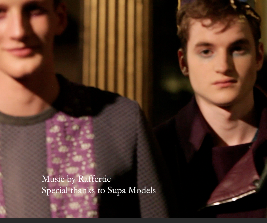
If there is a way that is, the text is white against a shot of male models posing in some clothes.
Please Log in to join the conversation.
15 May 2014 05:21 #46093
by Seany
Replied by Seany on topic Getting rid of text thats baked in?
Here is the shot in question.
Please Log in to join the conversation.
- Karsten Schlüter
-

- Offline
- Moderator
-

Less
More
- Posts: 3790
- Thank you received: 718
15 May 2014 07:00 - 15 May 2014 07:00 #46096
by Karsten Schlüter
Replied by Karsten Schlüter on topic Getting rid of text thats baked in?
I dare to say: That is close to impossible.
The bg is highly structured, it looks in that tiny stamp blurred/out of focus too, etc etc . In tools like Pixelmator (for stills!) features like the 'Heal'-tool can do marvel.. but in such a case...? Plus, we talk about moving images...
Plan B
Hide the old text with a 'banner', a box, a text-insert.. paste a new lower-third design over it.
plus... perhaps, for good reasons that text is baked-in...?
The bg is highly structured, it looks in that tiny stamp blurred/out of focus too, etc etc . In tools like Pixelmator (for stills!) features like the 'Heal'-tool can do marvel.. but in such a case...? Plus, we talk about moving images...
Plan B
Hide the old text with a 'banner', a box, a text-insert.. paste a new lower-third design over it.
plus... perhaps, for good reasons that text is baked-in...?
Last edit: 15 May 2014 07:00 by Karsten Schlüter.
Please Log in to join the conversation.
15 May 2014 09:29 #46101
by Seanus
Sean Lander - Editing since 1982 - AVID 1991 - FCP 1999 - FCPX 2011
Replied by Seanus on topic Getting rid of text thats baked in?
Only suggestion would be to copy the shot and place it on top of its self. Then key out the text of the top layer with a Luma Key. Then zoom up the lower layer and offset it a bit to see if you can find a match.
Finally join the two together into a compound clip and if the quality can stand it, zoom it up a little and move it down. Finally perhaps add a vignette to the compound clip with a touch of blur.
Good luck.
Finally join the two together into a compound clip and if the quality can stand it, zoom it up a little and move it down. Finally perhaps add a vignette to the compound clip with a touch of blur.
Good luck.
Sean Lander - Editing since 1982 - AVID 1991 - FCP 1999 - FCPX 2011
Please Log in to join the conversation.
15 May 2014 10:46 #46105
by lichinho
Replied by lichinho on topic Getting rid of text thats baked in?
You should settle for the possible instead of asking for the impossible.
Cover the text with a generator and put a new title above the generator.
Cover the text with a generator and put a new title above the generator.
Please Log in to join the conversation.

15 May 2014 11:30 #46106
by BenB
Replied by BenB on topic Getting rid of text thats baked in?
SliceX has an Object Replacement tool that would help do this quickly and easily, giving you about the best result you'll get. But what you'll end up with will not be perfect.
Another solution would be to use Motion, place a Shape Mask over that area to blur it just enough for effect, feather the edges, then place the new text on top if it.
Another solution would be to use Motion, place a Shape Mask over that area to blur it just enough for effect, feather the edges, then place the new text on top if it.
Please Log in to join the conversation.
- haysoos123
-

- Offline
- Platinum Member
-

Less
More
- Posts: 402
- Thank you received: 72
16 May 2014 00:00 #46141
by haysoos123
Replied by haysoos123 on topic Getting rid of text thats baked in?
This is probably possible, but requires some good, detailed work in Motion or After Effects. SliceX Object Replacement MAY work and get you 90% of the way there, and you might have to do some touchups in a compositing app.
I say it's possible because the patterns on the jacket, both the grey and the purple, are repeating and kind of busy to begin with. You'd have to "patch" over the title area with pieces of the grey and purple from above (basically masked-out sections of a duplicate layer with feathering), and then track the motion for those patches to take care of any subtle movements. This will erase the titles, and then you'd write your new titles on top.
I say it's possible because the patterns on the jacket, both the grey and the purple, are repeating and kind of busy to begin with. You'd have to "patch" over the title area with pieces of the grey and purple from above (basically masked-out sections of a duplicate layer with feathering), and then track the motion for those patches to take care of any subtle movements. This will erase the titles, and then you'd write your new titles on top.
Please Log in to join the conversation.
16 May 2014 00:23 #46143
by tpayton
Replied by tpayton on topic Getting rid of text thats baked in?
Just to chime in, as my esteemed fellow fcp.co board members have said, this is not an easy task.
Would you consider posting the entire clip of what needs to change, and perhaps we can give you better advice.
Also, I made a tutorial video a few weeks ago showing some text removal. It starts at 7:15
Would you consider posting the entire clip of what needs to change, and perhaps we can give you better advice.
Also, I made a tutorial video a few weeks ago showing some text removal. It starts at 7:15
Please Log in to join the conversation.
