


3 Post Moderation Rule for New Boarders (25 Jan 2021)
New boarders will have their posts moderated - Don't worry if you cannot see your post immediately.
Blank Frames when dropped into the timeline
- inkeye
-
 Topic Author
- Offline
- Junior Member
-

- Sometimes musician, sometimes designer, sometime DIY film student.
Less
More
15 May 2014 03:02 - 15 May 2014 10:23 #46080
by inkeye
Blank Frames when dropped into the timeline was created by inkeye
I am getting blank frames when I drop a sync clip into the timeline. I've searched the forum but could not find an answer. I appreciate the help.
I am running the latest FCPX and the latest Mavericks 10.9.2. iMac 3.4 GHz Intel Core i7, 16 GB 1067 Mhz DDR3 ram. I have around 300 GB of space left on my main HD and on my external that is storing the media.
I have the project encoded in proxy and optimized.
I am running the latest FCPX and the latest Mavericks 10.9.2. iMac 3.4 GHz Intel Core i7, 16 GB 1067 Mhz DDR3 ram. I have around 300 GB of space left on my main HD and on my external that is storing the media.
I have the project encoded in proxy and optimized.
Last edit: 15 May 2014 10:23 by inkeye.
Please Log in to join the conversation.

15 May 2014 03:56 #46084
by BenB
Replied by BenB on topic Blank Frames when dropped into the timeline
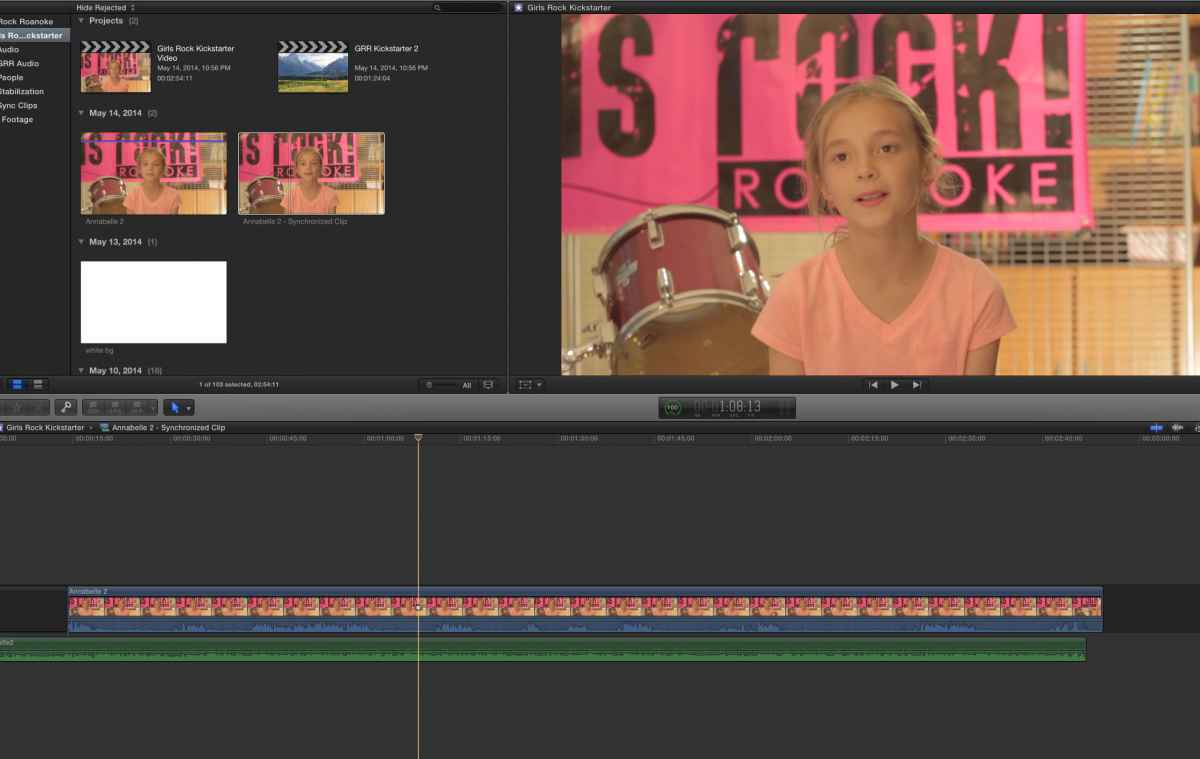
In the Browser, right-click that Sync Clip, "Open In Timeline", then in the Timeline, Shift-Z (fit to window), and show us that screen shot.
Please Log in to join the conversation.

15 May 2014 10:43 #46104
by lichinho
Replied by lichinho on topic Blank Frames when dropped into the timeline
Your screenshot clearly shows that the start of the synchronized clip contains only audio (probably because the audio recorder was started before the video camera), so it is natural that you get no video there.
Just trim out the starting bit (which you probably don't want in your project anyway).
Just trim out the starting bit (which you probably don't want in your project anyway).
Please Log in to join the conversation.
15 May 2014 11:31 #46108
by BenB
Replied by BenB on topic Blank Frames when dropped into the timeline
Bingo, exactly what I was looking for.
Please Log in to join the conversation.
15 May 2014 12:21 #46112
by inkeye
Replied by inkeye on topic Blank Frames when dropped into the timeline
Thank you. That seemed to work. I knew there was a gap clip at the beginning. I just didn’t think it would stay blank throughout the clip. Cutting that gap out at the beginning seemed to work.
Now I can work on finishing these edits.
Thank you.
Now I can work on finishing these edits.
Thank you.
Please Log in to join the conversation.
