


- Posts: 786
- Thank you received: 21
3 Post Moderation Rule for New Boarders (25 Jan 2021)
New boarders will have their posts moderated - Don't worry if you cannot see your post immediately.
Library gigantic, but back up small
- Jonathan Levin
-
 Topic Author
- Offline
- Platinum Member
-

Less
More
13 May 2014 05:23 #45951
by Jonathan Levin
Library gigantic, but back up small was created by Jonathan Levin
Hi eveyone.
I know this has been asked before, possibly even by me.
Working on a video that is about 1-1/2 hours long, and working with all external media. But even with external media, the library still weighs in at 40GB and growing as it renders!
And just a little background: the original video was Apple Intermediate codec, which I am not certain how that happened since I always do Pro Res 422. I then transcoded the video to Pro Res 422 using MpegStream clip, then reconnected the video in FCP X. I then deleted all the renders for each event, so now everything is re-rendering and the library is getting bigger by the second.
What's weird is the back ups, of which there are about six versions are only about 6MB each.
I've tried to delete the render files, used and unused.
I also went into the "package" to see if i could find anything that was a really large file(s) but didn't find anything that looked like it would add up to 40GB worth of files.
Any clues?
Jonathan
I know this has been asked before, possibly even by me.
Working on a video that is about 1-1/2 hours long, and working with all external media. But even with external media, the library still weighs in at 40GB and growing as it renders!
And just a little background: the original video was Apple Intermediate codec, which I am not certain how that happened since I always do Pro Res 422. I then transcoded the video to Pro Res 422 using MpegStream clip, then reconnected the video in FCP X. I then deleted all the renders for each event, so now everything is re-rendering and the library is getting bigger by the second.
What's weird is the back ups, of which there are about six versions are only about 6MB each.
I've tried to delete the render files, used and unused.
I also went into the "package" to see if i could find anything that was a really large file(s) but didn't find anything that looked like it would add up to 40GB worth of files.
Any clues?
Jonathan
Please Log in to join the conversation.
13 May 2014 05:47 #45953
by plysat
Can't sleep? Try this: fcpxpert.net ;-)
Replied by plysat on topic Library gigantic, but back up small
if you've done any optical flow, stabilization, use etc, you'll find the culprits in the "Analysis Files" folder in the package. Also, mp3's automatically get converted to aiff if you're using any of those, but it's likely the analysis files….
Can't sleep? Try this: fcpxpert.net ;-)
Please Log in to join the conversation.
- Jonathan Levin
-
Topic Author
- Offline
- Platinum Member
-
Less
More
- Posts: 786
- Thank you received: 21
13 May 2014 06:16 #45954
by Jonathan Levin
Replied by Jonathan Levin on topic Library gigantic, but back up small
Hi Plysat,
Thanks for your reply.
No effects whatsoever, just a few cross dissolves. All audio AIFF 48Khz. And I don't see a "Analysis Files" section in the package.
I might add this was a project that I converted using 7 to X, always the source of my frustration.
When I start a new video from scratch, I don't seem to have many issues.
Jonathan
Thanks for your reply.
No effects whatsoever, just a few cross dissolves. All audio AIFF 48Khz. And I don't see a "Analysis Files" section in the package.
I might add this was a project that I converted using 7 to X, always the source of my frustration.
When I start a new video from scratch, I don't seem to have many issues.
Jonathan
Please Log in to join the conversation.
13 May 2014 06:36 #45955
by plysat
Can't sleep? Try this: fcpxpert.net ;-)
Replied by plysat on topic Library gigantic, but back up small
Odd... the backups are small because they only con tai the databases, so something in the package contents is (obviously) the issue. I've see something similar and just gone through everything in the package hitting get info 'til I found it. In my case it was analyses files from some optical flow retimed shots. Maybe make a new Library and drag the project over and see if it behaves. 7 to X is a great app, but it does occasionally result in some slightly odd behavior... Given what they're doing it's not surprising. 
Can't sleep? Try this: fcpxpert.net ;-)
Please Log in to join the conversation.
13 May 2014 09:25 #45959
by Seanus
Sean Lander - Editing since 1982 - AVID 1991 - FCP 1999 - FCPX 2011
Replied by Seanus on topic Library gigantic, but back up small
Open the package again and select Command J then turn on "calculate all sizes "to reveal the culprit.
I suspect you've missed some render files from somewhere.
I suspect you've missed some render files from somewhere.
Sean Lander - Editing since 1982 - AVID 1991 - FCP 1999 - FCPX 2011
Please Log in to join the conversation.
- Jonathan Levin
-
Topic Author
- Offline
- Platinum Member
-
Less
More
- Posts: 786
- Thank you received: 21
13 May 2014 15:14 #45978
by Jonathan Levin
Replied by Jonathan Levin on topic Library gigantic, but back up small
Thanks guys.
This is totally weird. Even though this project is 1-1/2 hours long, there are no effects, corrections, anything. There are just 12 titles. There is one compound clip at very beginning of company logo thing. The video is a compilation of my old 8mm and 16mm student work. I copied the movies with Canon HV30 HDV
Seanus, I am going to try to do what you suggest, but I think I am just going to let everything render which for some odd reason is taking forever. After the render, I will go to all events and delete all UNUSED render files, quit FCP and then restart to see if that cleans stuff up.
Just to recap, this was a conversion from FCP 7 using 7 to X. Current project properties= 1080p HD, 1920x1080, 29.97p, Audio 48kHz Original camera footage= HDV 1080 from Canon HV30.
User error (me) button somehow video clips ended up Apple Intermediate Codec, which I transcoded to Pro Res 422 using Mpeg Streamclip. Relinked new files in FCPX, deleted old video files. Then the total re-render.
This is totally weird. Even though this project is 1-1/2 hours long, there are no effects, corrections, anything. There are just 12 titles. There is one compound clip at very beginning of company logo thing. The video is a compilation of my old 8mm and 16mm student work. I copied the movies with Canon HV30 HDV
Seanus, I am going to try to do what you suggest, but I think I am just going to let everything render which for some odd reason is taking forever. After the render, I will go to all events and delete all UNUSED render files, quit FCP and then restart to see if that cleans stuff up.
Just to recap, this was a conversion from FCP 7 using 7 to X. Current project properties= 1080p HD, 1920x1080, 29.97p, Audio 48kHz Original camera footage= HDV 1080 from Canon HV30.
User error (me) button somehow video clips ended up Apple Intermediate Codec, which I transcoded to Pro Res 422 using Mpeg Streamclip. Relinked new files in FCPX, deleted old video files. Then the total re-render.
Please Log in to join the conversation.
- Jonathan Levin
-
Topic Author
- Offline
- Platinum Member
-
Less
More
- Posts: 786
- Thank you received: 21
13 May 2014 16:09 #45988
by Jonathan Levin
Replied by Jonathan Levin on topic Library gigantic, but back up small
OK. I let everything render. But a new problem. Part of my project timeline won't render, even if I manually select part of the unrendered section, and go to Modify>Render Selection.
Seanus- Did what you said and this is what I found= An Event that has my Projects (called Sequences) has a render folder in there that is 74GB, so it is obviously the renders. Hi Quality Media render is 74GB
What's even more strange is the render display was rendering something over and over, just not the un-rendered section of my project.
BTW- my library for this thing is now close to 75GB!!!
Please help before my computer destroys Chicago
Jonathan
Seanus- Did what you said and this is what I found= An Event that has my Projects (called Sequences) has a render folder in there that is 74GB, so it is obviously the renders. Hi Quality Media render is 74GB
What's even more strange is the render display was rendering something over and over, just not the un-rendered section of my project.
BTW- my library for this thing is now close to 75GB!!!
Please help before my computer destroys Chicago
Jonathan
Please Log in to join the conversation.
- cinemaloha
-

- Offline
- Elite Member
-

Less
More
- Posts: 163
- Thank you received: 36
13 May 2014 17:13 #45989
by cinemaloha
Try creating a new Library and Project then copy and paste your clips into the new project and then render again. I had a similar problem in the past & that was my workaround.
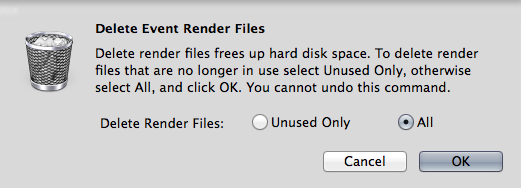
Regarding the 75GB render files, did you use 'Delete Event Render Files' to clear up all your renders?
Replied by cinemaloha on topic Library gigantic, but back up small
Jonathan Levin wrote: OK. I let everything render. But a new problem. Part of my project timeline won't render, even if I manually select part of the unrendered section, and go to Modify>Render Selection.
Try creating a new Library and Project then copy and paste your clips into the new project and then render again. I had a similar problem in the past & that was my workaround.
Regarding the 75GB render files, did you use 'Delete Event Render Files' to clear up all your renders?
Please Log in to join the conversation.
- Jonathan Levin
-
Topic Author
- Offline
- Platinum Member
-
Less
More
- Posts: 786
- Thank you received: 21
13 May 2014 17:55 #45992
by Jonathan Levin
Replied by Jonathan Levin on topic Library gigantic, but back up small
Thanks cinemaloha.
What I ended up doing is starting over.
I created a new project, re-imported every thing from the browser, copied the titles from problem project.
I then deleted the problem project, then deleted UNUSED render files from that Event folder. Library is now a reasonable 373MB.
I still have a persistent problem that my changes to the text tiles such as size don't stick when I quit and re-open. So I have to re-size those. Not sure why this is happening.
This has really sucked.
Jonathan
What I ended up doing is starting over.
I created a new project, re-imported every thing from the browser, copied the titles from problem project.
I then deleted the problem project, then deleted UNUSED render files from that Event folder. Library is now a reasonable 373MB.
I still have a persistent problem that my changes to the text tiles such as size don't stick when I quit and re-open. So I have to re-size those. Not sure why this is happening.
This has really sucked.
Jonathan
Please Log in to join the conversation.
