


- Posts: 34
- Thank you received: 0
3 Post Moderation Rule for New Boarders (25 Jan 2021)
New boarders will have their posts moderated - Don't worry if you cannot see your post immediately.
Beginner Question - First Export Seems WAY too Big?
12 May 2014 23:39 #45938
by SFA2013
Beginner Question - First Export Seems WAY too Big? was created by SFA2013
I am working on my first FCPX project using the skills I just picked up from finishing a book with worked examples. For export, the book suggested exporting a master file, then using Compressor to work on this file to get something appropriate for your destination. This made sense to me, so I bought Compressor.
My project was a 3 minute 720p clip of someone singing at my church, raw, a 250+MB mp4 file. I fixed the volume, color, trimmed, broadcast safe, added a title, credits and a lower third. My master file is 2GB. I wanted to upload this project to YouTube. I used the "Video Sharing Services" HD 720p setting in Compressor. I ended up with a 287MB .mov file that YouTube doesn't like, it suggested next time uploading in a streaming format.
I must be doing something wrong in the export, the file size, and the fact that YouTube is looking for something else. Please help.
My project was a 3 minute 720p clip of someone singing at my church, raw, a 250+MB mp4 file. I fixed the volume, color, trimmed, broadcast safe, added a title, credits and a lower third. My master file is 2GB. I wanted to upload this project to YouTube. I used the "Video Sharing Services" HD 720p setting in Compressor. I ended up with a 287MB .mov file that YouTube doesn't like, it suggested next time uploading in a streaming format.
I must be doing something wrong in the export, the file size, and the fact that YouTube is looking for something else. Please help.
Please Log in to join the conversation.


12 May 2014 23:50 #45941
by cseeman
Replied by cseeman on topic Beginner Question - First Export Seems WAY too Big?
There's nothing wrong with the file size. YouTube will now accept files up to 20GB although you'd probably have to use FireFox for anything over 2GB.
File is generally duration times data rate. I believe the 720p sharing preset is set to (restricted to) 10,000kbps.
File is generally duration times data rate. I believe the 720p sharing preset is set to (restricted to) 10,000kbps.
Please Log in to join the conversation.
13 May 2014 00:36 #45944
by SFA2013
Replied by SFA2013 on topic Beginner Question - First Export Seems WAY too Big?
Thank you for the reply, and the reassurance on file size. What about YouTube telling me I would do better if I uploaded using a streaming format? Can you help me with that? It doesn't make sense to me that the format outputted by Compressor for "file sharing services" is judged deficient, could be better, by YouTube.
cseeman wrote: There's nothing wrong with the file size. YouTube will now accept files up to 20GB although you'd probably have to use FireFox for anything over 2GB.
File is generally duration times data rate. I believe the 720p sharing preset is set to (restricted to) 10,000kbps.
Please Log in to join the conversation.

13 May 2014 02:32 #45946
by dgwvideo
Creating history....one edit at a time !
Replied by dgwvideo on topic Beginner Question - First Export Seems WAY too Big?
I don't have a direct answer to your Youtube question, but this link from MacProVideo might provide some useful general encoding information for you.
www.macprovideo.com/hub/final-cut/fcp-x-...or-hardware-encoding
www.macprovideo.com/hub/final-cut/fcp-x-...or-hardware-encoding
Creating history....one edit at a time !
Please Log in to join the conversation.
13 May 2014 03:42 - 13 May 2014 03:47 #45949
by cseeman
That might happen with H.264 .mov files if the "moov atom" is not at the front of the file. I was under the impression that Compressor 4 does that automatically. Compressor 3 had a check box for that. It was called "Fast Start."
There's something you could try. Duplicate Apple's preset. In the Inspector under General look for "Optimize for network use" and check that box.
Replied by cseeman on topic Beginner Question - First Export Seems WAY too Big?
What about YouTube telling me I would do better if I uploaded using a streaming format? Can you help me with that? It doesn't make sense to me that the format outputted by Compressor for "file sharing services" is judged deficient, could be better, by YouTube.
That might happen with H.264 .mov files if the "moov atom" is not at the front of the file. I was under the impression that Compressor 4 does that automatically. Compressor 3 had a check box for that. It was called "Fast Start."
There's something you could try. Duplicate Apple's preset. In the Inspector under General look for "Optimize for network use" and check that box.
Last edit: 13 May 2014 03:47 by cseeman.
Please Log in to join the conversation.
13 May 2014 12:15 #45962
by SFA2013
Replied by SFA2013 on topic Beginner Question - First Export Seems WAY too Big?
Thank you. That was it. It appears the new compressor 4.1.1 does not put the moov atom at the start of videos created for file sharing, or I cannot find anything related to fast start, web optimized anywhere in the settings. It certainly does not do this by default.
I found this so frustrating that I looked at Handbrake, the free converter that I used previously to convert Windows AVI video into MP4s. Not only did I find how to do this quickly click "web optimized", but in using its x264 codec, I was able to get a great looking file for upload that was only 23MBs. I don't understand why Compressor's output is so large using the default settings, 280MB. Perhaps I don't know how to use it correctly, but this is disappointing in a program that Apple sells for $50.
I found this so frustrating that I looked at Handbrake, the free converter that I used previously to convert Windows AVI video into MP4s. Not only did I find how to do this quickly click "web optimized", but in using its x264 codec, I was able to get a great looking file for upload that was only 23MBs. I don't understand why Compressor's output is so large using the default settings, 280MB. Perhaps I don't know how to use it correctly, but this is disappointing in a program that Apple sells for $50.
cseeman wrote:
What about YouTube telling me I would do better if I uploaded using a streaming format? Can you help me with that? It doesn't make sense to me that the format outputted by Compressor for "file sharing services" is judged deficient, could be better, by YouTube.
That might happen with H.264 .mov files if the "moov atom" is not at the front of the file. I was under the impression that Compressor 4 does that automatically. Compressor 3 had a check box for that. It was called "Fast Start."
There's something you could try. Duplicate Apple's preset. In the Inspector under General look for "Optimize for network use" and check that box.
Please Log in to join the conversation.
13 May 2014 13:23 #45967
by cseeman
Replied by cseeman on topic Beginner Question - First Export Seems WAY too Big?
File size is always a function of duration times data rate. Any decent compression program allows you to target data rate whether Compressor or Handbrake. Apple's file sizes are no different than any other program. Presets are really just a developer's "opinion" or tests or whatever. You're not obligated to use them. I make my own in Compressor.
Encoder capabilities are a different story. Apple's H.264 is one of the least efficient. x264 is one of the most. Generally at matching data rates x264 will look better. That said, some noted compressionists have found that Apple's High Profile CABAC encoding is very close to x264 quality which is why it's what I use.
The moov atom issue is specific to .mov. Compressor 4, unlike Compressor 3, can create H.264 .mp4 which always has the moov atom in the front. It's easy enough in Compressor to make H.264 .mp4 High Profile CABAC encoding and it will be very close to x264.
Encoder capabilities are a different story. Apple's H.264 is one of the least efficient. x264 is one of the most. Generally at matching data rates x264 will look better. That said, some noted compressionists have found that Apple's High Profile CABAC encoding is very close to x264 quality which is why it's what I use.
The moov atom issue is specific to .mov. Compressor 4, unlike Compressor 3, can create H.264 .mp4 which always has the moov atom in the front. It's easy enough in Compressor to make H.264 .mp4 High Profile CABAC encoding and it will be very close to x264.
Please Log in to join the conversation.
- Tom Wolsky
-

- Offline
- Moderator
-

13 May 2014 14:34 #45975
by Tom Wolsky
Replied by Tom Wolsky on topic Beginner Question - First Export Seems WAY too Big?
Does it matter that you can't do multi-pass encoding with CABAC? I would have thought this reduced compression quality. Certainly the default data rates are too high in my view, but I guess they're going for a level that will cover extreme videos with lost of action.
Please Log in to join the conversation.
13 May 2014 15:24 - 13 May 2014 15:31 #45980
by cseeman
Replied by cseeman on topic Beginner Question - First Export Seems WAY too Big?
My hunch is that Apple compared single pass and multi pass at High CABAC and found little difference.
From Jan Ozer whom I trust
www.streamingmedia.com/Articles/Editoria...essor-4.1-94026.aspx
So single pass High CABAC is Compressor's best quality and closest to x264 you can get from Apple.
But he does add,
So CAVLC Multipass seems better for low motion whereas CABAC Single pass for higher motion.
From Jan Ozer whom I trust
www.streamingmedia.com/Articles/Editoria...essor-4.1-94026.aspx
During the first round of tests, I noticed that when I enabled multi-pass encoding, which Apple recommends for the best quality, entropy coding switched from CABAC, the higher-quality option, to CAVLC, which delivers lower quality but is easier to decode. In fact, you can’t use CABAC with multi-pass encoding; the option is grayed. So I decided to try single-pass encoding with CABAC enabled, producing the result shown in Figure 6. Here, single-pass CABAC encoding was vastly superior to multi-pass CAVLC, and almost (but not quite) as good as x264.
So single pass High CABAC is Compressor's best quality and closest to x264 you can get from Apple.
But he does add,
.... I started encoding regular video clips from various projects and sources. In general, if the clips were relatively consistent, say a single camera talking head, the results reversed, and multi-pass encoding with CAVLC produced better results than single-pass CABAC. As the clips gained motion and complexity, the results started to turn around, and single-pass CABAC proved the better option.
So CAVLC Multipass seems better for low motion whereas CABAC Single pass for higher motion.
Last edit: 13 May 2014 15:31 by cseeman.
Please Log in to join the conversation.
- Tom Wolsky
-
- Offline
- Moderator
-
13 May 2014 15:31 #45983
by Tom Wolsky
Replied by Tom Wolsky on topic Beginner Question - First Export Seems WAY too Big?
Thanks Craig. The default wen handling is set to download btw not streaming.
Please Log in to join the conversation.
13 May 2014 15:34 #45985
by cseeman
It's odd that Apple insists on using that as the default. Personally I can't see why Download would be the default.
BTW I note two areas, the General area which has that "network" setting which seems to imply fast start and going into "change" which has the "traditional" Quicktime options of DVD, Download, Streaming.
I wonder if either/or achieves the same result.
Replied by cseeman on topic Beginner Question - First Export Seems WAY too Big?
Tom Wolsky wrote: Thanks Craig. The default wen handling is set to download btw not streaming.
It's odd that Apple insists on using that as the default. Personally I can't see why Download would be the default.
BTW I note two areas, the General area which has that "network" setting which seems to imply fast start and going into "change" which has the "traditional" Quicktime options of DVD, Download, Streaming.
I wonder if either/or achieves the same result.
Please Log in to join the conversation.
13 May 2014 17:45 #45991
by SFA2013
Replied by SFA2013 on topic Beginner Question - First Export Seems WAY too Big?
Thank you for explaining how you do it. Would please be able to post a couple of screenshots for your settings so I could try the CABAC setting, with the moov atom at the front like YouTube prefers?
Also, I do understand that compressor is tool that you can use with a lot of options, but it does not make sense to me to have presets for "Video Sharing Services" that produces output that is unwieldy, and with the moov atom at the end. For beginners like me, Apple is saddling me with a huge unnecessary learning curve. And it is not like there is a lot of help files that tell you how to make it work. I am just expressing my disappointment with Apple, this doesn't seem to me that my experience fit its "it just works right out of the box" marketing theme.
Also, I do understand that compressor is tool that you can use with a lot of options, but it does not make sense to me to have presets for "Video Sharing Services" that produces output that is unwieldy, and with the moov atom at the end. For beginners like me, Apple is saddling me with a huge unnecessary learning curve. And it is not like there is a lot of help files that tell you how to make it work. I am just expressing my disappointment with Apple, this doesn't seem to me that my experience fit its "it just works right out of the box" marketing theme.
cseeman wrote:
Encoder capabilities are a different story. Apple's H.264 is one of the least efficient. x264 is one of the most. Generally at matching data rates x264 will look better. That said, some noted compressionists have found that Apple's High Profile CABAC encoding is very close to x264 quality which is why it's what I use.
The moov atom issue is specific to .mov. Compressor 4, unlike Compressor 3, can create H.264 .mp4 which always has the moov atom in the front. It's easy enough in Compressor to make H.264 .mp4 High Profile CABAC encoding and it will be very close to x264.
Please Log in to join the conversation.
- jjsanderson
-

- Offline
- Elite Member
-

13 May 2014 18:28 #45994
by jjsanderson
Replied by jjsanderson on topic Beginner Question - First Export Seems WAY too Big?
A note in here - I agree that Compressor's default settings need some work, but it's worth persevering if you have some types of Mac. Compressor's single-pass encoding appears to use Intel's Quick Sync video compression engine, built into recent Core processors (but not Xeons).
I've previously been using x264 via Telestream Episode on my 2008 Mac Pro, but with the latest Compressor my Retina MacBook Pro blows it out of the water for compression throughput. I haven't yet done exhaustive quality testing, but what I've seen so far is tremendously impressive.
Compressor has gone from being both poor and slow compared to x264, to being competitive and – on compatible Macs – dramatically faster.
I've previously been using x264 via Telestream Episode on my 2008 Mac Pro, but with the latest Compressor my Retina MacBook Pro blows it out of the water for compression throughput. I haven't yet done exhaustive quality testing, but what I've seen so far is tremendously impressive.
Compressor has gone from being both poor and slow compared to x264, to being competitive and – on compatible Macs – dramatically faster.
Please Log in to join the conversation.
14 May 2014 04:17 #46036
by marchyman
Replied by marchyman on topic Beginner Question - First Export Seems WAY too Big?
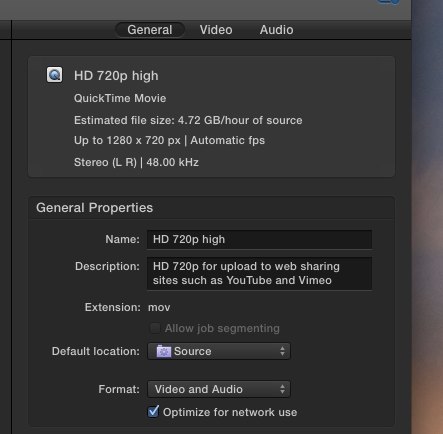
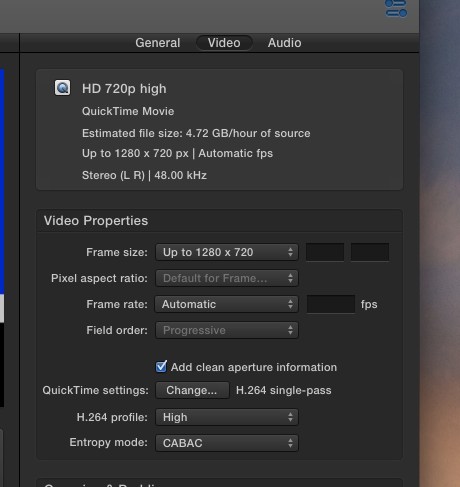
I use 720p for most youtube uploads for various reasons. I copied the "HD 720p" entry from the Video Sharing Service to create the "HD 720p high" settings that I use. Differences were:
In the general tab click on the "Optimize for network use" box.
In the video tab set the H.264 profile to High and the Entropy mode to CABAC.
I also changed some QuickTime settings.
In the general tab click on the "Optimize for network use" box.
In the video tab set the H.264 profile to High and the Entropy mode to CABAC.
I also changed some QuickTime settings.
Please Log in to join the conversation.
