


3 Post Moderation Rule for New Boarders (25 Jan 2021)
New boarders will have their posts moderated - Don't worry if you cannot see your post immediately.
please help - massive problems and a deadline
- alex davies
-
 Topic Author
- Offline
- New Member
-

- "you only grow up when you stop playing" email: re_trace@hotmail.com
Please Log in to join the conversation.

Please Log in to join the conversation.
Try this: select all the clips that you want to move around (use the lasso for this) and hit ALT-G --> this will turn all the selected clip into one 'compound clip' which you can then move around. A double click on the compound clip will open the compound clip itself in case you need to make adjustments. After doing so don't forget to click on the left facing arrow on the left top of your timeline to leave the compound clip and return to your project.
Hope this helps!
Please Log in to join the conversation.
- alex davies
-
Topic Author
- Offline
- New Member
-
- "you only grow up when you stop playing" email: re_trace@hotmail.com
 so say i need to move 1 section and parts of that section are connected to other sections i cant move it at all, unless i delete all the transitions and move the clips separate but thats a night mare, ill try post a screen shot, thanks for the help
 Please Log in to join the conversation.
- alex davies
-
Topic Author
- Offline
- New Member
-
- "you only grow up when you stop playing" email: re_trace@hotmail.com
Please Log in to join the conversation.
- alex davies
-
Topic Author
- Offline
- New Member
-
- "you only grow up when you stop playing" email: re_trace@hotmail.com
Please Log in to join the conversation.
It works just like the primary storyline, with the same "magnetic" properties. You should just drag your clips around within the storyline.
If this is not what you see or expect, then really the screenshot which you failed to post can help us help you...
Please Log in to join the conversation.
Compound-clipping works beyond storyline boundaries afaik, though.
A screenshot would be helpful, Alex. I know fcp.co is a bit tricky with that, keep on trying

Please Log in to join the conversation.
- Daniel Rutledge
-
- Offline
- Premium Member
-

- Those that know don't tell, and those that tell don't know.
Please Log in to join the conversation.

Please Log in to join the conversation.
Select all the connected clips and select COMMAND G.
The other way would be to move the music track out of the Primary and move the clips into it.
Select the music and hit COMMAND OPTION DOWN ARROW.
Hit P on the Keyboard. Select all the clips and holding down the SHIFT key move them all into the Primary Storyline.
If you're not confident duplicate your project first before trying these solutions.
Sean Lander - Editing since 1982 - AVID 1991 - FCP 1999 - FCPX 2011
Please Log in to join the conversation.
- haysoos123
-
- Offline
- Platinum Member
-

- Posts: 402
- Thank you received: 72
anickt wrote: This is one of the reasons I stay away from transitions in spots unless they are integral to the overall presentation and not just "added in" to make things "more interesting". Not judging what the OP has done, just chiming in...
Just so we're clear, there is no limitation to any kind of transitions or any kind of effects you want to add to any kind of project in FCPX. How exactly is cutting a spot any different from cutting anything else in regard to adding transitions? To actively limit your creative possibilities because of some odd technical deficiency is very odd to me. I agree, in general in the commercials I cut, everything is almost always a hard cut, but this is a creative decision and has nothing to do with the software.
Please post a screenshot as everyone says because it's still unclear to me exactly what the problem is as described.
Please Log in to join the conversation.
I guess I'm jaded after 30 some years but I'll take content over Kiki-wipes any day. LOL!
Please Log in to join the conversation.
- haysoos123
-
- Offline
- Platinum Member
-
- Posts: 402
- Thank you received: 72
- It's your choice to put music in the primary storyline, but you really should learn to put your music into a secondary storyline and attach it to a gap clip at the head. That way, you can "lock it down" to exactly 30 seconds, and it will never move. Then you'll be able use the primary properly, and it's easier to experiment with things once you pop clips in and out of the primary to move them around without disturbing other parts of your edit (cmd-opt-UP and cmd-opt-DOWN will move a clip up and down from the primary, as someone has noted).
- you can keep some "old versions" of a section of your edit attached in secondary storylines way down in the timeline, and simply move around clips or entire sections of edit as you please. I say keep these, because they will have your transitions in them. You can option-drag a transition to duplicate them any time, so they may serve as a kind of "favorites" for your transitions.
- when you're moving clips around in a secondary or primary, the transitions don't get deleted. They just pop into the next clip. So you're pretty much NOT getting rid of your transitions with their tweaked settings, they just apply between two different clips as you move clips around. This is actually a big advantage of the magnetism if you know what it's doing.
Please Log in to join the conversation.
- haysoos123
-
- Offline
- Platinum Member
-
- Posts: 402
- Thank you received: 72
anickt wrote: That's why I said "...unless they are integral to the overall presentation and not just "added in" to make things "more interesting".
I guess I'm jaded after 30 some years but I'll take content over Kiki-wipes any day. LOL!
Yeah, didn't mean to sound snippy, but I'm in agreement with you. Just wanted to clarify that it's not inherently harder to do cause it's a spot.
Please Log in to join the conversation.
- alex davies
-
Topic Author
- Offline
- New Member
-
- "you only grow up when you stop playing" email: re_trace@hotmail.com
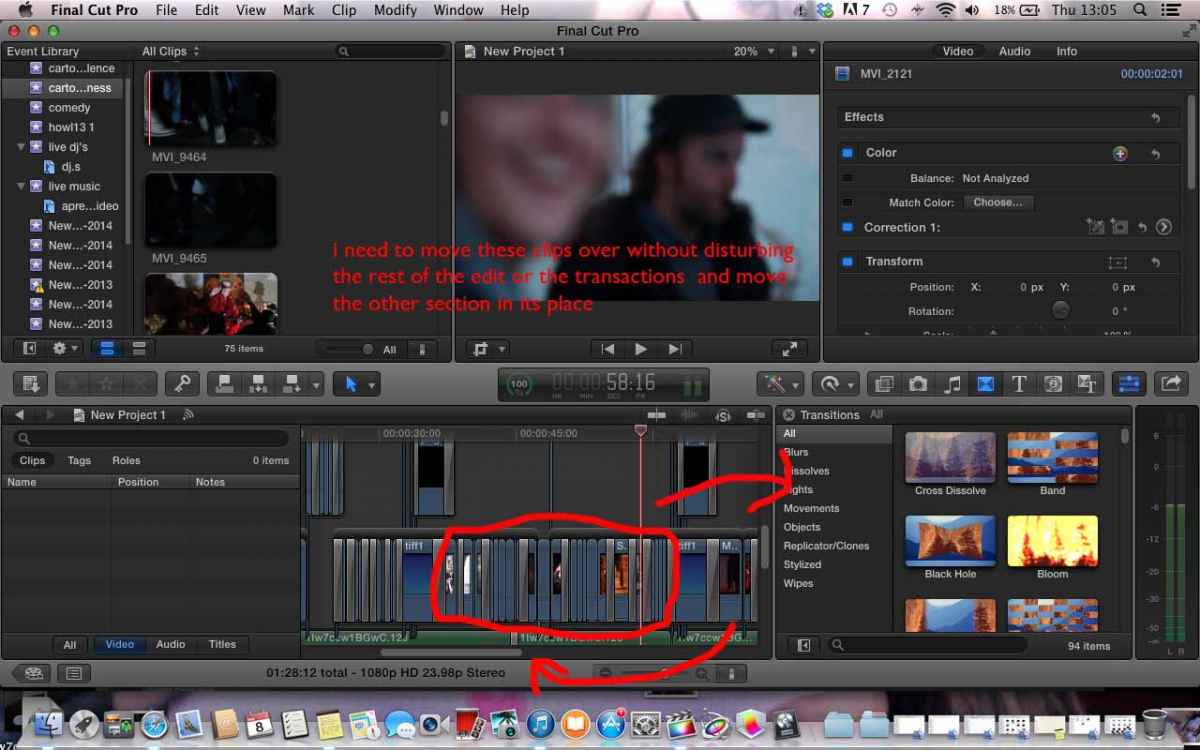
I'm trying to add a screen shot but its not working
Please Log in to join the conversation.
- alex davies
-
Topic Author
- Offline
- New Member
-
- "you only grow up when you stop playing" email: re_trace@hotmail.com
Please Log in to join the conversation.
- Tom Wolsky
-

- Offline
- Moderator
-

Please Log in to join the conversation.
