


- Posts: 383
- Thank you received: 36
3 Post Moderation Rule for New Boarders (25 Jan 2021)
New boarders will have their posts moderated - Don't worry if you cannot see your post immediately.
My Video is pixelated in very 2 seconds
10 May 2014 20:04 #45882
by Dave_EP
I can see them Ronny.
Replied by Dave_EP on topic My Video is pixelated in very 2 seconds
ronny courtens wrote: I cannot see the screenshots, I only see large squares with question marks inside. Is it just me or does everyone else sees this as well? Could you make your screenshots smaller? Maybe they're too large for the forum.
Anyway, as you describe the blurring only happens on moving pictures this may be an interpolation issue. It would really help if I could see the screenshots.
- Ronny
I can see them Ronny.
Please Log in to join the conversation.
- ronny courtens
-

- Offline
- Moderator
-

Less
More
- Posts: 4455
- Thank you received: 962
10 May 2014 20:05 #45883
by ronny courtens
Replied by ronny courtens on topic My Video is pixelated in very 2 seconds
Okay, thanks for confirming this. Will try using a different browser 
Please Log in to join the conversation.

10 May 2014 20:26 #45888
by BenB
Replied by BenB on topic My Video is pixelated in very 2 seconds
Running H.264 on 4GB RAM, and I hope not on the internal system drive, yes, you could get some playback issues. Have you tried running the media off of a USB 3.0 drive? Don't remember if that Mac has T'bolt or not.
Please Log in to join the conversation.
- Dann_Leung
-
 Topic Author
- Offline
- New Member
-

- 山系男
10 May 2014 21:00 - 10 May 2014 21:06 #45890
by Dann_Leung
Ronny, this is the url link of the pictures also
postimg.org/image/ogl471lj3/
postimg.org/image/pvhmyngan/
Replied by Dann_Leung on topic My Video is pixelated in very 2 seconds
ronny courtens wrote: Okay, thanks for confirming this. Will try using a different browser
Ronny, this is the url link of the pictures also
postimg.org/image/ogl471lj3/
postimg.org/image/pvhmyngan/
Last edit: 10 May 2014 21:06 by Dann_Leung.
Please Log in to join the conversation.
- Dann_Leung
-
Topic Author
- Offline
- New Member
-
- 山系男
10 May 2014 21:02 - 10 May 2014 21:03 #45891
by Dann_Leung
as you see I'm just a Fresh beginner of using FCPX. i shouldn't have been assumed to know everyone is using 10.1.1...
Replied by Dann_Leung on topic My Video is pixelated in very 2 seconds
Dave_EP wrote:
Dann_Leung wrote: my FCPX version is 10.0.6
Why are you not using 10.1.1 like most other people?
as you see I'm just a Fresh beginner of using FCPX. i shouldn't have been assumed to know everyone is using 10.1.1...
Last edit: 10 May 2014 21:03 by Dann_Leung.
Please Log in to join the conversation.
- ronny courtens
-
- Offline
- Moderator
-
Less
More
- Posts: 4455
- Thank you received: 962
10 May 2014 21:12 #45892
by ronny courtens
Replied by ronny courtens on topic My Video is pixelated in very 2 seconds
Thank you, I just saw the screenshots. Looks like a hardware problem, very probably the graphics card. You cannot compare with iMovie as iMovie uses far less hardware resources than FCP X.
I don't know exactly what kind of 13" MBP you are using but if it only has an integrated graphics card this can happen. If it does have two graphics processor make sure to go to System Preferences an in the Energy Saver tab set Graphics to "Better Performance".
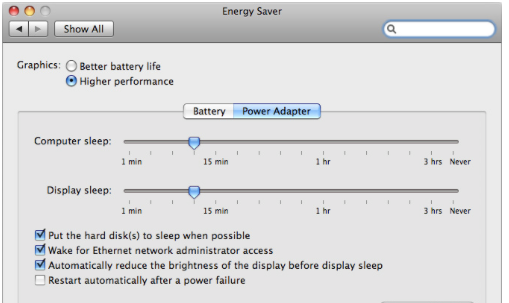
If you only have an integrated graphics card you can try setting FCP X playback quality to "Better Performance" and see if this improves playback.
If you are new to FCP X you really should start with version 10.1.1 and not an older version. A lot has changed since 10.0.6.
- Ronny
I don't know exactly what kind of 13" MBP you are using but if it only has an integrated graphics card this can happen. If it does have two graphics processor make sure to go to System Preferences an in the Energy Saver tab set Graphics to "Better Performance".
If you only have an integrated graphics card you can try setting FCP X playback quality to "Better Performance" and see if this improves playback.
If you are new to FCP X you really should start with version 10.1.1 and not an older version. A lot has changed since 10.0.6.
- Ronny
Please Log in to join the conversation.
- Dann_Leung
-
Topic Author
- Offline
- New Member
-
- 山系男
10 May 2014 21:24 #45893
by Dann_Leung
It seems I have an integrated graphic card as there's no such a graphics setting in Energy Saver tab…
I've tried to change the playback setting to "better performance". it has no change.
So from now on, may be i should get a way to upgrade to 10.1.1.
thanks, Ronny anyways.
Replied by Dann_Leung on topic My Video is pixelated in very 2 seconds
ronny courtens wrote: Thank you, I just saw the screenshots. Looks like a hardware problem, very probably the graphics card. You cannot compare with iMovie as iMovie uses far less hardware resources than FCP X.
I don't know exactly what kind of 13" MBP you are using but if it only has an integrated graphics card this can happen. If it does have two graphics processor make sure to go to System Preferences an in the Energy Saver tab set Graphics to "Better Performance".
If you only have an integrated graphics card you can try setting FCP X playback quality to "Better Performance" and see if this improves playback.
If you are new to FCP X you really should start with version 10.1.1 and not an older version. A lot has changed since 10.0.6.
- Ronny
It seems I have an integrated graphic card as there's no such a graphics setting in Energy Saver tab…
I've tried to change the playback setting to "better performance". it has no change.
So from now on, may be i should get a way to upgrade to 10.1.1.
thanks, Ronny anyways.
Please Log in to join the conversation.
10 May 2014 22:17 #45895
by BenB
Replied by BenB on topic My Video is pixelated in very 2 seconds
Also, UNCHECK the option in your system prefs, energy settings, to NOT let drives go to sleep.
Please Log in to join the conversation.
- jjsanderson
-
- Offline
- Elite Member
-

11 May 2014 15:21 #45909
by jjsanderson
Updating to 10.1.1 should be as simple as letting Software Update do its thing - though you'll also need to update to OS X 10.9 if you've not already done so.
One thought: do you have Perian installed? I never had any problems, but it's defunct software now and there were reports of it not playing well with FCPX. Try disabling it.
Replied by jjsanderson on topic My Video is pixelated in very 2 seconds
Dann_Leung wrote: So from now on, may be i should get a way to upgrade to 10.1.1.
Updating to 10.1.1 should be as simple as letting Software Update do its thing - though you'll also need to update to OS X 10.9 if you've not already done so.
One thought: do you have Perian installed? I never had any problems, but it's defunct software now and there were reports of it not playing well with FCPX. Try disabling it.
Please Log in to join the conversation.
- ronny courtens
-
- Offline
- Moderator
-
Less
More
- Posts: 4455
- Thank you received: 962
11 May 2014 15:34 #45910
by ronny courtens
Replied by ronny courtens on topic My Video is pixelated in very 2 seconds
One thought: do you have Perian installed?
Now that's a good thought! If you still have Perian installed you should indeed delete it. It can be very troublesome with specific FCP X setups.
- Ronny
Now that's a good thought! If you still have Perian installed you should indeed delete it. It can be very troublesome with specific FCP X setups.
- Ronny
Please Log in to join the conversation.
- Dann_Leung
-
Topic Author
- Offline
- New Member
-
- 山系男
26 May 2014 12:00 #46730
by Dann_Leung
Replied by Dann_Leung on topic My Video is pixelated in very 2 seconds
thank you all i've upgraded to the OSX maverick and final cut pro x 10.1.1. the pixelated problem disappear not. but there 's another new issue....god... I'm gonna open another post to discuss it
Please Log in to join the conversation.
- AndreSantos
-
- Offline
- New Member
-
Less
More
- Posts: 3
- Thank you received: 0
08 Oct 2017 19:24 #91031
by AndreSantos
Replied by AndreSantos on topic My Video is pixelated in very 2 seconds
Hi.
I am having the same problem...
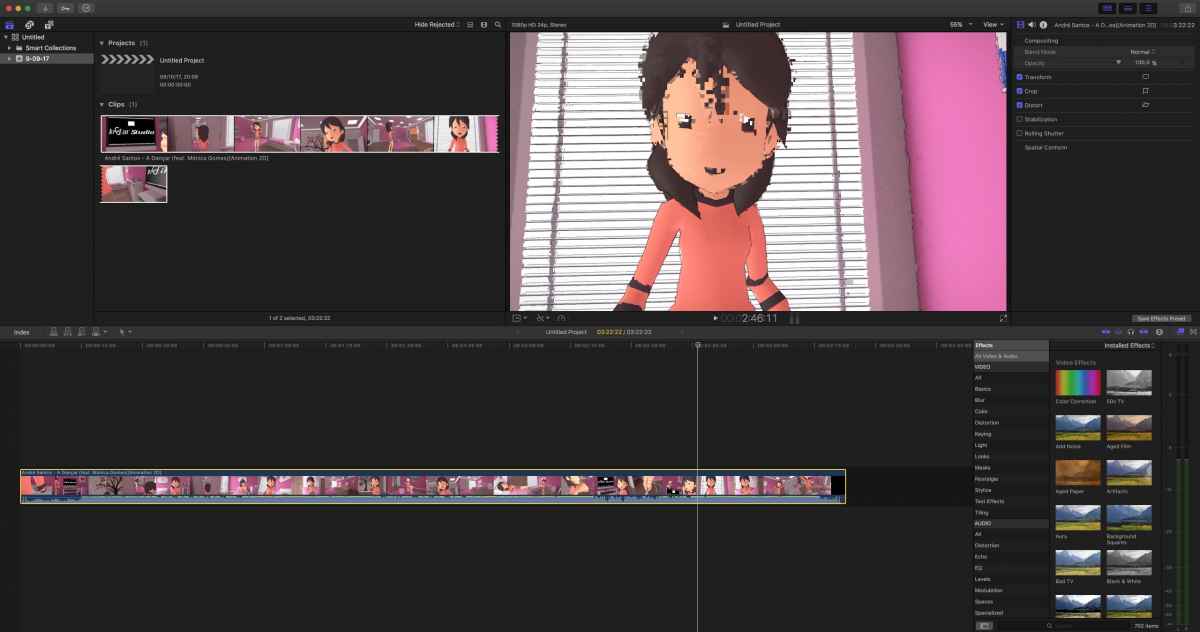
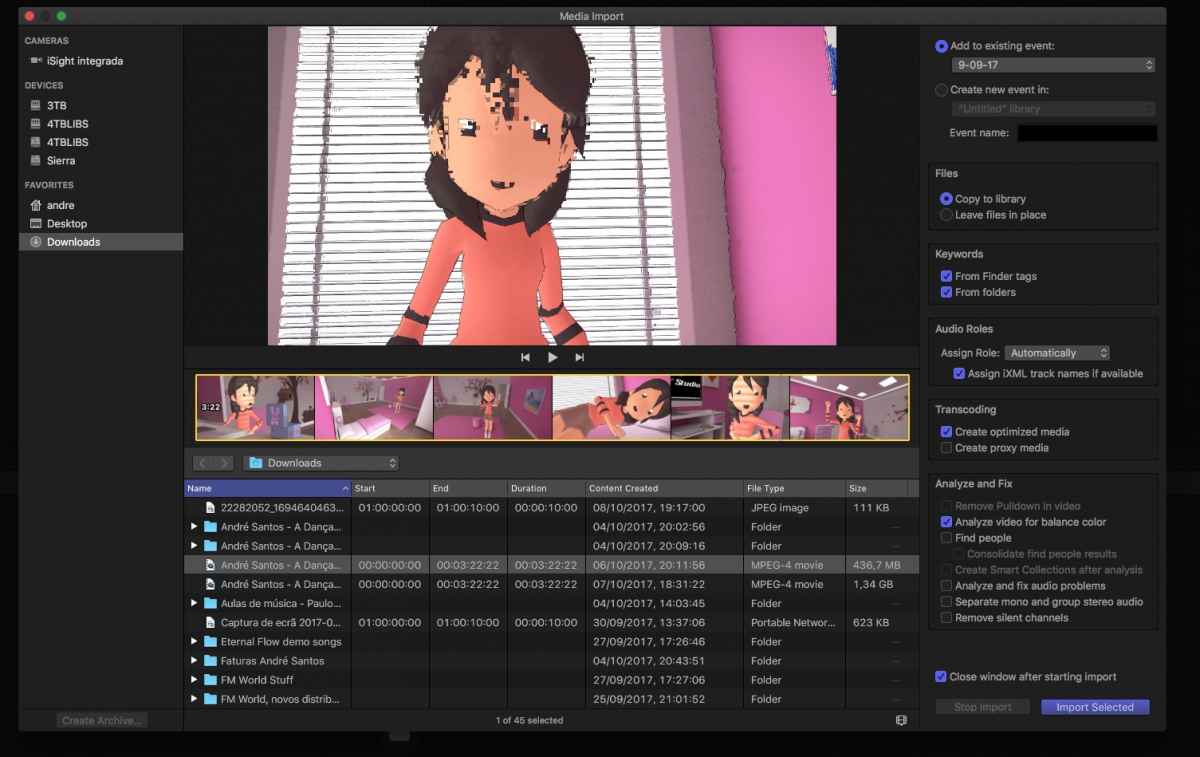
I am working with Final Cut Pro X 10.3.4 and i imported a video file that is showing me pixelation too.
With vlc and quicktime runs the video good without any problem (i checked frame by frame).
Final Cut Pro X 10.3.4 shows me this pixelation even in the preview import window.
I get the same result with the video in the project window then.
What may be the problem here?
I am having the same problem...
I am working with Final Cut Pro X 10.3.4 and i imported a video file that is showing me pixelation too.
With vlc and quicktime runs the video good without any problem (i checked frame by frame).
Final Cut Pro X 10.3.4 shows me this pixelation even in the preview import window.
I get the same result with the video in the project window then.
What may be the problem here?
Please Log in to join the conversation.
- Tom Wolsky
-

- Offline
- Moderator
-
09 Oct 2017 06:45 #91037
by Tom Wolsky
Replied by Tom Wolsky on topic My Video is pixelated in very 2 seconds
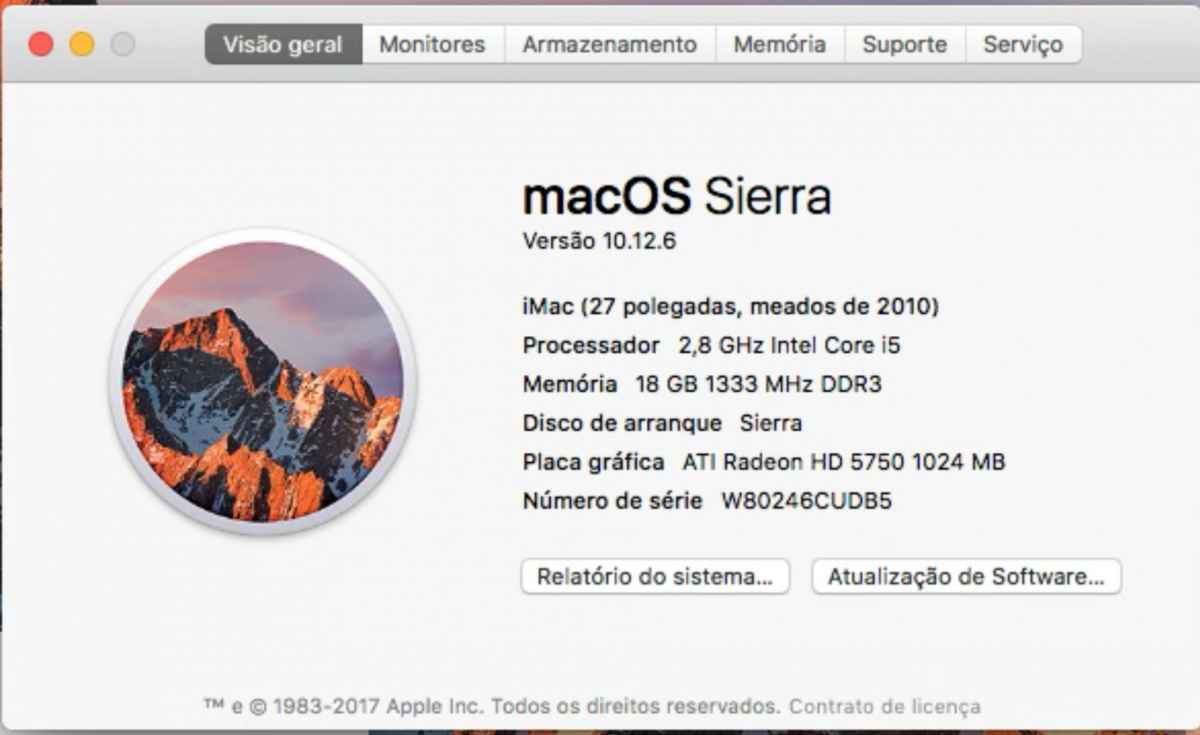
Please give the complete specifications of the media and of your system including graphics card.
Please Log in to join the conversation.
- AndreSantos
-
- Offline
- New Member
-
Less
More
- Posts: 3
- Thank you received: 0
09 Oct 2017 08:06 #91039
by AndreSantos
Replied by AndreSantos on topic My Video is pixelated in very 2 seconds
Here is my iMac specs:
And here it is the file information:
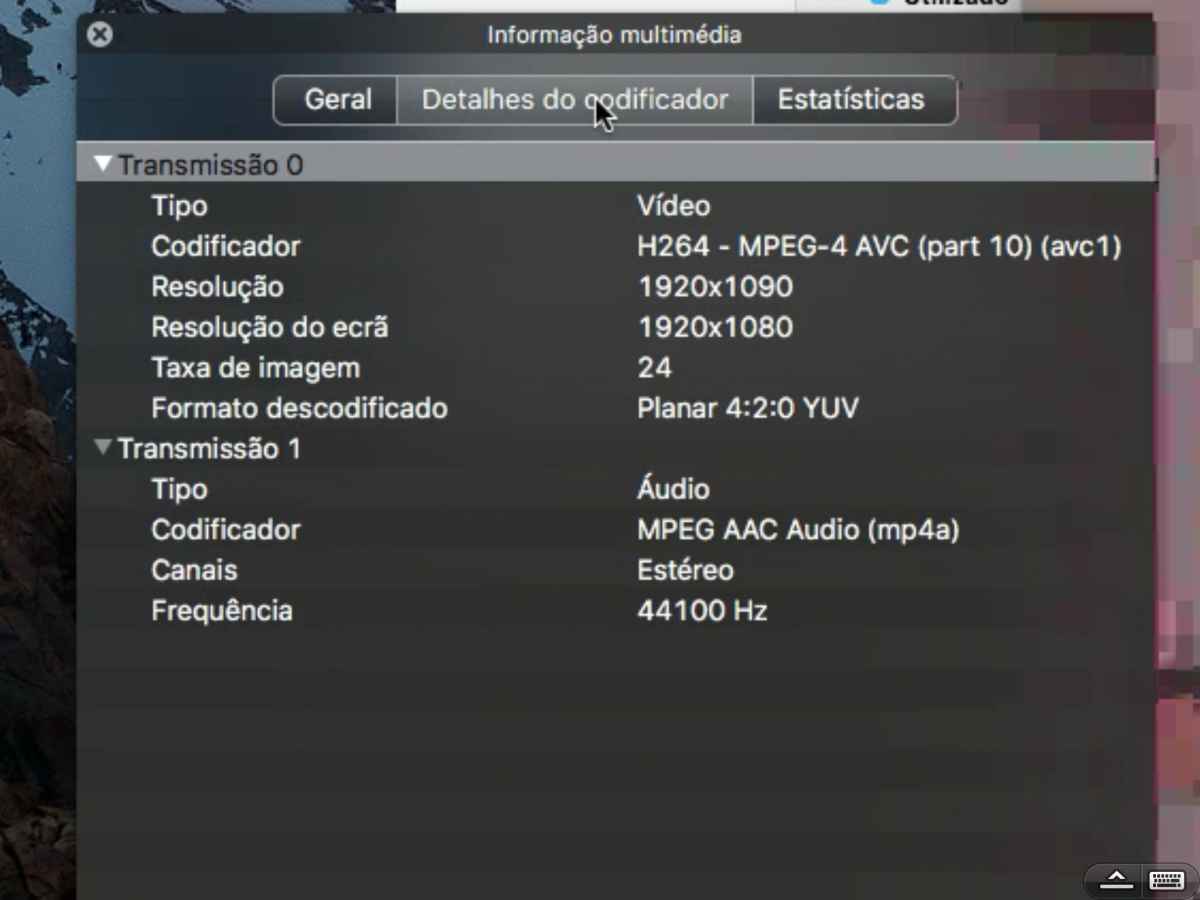
And here it is the file information:
Please Log in to join the conversation.
- ronny courtens
-
- Offline
- Moderator
-
Less
More
- Posts: 4455
- Thank you received: 962
10 Oct 2017 05:52 #91050
by ronny courtens
Replied by ronny courtens on topic My Video is pixelated in very 2 seconds
Hi Andre,
Could you send me the MP4 file, or a link to the page where you have downloaded the file?
I see it's only 436MB, so you can send it via We Transfer. My e-mail address is ronnycourtens@mac.com
Thanks!
- Ronny
Could you send me the MP4 file, or a link to the page where you have downloaded the file?
I see it's only 436MB, so you can send it via We Transfer. My e-mail address is ronnycourtens@mac.com
Thanks!
- Ronny
Please Log in to join the conversation.
- Tom Wolsky
-
- Offline
- Moderator
-
10 Oct 2017 06:41 #91051
by Tom Wolsky
Replied by Tom Wolsky on topic My Video is pixelated in very 2 seconds
That’s a very odd frame size. Wonder if the images flakes whenever it hits a compression keyframe. Where did this come from? Try converting it to 1920x1080 and see if that works. You’d probably want to convert the audio as well to uncompressed 48K.
Please Log in to join the conversation.
- AndreSantos
-
- Offline
- New Member
-
Less
More
- Posts: 3
- Thank you received: 0
10 Oct 2017 15:05 #91057
by AndreSantos
Replied by AndreSantos on topic My Video is pixelated in very 2 seconds
The video animation is "secret" yet. It is to show next to Christmas with a new song. So i'm afraid i can't send it just right now.
But i can say more details...
The video animation is a project that was made with BLENDER (in a Linux system), after months, we finished it and now we exported to mp4 from there.
Today i asked my Blender worker for a lossless export. And this lossless file stays full black in final cut pro x (preview/import mode and already in project mode).
I tried with Quicktime and it says it isn't a valid mp4.
ONLY VLC reads and plays all files.
Again, in VLC i took snaps from multimedia information:
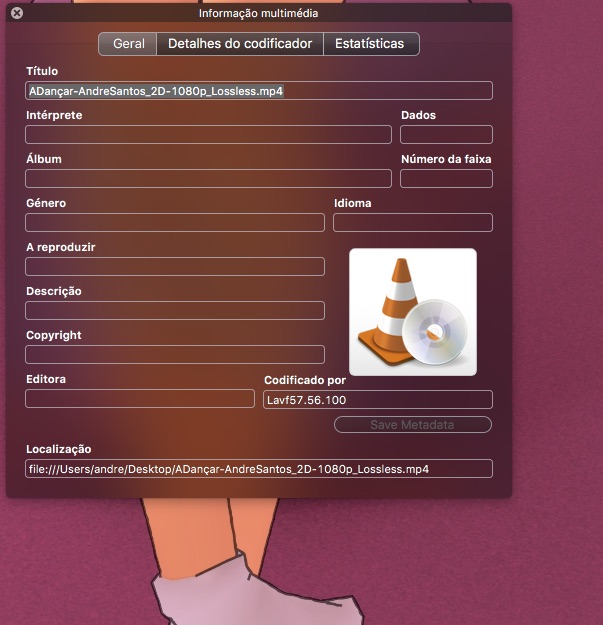
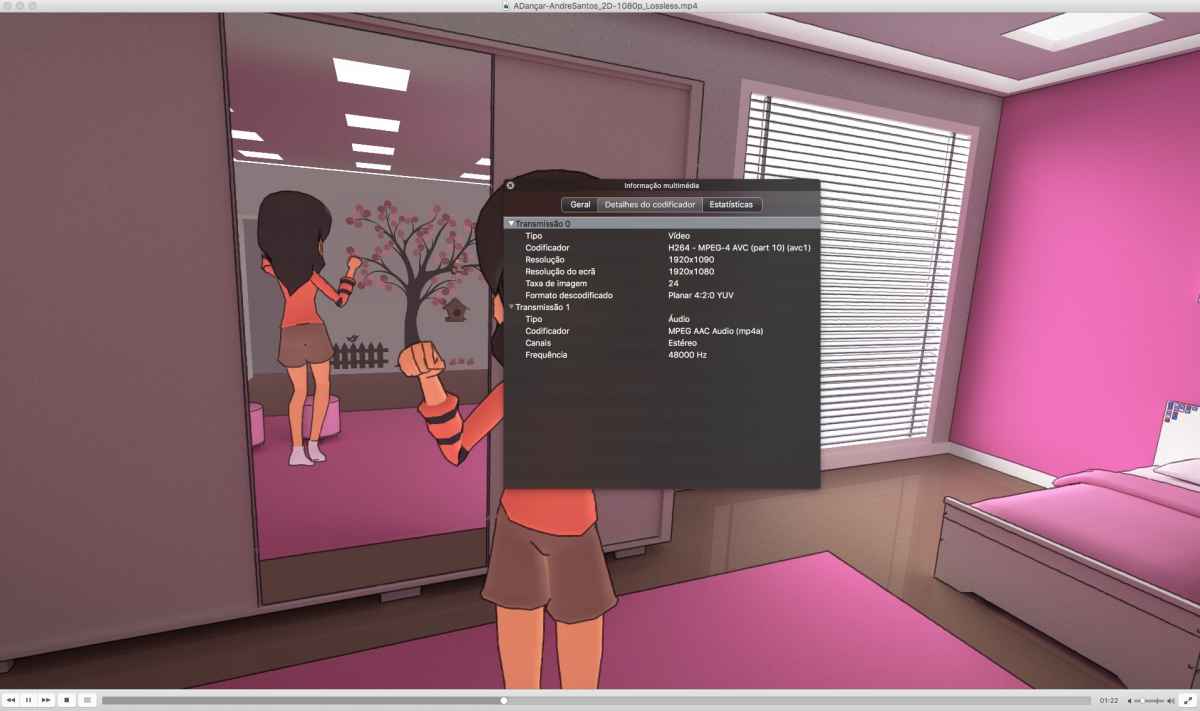
But i can say more details...
The video animation is a project that was made with BLENDER (in a Linux system), after months, we finished it and now we exported to mp4 from there.
Today i asked my Blender worker for a lossless export. And this lossless file stays full black in final cut pro x (preview/import mode and already in project mode).
I tried with Quicktime and it says it isn't a valid mp4.
ONLY VLC reads and plays all files.
Again, in VLC i took snaps from multimedia information:
Please Log in to join the conversation.
- ronny courtens
-
- Offline
- Moderator
-
Less
More
- Posts: 4455
- Thank you received: 962
11 Oct 2017 06:26 #91069
by ronny courtens
Replied by ronny courtens on topic My Video is pixelated in very 2 seconds
Thank you for the extra information, Andre. This explains a lot. I am not going to give any lengthy explanations about everything that can cause incompatibility issues for video exports between Linux and Mac. Short story is that you an solve this in two ways:
1. If you are familiar with Blender:
Install Blender (free) on your Mac and ask the Blender artist to send you the .blend project file. As long as the project does not use any external links you should be able to open the .blend project file on your Mac and export a high quality .mov file from the project. Use QuickTime as your container and ProRes 422 or higher as your video format.
2. If you are not familiar with Blender:
Ask your Blender artist to export an image sequence from the project. No need for DPX or Open EXR, a TIFF or PNG sequence will do.
Then you can open the image sequence in Compressor on your Mac and create a high quality .mov file from the image sequence: support.apple.com/kb/PH21204?locale=nl_BE
Or you can import the image sequence straight into FCP X and create a compound clip: www.rocketstock.com/blog/fcpx-quick-tip-...m-an-image-sequence/
- Ronny
1. If you are familiar with Blender:
Install Blender (free) on your Mac and ask the Blender artist to send you the .blend project file. As long as the project does not use any external links you should be able to open the .blend project file on your Mac and export a high quality .mov file from the project. Use QuickTime as your container and ProRes 422 or higher as your video format.
2. If you are not familiar with Blender:
Ask your Blender artist to export an image sequence from the project. No need for DPX or Open EXR, a TIFF or PNG sequence will do.
Then you can open the image sequence in Compressor on your Mac and create a high quality .mov file from the image sequence: support.apple.com/kb/PH21204?locale=nl_BE
Or you can import the image sequence straight into FCP X and create a compound clip: www.rocketstock.com/blog/fcpx-quick-tip-...m-an-image-sequence/
- Ronny
Please Log in to join the conversation.
