


- Posts: 19
- Thank you received: 0
3 Post Moderation Rule for New Boarders (25 Jan 2021)
New boarders will have their posts moderated - Don't worry if you cannot see your post immediately.
Freezing on import
- bigfrankblue
-
 Topic Author
- Offline
- New Member
-

Less
More
05 May 2014 19:11 #45630
by bigfrankblue
Freezing on import was created by bigfrankblue
I'm running a new iMac, all bells and whistles...
Just installed FCPX, having trashed my original install from Time Machine backup due to constant crashing.
So got a clean install, latest version and now it just beach balls forever when i try and import. I used a Peg 2 Thunderbolt Raid but despite trying a variation of local vs Raid files, the damned thing keeps freezing on import.
Any help would be massively appreciated!
Just installed FCPX, having trashed my original install from Time Machine backup due to constant crashing.
So got a clean install, latest version and now it just beach balls forever when i try and import. I used a Peg 2 Thunderbolt Raid but despite trying a variation of local vs Raid files, the damned thing keeps freezing on import.
Any help would be massively appreciated!
Please Log in to join the conversation.
- ronny courtens
-

- Offline
- Moderator
-

Less
More
- Posts: 4455
- Thank you received: 962
05 May 2014 19:24 #45632
by ronny courtens
Replied by ronny courtens on topic Freezing on import
Hi Matt,
If FCP X only crashes when importing you should give us some more information about what you are trying to import and how you are importing.
If FCP X has crashed before, and not only while importing, you need to check your system drive. Check the drive with Disk Utility and run a Repair Permissions on it.
If this doesn't help: create a new admin user account and see if FCP X works well using this account.
- Ronny
If FCP X only crashes when importing you should give us some more information about what you are trying to import and how you are importing.
If FCP X has crashed before, and not only while importing, you need to check your system drive. Check the drive with Disk Utility and run a Repair Permissions on it.
If this doesn't help: create a new admin user account and see if FCP X works well using this account.
- Ronny
Please Log in to join the conversation.
- bigfrankblue
-
Topic Author
- Offline
- New Member
-
Less
More
- Posts: 19
- Thank you received: 0
05 May 2014 19:26 #45633
by bigfrankblue
Replied by bigfrankblue on topic Freezing on import
Hi Ronny, will run permissions now and will then report back how i get on.
Long and short is, it's freezing literally whenever i select the import option...
Long and short is, it's freezing literally whenever i select the import option...
Please Log in to join the conversation.
- ronny courtens
-
- Offline
- Moderator
-
Less
More
- Posts: 4455
- Thank you received: 962
05 May 2014 19:31 #45634
by ronny courtens
Replied by ronny courtens on topic Freezing on import
Okay, running a permissions repair is always good.
If the app freezes as soon as you select the import option you also should check the devices that are connected to your iMac. If you import from a camera a bad cable can cause freezing. Same when you import from a USB device. You can disconnect any peripherals, then select the import function. If FCP X does not freeze with all external devices disconnected you know it's one of those connections or devices that is giving you trouble.
- Ronny
If the app freezes as soon as you select the import option you also should check the devices that are connected to your iMac. If you import from a camera a bad cable can cause freezing. Same when you import from a USB device. You can disconnect any peripherals, then select the import function. If FCP X does not freeze with all external devices disconnected you know it's one of those connections or devices that is giving you trouble.
- Ronny
Please Log in to join the conversation.
- bigfrankblue
-
Topic Author
- Offline
- New Member
-
Less
More
- Posts: 19
- Thank you received: 0
05 May 2014 19:39 #45635
by bigfrankblue
Replied by bigfrankblue on topic Freezing on import
Right permissions repaired. There was a hell of a lot of issues but these seemed to be around Safari and iBooks, the later of which I've never used.
I've got 2 thunderbolt drives attached currently. One for media storage of my FCP Bundle and the other is used purely for Time Machine...
When FCP starts it runs through the projects and loads all of the content on the Peg Raid....no problem, I can skim footage, load project files....but as soon as I click import...bam it's the beach ball of death!
Having cleared permission it did at least load the media import window, which it wasn't doing before that...
I've got 2 thunderbolt drives attached currently. One for media storage of my FCP Bundle and the other is used purely for Time Machine...
When FCP starts it runs through the projects and loads all of the content on the Peg Raid....no problem, I can skim footage, load project files....but as soon as I click import...bam it's the beach ball of death!
Having cleared permission it did at least load the media import window, which it wasn't doing before that...
Please Log in to join the conversation.
- ronny courtens
-
- Offline
- Moderator
-
Less
More
- Posts: 4455
- Thank you received: 962
05 May 2014 20:09 #45638
by ronny courtens
Replied by ronny courtens on topic Freezing on import
Disconnect the two Thunderbolt drives, launch FCP X, create a Library on your system drive and launch the import window. Can you import files into this Library?
- Ronny
- Ronny
Please Log in to join the conversation.
- bigfrankblue
-
Topic Author
- Offline
- New Member
-
Less
More
- Posts: 19
- Thank you received: 0
05 May 2014 21:21 #45642
by bigfrankblue
Replied by bigfrankblue on topic Freezing on import
Hi Ronny
I did exactly as you suggested. I started FCPX with both Thunderbolt drives disconnected and my second screen which is daisy chained all removed. Exact same thing, create a new event or project and try and import and it freezes to ball spinning instantaneously.
The iMac is brand new, and was an Applecare replacement for my old i7 2011 iMac which failed. I migrated all of my info via TMachine and had all sorts of issues. I followed the Apple support guide page for uninstalling and reinstalling which included removing a few pref files and plist files.
Reinstalled FCPX from scratch and whilst it fixed the issue of it freezing and crashing on the app launch I've got this constant import headache.
Any further advice would be very much appreciated.
Matt
I did exactly as you suggested. I started FCPX with both Thunderbolt drives disconnected and my second screen which is daisy chained all removed. Exact same thing, create a new event or project and try and import and it freezes to ball spinning instantaneously.
The iMac is brand new, and was an Applecare replacement for my old i7 2011 iMac which failed. I migrated all of my info via TMachine and had all sorts of issues. I followed the Apple support guide page for uninstalling and reinstalling which included removing a few pref files and plist files.
Reinstalled FCPX from scratch and whilst it fixed the issue of it freezing and crashing on the app launch I've got this constant import headache.
Any further advice would be very much appreciated.
Matt
Please Log in to join the conversation.
- bigfrankblue
-
Topic Author
- Offline
- New Member
-
Less
More
- Posts: 19
- Thank you received: 0
05 May 2014 21:24 #45644
by bigfrankblue
Replied by bigfrankblue on topic Freezing on import
Incidentally I did grab a copy of the error log. Not sure if this will help?
Please Log in to join the conversation.
- bigfrankblue
-
Topic Author
- Offline
- New Member
-
Less
More
- Posts: 19
- Thank you received: 0
05 May 2014 21:32 - 05 May 2014 21:33 #45645
by bigfrankblue
Replied by bigfrankblue on topic Freezing on import
Right did some more digging and decided to trash the preference file. Did a further disk permission repair run and restarted.
Bingo this fixed my import issue!
Big thanks to Ronny regardless for his support and quick assistance!
Bingo this fixed my import issue!
Big thanks to Ronny regardless for his support and quick assistance!
Last edit: 05 May 2014 21:33 by bigfrankblue.
Please Log in to join the conversation.
- bigfrankblue
-
Topic Author
- Offline
- New Member
-
Less
More
- Posts: 19
- Thank you received: 0
05 May 2014 21:52 #45649
by bigfrankblue
Replied by bigfrankblue on topic Freezing on import
Wow, talk about speaking too soon. Import initially worked fine, loaded up the options screen with file location s really nice and quick. Selected the files to import, in this case a series of clips from a Sony AVCHD file...and you guessed it, FCPX hung. My initial import of 3 files from a Go Pro imported fine...
This is so frustrating, I've had issues in the past with FCPX but this is just so frustrating...one step forward and three steps back...
Incidentally, I tried to do things another way, this time I copied the AVCHD file to the desktop and then thought I'd import them from there...This time the import window, didn't even open properly, the animation which opens the import window crapped out mid way through scaling the window open...
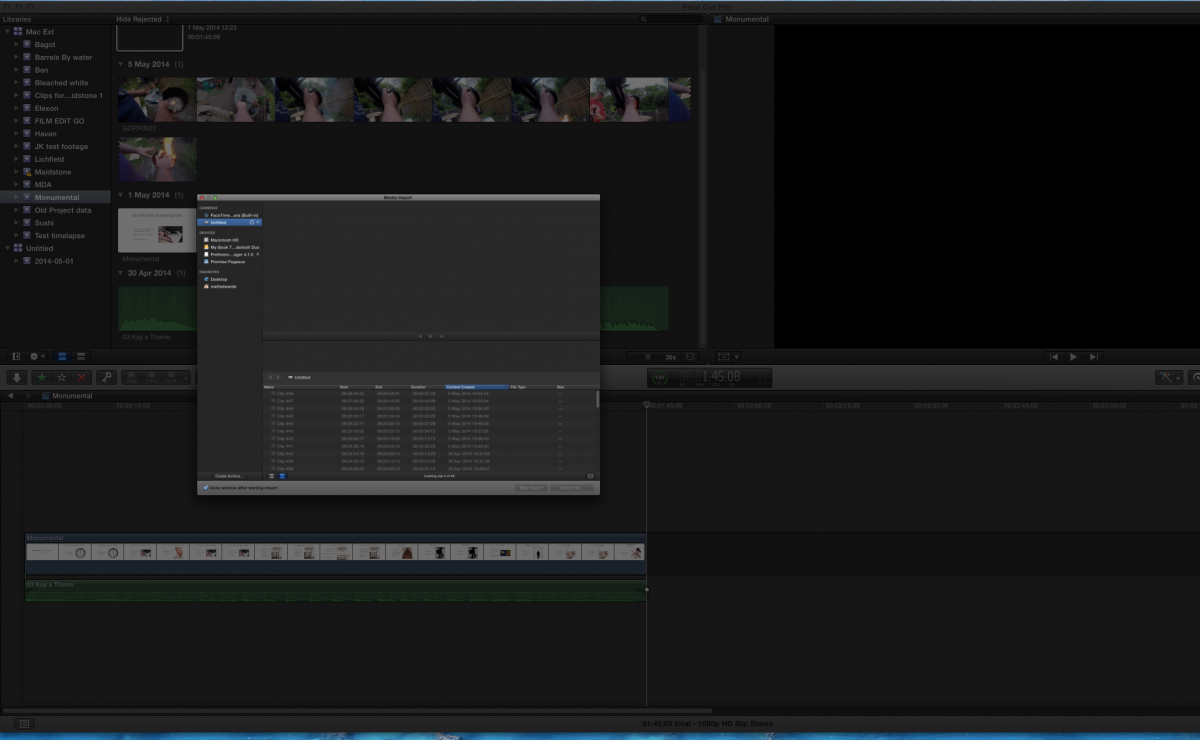
This is so frustrating, I've had issues in the past with FCPX but this is just so frustrating...one step forward and three steps back...
Incidentally, I tried to do things another way, this time I copied the AVCHD file to the desktop and then thought I'd import them from there...This time the import window, didn't even open properly, the animation which opens the import window crapped out mid way through scaling the window open...
Please Log in to join the conversation.
05 May 2014 22:55 #45650
by hirstg
Replied by hirstg on topic Freezing on import
I have had similar issues with Sony AVCHD files. I now process them first using Clip Wrap. It provides a number of options for conversion and the files behave much better afterwards. You can find it here:
www.divergentmedia.com/clipwrap
www.divergentmedia.com/clipwrap
Please Log in to join the conversation.
- ronny courtens
-
- Offline
- Moderator
-
Less
More
- Posts: 4455
- Thank you received: 962
06 May 2014 05:30 #45654
by ronny courtens
Replied by ronny courtens on topic Freezing on import
Matt,
As you have had problems before and your user settings have been migrated from a failing computer the next thing I would do is create a new admin user account, launch FCP X from this account and see if importing does work now.
Before you do this makes sure to disconnect the MyBook drive from your computer to eliminate any possible issues with peripheral drives, and leave it disconnected until you have tested FCP X with the new user account.
Launch FCP X with only one Library and open the import window. If the import window opens correctly, first import some stills or QT movies. If these import correctly: then try importing the problematic AVCHD footage again and see if it crashes. Report back with your findings, in the meantime I will have a look at your crash report.
- Ronny
As you have had problems before and your user settings have been migrated from a failing computer the next thing I would do is create a new admin user account, launch FCP X from this account and see if importing does work now.
Before you do this makes sure to disconnect the MyBook drive from your computer to eliminate any possible issues with peripheral drives, and leave it disconnected until you have tested FCP X with the new user account.
Launch FCP X with only one Library and open the import window. If the import window opens correctly, first import some stills or QT movies. If these import correctly: then try importing the problematic AVCHD footage again and see if it crashes. Report back with your findings, in the meantime I will have a look at your crash report.
- Ronny
Please Log in to join the conversation.
- bigfrankblue
-
Topic Author
- Offline
- New Member
-
Less
More
- Posts: 19
- Thank you received: 0
06 May 2014 07:54 #45656
by bigfrankblue
Replied by bigfrankblue on topic Freezing on import
Hi guys,
Right I created a new Admin account and first off I was surprised about how quick FCPX was responding in this new user account...
I was able to import the AVCHD files instantaneously on the new account, so to push my luck I tried using the FCPX bundle on the external thunderbolt drive. Again zero problems and super fast both in terms of access and a quick import from AVCHD.
The only thing I did notice is that some of my plugins were absent from the new Admin account, whilst others were there. I have about 10 plugins, all colour effect and a few transition ones. Can't imagine that would be an issue on the functionality of FCPX, my guess is some sort of weird issue with the user account?
Right I created a new Admin account and first off I was surprised about how quick FCPX was responding in this new user account...
I was able to import the AVCHD files instantaneously on the new account, so to push my luck I tried using the FCPX bundle on the external thunderbolt drive. Again zero problems and super fast both in terms of access and a quick import from AVCHD.
The only thing I did notice is that some of my plugins were absent from the new Admin account, whilst others were there. I have about 10 plugins, all colour effect and a few transition ones. Can't imagine that would be an issue on the functionality of FCPX, my guess is some sort of weird issue with the user account?
Please Log in to join the conversation.
- ronny courtens
-
- Offline
- Moderator
-
Less
More
- Posts: 4455
- Thank you received: 962
06 May 2014 09:03 - 06 May 2014 09:05 #45657
by ronny courtens
Replied by ronny courtens on topic Freezing on import
Hi Matt,
As you have migrated your settings from the failing machine onto the new one you also have migrated any corrupt files that were in your old user account. Corrupt user accounts are the number one cause for FCP X hangups and freezes. Creating a fresh user account often solves these problems, as you have noticed.
It is possible that you have installed some plugins only for a specific user, that's why they won't show up under the new account. If you need these plugins you can re-install them for the new user or for all users on the machine.
I would advise to use the new account for all your work from now on and to delete the corrupt user. You may have to reconfigure and re-install a few things, but it certainly is worth the effort. In our facility we do fresh installs of the OS and all software on all machines on a regular basis. That's one of the many reasons why we rarely have any issues. Nothing runs better than a fresh install
- Ronny
As you have migrated your settings from the failing machine onto the new one you also have migrated any corrupt files that were in your old user account. Corrupt user accounts are the number one cause for FCP X hangups and freezes. Creating a fresh user account often solves these problems, as you have noticed.
It is possible that you have installed some plugins only for a specific user, that's why they won't show up under the new account. If you need these plugins you can re-install them for the new user or for all users on the machine.
I would advise to use the new account for all your work from now on and to delete the corrupt user. You may have to reconfigure and re-install a few things, but it certainly is worth the effort. In our facility we do fresh installs of the OS and all software on all machines on a regular basis. That's one of the many reasons why we rarely have any issues. Nothing runs better than a fresh install
- Ronny
Last edit: 06 May 2014 09:05 by ronny courtens.
Please Log in to join the conversation.
- bigfrankblue
-
Topic Author
- Offline
- New Member
-
Less
More
- Posts: 19
- Thank you received: 0
13 May 2014 13:45 #45970
by bigfrankblue
Replied by bigfrankblue on topic Freezing on import
Ronny
Once again thank you for your help.
I took some time out, sat down and comprehensively rebuilt the mac user account. What I found was lots of issues with the user file. So I created a new user account. Installed all of the apps from fresh direct from Apple. I then imported over my email account, iTunes and iPhoto library from Time Machine but nothing else.
I also had a massive spring clean and got rid of lots of crap. Moved the old FCP bundle files to an archive folder and finally reinstalled my plugins....touch wood so far no issues.
Previously my iMac had a SSD and this new iMac has a Fusion drive which I've found at times is prone to major slowdowns but other than that all would appear to be working.
Finally I did notice that having my iOS device set to sync over wifi or plugged in did seem to cause major issues for FCPX so i've stopped having it plugged in so much and have stopped wifi sync.
Out of interest did anything odd jump out from the error log?
Once again thank you for your help.
I took some time out, sat down and comprehensively rebuilt the mac user account. What I found was lots of issues with the user file. So I created a new user account. Installed all of the apps from fresh direct from Apple. I then imported over my email account, iTunes and iPhoto library from Time Machine but nothing else.
I also had a massive spring clean and got rid of lots of crap. Moved the old FCP bundle files to an archive folder and finally reinstalled my plugins....touch wood so far no issues.
Previously my iMac had a SSD and this new iMac has a Fusion drive which I've found at times is prone to major slowdowns but other than that all would appear to be working.
Finally I did notice that having my iOS device set to sync over wifi or plugged in did seem to cause major issues for FCPX so i've stopped having it plugged in so much and have stopped wifi sync.
Out of interest did anything odd jump out from the error log?
Please Log in to join the conversation.
