


- Posts: 11
- Thank you received: 0
3 Post Moderation Rule for New Boarders (25 Jan 2021)
New boarders will have their posts moderated - Don't worry if you cannot see your post immediately.
How to duplicate a generator below connected media?
03 May 2014 22:59 #45580
by nachocab
How to duplicate a generator below connected media? was created by nachocab
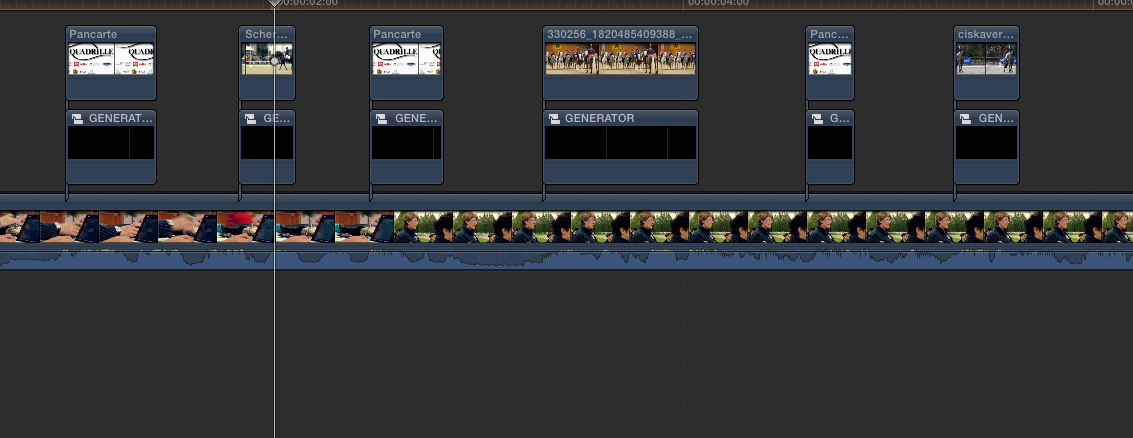
I have my main story line and then I've added still frames of a presentation throughout. The images don't cover the entire screen, so I can add a solid black generator under each image and it works great.
The problem is that I have 60+ images. Is there a way to paste a generator below every image? As you can see in the image, the duration of each image changes, so the brown boxes (solid black background) should match the duration of each connected image on top. Is there a way to automate this?

The problem is that I have 60+ images. Is there a way to paste a generator below every image? As you can see in the image, the duration of each image changes, so the brown boxes (solid black background) should match the duration of each connected image on top. Is there a way to automate this?
Please Log in to join the conversation.
- ronny courtens
-

- Offline
- Moderator
-

Less
More
- Posts: 4455
- Thank you received: 962
04 May 2014 11:25 #45586
by ronny courtens
Replied by ronny courtens on topic How to duplicate a generator below connected media?
With about 60 overlay clips it would take between 10 and 15 minutes to add a black generator underneath each clip. In this little video I will show you how to do this in less than 2 minutes:
vimeo.com/93836074
It takes one minute of preparation, then another minute to add the black background underneath all the overlay clips.
-Ronny
vimeo.com/93836074
It takes one minute of preparation, then another minute to add the black background underneath all the overlay clips.
-Ronny
Please Log in to join the conversation.

04 May 2014 12:42 #45591
by BenB
Replied by BenB on topic How to duplicate a generator below connected media?
Pretty slick, Ronny!
Please Log in to join the conversation.
04 May 2014 13:05 #45593
by nachocab
Replied by nachocab on topic How to duplicate a generator below connected media?
Wow, that's awesome. Thanks a lot!
Please Log in to join the conversation.
04 May 2014 13:43 #45594
by nachocab
Replied by nachocab on topic How to duplicate a generator below connected media?
So, now that I've created the blacks, what's the best way to keep them in sync with the images? I had to change the duration of one image and when I manually updated the corresponding black, the rest got out of sync.
Please Log in to join the conversation.
- ronny courtens
-
- Offline
- Moderator
-
Less
More
- Posts: 4455
- Thank you received: 962
04 May 2014 14:43 #45596
by ronny courtens
Replied by ronny courtens on topic How to duplicate a generator below connected media?
To avoid this: select the compound clip with the blacks on the timeline and press SHIFT+CMD+G to break apart the compound clip.
Now every single overlay with its corresponding black will be connected to a specific clip on the primary timeline and everything will remain in sync when you make changes to the timeline.
- Ronny
Now every single overlay with its corresponding black will be connected to a specific clip on the primary timeline and everything will remain in sync when you make changes to the timeline.
- Ronny
Please Log in to join the conversation.
