


- Posts: 177
- Thank you received: 12
3 Post Moderation Rule for New Boarders (25 Jan 2021)
New boarders will have their posts moderated - Don't worry if you cannot see your post immediately.
GoPro Images and QuickTime 7 Pro
- Nervebroke
-
 Topic Author
- Offline
- Elite Member
-

Less
More
26 Apr 2014 04:47 #45132
by Nervebroke
GoPro Images and QuickTime 7 Pro was created by Nervebroke
I was trying to use QuickTime Pro 7 to make a time-lapse Video with images shot on my Hero3 Black. I shot the images at 1 image per second at a resolution of 12 MP. I Created an image sequence with QT 7. Saved it as a QuickTime Movie. It plays wonderful in QT 7 and QT 10. However when I import it into FCPX 10.1.1 It get this little funny icon in the storyline. Please see attached image.
I tried the same thing with all the different capture settings on the GoPro. Only the 12MP images show this icon. Any thoughts on this?
Dave
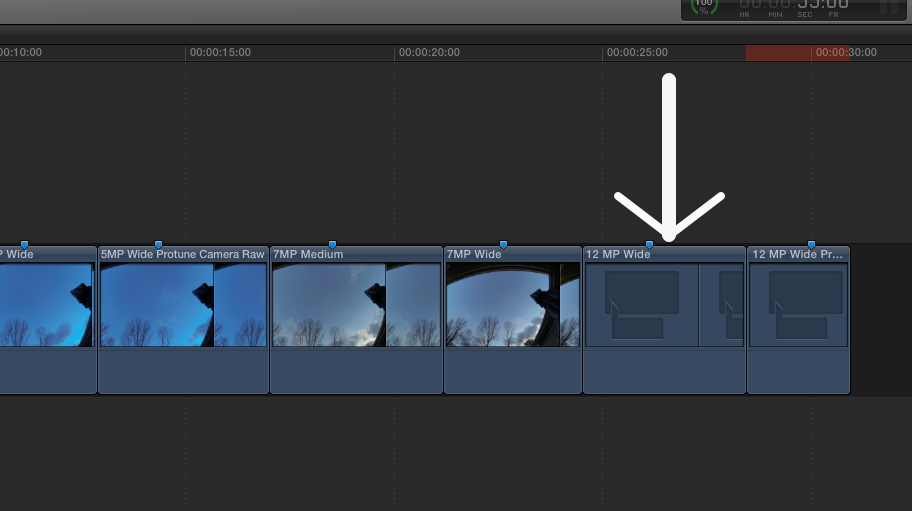
I tried the same thing with all the different capture settings on the GoPro. Only the 12MP images show this icon. Any thoughts on this?
Dave
Please Log in to join the conversation.
- Darren Roark
-
- Offline
- Platinum Member
-

26 Apr 2014 04:53 #45133
by Darren Roark
Replied by Darren Roark on topic GoPro Images and QuickTime 7 Pro
Try rendering it out as a prores file. I have a list of reasons what you did would work in QT but not in FCPX but it's getting late.
Please Log in to join the conversation.
- Nervebroke
-
Topic Author
- Offline
- Elite Member
-
Less
More
- Posts: 177
- Thank you received: 12
26 Apr 2014 05:16 #45135
by Nervebroke
Replied by Nervebroke on topic GoPro Images and QuickTime 7 Pro
Thanks Darren.
Go to bed and have a good sleep!
Go to bed and have a good sleep!
Please Log in to join the conversation.

26 Jul 2014 17:13 #50514
by joema
Replied by joema on topic GoPro Images and QuickTime 7 Pro
I just encountered this same problem. From the previous discussion I can't see what the solution was.
Has anyone else encountered this problem when making time lapse sequences from a GoPro Hero 3 Black camera using QuickTime 7 Pro and FCP X?
In my case the import to FCP X 10.1.2 shows the above mangled preview in the browser. Attempting to add that to a 1080P/30 project causes an infinite rendering loop in FCP X.
What is the best method for making a time lapse from a GoPro using FCP X? The usual method as discussed by Steve Martin doesn't seem to work with Quicktime 7 Pro.
Has anyone else encountered this problem when making time lapse sequences from a GoPro Hero 3 Black camera using QuickTime 7 Pro and FCP X?
In my case the import to FCP X 10.1.2 shows the above mangled preview in the browser. Attempting to add that to a 1080P/30 project causes an infinite rendering loop in FCP X.
What is the best method for making a time lapse from a GoPro using FCP X? The usual method as discussed by Steve Martin doesn't seem to work with Quicktime 7 Pro.
Please Log in to join the conversation.
- Nervebroke
-
Topic Author
- Offline
- Elite Member
-
Less
More
- Posts: 177
- Thank you received: 12
26 Jul 2014 18:04 #50517
by Nervebroke
Replied by Nervebroke on topic GoPro Images and QuickTime 7 Pro
There never was an answer to this post. I used the Steve Martin method using QT7 Pro. It never worked when using 12MP Wide image settings on the camera, however it worked with all the lower settings as you can see in my screenshot. So the workaround I have used is to not shoot with the 12MP settings.
Dave
Dave
Please Log in to join the conversation.
26 Jul 2014 23:12 - 26 Jul 2014 23:14 #50535
by joema
Replied by joema on topic GoPro Images and QuickTime 7 Pro
Thanks. I first tried LRTimeLapse ver 3.4. It is sophisticated but quite slow and required rendering passes by both it and LightRoom before even getting to FCP X.
I then resized my 4000x3000 GoPro Hero 3 Black 12 megapixel stills using PhotoResize Pro. That was pretty fast, and even though I picked the same output resolution (4000x3000), Quicktime 7 Pro handled it OK.
There is definitely a major benefit to using the QT 7 Pro time lapse method. It is much faster. Normally it doesn't require intermediate files, which also saves disk space. Due to this bug the resized files are intermediate files but it's still a lot faster this way.
Per your recommendation I'll try 7 megapixels, since I usually don't need 12 megapixels anyway. That would cut out the resize step.
I then resized my 4000x3000 GoPro Hero 3 Black 12 megapixel stills using PhotoResize Pro. That was pretty fast, and even though I picked the same output resolution (4000x3000), Quicktime 7 Pro handled it OK.
There is definitely a major benefit to using the QT 7 Pro time lapse method. It is much faster. Normally it doesn't require intermediate files, which also saves disk space. Due to this bug the resized files are intermediate files but it's still a lot faster this way.
Per your recommendation I'll try 7 megapixels, since I usually don't need 12 megapixels anyway. That would cut out the resize step.
Last edit: 26 Jul 2014 23:14 by joema.
Please Log in to join the conversation.
- Nervebroke
-
Topic Author
- Offline
- Elite Member
-
Less
More
- Posts: 177
- Thank you received: 12
27 Jul 2014 01:42 #50539
by Nervebroke
Replied by Nervebroke on topic GoPro Images and QuickTime 7 Pro
I would be curious if you have any issues with 7 megapixels. I also thank you for the info about PhotoResize Pro. The price was right and It will be a good addition to my arsenal.
Dave
Dave
Please Log in to join the conversation.
27 Jul 2014 23:50 - 27 Jul 2014 23:53 #50560
by joema
Replied by joema on topic GoPro Images and QuickTime 7 Pro
I confirm 12 megapixels still has the problem using GoPro Hero3+ Black.
Using 7 megapixels works around the problem.
So as already stated, the options are:
(1) Shoot at 12 megapixels and do faux (or actual) resize using some method like PhotoResize Pro
(2) Shoot at 7 megapixels
BTW using QT7 Pro on 5760 x 3840 Canon 5D Mark III jpgs causes graphical garbage in QT7 Pro which looks like the app crashed. However it's really OK and you can do File->Save As and the resultant file is imported OK by FCP X 10.1.2.
I guess this is what happens when Apple doesn't update an app in several years.
Using 7 megapixels works around the problem.
So as already stated, the options are:
(1) Shoot at 12 megapixels and do faux (or actual) resize using some method like PhotoResize Pro
(2) Shoot at 7 megapixels
BTW using QT7 Pro on 5760 x 3840 Canon 5D Mark III jpgs causes graphical garbage in QT7 Pro which looks like the app crashed. However it's really OK and you can do File->Save As and the resultant file is imported OK by FCP X 10.1.2.
I guess this is what happens when Apple doesn't update an app in several years.
Last edit: 27 Jul 2014 23:53 by joema.
Please Log in to join the conversation.
28 Jul 2014 00:16 #50561
by Seanus
Sean Lander - Editing since 1982 - AVID 1991 - FCP 1999 - FCPX 2011
Replied by Seanus on topic GoPro Images and QuickTime 7 Pro
Much much easier to do Timelapse video in Motion if you have a copy. Super fast, no limitations and you can animate the video if you like.
Sean Lander - Editing since 1982 - AVID 1991 - FCP 1999 - FCPX 2011
Please Log in to join the conversation.
- Nervebroke
-
Topic Author
- Offline
- Elite Member
-
Less
More
- Posts: 177
- Thank you received: 12
28 Jul 2014 02:42 #50565
by Nervebroke
This is true. It is just odd that there is this problem with the 12 megapixel images from a GoPro. IMHO using the QT7 Pro method is fast and usually pain free, but not for this one size of GoPro images.
Dave
Replied by Nervebroke on topic GoPro Images and QuickTime 7 Pro
Seanus wrote: Much much easier to do Timelapse video in Motion if you have a copy. Super fast, no limitations and you can animate the video if you like.
This is true. It is just odd that there is this problem with the 12 megapixel images from a GoPro. IMHO using the QT7 Pro method is fast and usually pain free, but not for this one size of GoPro images.
Dave
Please Log in to join the conversation.
28 Jul 2014 15:39 #50595
by joema
The reason for using QT 7 Pro is it's fast and saves a lot of space. This was discussed by Motion expert Mark Spencer: "You're starting with a huge amount of data to begin with...having all those images, Motion will recognize them as one movie...but if your goal is to create a QuickTime movie for Final Cut, the QuickTime Player way is better, because it's going to save space, it's just a pointer file."
Replied by joema on topic GoPro Images and QuickTime 7 Pro
Seanus wrote: Much much easier to do Timelapse video in Motion if you have a copy. Super fast, no limitations and you can animate the video if you like.
The reason for using QT 7 Pro is it's fast and saves a lot of space. This was discussed by Motion expert Mark Spencer: "You're starting with a huge amount of data to begin with...having all those images, Motion will recognize them as one movie...but if your goal is to create a QuickTime movie for Final Cut, the QuickTime Player way is better, because it's going to save space, it's just a pointer file."
Please Log in to join the conversation.
28 Jul 2014 22:07 #50615
by Seanus
Sean Lander - Editing since 1982 - AVID 1991 - FCP 1999 - FCPX 2011
Replied by Seanus on topic GoPro Images and QuickTime 7 Pro
I dispute that it's faster. Open Motion, navigate to files, drag to canvas, export. Plus you have precise control over the cropping and position of the image if it's much larger than HD.
As for just being a pointer file, well it would have to be a very very long Timelapse for it to make a significant dent in anyone's storage. Plus it will be smooth as butter in FCP X.
Anyway stick with what makes you happy, but at least give it a try I think you'll be impressed.
As for just being a pointer file, well it would have to be a very very long Timelapse for it to make a significant dent in anyone's storage. Plus it will be smooth as butter in FCP X.
Anyway stick with what makes you happy, but at least give it a try I think you'll be impressed.
Sean Lander - Editing since 1982 - AVID 1991 - FCP 1999 - FCPX 2011
Please Log in to join the conversation.
- Nervebroke
-
Topic Author
- Offline
- Elite Member
-
Less
More
- Posts: 177
- Thank you received: 12
28 Jul 2014 23:42 #50626
by Nervebroke
Seanus.
When I get a chance I will give Motion a try.
Dave
Replied by Nervebroke on topic GoPro Images and QuickTime 7 Pro
Seanus wrote: I dispute that it's faster. Open Motion, navigate to files, drag to canvas, export. Plus you have precise control over the cropping and position of the image if it's much larger than HD.
As for just being a pointer file, well it would have to be a very very long Timelapse for it to make a significant dent in anyone's storage. Plus it will be smooth as butter in FCP X.
Anyway stick with what makes you happy, but at least give it a try I think you'll be impressed.
Seanus.
When I get a chance I will give Motion a try.
Dave
Please Log in to join the conversation.
29 Jul 2014 00:53 - 29 Jul 2014 00:57 #50633
by joema
Using either QT7 Pro or Motion, you have full control over cropping and composition of a large image. The question is where you do that -- Motion or FCP X.
I just tried it on a 1,400 .jpg image sequence from a 5D Mark III. Each one is 5760x3840. There are actually three main options:
(1) Build the movie in Motion (which it does automatically, just like QT7 Pro), export at full res, then import into FCP X, crop, compose and finish. Motion export: 03:01, FCP X import: 00:22. Intermediate file size: 8.75GB.
(2) Build the movie in Motion, crop & compose, then export at 1080P for finishing in FCP X. Motion Export: 02:18, FCP X import: 00:06. Intermediate file size: 802MB.
(3) Build the movie in QT7 Pro, export the pointer file, import in FCP X, then crop, compose and finish there. QT7 Pro import: 00:20, QT7 Pro export: 00:02, FCP X import and add to storyline: 01:30. Intermediate file size: 0.
So technically QT7 Pro is faster for this workflow, but not by much vs. option #2. You're right a few gigabytes here and there are nothing on a large Thunderbolt RAID array.
No matter how nice the QT7 Pro option, it's buggy (apparently due to the legacy status). Motion isn't hard to use for a basic task like this, it is fully supported and it works very well. I experienced no problem on 5D Mark III at 5760x3840 or GoPro Hero3+ Black at 12 megapixels (4000x3000) or 7 megapixels (3000x2250) Thanks for the reminder.
With QT7 Pro, import of 5D Mark III images causes graphical garbage on the screen, although it does export OK and FCP X reads the pointer file OK. With 12 megapixel GoPro images, it totally fails, although works at 7 megapixels.
Replied by joema on topic GoPro Images and QuickTime 7 Pro
Seanus wrote: I dispute that it's faster. Open Motion, navigate to files, drag to canvas, export. Plus you have precise control over the cropping and position of the image if it's much larger than HD...
Using either QT7 Pro or Motion, you have full control over cropping and composition of a large image. The question is where you do that -- Motion or FCP X.
I just tried it on a 1,400 .jpg image sequence from a 5D Mark III. Each one is 5760x3840. There are actually three main options:
(1) Build the movie in Motion (which it does automatically, just like QT7 Pro), export at full res, then import into FCP X, crop, compose and finish. Motion export: 03:01, FCP X import: 00:22. Intermediate file size: 8.75GB.
(2) Build the movie in Motion, crop & compose, then export at 1080P for finishing in FCP X. Motion Export: 02:18, FCP X import: 00:06. Intermediate file size: 802MB.
(3) Build the movie in QT7 Pro, export the pointer file, import in FCP X, then crop, compose and finish there. QT7 Pro import: 00:20, QT7 Pro export: 00:02, FCP X import and add to storyline: 01:30. Intermediate file size: 0.
So technically QT7 Pro is faster for this workflow, but not by much vs. option #2. You're right a few gigabytes here and there are nothing on a large Thunderbolt RAID array.
No matter how nice the QT7 Pro option, it's buggy (apparently due to the legacy status). Motion isn't hard to use for a basic task like this, it is fully supported and it works very well. I experienced no problem on 5D Mark III at 5760x3840 or GoPro Hero3+ Black at 12 megapixels (4000x3000) or 7 megapixels (3000x2250) Thanks for the reminder.
With QT7 Pro, import of 5D Mark III images causes graphical garbage on the screen, although it does export OK and FCP X reads the pointer file OK. With 12 megapixel GoPro images, it totally fails, although works at 7 megapixels.
Last edit: 29 Jul 2014 00:57 by joema.
Please Log in to join the conversation.
