


- Posts: 19
- Thank you received: 0
3 Post Moderation Rule for New Boarders (25 Jan 2021)
New boarders will have their posts moderated - Don't worry if you cannot see your post immediately.
Interlacing problems: iMovie Better Than FCP10?
26 Apr 2014 14:55 #45145
by Joe90
Replied by Joe90 on topic Interlacing problems: iMovie Better Than FCP10?
Hi Joe
Yeah, FCP 10.1 definitely looks more than able. I'm on OS 10.7 and reluctant to upgrade to Maverick as I don't think it will work well with my old 2009 MBP. I can't upgrade to FCP 10.1 until the Maverick upgrade happens. Anyway, so far the direct import from cam seems to do the job. Thanks for the advice!
Yeah, FCP 10.1 definitely looks more than able. I'm on OS 10.7 and reluctant to upgrade to Maverick as I don't think it will work well with my old 2009 MBP. I can't upgrade to FCP 10.1 until the Maverick upgrade happens. Anyway, so far the direct import from cam seems to do the job. Thanks for the advice!
Please Log in to join the conversation.
- Russ Haskell
-

- Offline
- Elite Member
-

Less
More
- Posts: 176
- Thank you received: 24
26 Apr 2014 16:11 - 26 Apr 2014 16:13 #45153
by Russ Haskell
Replied by Russ Haskell on topic Interlacing problems: iMovie Better Than FCP10?
In an earlier post, I said that your MBP will work with 10.9. Indeed I believe it will run better than Lion.
If you want to be cautious (which is understandable), use a FW 800 external drive as a second boot drive with 10.9 and keep the 10.7 option until you are ready to make the change permanent. (Or make a bootable clone of the 10.7 system which you can use to roll back to – just in case.)
I can't remember at what point it became possible to work with MTS clips natively; but it is definitely the case now and it has simplified the process for a big segment of users.
Russ
If you want to be cautious (which is understandable), use a FW 800 external drive as a second boot drive with 10.9 and keep the 10.7 option until you are ready to make the change permanent. (Or make a bootable clone of the 10.7 system which you can use to roll back to – just in case.)
I can't remember at what point it became possible to work with MTS clips natively; but it is definitely the case now and it has simplified the process for a big segment of users.
Russ
Last edit: 26 Apr 2014 16:13 by Russ Haskell. Reason: typos
Please Log in to join the conversation.
27 Apr 2014 17:06 #45208
by Joe90
Replied by Joe90 on topic Interlacing problems: iMovie Better Than FCP10?
After heaps of great advice from FCP members, I have settled on a workflow when using AVCHD and FCP10. As I haven't yet ran back-ups of a considerable amount of data before upgrading to Maverick (and the latest FCP version), I took my version up to 10.0.8.
Using a Panasonic HCV700, I import clips direct from cam to FCP. Although my interlace problem isn't apparent during editing (unless the preview pane is minimised), I was dismayed to find the problem returned with a vengeance when viewing the file in Quicktime after export. This was after applying different fields, changing to progressive etc.
Long story short, I'm now forced to shoot 1080p/50fps if I want to edit in FCP. Although my cam offers HA1920 (and another three lesser settings), I must shoot at this rate which means memory cards don't last long and drive space used during editing will be massive (a 20sec clip came in at nearly 1GB - the project I'm about to complete will come in at 10 minutes).
The Quicktime export at 50fps played fine, no interlacing problems. Much better compared to the same test clip I shot at HA1920/25fps.
The problem here was that although it played fine on my Mac, it wouldn't play on my TV via USB-smarthub. As the SmartHub plays a myriad of formats I decided to convert the Quicktime file to DIVx. This played fine, although compression degrades quality somewhat.
So, long story short, AVCHD in FCP (for me) means shooting at 1080p/50fps then converting the exported Quicktime clip to DIVx (if you want it playing on a TV). For online presentation, I hope to leave the QT file unconverted (and at better quality). I must say, I agree with many comments I've read hoping that Apple will do more to embrace AVCHD, as the current workflow is rocky to say the least.
I hope this might help anyone visiting this thread who is as in the dark as I was. It can be done, but it's a pain If anyone has easier solutions that aren't mentioned on any of these posts, glad to hear them.
Using a Panasonic HCV700, I import clips direct from cam to FCP. Although my interlace problem isn't apparent during editing (unless the preview pane is minimised), I was dismayed to find the problem returned with a vengeance when viewing the file in Quicktime after export. This was after applying different fields, changing to progressive etc.
Long story short, I'm now forced to shoot 1080p/50fps if I want to edit in FCP. Although my cam offers HA1920 (and another three lesser settings), I must shoot at this rate which means memory cards don't last long and drive space used during editing will be massive (a 20sec clip came in at nearly 1GB - the project I'm about to complete will come in at 10 minutes).
The Quicktime export at 50fps played fine, no interlacing problems. Much better compared to the same test clip I shot at HA1920/25fps.
The problem here was that although it played fine on my Mac, it wouldn't play on my TV via USB-smarthub. As the SmartHub plays a myriad of formats I decided to convert the Quicktime file to DIVx. This played fine, although compression degrades quality somewhat.
So, long story short, AVCHD in FCP (for me) means shooting at 1080p/50fps then converting the exported Quicktime clip to DIVx (if you want it playing on a TV). For online presentation, I hope to leave the QT file unconverted (and at better quality). I must say, I agree with many comments I've read hoping that Apple will do more to embrace AVCHD, as the current workflow is rocky to say the least.
I hope this might help anyone visiting this thread who is as in the dark as I was. It can be done, but it's a pain
If anyone has easier solutions that aren't mentioned on any of these posts, glad to hear them. Please Log in to join the conversation.
- Tom Wolsky
-

- Offline
- Moderator
-

27 Apr 2014 17:22 #45209
by Tom Wolsky
Replied by Tom Wolsky on topic Interlacing problems: iMovie Better Than FCP10?
This is misleading and misinformed. FCP supports all forms of AVCHD. What formats exactly does your camera shoot? The highest data rate will give to the highest frame rate. Why do you have to shoot the highest frame rate? Does your camera shoot 1080p25? Furthermore, the data rates for working in FCP are incorrect. There is no requirement in FCP for creating optimized media.
Please Log in to join the conversation.
27 Apr 2014 18:30 #45215
by Joe90
Replied by Joe90 on topic Interlacing problems: iMovie Better Than FCP10?
Hi Tom
My settings are:
HA1920
HG1920
HX1920
HE1920
All interlaced.
Progressive settings:
1080/50p
Finally, I have iFrame.
My settings are:
HA1920
HG1920
HX1920
HE1920
All interlaced.
Progressive settings:
1080/50p
Finally, I have iFrame.
Please Log in to join the conversation.
- Tom Wolsky
-
- Offline
- Moderator
-
27 Apr 2014 18:45 #45216
by Tom Wolsky
Replied by Tom Wolsky on topic Interlacing problems: iMovie Better Than FCP10?
You can't blame FCP because your camera doesn't shoot 1080p25.
Please Log in to join the conversation.
27 Apr 2014 20:58 #45223
by Joe90
Replied by Joe90 on topic Interlacing problems: iMovie Better Than FCP10?
'Blame' is a bit melodramatic, Tom. More like frustrated - as are the many people I've came across online having the same problem as me. We all want to use FCP10 as it's the best semi--professional video editing out there. It's just disappointing to find it out it doesn't get on with some Panasonic cam formats. I should have waited a couple of months and got that DSLR! 
Anyway, thank you for the insightful reply.
Anyway, thank you for the insightful reply.
Please Log in to join the conversation.
- Tom Wolsky
-
- Offline
- Moderator
-
27 Apr 2014 21:06 #45224
by Tom Wolsky
Replied by Tom Wolsky on topic Interlacing problems: iMovie Better Than FCP10?
This is flat out wrong. FCP works correctly with this camera. Unfortunately you chose a camera which is largely unsuitable for providing web delivery video. FCP will edit the interlaced footage from the camera. It will even make it progressive if you want. The shortcomings are in your choice of equipment not the software, which is perfectly capable of dealing with this footage within the limitations of the format choices the camera offers. I'm exactly clear what you expect of the software, but your repeated statements that FCP is somehow inadequate fir working with AVCHD media is just wrong.
Please Log in to join the conversation.


27 Apr 2014 21:36 #45226
by joema
This can be a very confusing area, because the playback tool itself may or may not deinterlace the material. I don't recollect what Quicktime Player X does, but VLC by default does not deinterlace, and when enabled has various available deinterlace algorithms. That is not changing the file, but how that file is displayed when played locally. So your visual assessment of severity of interlacing artifacts, etc. can be skewed by the playback tool and its settings.
Note that is playing the exported video file directly. When you upload the file to Youtube, etc. it is transcoded to another format, so what you see there could be different.
If you intend web distribution, try uploading a short 1080/60i clip and see how it looks.
If you intend direct distribution of a digital file, then the appearance of interlacing artifacts will depend on the playback method used. Generally you'd want to deinterlace the material, since virtually all viewing is on progressive monitors, and it avoids having users specifically configure software players to deinterlace.
If the file is authored to DVD video format, that is usually interlaced and the player or TV monitor deinterlaces it.
FCP X should be able to deinterlace the file on export so the output progressive. Here's an article explaining how: zachflugum.com/post/29958636997/deinterl...minance-in-final-cut
Replied by joema on topic Interlacing problems: iMovie Better Than FCP10?
Joe90 wrote: ...Although my interlace problem isn't apparent during editing (unless the preview pane is minimised), I was dismayed to find the problem returned with a vengeance when viewing the file in Quicktime after export. This was after applying different fields, changing to progressive etc.
Long story short, I'm now forced to shoot 1080p/50fps if I want to edit in FCP...
This can be a very confusing area, because the playback tool itself may or may not deinterlace the material. I don't recollect what Quicktime Player X does, but VLC by default does not deinterlace, and when enabled has various available deinterlace algorithms. That is not changing the file, but how that file is displayed when played locally. So your visual assessment of severity of interlacing artifacts, etc. can be skewed by the playback tool and its settings.
Note that is playing the exported video file directly. When you upload the file to Youtube, etc. it is transcoded to another format, so what you see there could be different.
If you intend web distribution, try uploading a short 1080/60i clip and see how it looks.
If you intend direct distribution of a digital file, then the appearance of interlacing artifacts will depend on the playback method used. Generally you'd want to deinterlace the material, since virtually all viewing is on progressive monitors, and it avoids having users specifically configure software players to deinterlace.
If the file is authored to DVD video format, that is usually interlaced and the player or TV monitor deinterlaces it.
FCP X should be able to deinterlace the file on export so the output progressive. Here's an article explaining how: zachflugum.com/post/29958636997/deinterl...minance-in-final-cut
Please Log in to join the conversation.
- Tom Wolsky
-
- Offline
- Moderator
-
27 Apr 2014 21:49 - 27 Apr 2014 21:51 #45227
by Tom Wolsky
Replied by Tom Wolsky on topic Interlacing problems: iMovie Better Than FCP10?
To deinterlace simply edit in or put your edited project in a progressive project. The link does not show the correct way to deinterlace a project of interlaced media. It is simply for changing the field order for single files that may not conform to the rest of your media. The link is also very dated.
You can see interlacing at any time in the FCP Viewer simply by switching on both fields in the Viewer appearance popup, which should be the norm when working in an interlaced project.
You can see interlacing at any time in the FCP Viewer simply by switching on both fields in the Viewer appearance popup, which should be the norm when working in an interlaced project.
Last edit: 27 Apr 2014 21:51 by Tom Wolsky.
Please Log in to join the conversation.
27 Apr 2014 22:09 #45228
by Joe90
Replied by Joe90 on topic Interlacing problems: iMovie Better Than FCP10?
Thanks, J, that really helped me to interpret the problems. I like the idea of trying the clip on VLC, and as I have a private YouTube account, it's the perfect place to run a HA1920/1080/60i test. I'll also have to stop being a big chicken and upgrade my OS to Maverick to take advantage of FCP10.1.
Onwards and upwards!
Onwards and upwards!
Please Log in to join the conversation.
27 Apr 2014 22:12 #45229
by joema
Tom, thanks for catching that. If you deinterlace in FCP X, does this is use the fastest, lowest-quality algorithm (line averaging)? If so he could probably get better quality by deinterlacing in Compressor. Larry Jordan describes it in this video:
Replied by joema on topic Interlacing problems: iMovie Better Than FCP10?
Tom Wolsky wrote: To deinterlace simply edit in or put your edited project in a progressive project. The link does not show the correct way to deinterlace a project of interlaced media. It is simply for changing the field order for single files that may not conform to the rest of your media. The link is also very dated...
Tom, thanks for catching that. If you deinterlace in FCP X, does this is use the fastest, lowest-quality algorithm (line averaging)? If so he could probably get better quality by deinterlacing in Compressor. Larry Jordan describes it in this video:
Please Log in to join the conversation.
- Tom Wolsky
-
- Offline
- Moderator
-
27 Apr 2014 22:28 #45230
by Tom Wolsky
Replied by Tom Wolsky on topic Interlacing problems: iMovie Better Than FCP10?
This is an old version of Compressor. Line averaging is not the fastest way. Field discarding is the fastest way. FCP does not do that. It field blends to create motion blur on moving portions of the frame.
Please Log in to join the conversation.
27 Apr 2014 22:31 #45231
by Joe90
Replied by Joe90 on topic Interlacing problems: iMovie Better Than FCP10?
I don't know, Tom. You'll be rolling your eyes by now, but I've clicked deinterlace/change fields/show fields and every export has movement lines.
I'm going to clear my head and start afresh tomorrow evening using everything you and the guys have told me. This is crazy, I've learned so much about editing, colour correction etc on FCP yet I can't export a bloody project at the right settings.
I think I'll order Compressor, too.
Cheers Tom.
I'm going to clear my head and start afresh tomorrow evening using everything you and the guys have told me. This is crazy, I've learned so much about editing, colour correction etc on FCP yet I can't export a bloody project at the right settings.
I think I'll order Compressor, too.
Cheers Tom.
Please Log in to join the conversation.
27 Apr 2014 22:37 #45232
by Joe90
Replied by Joe90 on topic Interlacing problems: iMovie Better Than FCP10?
Fantastic, J. As I said to Tom, I fancy getting Compressor. I'm getting the message from Apple forums that it's as near as damn it to a necessity.
Any more problems and I'll be posting a barrage of screen shots showing my complete workflow. You have been warned!
Thanks again.
Any more problems and I'll be posting a barrage of screen shots showing my complete workflow. You have been warned!
Thanks again.
Please Log in to join the conversation.
- Tom Wolsky
-
- Offline
- Moderator
-
27 Apr 2014 22:39 #45233
by Tom Wolsky
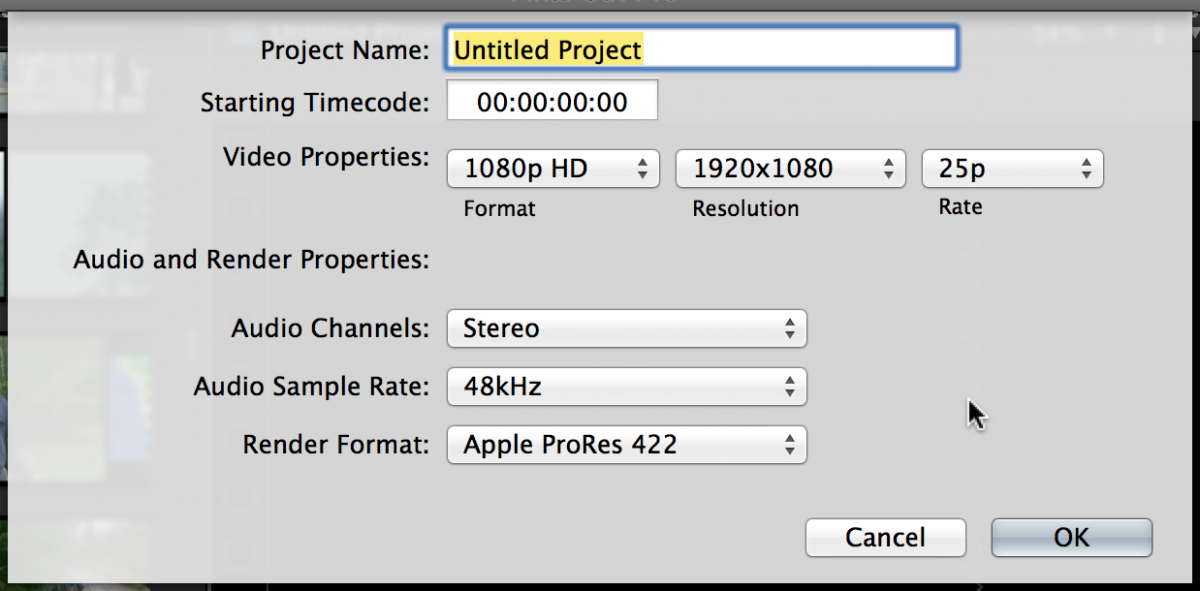
Replied by Tom Wolsky on topic Interlacing problems: iMovie Better Than FCP10?
Please Log in to join the conversation.
27 Apr 2014 22:45 #45234
by joema
According to Tom, FCP should do a decent job of deinterlacing. If you aren't seeing that in the output file, something is wrong.
Here is my best guess: your Project properties are determined by the first clip. If that is interlaced your project will be interlaced. You can't change that dynamically for all material with the field settings.
You have to create a new progressive project and drag the material to that, or else use Compressor. However Compressor should not be needed in this case.
Replied by joema on topic Interlacing problems: iMovie Better Than FCP10?
Joe90 wrote: Fantastic, J. As I said to Tom, I fancy getting Compressor. I'm getting the message from Apple forums that it's as near as damn it to a necessity...
According to Tom, FCP should do a decent job of deinterlacing. If you aren't seeing that in the output file, something is wrong.
Here is my best guess: your Project properties are determined by the first clip. If that is interlaced your project will be interlaced. You can't change that dynamically for all material with the field settings.
You have to create a new progressive project and drag the material to that, or else use Compressor. However Compressor should not be needed in this case.
Please Log in to join the conversation.
27 Apr 2014 23:27 #45235
by Joe90
Replied by Joe90 on topic Interlacing problems: iMovie Better Than FCP10?
Tom, it's late and I was due in bed 30mins ago. I just ran two of the clips that highlighted my problem. This time, I simply changed the property to progressive and...it worked!!
FCP - I apologise for ever doubting you. As I suspected deep down - I was a numpty.
Two clips: one of an approaching van and one of my actors running dialogue while walking through a field.
The van, as it approached cam, was swarming with messy zig zag fields. Now all gone.
The long grass in the field - also swarming with lines - now gone.
Big thanks, Tom!
FCP - I apologise for ever doubting you. As I suspected deep down - I was a numpty.
Two clips: one of an approaching van and one of my actors running dialogue while walking through a field.
The van, as it approached cam, was swarming with messy zig zag fields. Now all gone.
The long grass in the field - also swarming with lines - now gone.
Big thanks, Tom!
Please Log in to join the conversation.
27 Apr 2014 23:37 #45236
by Joe90
Replied by Joe90 on topic Interlacing problems: iMovie Better Than FCP10?
Joe, between your suggestion and Tom's grab I thought, "surely it couldn't be this simple?" My brain was wired into a solution that would involve a complex series of amendments and general fiddling about.
As I told Tom, simply importing the 1080i and entering it as a progressive project worked. I've seen a few other boards talking about this problem - I'll spread the good news.
Thank you so much for persevering with my dilemma. As I have 4 actors, a lighting man and a boom operator expecting us to film this weekend, I can't tell you how relieved I am to clear this madness up.
Regardless of my looking like a right doofus on the forum, and the fact that when I log in i keep being told I have an empty password and have to do a password reset, FCP.CO is now the only site I need for all things FCP.
You guys are stars!
Right. Bedtime.
As I told Tom, simply importing the 1080i and entering it as a progressive project worked. I've seen a few other boards talking about this problem - I'll spread the good news.
Thank you so much for persevering with my dilemma. As I have 4 actors, a lighting man and a boom operator expecting us to film this weekend, I can't tell you how relieved I am to clear this madness up.
Regardless of my looking like a right doofus on the forum, and the fact that when I log in i keep being told I have an empty password and have to do a password reset, FCP.CO is now the only site I need for all things FCP.
You guys are stars!
Right. Bedtime.
Please Log in to join the conversation.
