


- Posts: 34
- Thank you received: 0
3 Post Moderation Rule for New Boarders (25 Jan 2021)
New boarders will have their posts moderated - Don't worry if you cannot see your post immediately.
Beginner Question-Accidently hit zoom in timeline
24 Apr 2014 17:32 #45017
by SFA2013
Beginner Question-Accidently hit zoom in timeline was created by SFA2013
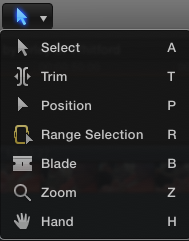
Instead of hitting shift-Z to make a project fill the timeline, I hit Z. The cursor turned to a plus sign and everything I clicked got bigger. I couldn't figure out how to get out of this behavior without exiting FCPX.
If I mess up again, how to go back to regular behavior?
If I mess up again, how to go back to regular behavior?
Please Log in to join the conversation.
- Tom Wolsky
-

- Offline
- Moderator
-

24 Apr 2014 17:38 #45018
by Tom Wolsky
Replied by Tom Wolsky on topic Beginner Question-Accidently hit zoom in timeline
Press A for the Select tool. Z activates the Zoom tool.
Please Log in to join the conversation.

24 Apr 2014 17:40 #45019
by moviestim
Replied by moviestim on topic Beginner Question-Accidently hit zoom in timeline
How is your keyboard set up? If it is the FCPX default you can hit "A" to get back to the select tool. I have attached an image of the different tools and their shortcut letter. Each tool has specific functions. Hope this helps.
Please Log in to join the conversation.
