


- Posts: 5
- Thank you received: 1
3 Post Moderation Rule for New Boarders (25 Jan 2021)
New boarders will have their posts moderated - Don't worry if you cannot see your post immediately.
HTTP Streaming Video
22 Apr 2014 01:16 #44887
by s1548
HTTP Streaming Video was created by s1548
I followed the FCP instructions on creating HTTP streaming video and I can't seem to get it to work. I generated 6 files to my desktop for broadband only. My understanding is that the two folders containing the broadband files, the folder with audio files, the .m3u8 file, and an index.html file all need to be loaded into the same publicly accessible folder on the Web server. What shows up when enter in my browser
www.pyeserver.net/Easter%202014/index.html
is the following:
<?xml version="1.0" encoding="utf-8" ?>
<!DOCTYPE html PUBLIC "-//W3C//DTD XHTML 1.0 Strict//EN" " www.w3.org/TR/xhtml1/DTD/xhtml1-strict.dtd ">
<html>
<head>
<title>HTTP Live Streaming Test</title>
<meta name="viewport" content="width=0; height=0; initial-scale=1.0; maximum-scale=1.0; user-scalable=0;"/>
</head>
<body style="background-color:#FFFFFF;">
<center>
<video src="/Easter 2014.m3u8" controls autoplay></video>
</center>
</body>
</html>
This is what is in the index.html. This is the code Final Cut Pro X suggested that I use in my Web (I assume index.html) page. It doesn’t play a video…just displays this code.
What am I doing wrong?
<?xml version="1.0" encoding="utf-8" ?>
<!DOCTYPE html PUBLIC "-//W3C//DTD XHTML 1.0 Strict//EN" " www.w3.org/TR/xhtml1/DTD/xhtml1-strict.dtd ">
<html>
<head>
<title>HTTP Live Streaming Test</title>
<meta name="viewport" content="width=0; height=0; initial-scale=1.0; maximum-scale=1.0; user-scalable=0;"/>
</head>
<body style="background-color:#FFFFFF;">
<center>
<video src="/Easter 2014.m3u8" controls autoplay></video>
</center>
</body>
</html>
This is what is in the index.html. This is the code Final Cut Pro X suggested that I use in my Web (I assume index.html) page. It doesn’t play a video…just displays this code.
What am I doing wrong?
Please Log in to join the conversation.

22 Apr 2014 05:03 - 22 Apr 2014 05:22 #44891
by plysat
Can't sleep? Try this: fcpxpert.net ;-)
Replied by plysat on topic HTTP Streaming Video
The code is messed up... basically what you see printed on the page should be the actual code in the page, but it's getting put in the body. Try this. make a new TextEdit document. Copy the code that's showing up on the current page (what you posted above) into it.Save it as index.html and try using that. should work... I did it and it opened (obviously no video since I don't have it), but the forum won't let me upload an html or zip file...
edit... I take that back, it did upload it. Just unzip it and make sure all the files are in the same directory with it on your server.
Another Edit: You may have another problem in that your source file name contains a space. rename the source file Easter 2014.m3u8 to Easter_2014.m3u8. Then open the index file in a text editor and change the line with the file name in it to match. So src="Easter 2014.m3u8" becomes src="Easter_2014.m3u8"
edit... I take that back, it did upload it.
Just unzip it and make sure all the files are in the same directory with it on your server.Another Edit: You may have another problem in that your source file name contains a space. rename the source file Easter 2014.m3u8 to Easter_2014.m3u8. Then open the index file in a text editor and change the line with the file name in it to match. So src="Easter 2014.m3u8" becomes src="Easter_2014.m3u8"
Can't sleep? Try this: fcpxpert.net ;-)
Last edit: 22 Apr 2014 05:22 by plysat.
Please Log in to join the conversation.
22 Apr 2014 15:38 #44914
by s1548
Replied by s1548 on topic HTTP Streaming Video
Thank you for responding so quickly. However, it seems I'm still getting the same result. I deleted all my files and went into FCP changing the name to Easter2014, no space, no underscore. Then to File > Share > HTTP Streaming > Broadband only, and it recreated all the files. I added the following to my index.html:
<?xml version="1.0" encoding="utf-8" ?>
<!DOCTYPE html PUBLIC "-//W3C//DTD XHTML 1.0 Strict//EN" " www.w3.org/TR/xhtml1/DTD/xhtml1-strict.dtd ">
<html>
<head>
<title>HTTP Live Streaming Test</title>
<meta name="viewport" content="width=0; height=0; initial-scale=1.0; maximum-scale=1.0; user-scalable=0;"/>
</head>
<body style="background-color:#FFFFFF;">
<center>
<video src="/Easter2014.m3u8" controls autoplay></video>
</center>
</body>
</html>
I uploaded all files to www.pyeserver.net/Easter2014 but continue to get the text of the index.html and no video. No sure where to look next.
<?xml version="1.0" encoding="utf-8" ?>
<!DOCTYPE html PUBLIC "-//W3C//DTD XHTML 1.0 Strict//EN" " www.w3.org/TR/xhtml1/DTD/xhtml1-strict.dtd ">
<html>
<head>
<title>HTTP Live Streaming Test</title>
<meta name="viewport" content="width=0; height=0; initial-scale=1.0; maximum-scale=1.0; user-scalable=0;"/>
</head>
<body style="background-color:#FFFFFF;">
<center>
<video src="/Easter2014.m3u8" controls autoplay></video>
</center>
</body>
</html>
I uploaded all files to www.pyeserver.net/Easter2014 but continue to get the text of the index.html and no video. No sure where to look next.
Please Log in to join the conversation.

23 Apr 2014 03:33 #44950
by marchyman
That is your issue. That is a COMPLETE html file, not something you add to an existing file.
Try this: save that code to a file called "test.html". Now upload that code to your server and use your web browser to access the new page you just created. Does it work?
Replied by marchyman on topic HTTP Streaming Video
s1548 wrote: I added the following to my index.html:
That is your issue. That is a COMPLETE html file, not something you add to an existing file.
Try this: save that code to a file called "test.html". Now upload that code to your server and use your web browser to access the new page you just created. Does it work?
Please Log in to join the conversation.
23 Apr 2014 21:06 #44981
by s1548
Replied by s1548 on topic HTTP Streaming Video
The code in my prior post constitutes the complete index.html, but it doesn't seem to work. I just get they code displayed on my browser.
Please Log in to join the conversation.
23 Apr 2014 21:22 #44983
by s1548
Replied by s1548 on topic HTTP Streaming Video
Ooops....correction:
I opened the index.html with Dreamweaver and there was a whole bunch of other code, so I just replaced it with this code:
<?xml version="1.0" encoding="utf-8" ?>
<!DOCTYPE html PUBLIC "-//W3C//DTD XHTML 1.0 Strict//EN" " www.w3.org/TR/xhtml1/DTD/xhtml1-strict.dtd ">
<html>
<head>
<title>HTTP Live Streaming Test</title>
<meta name="viewport" content="width=0; height=0; initial-scale=1.0; maximum-scale=1.0; user-scalable=0;"/>
</head>
<body style="background-color:#FFFFFF;">
<center>
<video src="/Easter2014.m3u8" controls autoplay></video>
</center>
</body>
</html>
Now I'm getting what you see in the attached image file. Looks like we're making some progress, just not quite there yet.
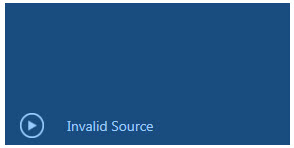
I opened the index.html with Dreamweaver and there was a whole bunch of other code, so I just replaced it with this code:
<?xml version="1.0" encoding="utf-8" ?>
<!DOCTYPE html PUBLIC "-//W3C//DTD XHTML 1.0 Strict//EN" " www.w3.org/TR/xhtml1/DTD/xhtml1-strict.dtd ">
<html>
<head>
<title>HTTP Live Streaming Test</title>
<meta name="viewport" content="width=0; height=0; initial-scale=1.0; maximum-scale=1.0; user-scalable=0;"/>
</head>
<body style="background-color:#FFFFFF;">
<center>
<video src="/Easter2014.m3u8" controls autoplay></video>
</center>
</body>
</html>
Now I'm getting what you see in the attached image file. Looks like we're making some progress, just not quite there yet.
Please Log in to join the conversation.
24 Apr 2014 04:45 - 24 Apr 2014 04:48 #44991
by marchyman
Replied by marchyman on topic HTTP Streaming Video
I hate that the thank you button is below the submit button for a quick reply... 2nd try...
Is the m3u8 file on you web server in the same folder as index.html?
Does your web server know what to do with m3u8 files? (Mine doesn't).
I think an m3u8 file is nothing more than a playlist... are the files/URLs mentioned in the playlist available to your web server?f
That's where my (little) knowledge ends.
Is the m3u8 file on you web server in the same folder as index.html?
Does your web server know what to do with m3u8 files? (Mine doesn't).
I think an m3u8 file is nothing more than a playlist... are the files/URLs mentioned in the playlist available to your web server?f
That's where my (little) knowledge ends.
Last edit: 24 Apr 2014 04:48 by marchyman.
Please Log in to join the conversation.
25 Apr 2014 21:34 #45113
by s1548
Replied by s1548 on topic HTTP Streaming Video
You folks have been really helpful and sincere in coming to my aid. Alas, I believe I'm at a complete stopping point. What should work doesn't. My last effort was to simply place ALL files in one folder on the server - same result. I guess this FCP streaming thing just doesn't work.
Thanks for your effort!
Thanks for your effort!
Please Log in to join the conversation.
