


- Posts: 5
- Thank you received: 0
3 Post Moderation Rule for New Boarders (25 Jan 2021)
New boarders will have their posts moderated - Don't worry if you cannot see your post immediately.
Transitions Not Working
21 Apr 2014 19:13 #44866
by kinegbg

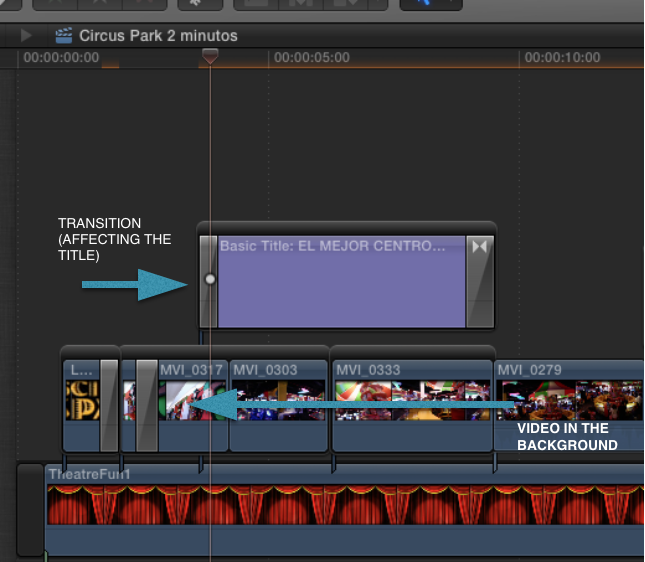
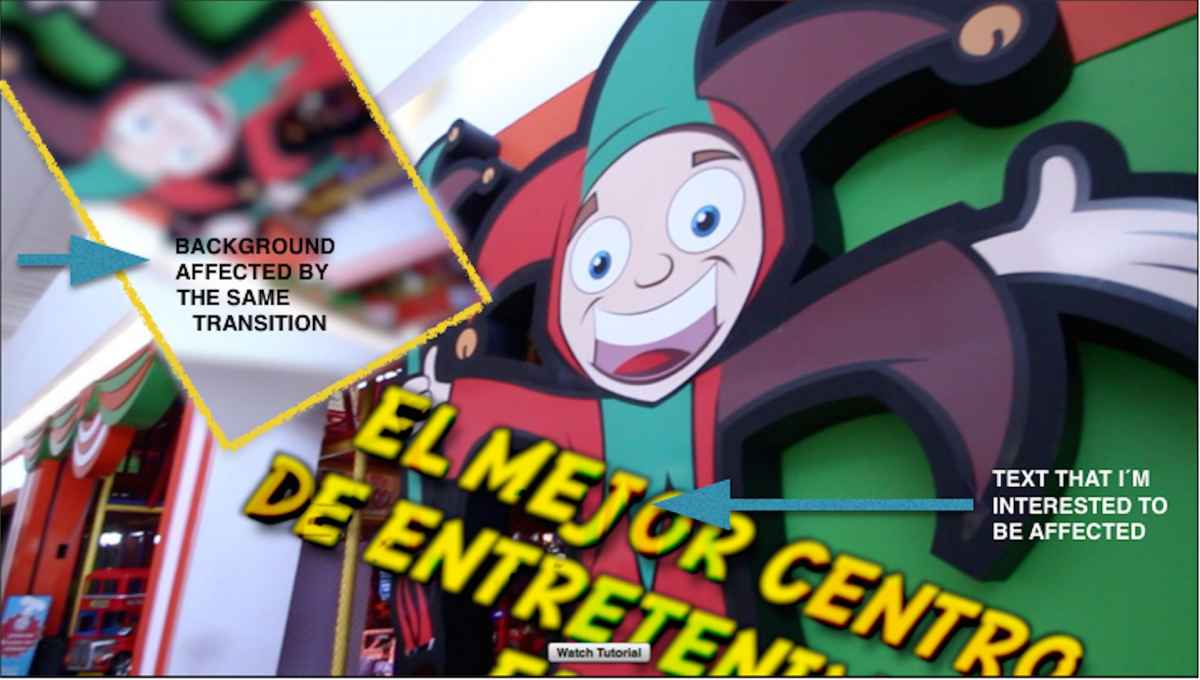
Hi, I´m using FCPX and every time I add a third party transition plug in. The transition will affect the background. For instance, If I want to apply a transition to an image that is above another image, let´s say a picture on video, the transition will affect also the video not only the picture. How can I solve this?
Note: I´m adding some screenshots to be more specific.
Thank you.
Transitions Not Working was created by kinegbg
Hi, I´m using FCPX and every time I add a third party transition plug in. The transition will affect the background. For instance, If I want to apply a transition to an image that is above another image, let´s say a picture on video, the transition will affect also the video not only the picture. How can I solve this?
Note: I´m adding some screenshots to be more specific.
Thank you.
Please Log in to join the conversation.
- Tom Wolsky
-

- Offline
- Moderator
-

21 Apr 2014 20:25 #44873
by Tom Wolsky
Replied by Tom Wolsky on topic Transitions Not Working
This is pretty common with transitions, including the built-in transitions. Many are designed to effect not only the incoming clip, but also the outgoing clip. These transitions will effect the underlying layer. There may be a way to fix this in Motion, but you'd have to do it on a transition by transition basis.
Please Log in to join the conversation.


21 Apr 2014 20:38 #44875
by anickt
Replied by anickt on topic Transitions Not Working
Some transitions have options in the inspector. They may say "in", "out" or "automatic" or something like that. If that's the case choose the appropriate setting.
Some transitions are not made to work with titles and can't be modified and (as Tom says) some can be modified in Motion.
If it's a third party transition, check with the developer.
Some transitions are not made to work with titles and can't be modified and (as Tom says) some can be modified in Motion.
If it's a third party transition, check with the developer.
Please Log in to join the conversation.
21 Apr 2014 23:36 #44882
by kinegbg
Replied by kinegbg on topic Transitions Not Working
I tried to do it in Motion but some third party plug ins won´t let me. Thanks for the information.
Cheers.
Cheers.
Please Log in to join the conversation.
21 Apr 2014 23:40 #44883
by kinegbg
Replied by kinegbg on topic Transitions Not Working
Thanks a lot. I´ve tried some to change with Motion, but it won´t let me. The thing is that this not only happens with text but also with other video or picture.
Is there any way you recommend to get the same effect? Without doing all the changes in Motion. Maybe changing the storyline or something else?
Thanks to both of you!
Is there any way you recommend to get the same effect? Without doing all the changes in Motion. Maybe changing the storyline or something else?
Thanks to both of you!
Please Log in to join the conversation.
22 Apr 2014 00:26 #44885
by Julian
Replied by Julian on topic Transitions Not Working
It's annoying when you don't want it to do this, but awesome when you have a ton a layers you need to apply the same transition to.
My solution is to just throw a solid black generator below the clip, then you can assign a custom role to it and if you click on that role it will make the generator short like a title instead of tall like a video clip.
My solution is to just throw a solid black generator below the clip, then you can assign a custom role to it and if you click on that role it will make the generator short like a title instead of tall like a video clip.
Please Log in to join the conversation.
