


- Posts: 402
- Thank you received: 72
3 Post Moderation Rule for New Boarders (25 Jan 2021)
New boarders will have their posts moderated - Don't worry if you cannot see your post immediately.
Proxy transcode hanging
- haysoos123
-
 Topic Author
- Offline
- Platinum Member
-

Less
More
18 Apr 2014 18:33 #44716
by haysoos123
Proxy transcode hanging was created by haysoos123
Hey guys,
I'm wondering if anyone has had odd problems when trying to transcode proxies after ingesting. That is, not during the import process, but some time later.
It seems to work fine if I select a couple dozen clips at a time and transcode, but when I select many more than that (say, 100 clips), it will work for a bit and then hang the system randomly in the middle of one of the clips. Then, it becomes a process of force-quitting and then reselecting the clips not done yet and transcoding those. Basically, you have to babysit the process. Trashing preferences and rebooting doesn't fix the problem. For this project, it's a mixture of c300 and 5D footage, but I'm not sure it's related to the codec. I've had this issue with Red proxy transcodes also.
I would bypass this process and use compressor to create proxies, but the problem is that FCPX needs to "know" that it created a proxy for a particular clip (it marks it that way in an event's database), and the only way to do that is to tell it to transcode. Is there a way to make it use proxies without telling it to transcode?
I'm wondering if anyone has had odd problems when trying to transcode proxies after ingesting. That is, not during the import process, but some time later.
It seems to work fine if I select a couple dozen clips at a time and transcode, but when I select many more than that (say, 100 clips), it will work for a bit and then hang the system randomly in the middle of one of the clips. Then, it becomes a process of force-quitting and then reselecting the clips not done yet and transcoding those. Basically, you have to babysit the process. Trashing preferences and rebooting doesn't fix the problem. For this project, it's a mixture of c300 and 5D footage, but I'm not sure it's related to the codec. I've had this issue with Red proxy transcodes also.
I would bypass this process and use compressor to create proxies, but the problem is that FCPX needs to "know" that it created a proxy for a particular clip (it marks it that way in an event's database), and the only way to do that is to tell it to transcode. Is there a way to make it use proxies without telling it to transcode?
Please Log in to join the conversation.
- ronny courtens
-

- Offline
- Moderator
-

Less
More
- Posts: 4455
- Thank you received: 962
18 Apr 2014 19:12 #44721
by ronny courtens
Replied by ronny courtens on topic Proxy transcode hanging
Hey haysoos,
As long as you make sure that the proxies have exactly the same name as the original media and that you create them at exactly 50% or 25% of the resolution of the original media (to ensure correct pixel aspect ratio) you will be fine. Create the proxies in Compressor an drop them in the Transcoded Media > Proxy media folder of the Library and FCP X will recognize them.
Andreas has even created a very useful utility for this:
www.spherico.com/filmtools/X-Files/X-Proxy/X-Proxy.dmg
You can read more about it here:
www.fcp.co/forum/4-final-cut-pro-x-fcpx/...-proxy-files-in-fcpx
- Ronny
As long as you make sure that the proxies have exactly the same name as the original media and that you create them at exactly 50% or 25% of the resolution of the original media (to ensure correct pixel aspect ratio) you will be fine. Create the proxies in Compressor an drop them in the Transcoded Media > Proxy media folder of the Library and FCP X will recognize them.
Andreas has even created a very useful utility for this:
www.spherico.com/filmtools/X-Files/X-Proxy/X-Proxy.dmg
You can read more about it here:
www.fcp.co/forum/4-final-cut-pro-x-fcpx/...-proxy-files-in-fcpx
- Ronny
Please Log in to join the conversation.
- haysoos123
-
Topic Author
- Offline
- Platinum Member
-
Less
More
- Posts: 402
- Thank you received: 72
18 Apr 2014 19:39 #44722
by haysoos123
Replied by haysoos123 on topic Proxy transcode hanging
Thanks, Ronny! I think I did see something about this a while back, but does it actually tweak the event to recognize the proxy files? Meaning, you don't even have to go into FCPX and tell it to transcode, you can just put them in there? I ask because I could have sworn we tried to do this manually once, but FCPX didn't "know" that the proxies were made even though we put them in the right place with the right filename.
Please Log in to join the conversation.
- ronny courtens
-
- Offline
- Moderator
-
Less
More
- Posts: 4455
- Thank you received: 962
18 Apr 2014 19:45 #44724
by ronny courtens
Replied by ronny courtens on topic Proxy transcode hanging
That must have been prior to 10.0.9.
Now you just drop the externally created proxies in the correct folder and FCP X magically links them to the original media And seeing how X is evolving I think the proxy workflow will improve even more in the near future.
- Ronny
Now you just drop the externally created proxies in the correct folder and FCP X magically links them to the original media
And seeing how X is evolving I think the proxy workflow will improve even more in the near future.- Ronny
Please Log in to join the conversation.
- haysoos123
-
Topic Author
- Offline
- Platinum Member
-
Less
More
- Posts: 402
- Thank you received: 72
22 Apr 2014 20:20 #44939
by haysoos123
Replied by haysoos123 on topic Proxy transcode hanging
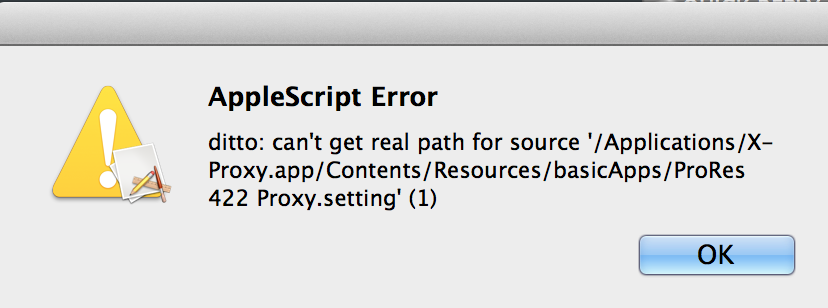
I wonder if Andreas can chime in here, since I can't seem to get X-Proxy to work. Upon loading it, there's an error message: "can't get real path for source ... /ProRes 422 proxy.setting" which seems to be a missing. When I show package contents, there does seem to be something there name "ProRes 422 proxy," but I'm not sure it's the setting file. I'm attaching the error message.
Please Log in to join the conversation.
