


- Posts: 6
- Thank you received: 0
3 Post Moderation Rule for New Boarders (25 Jan 2021)
New boarders will have their posts moderated - Don't worry if you cannot see your post immediately.
Modify a Project's Settings Not Working in FCPX 10.1.1
16 Apr 2014 00:58 #44576
by pacificm
Modify a Project's Settings Not Working in FCPX 10.1.1 was created by pacificm
I want to change the resolution of a video. I opened the FCPX Help to "Modify a Project's Settings" and followed the directions. The problem is Window > Project Properties (Command -J) is greyed out. I cannot get Window > Properties to become black or active. I've gone through the directions several times with different clips to no avail.
Any suggestions how to proceed so I can change the video resolution?
Thanks.
Any suggestions how to proceed so I can change the video resolution?
Thanks.
Please Log in to join the conversation.
- Tom Wolsky
-

- Offline
- Moderator
-

16 Apr 2014 01:05 #44577
by Tom Wolsky
Replied by Tom Wolsky on topic Modify a Project's Settings Not Working in FCPX 10.1.1
You can't change the properties of a video. They are what they are. You can change the properties of a project.
Please Log in to join the conversation.
16 Apr 2014 01:30 #44578
by pacificm
Replied by pacificm on topic Modify a Project's Settings Not Working in FCPX 10.1.1
Thanks for your prompt reply. But, I'm still confused how to accomplish what I want to do. If a video is currently at a certain resolution and I want to change it to another, how can I go about changing it via the project approach you refer to?
Please Log in to join the conversation.
- Tom Wolsky
-
- Offline
- Moderator
-
16 Apr 2014 03:12 #44580
by Tom Wolsky
Replied by Tom Wolsky on topic Modify a Project's Settings Not Working in FCPX 10.1.1
What is it you want to do? What exactly do you want to change? You can change the properties of a project.
Please Log in to join the conversation.


16 Apr 2014 04:15 #44582
by dgwvideo
Creating history....one edit at a time !
Replied by dgwvideo on topic Modify a Project's Settings Not Working in FCPX 10.1.1
You cannot change the clip resolution within FCPX by modifying the project properties, however you can change your project timeline (for example from 1080p to 720p as well as the frame-rate). You do this by selecting the project in the event, and then in the inspector under the info tab choose "Modify Settings". Any clips in your project will likely need to be re-rendered and you can further make them fill or fit the screen using the "Spatial Conform" setting in the inspector when you have a timeline clip selected.
You can also use compressor or quicktime and many other apps to modify the clip resolution to various frame sizes prior to importing them into FCPX if they are of a size that doesn't work for your project.
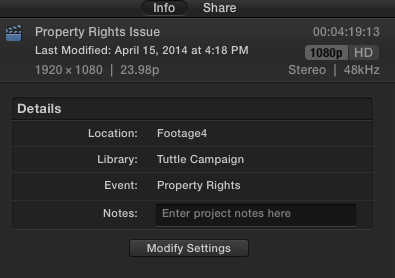
You can also use compressor or quicktime and many other apps to modify the clip resolution to various frame sizes prior to importing them into FCPX if they are of a size that doesn't work for your project.
Creating history....one edit at a time !
Please Log in to join the conversation.
- Russ Haskell
-

- Offline
- Elite Member
-

Less
More
- Posts: 176
- Thank you received: 24
17 Apr 2014 02:26 #44634
by Russ Haskell
Replied by Russ Haskell on topic Modify a Project's Settings Not Working in FCPX 10.1.1
Possibly I'm wrong but while you can change the project resolution with Modify Settings, I believe the only way change the frame rate is to make a new custom project and paste a copy of the original into it.
Russ
Russ
Please Log in to join the conversation.
20 Apr 2014 04:34 #44792
by dgwvideo
Creating history....one edit at a time !
Replied by dgwvideo on topic Modify a Project's Settings Not Working in FCPX 10.1.1
You are correct about the frame- rate, Russ. It cannot be changed once a clip is in the project timeline. If a project is just started and has a few clips in it, you can cut the clips, modify the project frame-rate and then repaste them into the newly modified project (maybe easier than creating a new project). Thanks for catching my error 
Dan
Dan
Creating history....one edit at a time !
Please Log in to join the conversation.
