


- Posts: 1433
- Thank you received: 64
3 Post Moderation Rule for New Boarders (25 Jan 2021)
New boarders will have their posts moderated - Don't worry if you cannot see your post immediately.
Sync Clips
- Disproportionate Pictures
-
 Topic Author
- Offline
- Platinum Member
-

Less
More
15 Apr 2014 13:56 #44547
by Disproportionate Pictures
Sync Clips was created by Disproportionate Pictures
Hey everyone.
When creating sync clips with second source audio, is there a way to define which element the sync clip gets it's name from? I have a video file and 3 zoom audio files. When I create a sync clip it defaults to use the first Zoom clip for name and metadata. Obviously I want to use the Camera clip as the defining element. Thoughts?
I have a lot of material to go thru over the next couple months- I've looked at Pluralize but I'm a bit confused as to the process. If I understand correctly you
1. Import your Audio and Video
2. Lay all this material into a Project
3. Export XML and bring it into Pluralize to to syncing
4. Import XML from Pluralize into FCPX and get a sync'd Project.
If this is the case, this is a big step down from the individual sync'd clips which you get using FCPX's own syncing feature, isn't it? Yes you save time by not having to select individual sets and syncing each one, but with the Pluralize method you'd have to create individual sync clips from the imported XML sync Project, wouldn't you? 6 and 1/2 dozen of the other, isn't it?
When creating sync clips with second source audio, is there a way to define which element the sync clip gets it's name from? I have a video file and 3 zoom audio files. When I create a sync clip it defaults to use the first Zoom clip for name and metadata. Obviously I want to use the Camera clip as the defining element. Thoughts?
I have a lot of material to go thru over the next couple months- I've looked at Pluralize but I'm a bit confused as to the process. If I understand correctly you
1. Import your Audio and Video
2. Lay all this material into a Project
3. Export XML and bring it into Pluralize to to syncing
4. Import XML from Pluralize into FCPX and get a sync'd Project.
If this is the case, this is a big step down from the individual sync'd clips which you get using FCPX's own syncing feature, isn't it? Yes you save time by not having to select individual sets and syncing each one, but with the Pluralize method you'd have to create individual sync clips from the imported XML sync Project, wouldn't you? 6 and 1/2 dozen of the other, isn't it?
Please Log in to join the conversation.
- ronny courtens
-

- Offline
- Moderator
-

Less
More
- Posts: 4455
- Thank you received: 962
15 Apr 2014 20:46 #44559
by ronny courtens
Replied by ronny courtens on topic Sync Clips
Hey Marcus,
I don't see that behavior when syncing clips. A synced clip should always get the name of the video clip + "Synchronized Clip" behind it, no matter how many second source audio clips you sync with the video.
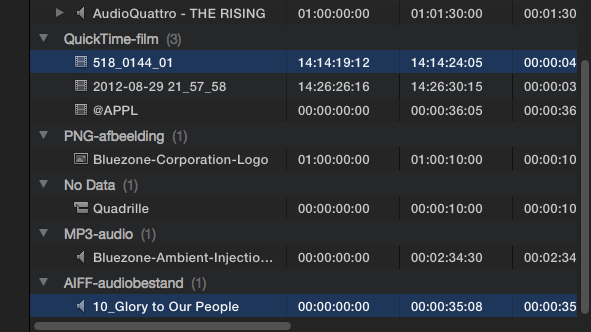
Here I sync a video clip with an audio clip, the video clip is named 518_0144_01:
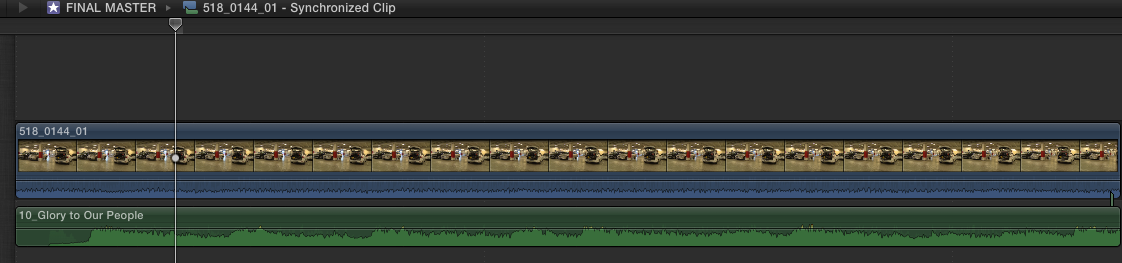
When I open the synced clip in its timeline you see the clip has the same name as the video clip:
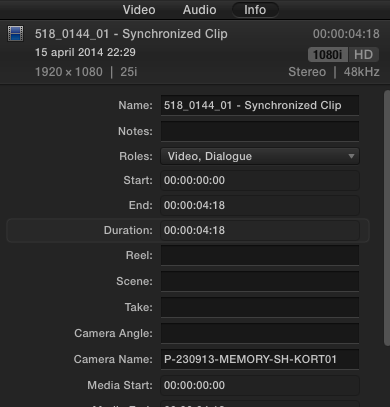
In the Info tab the synced clip even shows the correct name for the Camera the video clip was shot with:
Do you select the clips in the correct order before syncing i.e. first you select the video clip, then the second source audio clips?
Pluraleyes is not bad, I have used it before with FCP7. But the workflow is indeed a big step down from the easy syncing procedure in FCP X. I would only use it for syncing different bits of external audio to a longer video clip and even then you could use FCP X multi cam synching for this, which is again much easier.
-Ronny
I don't see that behavior when syncing clips. A synced clip should always get the name of the video clip + "Synchronized Clip" behind it, no matter how many second source audio clips you sync with the video.
Here I sync a video clip with an audio clip, the video clip is named 518_0144_01:
When I open the synced clip in its timeline you see the clip has the same name as the video clip:
In the Info tab the synced clip even shows the correct name for the Camera the video clip was shot with:
Do you select the clips in the correct order before syncing i.e. first you select the video clip, then the second source audio clips?
Pluraleyes is not bad, I have used it before with FCP7. But the workflow is indeed a big step down from the easy syncing procedure in FCP X. I would only use it for syncing different bits of external audio to a longer video clip and even then you could use FCP X multi cam synching for this, which is again much easier.
-Ronny
Please Log in to join the conversation.
- Disproportionate Pictures
-
Topic Author
- Offline
- Platinum Member
-
Less
More
- Posts: 1433
- Thank you received: 64
15 Apr 2014 20:49 #44560
by Disproportionate Pictures
Replied by Disproportionate Pictures on topic Sync Clips
Hey Ronny,
I think the issue is that I'm syncing one video clip with 3 audio files. The Zoom recorder on set recorded 3 individual mono WAV files.
Regardless of how I select them, the Synchronized clip always picks it's name from the first Zoom WAV file.
I think the issue is that I'm syncing one video clip with 3 audio files. The Zoom recorder on set recorded 3 individual mono WAV files.
Regardless of how I select them, the Synchronized clip always picks it's name from the first Zoom WAV file.
Please Log in to join the conversation.
- ronny courtens
-
- Offline
- Moderator
-
Less
More
- Posts: 4455
- Thank you received: 962
15 Apr 2014 20:58 #44562
by ronny courtens
Replied by ronny courtens on topic Sync Clips
I haven't noticed this before. I will dig up some footage to test this again. Will be back in a moment.
- Ronny
- Ronny
Please Log in to join the conversation.
- Disproportionate Pictures
-
Topic Author
- Offline
- Platinum Member
-
Less
More
- Posts: 1433
- Thank you received: 64
15 Apr 2014 21:00 #44564
by Disproportionate Pictures
Replied by Disproportionate Pictures on topic Sync Clips
I tested it by doing a sync clip with only one of the zoom audio files and it does defaulted to the video clip's name.
So it looks like this is only an issue with multiple second-source audio files.
So it looks like this is only an issue with multiple second-source audio files.
Please Log in to join the conversation.
- ronny courtens
-
- Offline
- Moderator
-
Less
More
- Posts: 4455
- Thank you received: 962
15 Apr 2014 21:07 #44565
by ronny courtens
Replied by ronny courtens on topic Sync Clips
Yep, you are right. Just tried it with one video and 4 audio clips, the synced clip always takes the name of the alphabetically first audio clip. The only workaround I can think of right now is to copy/paste the name and other metadata from the video clip to the synced clip in the Info tab.
Feedback is posted.
- Ronny
Feedback is posted.
- Ronny
Please Log in to join the conversation.
- Disproportionate Pictures
-
Topic Author
- Offline
- Platinum Member
-
Less
More
- Posts: 1433
- Thank you received: 64
16 Apr 2014 13:27 #44599
by Disproportionate Pictures
Replied by Disproportionate Pictures on topic Sync Clips
Me as well. Thanks Ronny. Also threw in a jab about video metadata being carried over to the sync clip.
Please Log in to join the conversation.
