


- Posts: 3790
- Thank you received: 718
3 Post Moderation Rule for New Boarders (25 Jan 2021)
New boarders will have their posts moderated - Don't worry if you cannot see your post immediately.
Multicam - doesn't show some clips content?
- Karsten Schlüter
-
 Topic Author
- Offline
- Moderator
-

Less
More
13 Apr 2014 08:03 - 13 Apr 2014 08:06 #44426
by Karsten Schlüter
Multicam - doesn't show some clips content? was created by Karsten Schlüter
oops, something kaputt:
as always, I import my 4-6 cams into FCPX;select optimize; set a Marker for synching; select clips for Multicam; and usually I get a nice Multicam-clip for edit. Proofed, routine workflow. As always....
Now, today:
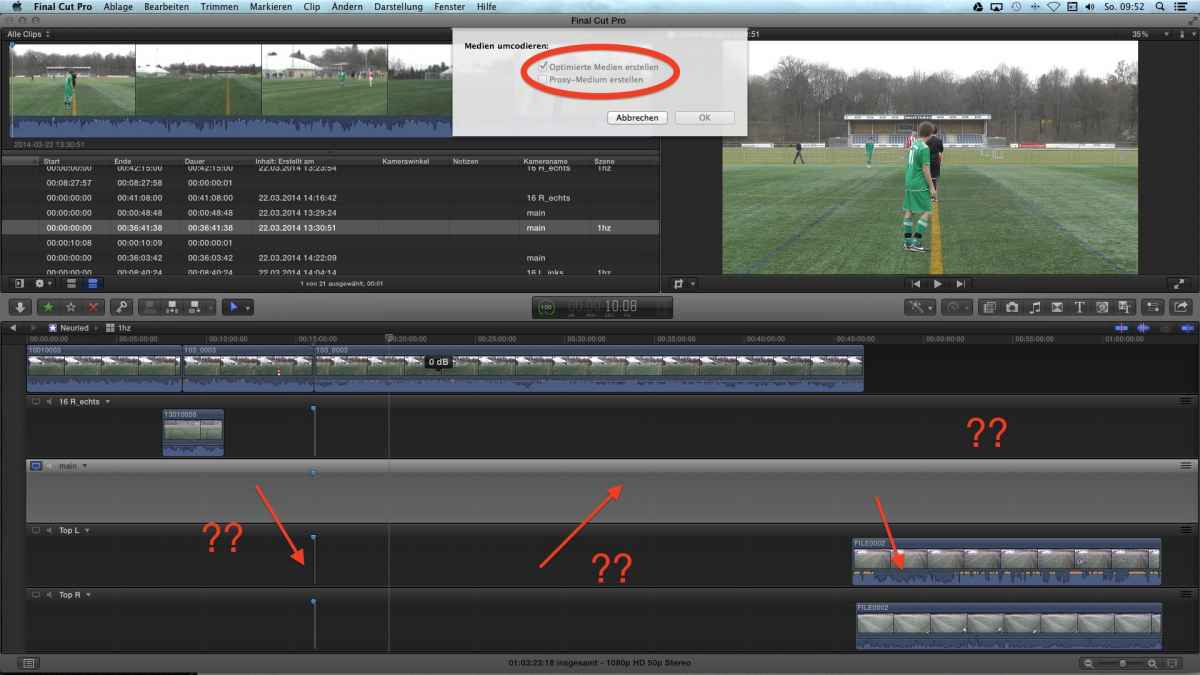
as you can see: optimized, selected .. as always - but no content!!!
my settings (as always, worked a dozen times:)
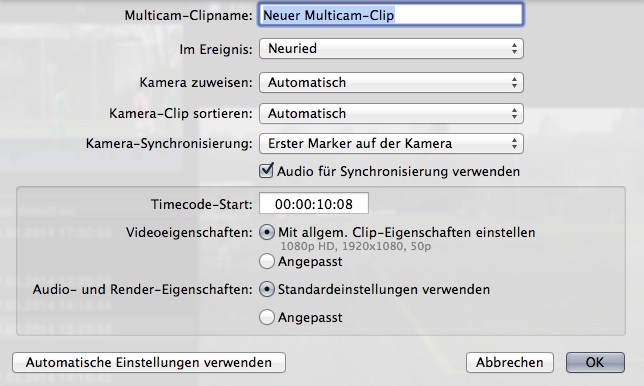
tried erasing prefs, tried erased render files - no help.
What have I done wrong????
(pretty sure, I missed some checkbox - but which??)
24 soccer-kids need urgently help! ... ok, too much :lol:
as always, I import my 4-6 cams into FCPX;select optimize; set a Marker for synching; select clips for Multicam; and usually I get a nice Multicam-clip for edit. Proofed, routine workflow. As always....
Now, today:
as you can see: optimized, selected .. as always - but no content!!!
my settings (as always, worked a dozen times:)
tried erasing prefs, tried erased render files - no help.
What have I done wrong????
(pretty sure, I missed some checkbox - but which??)
24 soccer-kids need urgently help! ... ok, too much :lol:
Last edit: 13 Apr 2014 08:06 by Karsten Schlüter.
Please Log in to join the conversation.
- Karsten Schlüter
-
Topic Author
- Offline
- Moderator
-
Less
More
- Posts: 3790
- Thank you received: 718
14 Apr 2014 07:01 #44471
by Karsten Schlüter
Replied by Karsten Schlüter on topic Multicam - doesn't show some clips content?
... 44 views, no reply?
:oops: I feel left alone! Ben, Ronny, Tom, my heroes, where are you??
actual workaround (kids wait for their weekly game-report):
create a Multicam with any two clips; applying cameras manually; synching manually (lucky me, referees use those annoying whistles!) ..
but, why doesn't work my habitual workflow anymore???
.... really weird!
:oops: I feel left alone! Ben, Ronny, Tom, my heroes, where are you??
actual workaround (kids wait for their weekly game-report):
create a Multicam with any two clips; applying cameras manually; synching manually (lucky me, referees use those annoying whistles!) ..
but, why doesn't work my habitual workflow anymore???
.... really weird!
Please Log in to join the conversation.
- ronny courtens
-

- Offline
- Moderator
-
Less
More
- Posts: 4455
- Thank you received: 962
14 Apr 2014 07:39 #44472
by ronny courtens
Replied by ronny courtens on topic Multicam - doesn't show some clips content?
Hi Karsten,
You seem to have set everything correctly, including assigning individual camera names. Just a few ideas:
- Have the cameras been running all the time or do you have stop/starts? If they have been running all the time you can disable "synch by audio" if you are using markers for syncing up the angles.
- As you have set correct camera names you also can set "Kamera-Clip sortieren" to "Kamera Name". This will put every clip that comes from the same camera into the same angle.
- If you are running Mavericks OS you should restart your computer once you have trashed the prefs, otherwise the prefs files may not be replaced correctly. This should be fixed with the coming Mavs update.
- Ronny
You seem to have set everything correctly, including assigning individual camera names. Just a few ideas:
- Have the cameras been running all the time or do you have stop/starts? If they have been running all the time you can disable "synch by audio" if you are using markers for syncing up the angles.
- As you have set correct camera names you also can set "Kamera-Clip sortieren" to "Kamera Name". This will put every clip that comes from the same camera into the same angle.
- If you are running Mavericks OS you should restart your computer once you have trashed the prefs, otherwise the prefs files may not be replaced correctly. This should be fixed with the coming Mavs update.
- Ronny
Please Log in to join the conversation.
