


- Posts: 1
- Thank you received: 0
3 Post Moderation Rule for New Boarders (25 Jan 2021)
New boarders will have their posts moderated - Don't worry if you cannot see your post immediately.
Importing Files
09 Apr 2014 18:13 #44302
by 2409208
Importing Files was created by 2409208
I currently have around 800gb of footage that im going through to edit, its currently all on my external harddrive. My question is if I want to edit this in FCPX, when i import these files will they make another copy of it on my computer? If so, is there a way to edit 800gb of footage at the same time as my computer has a limited amount of harddrive space.
Please Log in to join the conversation.

09 Apr 2014 18:44 #44303
by BenB
Replied by BenB on topic Importing Files
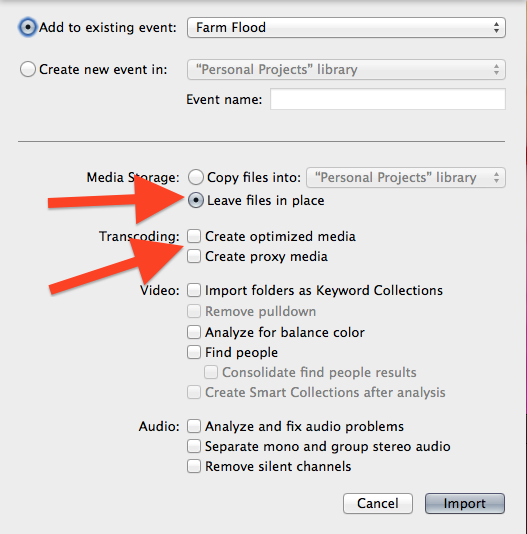
You want to keep the media External. So in the Import window, do NOT make optimized or proxy media, and set it to keep files in place. As I have it set up in this image.
Please Log in to join the conversation.
- Jonathan Levin
-

- Offline
- Platinum Member
-

Less
More
- Posts: 786
- Thank you received: 21
09 Apr 2014 19:05 #44305
by Jonathan Levin
Replied by Jonathan Levin on topic Importing Files
BenB,
I amy be having a senior moment, but why would you elect to not import Optimized media?
Jonathan
I amy be having a senior moment, but why would you elect to not import Optimized media?
Jonathan
Please Log in to join the conversation.

10 Apr 2014 04:55 #44333
by dgwvideo
Creating history....one edit at a time !
Replied by dgwvideo on topic Importing Files
If the media can benefit from optimizing ( such as h.264 or some highly compressed codec) then normally you would optimize. But the OP indicated he had limited HD space and optimizing the original footage would create new and larger clips in addition to his originals, something he has no extra room to handle.
Creating history....one edit at a time !
Please Log in to join the conversation.
- Jonathan Levin
-
- Offline
- Platinum Member
-
Less
More
- Posts: 786
- Thank you received: 21
10 Apr 2014 14:27 #44346
by Jonathan Levin
Replied by Jonathan Levin on topic Importing Files
Thanks DGW
Please Log in to join the conversation.
