


- Posts: 1
- Thank you received: 0
3 Post Moderation Rule for New Boarders (25 Jan 2021)
New boarders will have their posts moderated - Don't worry if you cannot see your post immediately.
Crashes when trying to import media
09 Apr 2014 02:01 #44256
by Nico1961
Crashes when trying to import media was created by Nico1961
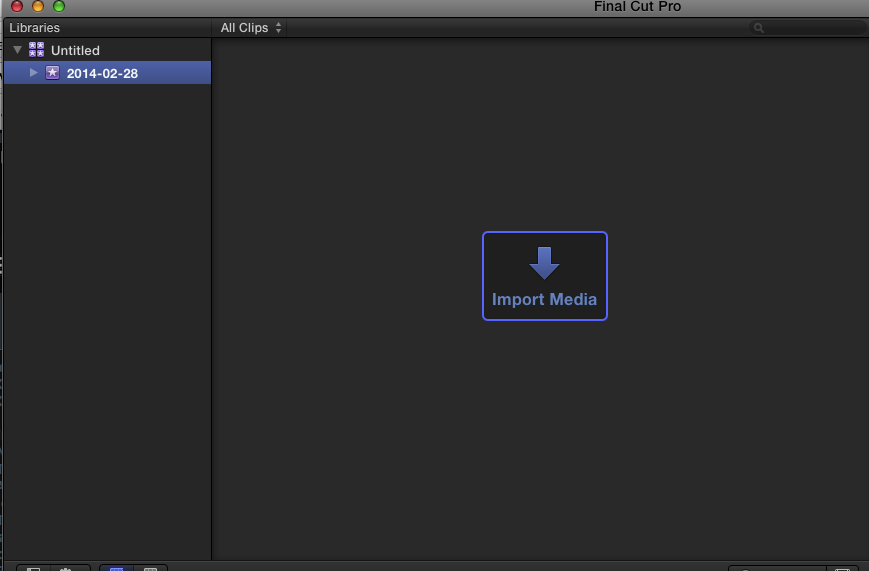
A couple of days ago suddenly FCPX crashes (Ball from Hell spinning forever and I have to force quit) when I try ti Import media. This happens BEFORE I even have pointed to the media or the (see attached picture). I push the "Import Media button and the beach ball starts spinning and won't stop. It doesn't even open the Import Media window. I've tried from the Menu aswell but with the same result. The only way to get new media in is to create a new project and drag/drop the files directly onto the timeline. This way I can't get footage in from my iPhone, though...
I have tried to trash pref's, make new event/library and re-install but nope.
I have tried to trash pref's, make new event/library and re-install but nope.
Please Log in to join the conversation.
- ronny courtens
-

- Offline
- Moderator
-

Less
More
- Posts: 4455
- Thank you received: 962
09 Apr 2014 06:59 #44264
by ronny courtens
Replied by ronny courtens on topic Crashes when trying to import media
Hi Nico,
When you refresh your FCP X preferences using the current version of Mavericks it is best to restart you computer before launching FCP X again. If this doesn't help:
Do a Repair Permissions on your system drive. If this doesn't help:
- What is the system you work on? (computer, RAM, OS version, FCP X version)
- Are your Libraries and media stored on your system drive?
- What is the size of your system drive and how much space do you have left on it?
Ronny
When you refresh your FCP X preferences using the current version of Mavericks it is best to restart you computer before launching FCP X again. If this doesn't help:
Do a Repair Permissions on your system drive. If this doesn't help:
- What is the system you work on? (computer, RAM, OS version, FCP X version)
- Are your Libraries and media stored on your system drive?
- What is the size of your system drive and how much space do you have left on it?
Ronny
Please Log in to join the conversation.
- Andreas Kiel
-

- Offline
- Platinum Member
-

Less
More
- Posts: 1077
- Thank you received: 189
09 Apr 2014 10:48 #44273
by Andreas Kiel
Replied by Andreas Kiel on topic Crashes when trying to import media
I had similar issues.
For whatever reason Mavericks put some drives to sleep – even though the system settings say 'no sleep'.
I wrote my own little app for a workaround. But there is a commercial app from Digital Heaven: www.digital-heaven.co.uk/disksomnia
-Andreas
For whatever reason Mavericks put some drives to sleep – even though the system settings say 'no sleep'.
I wrote my own little app for a workaround. But there is a commercial app from Digital Heaven: www.digital-heaven.co.uk/disksomnia
-Andreas
Please Log in to join the conversation.
