


- Posts: 5
- Thank you received: 0
3 Post Moderation Rule for New Boarders (25 Jan 2021)
New boarders will have their posts moderated - Don't worry if you cannot see your post immediately.
Noob on Day 2 of 10.1 Trial—half my clips went blue overnight and won't play
05 Apr 2014 18:04 - 05 Apr 2014 18:22 #44097
by dora
Apologies for probably getting some vocabulary wrong; I'm learning FCPX lingo from Larry Jordan and other YouTube tutorials, but it's not all sticking. My system info's in my profile.
This is what my timeline looks like now; I'm sure if I had a name for what I'm seeing, I'd have been able to do a search.
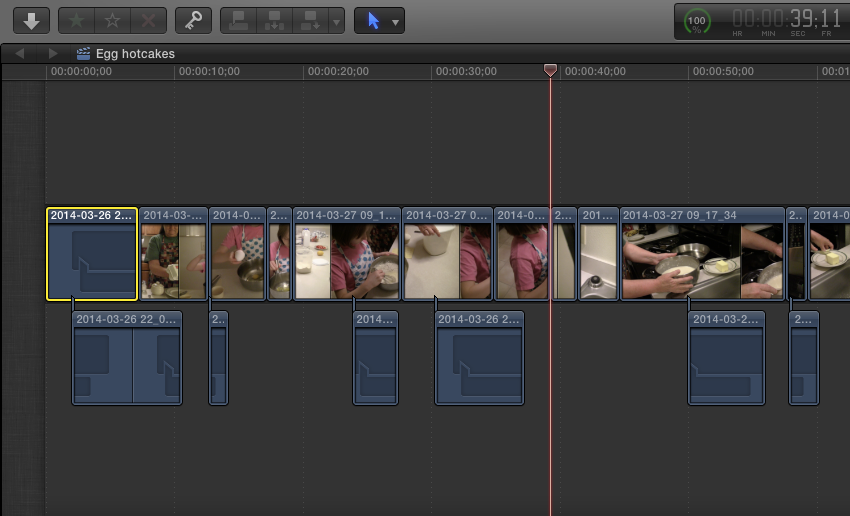
I'd roughed out my first several minutes in 10.1 and thought I was getting a feel for it. But I didn't close the program overnight, and when I came back to it this morning more than half my clips were devoid of video and audio. Some of the empty clips are below the main timeline, but many are in it.
As far as I can tell the files aren't missing; thumbnails show up in my event browser, though I can't preview them. The files do still play fine if I access them from Finder. FCP says there's nothing to Relink. I tried Consolidating my Library, and is says there's nothing to consolidate because the files are already all there.
I saw mention of making sure you're set to "view all" clips, but I don't even know where to set that.
Any wisdom?
My primary question is, do I have to edit it all over again, and if so am I better off starting over at an on-campus computer lab with 10?
edit: I've just found one reference to a similar problem in this review , but it's not manifesting quite the same way—I'm not getting any warnings about incompatibility. That author ended up reimporting and reconstructing everything.
This is what my timeline looks like now; I'm sure if I had a name for what I'm seeing, I'd have been able to do a search.
I'd roughed out my first several minutes in 10.1 and thought I was getting a feel for it. But I didn't close the program overnight, and when I came back to it this morning more than half my clips were devoid of video and audio. Some of the empty clips are below the main timeline, but many are in it.
As far as I can tell the files aren't missing; thumbnails show up in my event browser, though I can't preview them. The files do still play fine if I access them from Finder. FCP says there's nothing to Relink. I tried Consolidating my Library, and is says there's nothing to consolidate because the files are already all there.
I saw mention of making sure you're set to "view all" clips, but I don't even know where to set that.
Any wisdom?
My primary question is, do I have to edit it all over again, and if so am I better off starting over at an on-campus computer lab with 10?
edit: I've just found one reference to a similar problem in this review , but it's not manifesting quite the same way—I'm not getting any warnings about incompatibility. That author ended up reimporting and reconstructing everything.
Last edit: 05 Apr 2014 18:22 by dora. Reason: found a reference
Please Log in to join the conversation.
- Tom Wolsky
-

- Offline
- Moderator
-

05 Apr 2014 18:25 #44098
by Tom Wolsky
Replied by Tom Wolsky on topic Noob on Day 2 of 10.1 Trial—half my clips went blue overnight and won't play
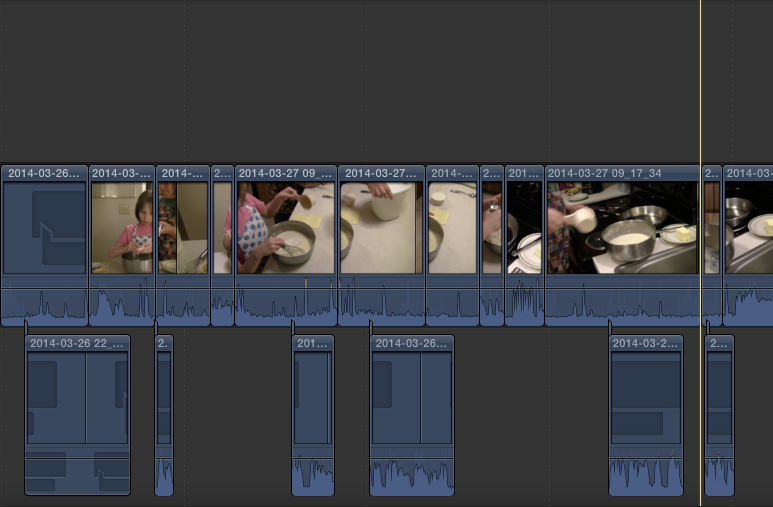
It looks like you've set clip appearance to not show audio. Change clip appearance in the lower right and post another screen shot of the timeline.
Please Log in to join the conversation.
05 Apr 2014 18:34 #44101
by dora
Replied by dora on topic Noob on Day 2 of 10.1 Trial—half my clips went blue overnight and won't play
So far everything I'm working with is video with audio. Waveforms do show up for the blued clips, but the audio doesn't play.
Please Log in to join the conversation.
- Tom Wolsky
-
- Offline
- Moderator
-
05 Apr 2014 18:46 #44104
by Tom Wolsky
Replied by Tom Wolsky on topic Noob on Day 2 of 10.1 Trial—half my clips went blue overnight and won't play
You mean you don't hear any audio? Do the meters move?
Please Log in to join the conversation.
05 Apr 2014 18:56 - 05 Apr 2014 18:59 #44106
by dora
Replied by dora on topic Noob on Day 2 of 10.1 Trial—half my clips went blue overnight and won't play
When it's just blue clips in the playhead—like those first seven seconds—the audio meters don't move and there's no sound at all.
Where a blue clip underlies a working clip in the timeline, I only see/hear the working clip. I should hear interview audio and see extra meter movement, and I don't.
Could this be an issue that I took multiple clips from the same media files, and somehow did it wrong?
I don't know why it would have worked last night and not this morning, but that's the only thing I can think of. My media files are all several minutes long and I am using a lot of little pieces from several of them.
edit: nope, that first clip is the only one I took from that particular media file.
Where a blue clip underlies a working clip in the timeline, I only see/hear the working clip. I should hear interview audio and see extra meter movement, and I don't.
Could this be an issue that I took multiple clips from the same media files, and somehow did it wrong?
I don't know why it would have worked last night and not this morning, but that's the only thing I can think of. My media files are all several minutes long and I am using a lot of little pieces from several of them.
edit: nope, that first clip is the only one I took from that particular media file.
Last edit: 05 Apr 2014 18:59 by dora. Reason: brainstorming
Please Log in to join the conversation.
- Tom Wolsky
-
- Offline
- Moderator
-
05 Apr 2014 19:09 #44107
by Tom Wolsky
Replied by Tom Wolsky on topic Noob on Day 2 of 10.1 Trial—half my clips went blue overnight and won't play
There's something odd about the connected clips underneath the primary storyline. Select one of them and use Shift-F. Does the clip play alright in the browser?
Please Log in to join the conversation.
05 Apr 2014 19:28 - 05 Apr 2014 19:30 #44109
by dora
Replied by dora on topic Noob on Day 2 of 10.1 Trial—half my clips went blue overnight and won't play
No, they won't play in the browser.
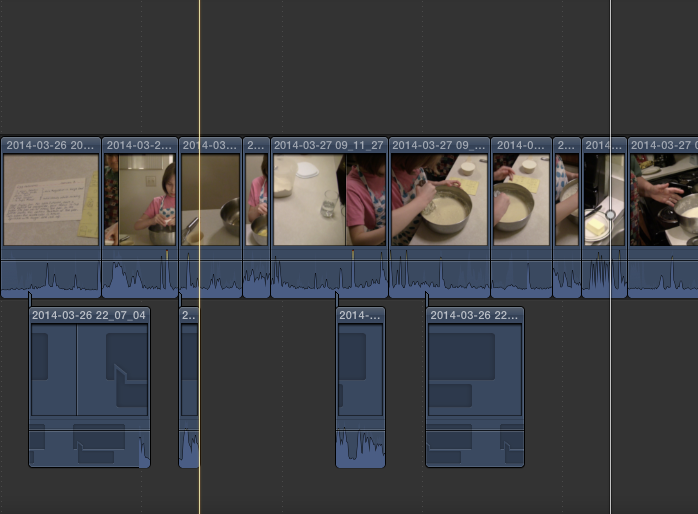
Later on in the timeline, primary storyline clips are also blued out. Most of them are from the same file as one of the connected clips, though. . .
Even though FCP said the files weren't missing, I used Relink to find the first clip's file and copy it (again?) to the library. That seems to have worked, so I did Select All, went to "Relink Files" and hunted all 10 down. It spent some time "copying" but this time it did not work.
Trying to relink the file for the second missing clip (the next few from the same file, actually) and not having ANY luck. The file is there, I can find it in the Relink window, choose the match and hit Relink but now it doesn't even claim to be processing anything. Nothing happens at all, and everything but that first magically repaired clip stays blue.
Later on in the timeline, primary storyline clips are also blued out. Most of them are from the same file as one of the connected clips, though. . .
Even though FCP said the files weren't missing, I used Relink to find the first clip's file and copy it (again?) to the library. That seems to have worked, so I did Select All, went to "Relink Files" and hunted all 10 down. It spent some time "copying" but this time it did not work.
Trying to relink the file for the second missing clip (the next few from the same file, actually) and not having ANY luck. The file is there, I can find it in the Relink window, choose the match and hit Relink but now it doesn't even claim to be processing anything. Nothing happens at all, and everything but that first magically repaired clip stays blue.
Last edit: 05 Apr 2014 19:30 by dora.
Please Log in to join the conversation.
05 Apr 2014 21:01 #44110
by dora
Replied by dora on topic Noob on Day 2 of 10.1 Trial—half my clips went blue overnight and won't play
I'm more confused than ever.
FCP did not show any Background tasks after I tried to use Relink to bring back those files—but after about half an hour, they popped back in.
BUT the linked files will not play in the browser, meaning that while my clips are back in my timeline for now, I can't bring in new clips from the same files.
There are so many key commands that I'm nervous that I was afraid I'd been doing something with accidental keystrokes, but does this seem like a processor or space issue?
FCP did not show any Background tasks after I tried to use Relink to bring back those files—but after about half an hour, they popped back in.
BUT the linked files will not play in the browser, meaning that while my clips are back in my timeline for now, I can't bring in new clips from the same files.
There are so many key commands that I'm nervous that I was afraid I'd been doing something with accidental keystrokes, but does this seem like a processor or space issue?
Please Log in to join the conversation.
