


- Posts: 263
- Thank you received: 2
3 Post Moderation Rule for New Boarders (25 Jan 2021)
New boarders will have their posts moderated - Don't worry if you cannot see your post immediately.
Storing Libraries on external HD?
05 Apr 2014 09:55 #44073
by gaddster
MBP retina 15" 2014
imac 27 i7 2013
G-tech
Panasonic GH4, AC90, Gopro
Storing Libraries on external HD? was created by gaddster
I have stored all my libraries on an external Hard drive and just noticed all the footage imported sits on the top level rather than inside the individual libraries!
Is this right??
Is this right??
MBP retina 15" 2014
imac 27 i7 2013
G-tech
Panasonic GH4, AC90, Gopro
Please Log in to join the conversation.
- Tom Wolsky
-

- Offline
- Moderator
-

05 Apr 2014 09:58 #44074
by Tom Wolsky
Replied by Tom Wolsky on topic Storing Libraries on external HD?
Where do you have the media set to be saved? If you want it in the library use the consolidate function to copy it into the library.
Please Log in to join the conversation.
05 Apr 2014 10:06 - 05 Apr 2014 10:10 #44075
by gaddster
Hi Tom
Good question, is there a setting somewhere or a preference i can check?
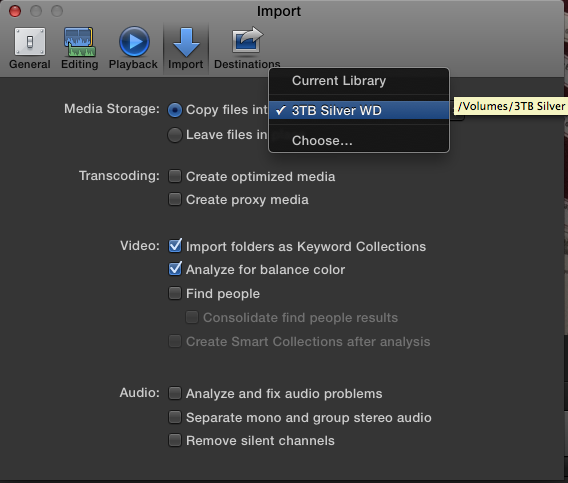
PS Think I found the settings: see image
MBP retina 15" 2014
imac 27 i7 2013
G-tech
Panasonic GH4, AC90, Gopro
Replied by gaddster on topic Storing Libraries on external HD?
Hi Tom
Good question, is there a setting somewhere or a preference i can check?
PS Think I found the settings: see image
MBP retina 15" 2014
imac 27 i7 2013
G-tech
Panasonic GH4, AC90, Gopro
Last edit: 05 Apr 2014 10:10 by gaddster.
Please Log in to join the conversation.
- Tom Wolsky
-
- Offline
- Moderator
-
05 Apr 2014 11:40 #44077
by Tom Wolsky
Replied by Tom Wolsky on topic Storing Libraries on external HD?
That's it. With that selected the media will go to the root level of the drive. If you want the media in a folder, select Choose and make a new folder or point to an existing one. Or if you want managed media, just select copy files to library.
Please Log in to join the conversation.
05 Apr 2014 12:04 #44078
by gaddster
MBP retina 15" 2014
imac 27 i7 2013
G-tech
Panasonic GH4, AC90, Gopro
Replied by gaddster on topic Storing Libraries on external HD?
Hi Tom, thanks again
When you say 'managed media' do I use 'finder' to copy and paste or is there a function within FCPX?
i have 5 libraries for 5 clients, each library has multiple projects etc so do I create one folder to hold all the footage for that 'Library' or should each project have a different folder?
Think I am getting myself confused now sorry lol
When you say 'managed media' do I use 'finder' to copy and paste or is there a function within FCPX?
i have 5 libraries for 5 clients, each library has multiple projects etc so do I create one folder to hold all the footage for that 'Library' or should each project have a different folder?
Think I am getting myself confused now sorry lol
MBP retina 15" 2014
imac 27 i7 2013
G-tech
Panasonic GH4, AC90, Gopro
Please Log in to join the conversation.
- Tom Wolsky
-
- Offline
- Moderator
-
05 Apr 2014 12:12 - 05 Apr 2014 12:18 #44079
by Tom Wolsky
Replied by Tom Wolsky on topic Storing Libraries on external HD?
Managed media means media that's inside the library bundle itself. External media means media that's outside the library bundle store in a folder.
If you want to put the media in a specific location do it inside FCP using File>Consolidate Library or whatever it says. That function will allow you to either consolidate all the media by copying it into the library bundle, or can also be used to copy it to a specific location, like a separate folder for each library.
Probably best to have a separate library for each production and keep all a client's libraries bundled together in a folder. Hopefully the whole drive is being backed up regularly.
I don't know maybe not. Depends on how large the productions are. You don't what the libraries to grow too large.
If you want to put the media in a specific location do it inside FCP using File>Consolidate Library or whatever it says. That function will allow you to either consolidate all the media by copying it into the library bundle, or can also be used to copy it to a specific location, like a separate folder for each library.
Probably best to have a separate library for each production and keep all a client's libraries bundled together in a folder. Hopefully the whole drive is being backed up regularly.
I don't know maybe not. Depends on how large the productions are. You don't what the libraries to grow too large.
Last edit: 05 Apr 2014 12:18 by Tom Wolsky.
Please Log in to join the conversation.
05 Apr 2014 12:45 #44080
by gaddster
MBP retina 15" 2014
imac 27 i7 2013
G-tech
Panasonic GH4, AC90, Gopro
Replied by gaddster on topic Storing Libraries on external HD?
Great thanks for your help Tom
I have used the 'consolidate' command and it has copied all the media into that library.. it has left a copy of the media in the original place, shall i just delete that media now?
I have used the 'consolidate' command and it has copied all the media into that library.. it has left a copy of the media in the original place, shall i just delete that media now?
MBP retina 15" 2014
imac 27 i7 2013
G-tech
Panasonic GH4, AC90, Gopro
Please Log in to join the conversation.
- Tom Wolsky
-
- Offline
- Moderator
-
05 Apr 2014 12:53 #44081
by Tom Wolsky
Replied by Tom Wolsky on topic Storing Libraries on external HD?
Yes after verifying the media is in the library by using the reveal in Finder function.
You can consolidate out of the library at any time should the library get too large. Toucan also consolidate specific events to put the media on that event in a separate location.
You can consolidate out of the library at any time should the library get too large. Toucan also consolidate specific events to put the media on that event in a separate location.
Please Log in to join the conversation.
05 Apr 2014 12:54 #44082
by gaddster
MBP retina 15" 2014
imac 27 i7 2013
G-tech
Panasonic GH4, AC90, Gopro
Replied by gaddster on topic Storing Libraries on external HD?
Excellent
Thanks Tom for your time and help
Thanks Tom for your time and help
MBP retina 15" 2014
imac 27 i7 2013
G-tech
Panasonic GH4, AC90, Gopro
Please Log in to join the conversation.
