


- Posts: 33
- Thank you received: 17
3 Post Moderation Rule for New Boarders (25 Jan 2021)
New boarders will have their posts moderated - Don't worry if you cannot see your post immediately.
HD media in SD timeline don't look well...
05 Apr 2014 08:25 - 05 Apr 2014 08:26 #44070
by cv21
HD media in SD timeline don't look well... was created by cv21
Hello, sorry for bad english, I'm french.
In my job, we need to work with SD4/3 timeline (PAL 25i SD16/9 in september). We mix SD or HD media from our camcorders. Their is no problem with FCP6 or FCP7, they mix very easily all formats we use in PAL DV 48hz 25i etc...timeline (only a little more time render with HD).
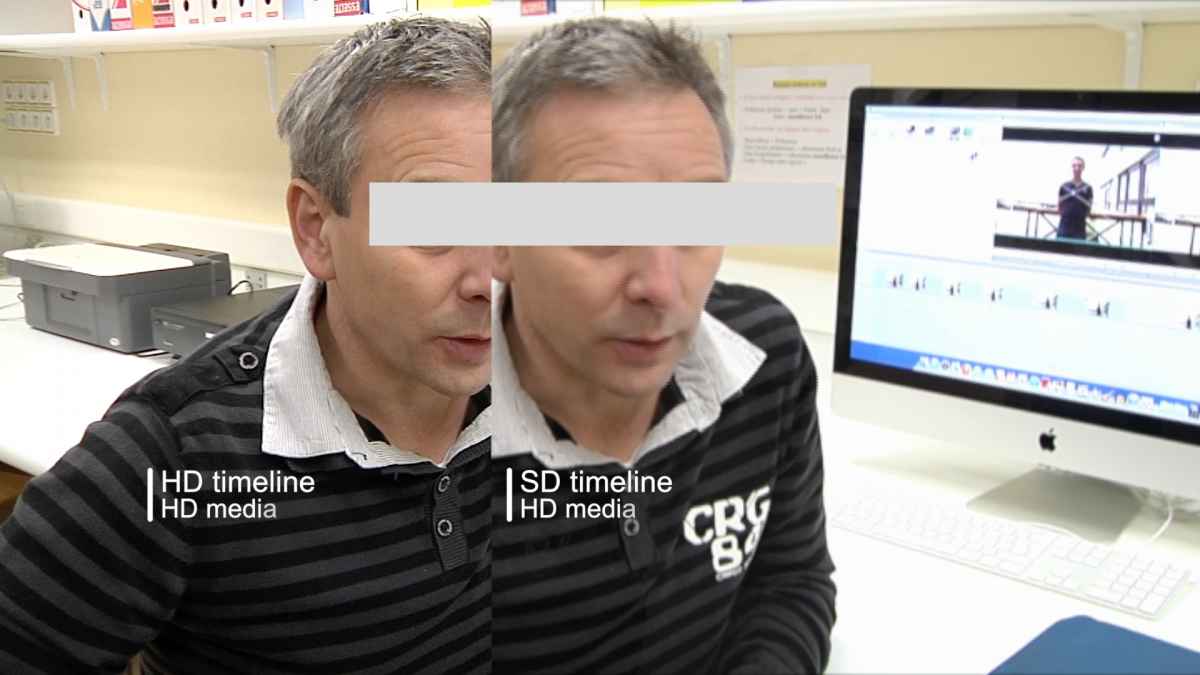
With FCPX that don't work at all since 10.0 to 10.1 ! When I import HD media in SD timeline their is a "blur" effect (image is not good). I try: convert to ProsRes or no (source: AVCHD, AVCIntra100, DVCPro??), fit, fill and none...frame up,low,any ...after sharing it's always the same.
At work we use 10.9 and 10.6 they will be upgrade next month, at home I use 10.1. When I know that at need to mix SD and HD media I use FCP6!
It's a boring situation. Do you have the same problem ? Any solution ?
In my job, we need to work with SD4/3 timeline (PAL 25i SD16/9 in september). We mix SD or HD media from our camcorders. Their is no problem with FCP6 or FCP7, they mix very easily all formats we use in PAL DV 48hz 25i etc...timeline (only a little more time render with HD).
With FCPX that don't work at all since 10.0 to 10.1 ! When I import HD media in SD timeline their is a "blur" effect (image is not good). I try: convert to ProsRes or no (source: AVCHD, AVCIntra100, DVCPro??), fit, fill and none...frame up,low,any ...after sharing it's always the same.
At work we use 10.9 and 10.6 they will be upgrade next month, at home I use 10.1. When I know that at need to mix SD and HD media I use FCP6!
It's a boring situation. Do you have the same problem ? Any solution ?
Last edit: 05 Apr 2014 08:26 by cv21.
Please Log in to join the conversation.
- ronny courtens
-

- Offline
- Moderator
-

Less
More
- Posts: 4455
- Thank you received: 962
05 Apr 2014 09:44 #44072
by ronny courtens
Replied by ronny courtens on topic HD media in SD timeline don't look well...
We often need to export SD versions from shows we are cutting in HD, never seen this problem before.
What are your Project settings? How do you export your timeline? As a master file?
-Ronny
What are your Project settings? How do you export your timeline? As a master file?
-Ronny
Please Log in to join the conversation.
05 Apr 2014 10:09 #44076
by cv21
Replied by cv21 on topic HD media in SD timeline don't look well...
Thanks, for the information, it's a good news !
I'm not at work but with fcp6 we work with PAL DV 48khz 25i frame up first (maybe).
In FCPX :
Project settings : I try with PAL SD 720*576 DV 25i and I try with PAL SD 720*576 (without DV).
Export settings : codec Apple ProRes422, resolution: 'same as source', file : Quicktime PCM linear.
Thanks for the answer.
I'm not at work but with fcp6 we work with PAL DV 48khz 25i frame up first (maybe).
In FCPX :
Project settings : I try with PAL SD 720*576 DV 25i and I try with PAL SD 720*576 (without DV).
Export settings : codec Apple ProRes422, resolution: 'same as source', file : Quicktime PCM linear.
Thanks for the answer.
Please Log in to join the conversation.
- ronny courtens
-
- Offline
- Moderator
-
Less
More
- Posts: 4455
- Thank you received: 962
05 Apr 2014 16:45 - 05 Apr 2014 16:47 #44095
by ronny courtens
Replied by ronny courtens on topic HD media in SD timeline don't look well...
Hello again,
Are you by any chance working with anamorphic (not full-raster) HD such as DVCPRO HD? Because that's the only reason I can think of that could cause the blurriness in the SD timeline that I see in your screenshot.
Here's an example of how FCP X deals with converting native 1080p25 XDCAM HD to interlaced PAL DV:
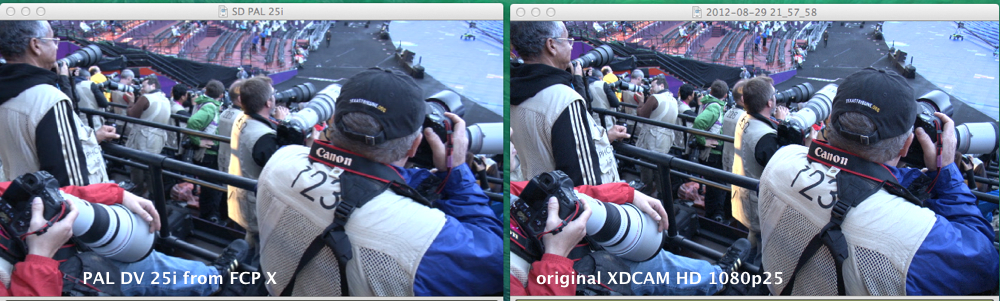
The blurring is certainly not comparable to the screenshot you have posted. The DV image is slightly softer because DV simply has less resolution than native full-raster HD. And the slight aliasing on the DV clip is due to the fact this is a still interlaced frame shown on a progressive monitor. When you play the file the interlacing is gone.
I remember we had a discussion about a similar issue a long time ago, and this was related to working with anamorphic video. But this issue was fixed in a next update of FCP X.
So you certainly should update FCP X to the latest version and then try this again. If you still have issues then, feel free to post back here so we can find out what could be going wrong. It's certainly not a specific FCP X problem.
- Ronny
Are you by any chance working with anamorphic (not full-raster) HD such as DVCPRO HD? Because that's the only reason I can think of that could cause the blurriness in the SD timeline that I see in your screenshot.
Here's an example of how FCP X deals with converting native 1080p25 XDCAM HD to interlaced PAL DV:
The blurring is certainly not comparable to the screenshot you have posted. The DV image is slightly softer because DV simply has less resolution than native full-raster HD. And the slight aliasing on the DV clip is due to the fact this is a still interlaced frame shown on a progressive monitor. When you play the file the interlacing is gone.
I remember we had a discussion about a similar issue a long time ago, and this was related to working with anamorphic video. But this issue was fixed in a next update of FCP X.
So you certainly should update FCP X to the latest version and then try this again. If you still have issues then, feel free to post back here so we can find out what could be going wrong. It's certainly not a specific FCP X problem.
- Ronny
Last edit: 05 Apr 2014 16:47 by ronny courtens.
Please Log in to join the conversation.
07 Apr 2014 17:35 #44183
by cv21
Replied by cv21 on topic HD media in SD timeline don't look well...
Hello Ronny,
Thanks for the answer.
I wait for uptade (with mavericks and FCP 10.1 at my job) for looking again if there is a problem. For the news I use ofen only timelines in HD or SD. So I can wait for this uptade. If it's work for you it must work for me too ! I will write a post and certainly this issue will be close.
Thank's a lot.
- Christian.
Thanks for the answer.
I wait for uptade (with mavericks and FCP 10.1 at my job) for looking again if there is a problem. For the news I use ofen only timelines in HD or SD. So I can wait for this uptade. If it's work for you it must work for me too ! I will write a post and certainly this issue will be close.
Thank's a lot.
- Christian.
Please Log in to join the conversation.
- ronny courtens
-
- Offline
- Moderator
-
Less
More
- Posts: 4455
- Thank you received: 962
07 Apr 2014 17:38 #44184
by ronny courtens
Replied by ronny courtens on topic HD media in SD timeline don't look well...
Hey Christian,
Okay, try it and if you have any further questions post back here and we will assist you.
Bonne soirée!
- Ronny
Okay, try it and if you have any further questions post back here and we will assist you.
Bonne soirée!
- Ronny
Please Log in to join the conversation.
