


- Posts: 402
- Thank you received: 72
3 Post Moderation Rule for New Boarders (25 Jan 2021)
New boarders will have their posts moderated - Don't worry if you cannot see your post immediately.
Sharing Projects on SAN
- haysoos123
-
 Topic Author
- Offline
- Platinum Member
-

Less
More
04 Apr 2014 18:39 #44026
by haysoos123
Sharing Projects on SAN was created by haysoos123
Hi guys,
I have a workflow question about our new 10 GigE SAN (is it now considered a NAS??) that we've got in our place for a few weeks now. Before, we had a fibre channel SAN system, but I decided it would be more cost-effective and flexible to go with ethernet on brand new system (we were actually able to reformat our old RAIDS into a Tier 2 system now, so it's great). The edit bays are on 10 GigE, and pretty much anyone else can jack in with 1 GigE if they need to, which is really great.
The one big wrinkle so far is that FCPX doesn't support Libraries on a network volume. Currently, we keep all the media on the SAN and that works great, but the libraries are local to each machine. Ideally, we would like to keep all projects on the SAN in spaces separated by client/project. Also, the SAN can be set up to perform a nightly backup of projects very easily this way. With the advent of libraries in 10.1, we ditched our use of sparse bundles, but now it seems that the only way to do this is to put the libraries in sparse bundles again. Is this what people are still doing as a work-around?
I have a workflow question about our new 10 GigE SAN (is it now considered a NAS??) that we've got in our place for a few weeks now. Before, we had a fibre channel SAN system, but I decided it would be more cost-effective and flexible to go with ethernet on brand new system (we were actually able to reformat our old RAIDS into a Tier 2 system now, so it's great). The edit bays are on 10 GigE, and pretty much anyone else can jack in with 1 GigE if they need to, which is really great.
The one big wrinkle so far is that FCPX doesn't support Libraries on a network volume. Currently, we keep all the media on the SAN and that works great, but the libraries are local to each machine. Ideally, we would like to keep all projects on the SAN in spaces separated by client/project. Also, the SAN can be set up to perform a nightly backup of projects very easily this way. With the advent of libraries in 10.1, we ditched our use of sparse bundles, but now it seems that the only way to do this is to put the libraries in sparse bundles again. Is this what people are still doing as a work-around?
Please Log in to join the conversation.
- ronny courtens
-

- Offline
- Moderator
-

Less
More
- Posts: 4455
- Thank you received: 962
05 Apr 2014 07:52 #44068
by ronny courtens
Replied by ronny courtens on topic Sharing Projects on SAN
Can you post a diagram of your 10 GigE setup? If you cannot post it in a screenshot you can send it in PDF format to ronnycourtens(at)mac(dot)com.
Please also mention what kind of hardware this setup includes (brands and models).
-Ronny
Please also mention what kind of hardware this setup includes (brands and models).
-Ronny
Please Log in to join the conversation.
- haysoos123
-
Topic Author
- Offline
- Platinum Member
-
Less
More
- Posts: 402
- Thank you received: 72
07 Apr 2014 21:13 #44195
by haysoos123
Replied by haysoos123 on topic Sharing Projects on SAN
Hi Ronny, thanks for a taking a look, and it's NAB week no less!
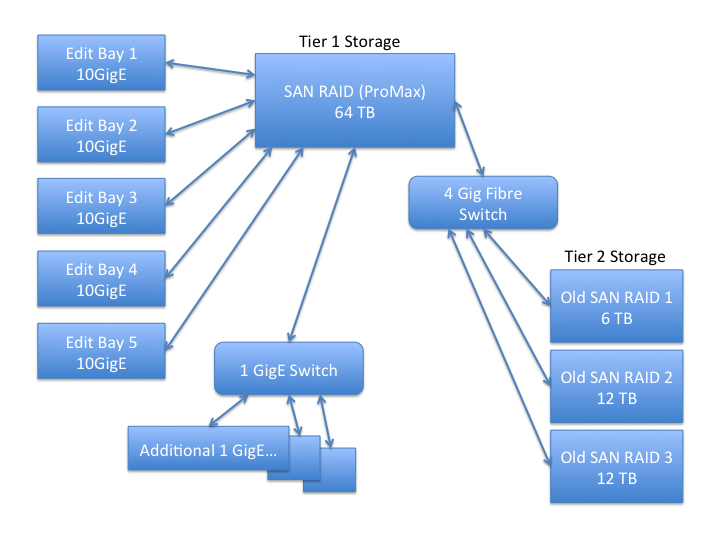
It's a ProMax Platform SAN that has both a 10 GigE and a 4 Gig Fibre card on it. The server and the RAID is all in one box, and it runs Windows Server 8. What's interesting about this setup is that it connects via 4 Gig fibre to our old RAIDs, but those volumes are also served through the same front-end through 10 GigE and 1 GigE to all the clients (it is now Tier 2 storage). We are not running a 10 GigE switch currently because we don't have more than 7 edit bays, and the 1 GigE connections are for more "casual" users (although it works great with HD ProRes). We run optical fibre to all the 10 GigE bays.
The most important detail is that this setup is NOT an XSAN (and even our old RAID was using SANmp, and never an XSAN), so it has the quirks of an ethernet system. The protocol I believe is SMB2.
The biggest issue we have is that FCPX can't run a Library off the SAN volumes unless it's contained in a sparse bundle. I've had some weird issues with sparse bundles and large Libraries where it claims that "there's not enough space" when you try to do simple operations, even when I allow way more space than needed. It's a workaround I'd love to avoid.
Anyway, I'm attaching a diagram of our system.
thanks!
It's a ProMax Platform SAN that has both a 10 GigE and a 4 Gig Fibre card on it. The server and the RAID is all in one box, and it runs Windows Server 8. What's interesting about this setup is that it connects via 4 Gig fibre to our old RAIDs, but those volumes are also served through the same front-end through 10 GigE and 1 GigE to all the clients (it is now Tier 2 storage). We are not running a 10 GigE switch currently because we don't have more than 7 edit bays, and the 1 GigE connections are for more "casual" users (although it works great with HD ProRes). We run optical fibre to all the 10 GigE bays.
The most important detail is that this setup is NOT an XSAN (and even our old RAID was using SANmp, and never an XSAN), so it has the quirks of an ethernet system. The protocol I believe is SMB2.
The biggest issue we have is that FCPX can't run a Library off the SAN volumes unless it's contained in a sparse bundle. I've had some weird issues with sparse bundles and large Libraries where it claims that "there's not enough space" when you try to do simple operations, even when I allow way more space than needed. It's a workaround I'd love to avoid.
Anyway, I'm attaching a diagram of our system.
thanks!
Please Log in to join the conversation.
