


- Posts: 3
- Thank you received: 0
3 Post Moderation Rule for New Boarders (25 Jan 2021)
New boarders will have their posts moderated - Don't worry if you cannot see your post immediately.
FCPX 10.1.1 Two Big Issues For Me
- Markmulvany
-
 Topic Author
- Offline
- New Member
-

Less
More
02 Apr 2014 13:40 - 02 Apr 2014 13:42 #43917
by Markmulvany
FCPX 10.1.1 Two Big Issues For Me was created by Markmulvany
I am curious if anyone is having these issues and can offer some help.
1. We shoot multiple cameras on Panasonic AC 160's. 64 GB SDXC cards and we use both slots to have a duplicate. After this weekend, on 2 separate sets of cards, from 2 different cameras I noticed that FCPX was doing the following in 10.1.1
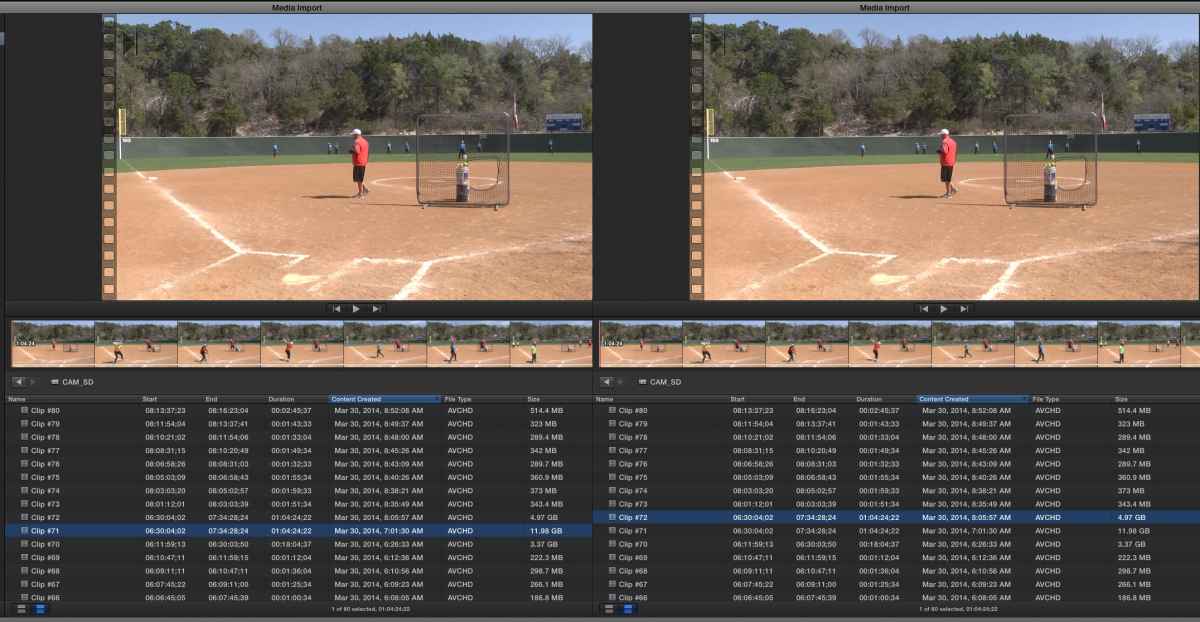
Scene file #80 was about 1:15:00 in length and Scene file #81 was about 00:30:00 in length. When importing the files, FCPX would show the 2 files were different sizes, however, for some reason it was reading the files as duplicates and only allowing import of one file. This happened on 2 different sets of cards from 2 different cameras. So, it appears that something is happening when a file reaches a certain size (almost 20 GB) that it effects the next scene. Why would it do this? How do I fix? Screen shot shows issue with scene files #71 and #72. It shows they are supposed to be different sizes, but it recognizes the larger file in place of the smaller file for import purposes.
2. Another issue that I have encountered is some sort of pixilation (spelling?) that takes place as I use the arrow keys to go through the file in slow motion.

Maybe I need to change my import preferences somehow?
I have another machine in which I didn't update to Maverick and I didn't update to the 10.1.1
No issues at all. No pixilation issues as I go frame by frame, and it recognizes the scene files as separate and different videos.
1. We shoot multiple cameras on Panasonic AC 160's. 64 GB SDXC cards and we use both slots to have a duplicate. After this weekend, on 2 separate sets of cards, from 2 different cameras I noticed that FCPX was doing the following in 10.1.1
Scene file #80 was about 1:15:00 in length and Scene file #81 was about 00:30:00 in length. When importing the files, FCPX would show the 2 files were different sizes, however, for some reason it was reading the files as duplicates and only allowing import of one file. This happened on 2 different sets of cards from 2 different cameras. So, it appears that something is happening when a file reaches a certain size (almost 20 GB) that it effects the next scene. Why would it do this? How do I fix? Screen shot shows issue with scene files #71 and #72. It shows they are supposed to be different sizes, but it recognizes the larger file in place of the smaller file for import purposes.
2. Another issue that I have encountered is some sort of pixilation (spelling?) that takes place as I use the arrow keys to go through the file in slow motion.
Maybe I need to change my import preferences somehow?
I have another machine in which I didn't update to Maverick and I didn't update to the 10.1.1
No issues at all. No pixilation issues as I go frame by frame, and it recognizes the scene files as separate and different videos.
Last edit: 02 Apr 2014 13:42 by Markmulvany.
Please Log in to join the conversation.
- ronny courtens
-

- Offline
- Moderator
-

Less
More
- Posts: 4455
- Thank you received: 962
02 Apr 2014 14:10 #43920
by ronny courtens
Replied by ronny courtens on topic FCPX 10.1.1 Two Big Issues For Me
Thank you for posting this. It is clear that this could indicate a problem with 10.1/Mavericks and large AVCHD files. I haven't noticed any such issues myself, so this is what I would suggest:
Refresh your FCPX preferences with Preference Manager X (free). Make sure to restart the computer after having refreshed the prefs. Then see if this resolves the issues.
If that does not solve the issues: submit immediate feedback to Apple. We are expecting a bug-fix update for FCP X and Mavericks, so now is the time
Of course this does not solve your immediate problem. The only real workaround I can think of at this moment is to convert the problematic long clips to ProRes in another application, the try importing them again. If any other members have a better idea I'm sure they will chime in.
-Ronny
Refresh your FCPX preferences with Preference Manager X (free). Make sure to restart the computer after having refreshed the prefs. Then see if this resolves the issues.
If that does not solve the issues: submit immediate feedback to Apple. We are expecting a bug-fix update for FCP X and Mavericks, so now is the time
Of course this does not solve your immediate problem. The only real workaround I can think of at this moment is to convert the problematic long clips to ProRes in another application, the try importing them again. If any other members have a better idea I'm sure they will chime in.
-Ronny
Please Log in to join the conversation.
- Markmulvany
-
Topic Author
- Offline
- New Member
-
Less
More
- Posts: 3
- Thank you received: 0
02 Apr 2014 14:17 #43921
by Markmulvany
Replied by Markmulvany on topic FCPX 10.1.1 Two Big Issues For Me
Thanks for the feedback, Ronny.
That is what I've done in the meantime, used our other computer with the previous version to import those clips. Then import the clip back into the project.
That is what I've done in the meantime, used our other computer with the previous version to import those clips. Then import the clip back into the project.
Please Log in to join the conversation.
- ronny courtens
-
- Offline
- Moderator
-
Less
More
- Posts: 4455
- Thank you received: 962
02 Apr 2014 14:22 #43922
by ronny courtens
Replied by ronny courtens on topic FCPX 10.1.1 Two Big Issues For Me
Good thinking! I have no similar media to test this now, but as exactly the same media work with older versions of X and the OS this certainly looks like a bug. Please use the feedback page to report this and add a link to this thread so they can see the screenshots.
- Ronny
- Ronny
Please Log in to join the conversation.
