


- Posts: 2
- Thank you received: 0
3 Post Moderation Rule for New Boarders (25 Jan 2021)
New boarders will have their posts moderated - Don't worry if you cannot see your post immediately.
How to set an end point to a project?!?! ( noobie )
- caplus12000
-
 Topic Author
- Offline
- New Member
-

- hello, i like noodles
Less
More
01 Apr 2014 07:18 #43848
by caplus12000
How to set an end point to a project?!?! ( noobie ) was created by caplus12000
I made a short video, about 2:40mins but when i exported, it took FOREVER and the final video was like 14Mins. It was just black/no sound after the video itself finished at 2:40.
Please Log in to join the conversation.
- ronny courtens
-

- Offline
- Moderator
-

Less
More
- Posts: 4455
- Thank you received: 962
01 Apr 2014 08:09 #43850
by ronny courtens
Replied by ronny courtens on topic How to set an end point to a project?!?! ( noobie )
This sounds familiar. What version of FCPX are you using?
-Ronny
-Ronny
Please Log in to join the conversation.
- Daniel Rutledge
-
- Offline
- Premium Member
-

- Those that know don't tell, and those that tell don't know.
01 Apr 2014 14:08 #43858
by Daniel Rutledge
Replied by Daniel Rutledge on topic How to set an end point to a project?!?! ( noobie )
It sounds like Ronny has recognized a bug, so I am sure you should listen to what he has to say. To answer your question: Mark in (I) at the first frame of the project and out (O) after the last frame. Then export. This is handy for exporting just portions of a project too. Also check to make sure that there isn't a gap clip at the end of your project. Sometimes when you are shuffling around connected clips FCPX will generate a gap clip at the end of a project.
Please Log in to join the conversation.

01 Apr 2014 14:13 #43859
by anickt
Replied by anickt on topic How to set an end point to a project?!?! ( noobie )
What Daniel says is most likely the issue.
As an aside, I have never been able to mark an in and out point and have FCP X export just that section. This is on more than one system and over several versions. I'm surprised nobody else has mentioned it but it's a potential probelm to be aware of.
Fortunately I don't have much need for that function anyway.
As an aside, I have never been able to mark an in and out point and have FCP X export just that section. This is on more than one system and over several versions. I'm surprised nobody else has mentioned it but it's a potential probelm to be aware of.
Fortunately I don't have much need for that function anyway.
Please Log in to join the conversation.
- Daniel Rutledge
-
- Offline
- Premium Member
-
- Those that know don't tell, and those that tell don't know.
01 Apr 2014 14:18 #43860
by Daniel Rutledge
Replied by Daniel Rutledge on topic How to set an end point to a project?!?! ( noobie )
What version are you using? That has been a feature since at least 10.9 I think. Definitely it is now.
Please Log in to join the conversation.
- Andreas Kiel
-
- Offline
- Platinum Member
-

Less
More
- Posts: 1077
- Thank you received: 189
01 Apr 2014 14:41 #43861
by Andreas Kiel
Replied by Andreas Kiel on topic How to set an end point to a project?!?! ( noobie )
Its quite annoying some times.
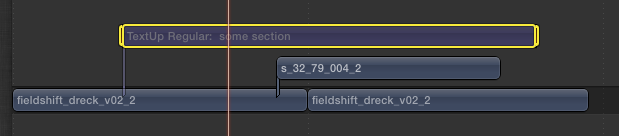
An easy workaround is to put an empty (or even not visible) title or adjustment layer in the timeline.
This allows to adjust to export selections.
-Andreas
An easy workaround is to put an empty (or even not visible) title or adjustment layer in the timeline.
This allows to adjust to export selections.
-Andreas
Please Log in to join the conversation.
01 Apr 2014 14:45 #43863
by anickt
Replied by anickt on topic How to set an end point to a project?!?! ( noobie )
Thanks Andreas - I'll try that
Daniel - I am on 10.1.1 but it has never worked for me in any version since the feature was introduced.
Daniel - I am on 10.1.1 but it has never worked for me in any version since the feature was introduced.
Please Log in to join the conversation.
- Daniel Rutledge
-
- Offline
- Premium Member
-
- Those that know don't tell, and those that tell don't know.
01 Apr 2014 14:51 #43865
by Daniel Rutledge
Replied by Daniel Rutledge on topic How to set an end point to a project?!?! ( noobie )
That's really strange. I sometimes find certain functions stop working when I use a custom keyboard command setup, even if customized keys don't effect that function. Have you tried it with the default keyboard active? Does it not let you set in and out points at all, or does it just not export the selection? Have you tried both using the Range tool and setting i and o with the keyboard? Also, what machine are you using?
Please Log in to join the conversation.
- Andreas Kiel
-
- Offline
- Platinum Member
-
Less
More
- Posts: 1077
- Thank you received: 189
01 Apr 2014 15:21 #43866
by Andreas Kiel
Here a little screenshot for the setup:
-Andreas
Replied by Andreas Kiel on topic How to set an end point to a project?!?! ( noobie )
anickt wrote: Thanks Andreas - I'll try that
Daniel - I am on 10.1.1 but it has never worked for me in any version since the feature was introduced.
Here a little screenshot for the setup:
-Andreas
Please Log in to join the conversation.
- Tom Wolsky
-

- Offline
- Moderator
-
01 Apr 2014 15:53 #43867
by Tom Wolsky
Replied by Tom Wolsky on topic How to set an end point to a project?!?! ( noobie )
You can mark the I/O in the primary storyline for an export segment. It will be confirmed in the export dialog. I have never seen it fail since it was introduced.
Please Log in to join the conversation.
- Andreas Kiel
-
- Offline
- Platinum Member
-
Less
More
- Posts: 1077
- Thank you received: 189
01 Apr 2014 16:38 #43868
by Andreas Kiel
Replied by Andreas Kiel on topic How to set an end point to a project?!?! ( noobie )
Tom,
You are right. But I've seen it failing several times for no obvious reasons.
The method I explained using the "overlays" always worked.
Another reason I use it is that you can set up some of the invisible regions, name them (apply a role maybe) and always can select them in the timeline index.
That is not only a big time saver when doing exports but also when doing partial renderings of a multi-lane timeline.
Making them visible can also be a help for versioning.
Only my 2 cents (Euro)
-Andreas
You are right. But I've seen it failing several times for no obvious reasons.
The method I explained using the "overlays" always worked.
Another reason I use it is that you can set up some of the invisible regions, name them (apply a role maybe) and always can select them in the timeline index.
That is not only a big time saver when doing exports but also when doing partial renderings of a multi-lane timeline.
Making them visible can also be a help for versioning.
Only my 2 cents (Euro)
-Andreas
Please Log in to join the conversation.
- caplus12000
-
Topic Author
- Offline
- New Member
-
- hello, i like noodles
Less
More
- Posts: 2
- Thank you received: 0
02 Apr 2014 06:00 #43909
by caplus12000
Replied by caplus12000 on topic How to set an end point to a project?!?! ( noobie )
Thanks for your input guys! Fortunately, I've fixed my issue. I right clicked the timeline and selected "change duration" and set it to 2:40. The video then took about 10 mins to export and there wasn't any blank footage! BTW I was using 10.1.1 I think
Please Log in to join the conversation.
- Tom Wolsky
-
- Offline
- Moderator
-
02 Apr 2014 07:12 #43911
by Tom Wolsky
Replied by Tom Wolsky on topic How to set an end point to a project?!?! ( noobie )
This doesn't sound like a project. It sounds as if you've been editing inside a clip.
Please Log in to join the conversation.
