


- Posts: 384
- Thank you received: 23
3 Post Moderation Rule for New Boarders (25 Jan 2021)
New boarders will have their posts moderated - Don't worry if you cannot see your post immediately.
Stuttering playback
30 Mar 2014 09:56 - 30 Mar 2014 09:56 #43776
by Makki
Stuttering playback was created by Makki
I do not know if this is normal. On a brand new Mac Pro 6 Core. Default Graphic card On playback unrendered clips stutter on playback. This is ok with simple color correction but when adding simple dissolve or effect and specially compound clips play almost stops completely. It makes no difference switching to better performance. I was expecting something more from my workhorse. Maybe I am expecting to much ?
Last edit: 30 Mar 2014 09:56 by Makki.
Please Log in to join the conversation.
- ronny courtens
-

- Offline
- Moderator
-

Less
More
- Posts: 4455
- Thank you received: 962
30 Mar 2014 10:33 #43777
by ronny courtens
Replied by ronny courtens on topic Stuttering playback
Of course it all depends on your exact setup, but what you are describing is absolutely not normal.
- What media are you working with?
- Do you store your Libraries and your media on an external drive and if so: which one?
Ronny
- What media are you working with?
- Do you store your Libraries and your media on an external drive and if so: which one?
Ronny
Please Log in to join the conversation.
- ronny courtens
-
- Offline
- Moderator
-
Less
More
- Posts: 4455
- Thank you received: 962
30 Mar 2014 11:28 #43779
by ronny courtens
Replied by ronny courtens on topic Stuttering playback
I don't think it has anything to do with your computer. Just to make sure perform a Repair Permissions on your system drive and refresh your FCPX preferences with Preference Manager X.
If this does not help: try converting a small part of your EX to ProRes 422 with Streamclip or any other app, import the ProRes clips in FCPX and see if you have the same problems. I don't think you will. XDCAM HD and EX footage should absolutely not be considered as optimized for FCPX, because they aren't. I have already posted feedback about this many times.
-Ronny
If this does not help: try converting a small part of your EX to ProRes 422 with Streamclip or any other app, import the ProRes clips in FCPX and see if you have the same problems. I don't think you will. XDCAM HD and EX footage should absolutely not be considered as optimized for FCPX, because they aren't. I have already posted feedback about this many times.
-Ronny
Please Log in to join the conversation.
30 Mar 2014 11:43 - 30 Mar 2014 11:49 #43780
by Makki
Replied by Makki on topic Stuttering playback
Thank you for you time Ronny. According to Apple white paper is my media optimized. FCP will not allow me to optimize to prores. But I am glad that to hear that my computer is ok. I asked Tom Wolsky on this forum why I could not optimize and he said because it was already optimized. I have tried the suggestions you name but can not hurt to try again.
Tom said this:
Best regards
Makki
Tom said this:
Best regards
Makki
Last edit: 30 Mar 2014 11:49 by Makki.
Please Log in to join the conversation.
30 Mar 2014 11:51 #43781
by Makki
Replied by Makki on topic Stuttering playback
Please Log in to join the conversation.
- ronny courtens
-
- Offline
- Moderator
-
Less
More
- Posts: 4455
- Thank you received: 962
30 Mar 2014 12:47 - 30 Mar 2014 12:48 #43785
by ronny courtens
Replied by ronny courtens on topic Stuttering playback
Hi Makki,
Yes you can batch convert in Streamclip. First let me explain something about XDCAM.
Even though XDCAM EX.mov is wrapped in a MOV container the codec inside it is still MPEG-2 MP@H14/HL, which is a highly compressed inter-frame format using 4.2.0 color sampling. This format is much harder to decode than ProRes 422, a full I-frame transparent format that uses 4.2.2 color sampling.
The same goes for XDCAM HD. This format does not play back smoothly on any NLE, but for some obscure reasons FCPX will refuse to optimize it to ProRes. We have done multiple tests with this on a long-form complex program. Native XDCAM HD would merely play natively using two streams, then we converted the footage to ProRes 422 and we could edit and play the entire program un-rendered on a full-spec iMac with a Promise T Raid.
To do a batch-conversion in MPEG Streamclip:
Choose List > Batch List (or press CMD+B ). This will open the Batch List window.
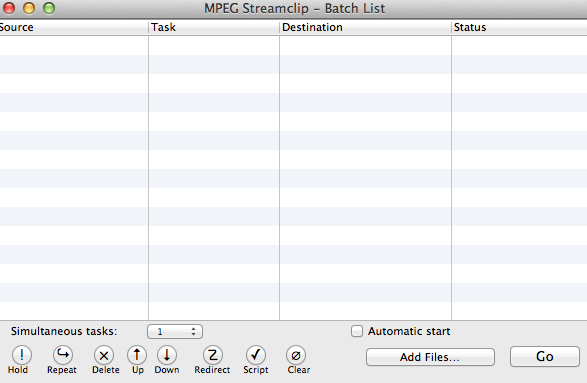
Then press the Add Files button, this will open a Finder window. Group-select all the clips you want to transcode and press the To Batch button
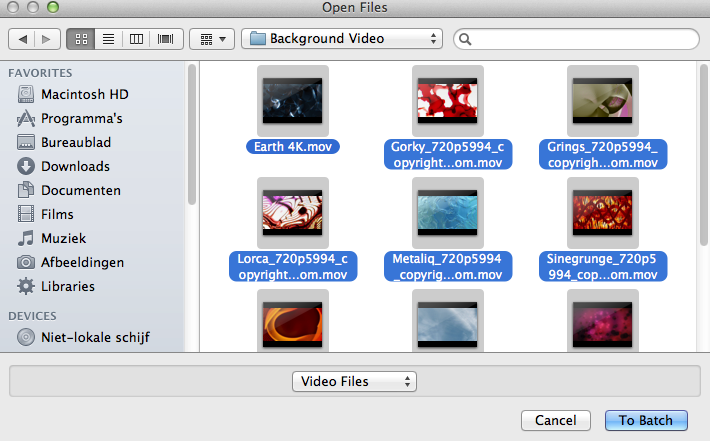
A new window will pop up asking you to what format you wish to transcode the clips. Just select Export to QuickTime and press OK.
Another window will pop up asking you to set a destination folder for the exported clips. Set a destination and press OK.
This will open the final settings window. Select the codec you want (Apple ProRes 422) and don't forget to push the Quality slider to Maximum. Deselect "Interlaced Scaling" for progressive footage. Then press "To Batch".
All your clips will be added to the Batch window, with "Waiting" next to them. To make things go faster you can set the app to handle multiple tasks simultaneously. As you have a multi-core MacPro I would advise you to do this.
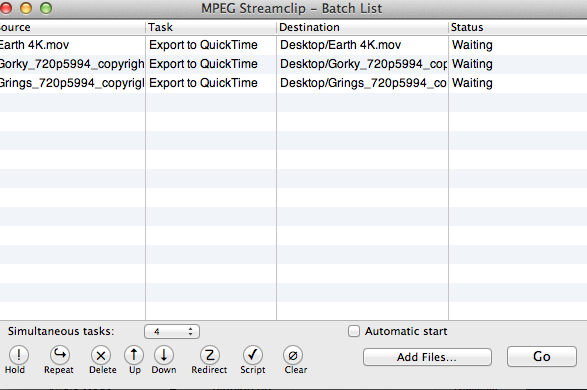
Then the only thing you need to do is press the GO button, your files will be processed and converted to ProRes 422.
TIP:
Always do a test encode with 2 or 3 clips to start with, import them in FCPX and see if everything works as expected to check if you have chosen the correct settings in the Encoder Settings window. If all goes well do the complete batch. If not, report back with the exact format and settings of your original footage and I will advise you which settings you should use in Streamclip.
-Ronny
Yes you can batch convert in Streamclip. First let me explain something about XDCAM.
Even though XDCAM EX.mov is wrapped in a MOV container the codec inside it is still MPEG-2 MP@H14/HL, which is a highly compressed inter-frame format using 4.2.0 color sampling. This format is much harder to decode than ProRes 422, a full I-frame transparent format that uses 4.2.2 color sampling.
The same goes for XDCAM HD. This format does not play back smoothly on any NLE, but for some obscure reasons FCPX will refuse to optimize it to ProRes. We have done multiple tests with this on a long-form complex program. Native XDCAM HD would merely play natively using two streams, then we converted the footage to ProRes 422 and we could edit and play the entire program un-rendered on a full-spec iMac with a Promise T Raid.
To do a batch-conversion in MPEG Streamclip:
Choose List > Batch List (or press CMD+B ). This will open the Batch List window.
Then press the Add Files button, this will open a Finder window. Group-select all the clips you want to transcode and press the To Batch button
A new window will pop up asking you to what format you wish to transcode the clips. Just select Export to QuickTime and press OK.
Another window will pop up asking you to set a destination folder for the exported clips. Set a destination and press OK.
This will open the final settings window. Select the codec you want (Apple ProRes 422) and don't forget to push the Quality slider to Maximum. Deselect "Interlaced Scaling" for progressive footage. Then press "To Batch".
All your clips will be added to the Batch window, with "Waiting" next to them. To make things go faster you can set the app to handle multiple tasks simultaneously. As you have a multi-core MacPro I would advise you to do this.
Then the only thing you need to do is press the GO button, your files will be processed and converted to ProRes 422.
TIP:
Always do a test encode with 2 or 3 clips to start with, import them in FCPX and see if everything works as expected to check if you have chosen the correct settings in the Encoder Settings window. If all goes well do the complete batch. If not, report back with the exact format and settings of your original footage and I will advise you which settings you should use in Streamclip.
-Ronny
Last edit: 30 Mar 2014 12:48 by ronny courtens.
Please Log in to join the conversation.
30 Mar 2014 13:10 #43787
by Makki
Replied by Makki on topic Stuttering playback
This was great Ronny, I think you have finally helped to understand an issue that I have thought about for so long time.
Many Thanks
From Makki.
Many Thanks
From Makki.
Please Log in to join the conversation.
30 Mar 2014 15:11 - 30 Mar 2014 15:12 #43794
by Makki
Replied by Makki on topic Stuttering playback
Hi Ronny
I have some problem. After working with a10 minutes prores project, make some simple color correction on a single clip, the render is extremely slow. Is possible that my CPU is not using its full potential for some reason ?
I have some problem. After working with a10 minutes prores project, make some simple color correction on a single clip, the render is extremely slow. Is possible that my CPU is not using its full potential for some reason ?
Last edit: 30 Mar 2014 15:12 by Makki.
Please Log in to join the conversation.
- ronny courtens
-
- Offline
- Moderator
-
Less
More
- Posts: 4455
- Thank you received: 962
30 Mar 2014 15:18 #43795
by ronny courtens
Replied by ronny courtens on topic Stuttering playback
Actually it's the GPU that is used for rendering most effects. Unless of course you are using third-party color correction plugins that have not yet been optimized for OpenCL? Most Red Giant plugins, including Magic Bullet Looks, are still extremely slow.
-Ronny
-Ronny
Please Log in to join the conversation.
30 Mar 2014 15:46 #43796
by Makki
Replied by Makki on topic Stuttering playback
I think you are right, this was third party plug in. With the usual color correction it is fast, really fast. So I continue to experiment and I think I will stay with pro res.
Thanks again for your help, and I am glad that you did not suspect my computer
Thanks again for your help, and I am glad that you did not suspect my computer
Please Log in to join the conversation.
- ronny courtens
-
- Offline
- Moderator
-
Less
More
- Posts: 4455
- Thank you received: 962
30 Mar 2014 15:57 #43797
by ronny courtens
Replied by ronny courtens on topic Stuttering playback
It will take some time before all third-party developers adapt their plugins for OpenCL. Only such plugins can take full advantage of the dual GPUs in the new MacPro. Another thing to consider is that in the future more plugins will use the new FxPlug architecture to enable faster rendering. The new hardware is finally here and it's blazing fast. Now it's time to adapt the software to fully take advantage of it. Only when this is done will everyone benefit from the tremendous power of the new MacPro.
- Ronny
- Ronny
Please Log in to join the conversation.
30 Mar 2014 17:29 #43799
by Makki
Replied by Makki on topic Stuttering playback
That was good information Ronny. The final question. With the ProRes clips in the viewer The colors seems to be more deep, is this optical imagination or different color included in 4:2:2 ?
Please Log in to join the conversation.
- ronny courtens
-
- Offline
- Moderator
-
Less
More
- Posts: 4455
- Thank you received: 962
30 Mar 2014 17:44 - 30 Mar 2014 17:45 #43800
by ronny courtens
Replied by ronny courtens on topic Stuttering playback
That is one of the most difficult questions to answer. Unless you have a Grade 1 calibrated broadcast monitor hooked to your system it is nearly impossible to judge color differences with the eye.
But there is a known gamut shift when you convert XDCAM to ProRes due to the very different compression schemes in both formats.
- If you would edit and finish using native XDCAM and then output to a ProRes master file or to tape you would see a slight difference between the original files in FCP X and the exported master.
- However, when you convert XDCAM to ProRes 422 prior to importing and you edit and finish in ProRes you can make any color decisions during the edit and your master will look exactly as your finished edit looked in FCP X.
Ronny
But there is a known gamut shift when you convert XDCAM to ProRes due to the very different compression schemes in both formats.
- If you would edit and finish using native XDCAM and then output to a ProRes master file or to tape you would see a slight difference between the original files in FCP X and the exported master.
- However, when you convert XDCAM to ProRes 422 prior to importing and you edit and finish in ProRes you can make any color decisions during the edit and your master will look exactly as your finished edit looked in FCP X.
Ronny
Last edit: 30 Mar 2014 17:45 by ronny courtens.
Please Log in to join the conversation.
01 Apr 2014 14:43 #43862
by Makki
Replied by Makki on topic Stuttering playback
Sorry to bother you again Ronny. I just wonder, when you talk about stutter free and smooth playback, I assume that the playback settings are set to better performance not high quality ?
Makki
Makki
Please Log in to join the conversation.
- ronny courtens
-
- Offline
- Moderator
-
Less
More
- Posts: 4455
- Thank you received: 962
01 Apr 2014 17:28 #43870
by ronny courtens
Replied by ronny courtens on topic Stuttering playback
I mostly use Better Performance, exempt when I want to play the edited timeline for final checks.
-Ronny
-Ronny
Please Log in to join the conversation.
01 Apr 2014 18:27 #43872
by Makki
Replied by Makki on topic Stuttering playback
Thank you. I have discovered a totally new workflow after your suggestions and information. Pro Res is far better than EXDCAM EX in FCPX so now I am very satisfied with the performance.
Thank you so much Ronny
Thank you so much Ronny
Please Log in to join the conversation.
- ronny courtens
-
- Offline
- Moderator
-
Less
More
- Posts: 4455
- Thank you received: 962
01 Apr 2014 18:30 - 01 Apr 2014 18:31 #43873
by ronny courtens
Replied by ronny courtens on topic Stuttering playback
Yes that has been our experience as well. I really don't understand why FCP X does not allow optimizing XDCAM inside the application. This format is absolutely not optimized for any editing. Send feedback to Apple about this, this should change.
-Ronny
-Ronny
Last edit: 01 Apr 2014 18:31 by ronny courtens.
Please Log in to join the conversation.
