


3 Post Moderation Rule for New Boarders (25 Jan 2021)
New boarders will have their posts moderated - Don't worry if you cannot see your post immediately.
Audio syncing issues!!! Please help!!!!
- shutterhire
-
 Topic Author
- Offline
- New Member
-

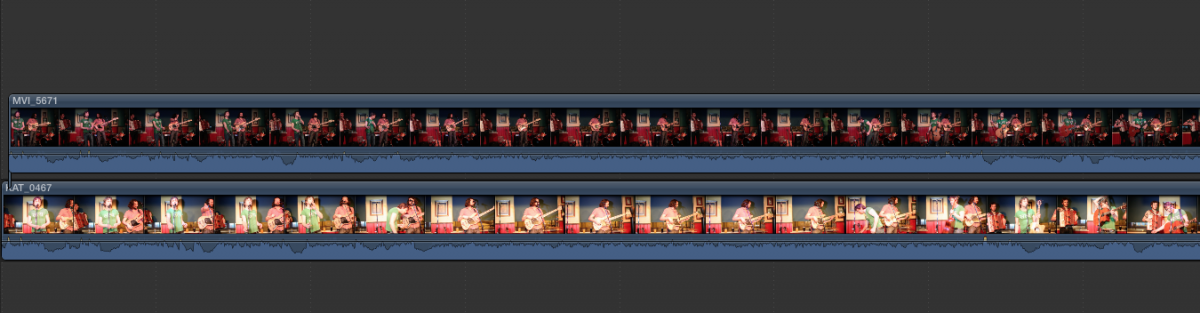
When I place the 650D footage on the timeline and sync it to the audio it matches up fine. When I pull the 5D Mark III footage onto the timeline above the primary storyline to begin syncing it doesn't match up.
I sync the beginning up fine but t will suddenly become out of sync as I play almost as if the footage is faster (or slower) than the 650D footage both filmed at the same frame rate. I often have these problems when working with different cameras and trying to sync up.
Any help would be appreciated!
Thanks in advance
Please Log in to join the conversation.
- shutterhire
-
Topic Author
- Offline
- New Member
-
I synced up the begnning of the videos but the 5D Mark III footage ends before the 650D footage. Very strange!
Please Log in to join the conversation.
- shutterhire
-
Topic Author
- Offline
- New Member
-
Please Log in to join the conversation.

Please Log in to join the conversation.
- shutterhire
-
Topic Author
- Offline
- New Member
-
Please Log in to join the conversation.
- shutterhire
-
Topic Author
- Offline
- New Member
-
Please Log in to join the conversation.
- Tom Wolsky
-

- Offline
- Moderator
-

Please Log in to join the conversation.
OK, what is the audio sample rate of the audio clip you're sync'ing to?
Please Log in to join the conversation.
Please Log in to join the conversation.
- shutterhire
-
Topic Author
- Offline
- New Member
-
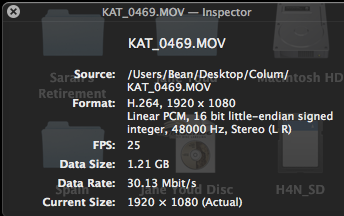
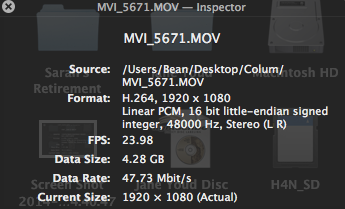
Well that's strange and both cameras were filming at 50fps...
Is there any way to still sync these clips?

Please Log in to join the conversation.
- shutterhire
-
Topic Author
- Offline
- New Member
-
Please Log in to join the conversation.
Please Log in to join the conversation.
- shutterhire
-
Topic Author
- Offline
- New Member
-
Please Log in to join the conversation.
- shutterhire
-
Topic Author
- Offline
- New Member
-
Please Log in to join the conversation.


shutterhire wrote: I did a retime and made the slower clip 4% faster and that is the closest I could get to a sync, although it's still slightly out of sync over time. I can't understand how this has happened with both cameras filming at 50FPS soooo frustrating!
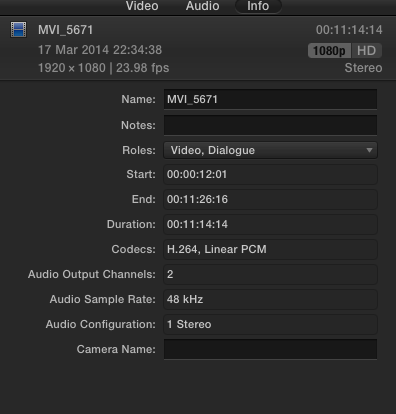
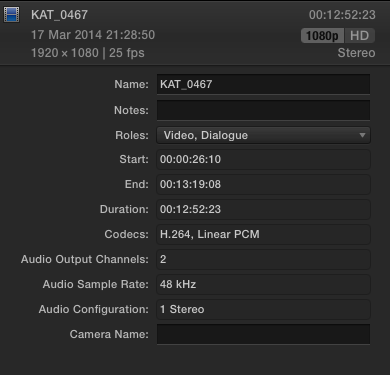
This is just a guess, but: If your material is really 50 fps from both cameras, but FCP thinks one is 23.98 and the other is 25 fps, in an effort to conform two differing frame rates it may somehow be causing the timing difference.
It is suspicious you report one clip is 4% faster -- that is the exact % difference between 23.98 and 25 fps. Of course each one should play back in the same real time, no matter what the frame rate -- provided the playback frame rate is the shooting frame rate.
But FCP believes there are two different media frame rates, so it can (1) Conform them by a rate stretch/shrink (2) Conform them by some other method like pulldown or motion interpolation, or (3) Do nothing. It may have done nothing.
I would suggest you inspect the actual characteristics of your media using an external tool like ExifTool: www.sno.phy.queensu.ca/~phil/exiftool/ or something else.
If both media sets really are 25 fps, then create a new project for 25 fps and import them.
Getting out of sync over time may be either an inexact rate stretch you did, or the camera timebases may be drifting. This is not unknown on extremely long takes like concert performances and lectures.
Please Log in to join the conversation.
