


- Posts: 11
- Thank you received: 0
3 Post Moderation Rule for New Boarders (25 Jan 2021)
New boarders will have their posts moderated - Don't worry if you cannot see your post immediately.
Always stops while editing - showing a slade
26 Mar 2014 20:49 #43499
by mindgap
Always stops while editing - showing a slade was created by mindgap
Hi together,
Hopefully anyone can help me with that issue. I don't know what this can be.
While I'm editing my footage sometimes FCPX stop to work and showing me a grey slade in the preview screen. Don't know what I did in the last days. I only installed a full version of Filmconvert and deleted the preferences using the Preference Manager.
While FCPX stops I don't get the "ball of death" I can do everything in the software but there is no reaction anymore with the footage. When I wait several seconds or minutes or switch the projects I edit in, it starts to work again.
Very strange behavior in my eyes.
My footage is on a Software RAID0 (2x3TB Seagate, USB3, Dockingstation) using the DisK Manager of Apple.
Attached also a screenshot.
Thanks for the help!
Michael
Hopefully anyone can help me with that issue. I don't know what this can be.
While I'm editing my footage sometimes FCPX stop to work and showing me a grey slade in the preview screen. Don't know what I did in the last days. I only installed a full version of Filmconvert and deleted the preferences using the Preference Manager.
While FCPX stops I don't get the "ball of death" I can do everything in the software but there is no reaction anymore with the footage. When I wait several seconds or minutes or switch the projects I edit in, it starts to work again.
Very strange behavior in my eyes.
My footage is on a Software RAID0 (2x3TB Seagate, USB3, Dockingstation) using the DisK Manager of Apple.
Attached also a screenshot.
Thanks for the help!
Michael
Please Log in to join the conversation.
- ronny courtens
-

- Offline
- Moderator
-

Less
More
- Posts: 4455
- Thank you received: 962
27 Mar 2014 11:36 #43549
by ronny courtens
Replied by ronny courtens on topic Always stops while editing - showing a slade
Hello Michael,
Have you been able to work on this same project without any stalling before, or has it been happening since you started using this setup?
What is the format of the video you are editing?
Do you work with optimized media?
What are your Project settings?
-Ronny
Have you been able to work on this same project without any stalling before, or has it been happening since you started using this setup?
What is the format of the video you are editing?
Do you work with optimized media?
What are your Project settings?
-Ronny
Please Log in to join the conversation.
27 Mar 2014 22:54 #43633
by mindgap
Replied by mindgap on topic Always stops while editing - showing a slade
he ronny,
thank you for reply.
the first 5 days were good...yesterday the problem starts....
I use footage from my 5D in h.264 transcoded into optimized media (HD). I let FCPX manage the media by its own (maybe there is the problem?).
I don't know why this behavior started. Totally no clue. Today I deleted the preference files again...and it worked for a while...
thank you for reply.
the first 5 days were good...yesterday the problem starts....
I use footage from my 5D in h.264 transcoded into optimized media (HD). I let FCPX manage the media by its own (maybe there is the problem?).
I don't know why this behavior started. Totally no clue. Today I deleted the preference files again...and it worked for a while...
Please Log in to join the conversation.
- ronny courtens
-
- Offline
- Moderator
-
Less
More
- Posts: 4455
- Thank you received: 962
27 Mar 2014 22:57 #43634
by ronny courtens
Replied by ronny courtens on topic Always stops while editing - showing a slade
Michael,
When you say "I let FCPX manage media by its own", what do you mean by this?
On what drive is your Library stored? On the USB RAID or on your internal drive?
-Ronny
When you say "I let FCPX manage media by its own", what do you mean by this?
On what drive is your Library stored? On the USB RAID or on your internal drive?
-Ronny
Please Log in to join the conversation.
27 Mar 2014 23:00 #43635
by mindgap
Replied by mindgap on topic Always stops while editing - showing a slade
Its all on the USB RAID.
I mean that the original footage is in the library...not outside...(maybe it should?)
I mean that the original footage is in the library...not outside...(maybe it should?)
Please Log in to join the conversation.
- ronny courtens
-
- Offline
- Moderator
-
Less
More
- Posts: 4455
- Thank you received: 962
27 Mar 2014 23:07 #43636
by ronny courtens
Replied by ronny courtens on topic Always stops while editing - showing a slade
No, that wouldn't make a difference since you have optimized the media to ProRes. Optimized and Proxy media are always stored inside the Library (for now).
When this happens, is it only the timeline that you cannot play and view anymore or does it also affect skimming or playing clips in the Event?
-Ronny
When this happens, is it only the timeline that you cannot play and view anymore or does it also affect skimming or playing clips in the Event?
-Ronny
Please Log in to join the conversation.
27 Mar 2014 23:13 #43637
by mindgap
Replied by mindgap on topic Always stops while editing - showing a slade
As far I remember it affected the timeline and the clips in the event...but I have to check that again...
Please Log in to join the conversation.
27 Mar 2014 23:19 - 27 Mar 2014 23:21 #43639
by mindgap
Replied by mindgap on topic Always stops while editing - showing a slade
This is the screen shot I did yesterday...today I did't work long in FCPX. Tomorrow (its night in Europe) I will check what exactly stops to work.

Last edit: 27 Mar 2014 23:21 by mindgap.
Please Log in to join the conversation.
- ronny courtens
-
- Offline
- Moderator
-
Less
More
- Posts: 4455
- Thank you received: 962
27 Mar 2014 23:35 #43641
by ronny courtens
Replied by ronny courtens on topic Always stops while editing - showing a slade
Yep, way past midnight here ace well, so I'm off to bed.
But your screenshot shows exactly what I thought. You get this grey slate in the Viewer when your Project is selected (yellow line around the Project) in the Library Browser. I wish it would not do that, I have submitted feedback about this.
Anyway, this should go away as soon as you click inside the timeline or in a clip in the Event. Does this not happen?
-Ronny
But your screenshot shows exactly what I thought. You get this grey slate in the Viewer when your Project is selected (yellow line around the Project) in the Library Browser. I wish it would not do that, I have submitted feedback about this.
Anyway, this should go away as soon as you click inside the timeline or in a clip in the Event. Does this not happen?
-Ronny
Please Log in to join the conversation.
27 Mar 2014 23:42 #43642
by mindgap
No, nothing happens then. When I go over the footage with the skimmer in the timeline I only see the skimmer following my mouse movements, nothing else. Also the external drive is not responding. The status LED (read/write) is off. When I switch to another project (using the left/right arrows), wait a bit and switch back to the "broken" timeline it works again (also the HDD "wakes up").
So its late. Have a good night there
Replied by mindgap on topic Always stops while editing - showing a slade
ronny courtens wrote:
Anyway, this should go away as soon as you click inside the timeline or in a clip in the Event. Does this not happen?
-Ronny
No, nothing happens then. When I go over the footage with the skimmer in the timeline I only see the skimmer following my mouse movements, nothing else. Also the external drive is not responding. The status LED (read/write) is off. When I switch to another project (using the left/right arrows), wait a bit and switch back to the "broken" timeline it works again (also the HDD "wakes up").
So its late. Have a good night there
Please Log in to join the conversation.
- clapton101
-

- Offline
- New Member
-

Less
More
- Posts: 4
- Thank you received: 0
28 Mar 2014 12:35 #43658
by clapton101
Replied by clapton101 on topic Always stops while editing - showing a slade
This has been reported by one of our editors as well. I haven't figured out why it's happening yet. Sometimes double clicking on the project that is selected will resolve the issue. If that doesn't do it then you have to do as you said and select a different project, wait, then select the offending project again.
Please Log in to join the conversation.


28 Mar 2014 13:54 #43664
by smg669
Replied by smg669 on topic Always stops while editing - showing a slade
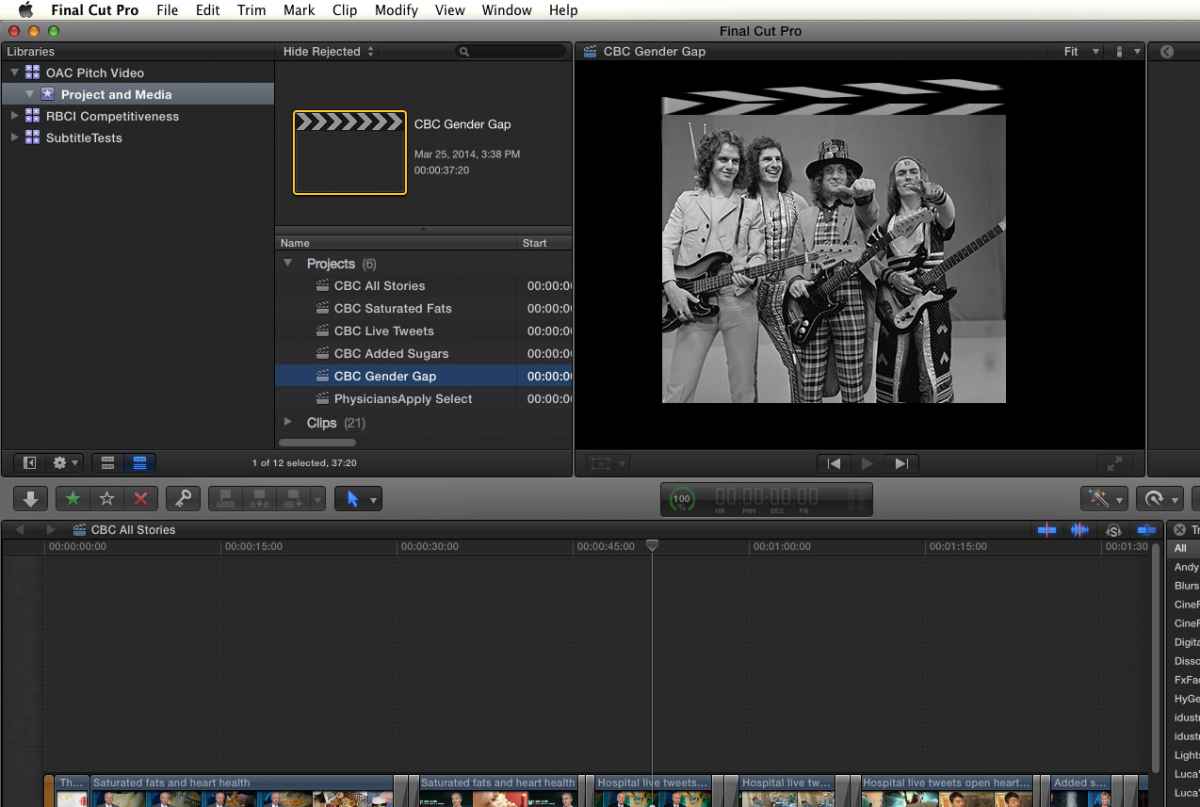
Here is a screenshot of my system when a grey Slade started showing up in the preview window. Odd.
Please Log in to join the conversation.
- Terry Gray
-

- Offline
- New Member
-
Less
More
- Posts: 1
- Thank you received: 0
28 Mar 2014 16:38 - 28 Mar 2014 16:38 #43679
by Terry Gray
Replied by Terry Gray on topic Always stops while editing - showing a slade
This problem popped up for me recently. As others have said, sometimes it can be cleared by clinking into the project, but that has been working less and less lately.
tg
tg
Last edit: 28 Mar 2014 16:38 by Terry Gray.
Please Log in to join the conversation.
28 Mar 2014 23:38 #43702
by mindgap
Replied by mindgap on topic Always stops while editing - showing a slade
Ok, after 4 hours editing today I had no problems with FCPX. Maybe cleaning the preferences helped. Lets have a look in the upcoming days.
Have a great weekend!
Michael
Have a great weekend!
Michael
Please Log in to join the conversation.
- acmeronhickey
-
- Offline
- New Member
-
12 Jun 2014 18:47 #47727
by acmeronhickey
Replied by acmeronhickey on topic Always stops while editing - showing a slade
I have experienced this problem over and over again over the last few days of editing my first project with FCPX 10.1.1.
I've clearly narrowed down how and when it happens. Whenever make a selection in the primary timeline, and the delete the selection, the timeline gets stalled. The viewer shows a slate with the name of the current project, and nothing will make the timeline play again until I skim over the timeline with the mouse so that some piece of video is displayed. If I switch to another program and back again, that also solves the problem. It seems like some kind of odd bug, because I can't really see any benefit to it. Anyone have an idea why it might be happening? Could there be some kind of setting which enables/disables this behavior?
I've clearly narrowed down how and when it happens. Whenever make a selection in the primary timeline, and the delete the selection, the timeline gets stalled. The viewer shows a slate with the name of the current project, and nothing will make the timeline play again until I skim over the timeline with the mouse so that some piece of video is displayed. If I switch to another program and back again, that also solves the problem. It seems like some kind of odd bug, because I can't really see any benefit to it. Anyone have an idea why it might be happening? Could there be some kind of setting which enables/disables this behavior?
Please Log in to join the conversation.

12 Jun 2014 21:29 #47732
by rjvddoes
Replied by rjvddoes on topic Always stops while editing - showing a slade
I have noticed this too and with some experimenting I managed to get around this by selecting "Show Event Viewer" in the "Window" menu.
Please Log in to join the conversation.
