


- Posts: 12
- Thank you received: 0
3 Post Moderation Rule for New Boarders (25 Jan 2021)
New boarders will have their posts moderated - Don't worry if you cannot see your post immediately.
Outputting compound clip troubles
- Villalobos
-
 Topic Author
- Offline
- New Member
-

Less
More
26 Mar 2014 09:15 #43441
by Villalobos
Outputting compound clip troubles was created by Villalobos
So...I'm working on a project and decided to output the beginning couple of minutes to a .mov to show sales dept our progress.
Everything was fantastic except for a couple of black holes in the middle, and the final shot of the project. Trying to understand why these particular clips didn't turn out and seems the only thing they had in common was they were all inserted from a compound clip. Deleted them and replaced with the original clips and they turned out fine.
Any thoughts as to why this may have happened???
To be clear...entire project outputted fine except for three compound clip shots. They appeared as black, even though audio continued underneath the black. All three were from compound clip. Replaced them with originals and everything worked out.
Anyone else have this problem??
Thanks!
Todd - San Diego
Everything was fantastic except for a couple of black holes in the middle, and the final shot of the project. Trying to understand why these particular clips didn't turn out and seems the only thing they had in common was they were all inserted from a compound clip. Deleted them and replaced with the original clips and they turned out fine.
Any thoughts as to why this may have happened???
To be clear...entire project outputted fine except for three compound clip shots. They appeared as black, even though audio continued underneath the black. All three were from compound clip. Replaced them with originals and everything worked out.
Anyone else have this problem??
Thanks!
Todd - San Diego
Please Log in to join the conversation.
- ronny courtens
-

- Offline
- Moderator
-

Less
More
- Posts: 4455
- Thank you received: 962
26 Mar 2014 11:28 #43446
by ronny courtens
Replied by ronny courtens on topic Outputting compound clip troubles
Hi Todd,
Nope, never seen this problem.
Did you actually see the problematic CCs play fine in the timeline before you exported the edit? Just asking this because my first thought is that you could have inserted them into the main edit with "Audio Only" selected. Believe me, this happens to all of us
If the inserted CCs do play perfectly in the main timeline and they all get exported without video I would be very interested to find out why this happens. Could you post two screenshots for me?
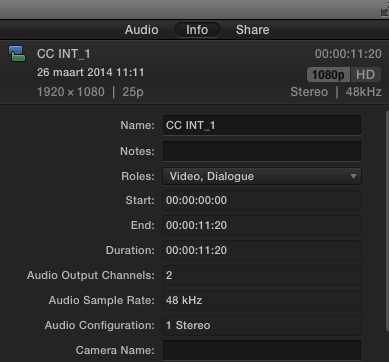
1. Select one of the problematic CCs in the Browser, then go to the Inspector > Info tab and make a screenshot of the settings of the CC. This should look like this:
2. Select the main Project in the Browser, then go to the Inspector > Info tab and make a screenshot of the settings of the Project.
Finally: are there multiple clips inside these CCs, and do you have any effects applied to the clips inside the CCs or to the CC itself?
Thank you
-Ronny
Nope, never seen this problem.
Did you actually see the problematic CCs play fine in the timeline before you exported the edit? Just asking this because my first thought is that you could have inserted them into the main edit with "Audio Only" selected. Believe me, this happens to all of us
If the inserted CCs do play perfectly in the main timeline and they all get exported without video I would be very interested to find out why this happens. Could you post two screenshots for me?
1. Select one of the problematic CCs in the Browser, then go to the Inspector > Info tab and make a screenshot of the settings of the CC. This should look like this:
2. Select the main Project in the Browser, then go to the Inspector > Info tab and make a screenshot of the settings of the Project.
Finally: are there multiple clips inside these CCs, and do you have any effects applied to the clips inside the CCs or to the CC itself?
Thank you
-Ronny
Please Log in to join the conversation.
- Feral Media
-
- Offline
- Junior Member
-

Less
More
- Posts: 31
- Thank you received: 1
26 Mar 2014 14:42 #43463
by Feral Media
Replied by Feral Media on topic Outputting compound clip troubles
I'm having a similar problem. Did you move the project to a different machine for the play out? If so I believe the compound clips might be saved in the temp files of the machine on which they were created. I'm trying to source a fix for this problem as we speak so will let you know when I find one. Good luck!!
Please Log in to join the conversation.
- Villalobos
-
Topic Author
- Offline
- New Member
-
Less
More
- Posts: 12
- Thank you received: 0
26 Mar 2014 18:30 #43490
by Villalobos
Replied by Villalobos on topic Outputting compound clip troubles
Thanks Ronny, Feral
I did not move the clips to a new machine. Evreything was done with the same computer with the clips locally stored.
They were definitely there during playback. Here's the other odd thing. In the entire 2 1/2 minutes or so I think I had 5 different clips on the timeline from the compound clip. There were 4 in a row in the middle of the project, then the final shot of the segment.
During the first output to .mov two clips in the middle and the one at the end were black. So I replaced those clips with the originals. When I re-outputted those clips were fine, but the two compound clips preceding them went black.
I ended up replacing all the clips with the originals and the clip outputted fine. Unfortunately I no longer have them in the timeline to give you a screen shot of them.
Once I get through these two projects, I'll go back and try and replicate and post screen shots. For now I'll just use all originals. Unfortunately I do enjoy using compound clips, but I'll have to learn more about them for next time.
Thanks for your help!
I did not move the clips to a new machine. Evreything was done with the same computer with the clips locally stored.
They were definitely there during playback. Here's the other odd thing. In the entire 2 1/2 minutes or so I think I had 5 different clips on the timeline from the compound clip. There were 4 in a row in the middle of the project, then the final shot of the segment.
During the first output to .mov two clips in the middle and the one at the end were black. So I replaced those clips with the originals. When I re-outputted those clips were fine, but the two compound clips preceding them went black.
I ended up replacing all the clips with the originals and the clip outputted fine. Unfortunately I no longer have them in the timeline to give you a screen shot of them.
Once I get through these two projects, I'll go back and try and replicate and post screen shots. For now I'll just use all originals. Unfortunately I do enjoy using compound clips, but I'll have to learn more about them for next time.
Thanks for your help!
Please Log in to join the conversation.
