


3 Post Moderation Rule for New Boarders (25 Jan 2021)
New boarders will have their posts moderated - Don't worry if you cannot see your post immediately.
Exporting and Project file size
- Starfox
-
 Topic Author
- Offline
- Senior Member
-

- Music, Djing, Music production, fitness. ◄◄ rewind ► play ▌▌pause ■ Stop ►► fast forward

From what i can see to export a project (bounce the project) i go to Share and then either Master file or youtube. I will be using it for youtube but id rather have it on my harddrive as a finished project before I upload it to youtube, anyway why is is so big?
If i choose share via youtube with 1080 settings the final file size will be 10gb, if i choose a master file its 20gb, and why so much smaller when i used FCP 7..
10gb is more appealing but i dont want it uploaded directly to youtube.
What do i do?
Please Log in to join the conversation.
- ronny courtens
-

- Offline
- Moderator
-

- Posts: 4455
- Thank you received: 962
- the length of your edit
- plus the video format you choose for exporting
A master file in FCPX gets exported to ProRes 422 by default. This is a very high-quality master format. A 20 minute 1920x1080 25p program will result in a 20 GB ProRes 422 file:
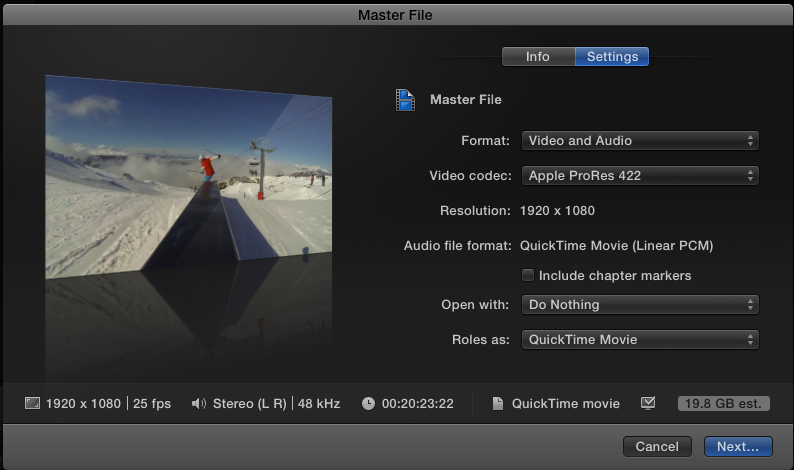
But if your final destination is youtube, and you only want to keep a copy of the finished project for viewing and not for further editing or broadcasting, you don't really need to make a ProRes 422 master file. You can export your program as a high quality H.264 file, which will result in a much smaller file size while maintaining a good picture quality.
Exactly the same 20 minute 1920x1080 25p program will result in a 3 GB file when you share as a master file and you select H.24 as your Video Codec in the Settings tab:
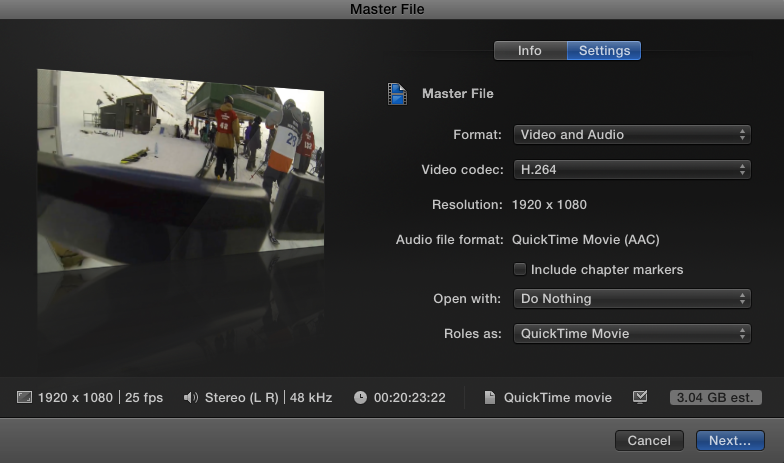
You can then upload this H.264 file to YT or any other platform.
-Ronny
Please Log in to join the conversation.
ronny courtens wrote: The file size of your exported video depends on:
- the length of your edit
- plus the video format you choose for exporting
A master file in FCPX gets exported to ProRes 422 by default. This is a very high-quality master format. A 20 minute 1920x1080 25p program will result in a 20 GB ProRes 422 file:
But if your final destination is youtube, and you only want to keep a copy of the finished project for viewing and not for further editing or broadcasting, you don't really need to make a ProRes 422 master file. You can export your program as a high quality H.264 file, which will result in a much smaller file size while maintaining a good picture quality.
Exactly the same 20 minute 1920x1080 25p program will result in a 3 GB file when you share as a master file and you select H.24 as your Video Codec in the Settings tab:
You can then upload this H.264 file to YT or any other platform.
-Ronny
Thanks Ronny,
I think what I need to do is export this project through compressor. Im not sure exactly what the difference is or how less the quality is but it results in a 2.1 Hour Video being just over 2Gb in size which suits me better.
Please Log in to join the conversation.
- ronny courtens
-
- Offline
- Moderator
-
- Posts: 4455
- Thank you received: 962
If you do want to preserve a high quality master for yourself you could share your FCPX project as a ProRes 422 master file, then bring that master file into Compressor to convert it to a much lower file size for YouTube. You keep the master file as your high quality backup and you send the lower file size video to YouTube.
-Ronny
Please Log in to join the conversation.
ronny courtens wrote: I think the video will be quite compressed if you get such a low file size for a 2 hour video. But if the quality is acceptable for you, then yes this is the way you could proceed.
If you do want to preserve a high quality master for yourself you could share your FCPX project as a ProRes 422 master file, then bring that master file into Compressor to convert it to a much lower file size for YouTube. You keep the master file as your high quality backup and you send the lower file size video to YouTube.
-Ronny
The only problem with the master file is it would probably take to long to process. A 2gb project takes around 12-24 hours on my macbook pro, so a 20gb... I just dont have the time especially when I have regular projects to create
Please Log in to join the conversation.
- ronny courtens
-
- Offline
- Moderator
-
- Posts: 4455
- Thank you received: 962
-Ronny
Please Log in to join the conversation.
ronny courtens wrote: That's a common misunderstanding. Exporting a 2 hour video to a format that only produces a 2 GB file takes a lot of time because of the heavy compressing that your computer has to do. Exporting your FCPX timeline to ProRes 422 will take much, much less time. You should give it a try.
-Ronny
hmm, Ill give it a go and post back the results

Please Log in to join the conversation.
ronny courtens wrote: That's a common misunderstanding. Exporting a 2 hour video to a format that only produces a 2 GB file takes a lot of time because of the heavy compressing that your computer has to do. Exporting your FCPX timeline to ProRes 422 will take much, much less time. You should give it a try.
-Ronny
Actually now that I think of it youtube has a file size limit of 20gb so either way I will need a smaller file size so compressor is the only way for now, that along with my incredible slow broadband and time constraints compressor it is.
Please Log in to join the conversation.
- ronny courtens
-
- Offline
- Moderator
-
- Posts: 4455
- Thank you received: 962
-Ronny
Please Log in to join the conversation.
ronny courtens wrote: That's why I suggested to export a master file out of FCPX and then compress the file to a much lower file size in Compressor. This way you have a high quality master for yourself (which is what you wanted) plus a lower quality file/smaller file you can upload to youtube. Exporting a master file for yourself and converting this master file in Compressor to a lower quality format for Youtube will be much faster that exporting from FCPX via Compressor.
-Ronny
Ok, I will try it this way, thanks for your help
Please Log in to join the conversation.
- ronny courtens
-
- Offline
- Moderator
-
- Posts: 4455
- Thank you received: 962
-Ronny
Please Log in to join the conversation.
ronny courtens wrote: You are welcome, my friend.
-Ronny
So I attempted this and it took about 12 hours to bounce the master file which ended up 3gb instead of the estimated 20+ and its currently bouncing this file in compressor for youtube but the estimated file size is 8+ gb lol.. hmm Im not sure, so all in all the master file is 3gb and if the final compressor file is 8gb its too big and besides all of that it has taken twice the time, so I think I will need to stick with my original way of doing things
The only thing i dont get is if i choose 1080p for render settings my still images wont be pixelated, if i choose 720 they will, but I could choose this 720 render settings in FCP 7 without any pixelation for still images
Please Log in to join the conversation.
- bruno.abreu
-
- Offline
- New Member
-

- Posts: 1
- Thank you received: 0
ronny courtens wrote:
But if your final destination is youtube, and you only want to keep a copy of the finished project for viewing and not for further editing or broadcasting, you don't really need to make a ProRes 422 master file.
-Ronny
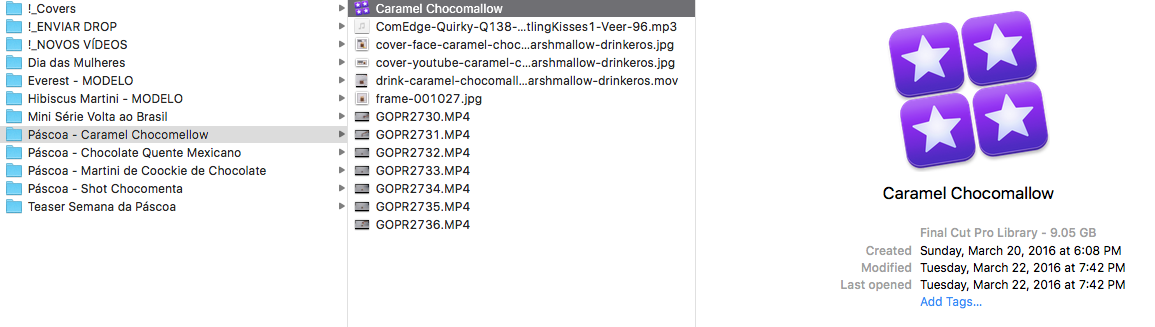
Hey guys.. i'm trying to find something about the FCPX project file.. i'm trying to send to my friend in Chile so he can edit and translate some videos for me.... And when I try to send him the file.. firstval 9gb is too heavy to send.. but is still possible.. he's just downloading my Dropbox link... but when he tries to edit.. i doesnt work.. the file seens to be broken, i dont know... but maybe be i have to make a ProRes 422 master file so he can open over there and edit the file.. is it right ??
Can some one help me with this please ?
I attached a print screen so you can can understand how i'm saving files.. i keep everything i use in my librery for the video in the same folder... i tried even zip this folder but whe he unzips the file and opens in FCPX.. does not work..

i really need help with this.. thanks a lot guys!!!
Please Log in to join the conversation.
- ronny courtens
-
- Offline
- Moderator
-
- Posts: 4455
- Thank you received: 962
If you want to send a complete FCP X Library, including all the media, then yes you need to ZIP the Library file first. Your friend needs to download the zipped Library, un-zip it and put it on an external drive or in his Movies folder. Then he can open the Library. He never should try to open the Library file inside DropBox.
In order to find out why your friend cannot work with the Library file you have sent him, we first should know what exactly happens when he tries to open the file. Does FCP X launch when he double-clicks the Library to open it? Does he get an error message? Are you sure you both have the same version of FCP X?
- Ronny
Please Log in to join the conversation.


Starfox wrote: ...master file which ended up 3gb instead of the estimated 20+ and its currently bouncing this file in compressor for youtube but the estimated file size is 8+ gb lol.. hmm Im not sure, so all in all the master file is 3gb and if the final compressor file is 8gb its too big and besides all of that it has taken twice the time, so I think I will need to stick with my original way of doing things....
The Youtube recommended bitrate for 1080p/30 is 8 megabits/sec:
support.google.com/youtube/answer/1722171?hl=en
Your video is 2.1 hours, right? That equates to 7.56GB. At any decent bitrate, your export file size is going to be pretty big using H264, which is generally your best upload option.
Using 720p will cut that considerably, yet the resolution is still pretty good, esp. on mobile devices and smaller monitors. Most customers don't notice the difference, in fact everything ABC, Fox and ESPN broadcasts is 720p. Using 720p at Youtube's recommended 5 megabit/sec encoding would produce a 4.7GB file for 2.1 hours. Using Compressor you could further cut the bitrate but that increasingly impacts image quality.
Eventually we will have H265 which will reduce that by 1/2, but FCPX nor Youtube support that yet.
In general I prefer exporting from FCPX straight to H264 720p/30 for examination before uploading to Youtube. If I need more control over export parameters I send it from FCPX to Compressor. As Ronnie says it is a good practice to have a ProRes "safety" copy of the final project. However maybe you don't have the time, you're confident of your backups and this project has a short shelf life. You can have Compressor create multiple versions of the same project in one batch. So it can do a 720p H264 version for upload and also do a 1080p ProRes version.
Starfox wrote: ...The only thing i dont get is if i choose 1080p for render settings my still images wont be pixelated, if i choose 720 they will, but I could choose this 720 render settings in FCP 7 without any pixelation for still images
720p should not be pixelated. If this is from Compressor you may be unintentionally doing something else to degrade the image. You can examine the characteristics of the exported file with MediaInfo (free): mediaarea.net/en/MediaInfo or Invisor: itunes.apple.com/us/app/invisor-media-fi...or/id442947586?mt=12
Please Log in to join the conversation.
