


- Posts: 2
- Thank you received: 0
3 Post Moderation Rule for New Boarders (25 Jan 2021)
New boarders will have their posts moderated - Don't worry if you cannot see your post immediately.
Only Full Overlap Transitions
03 Nov 2011 18:20 #1974
by KLNGNBRG
Only Full Overlap Transitions was created by KLNGNBRG
Hi guys
I have quick question.
Ever since I upgraded to 10.0.1 my transitions behave really strange.
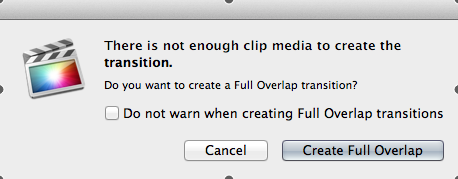
I keep receiving the alert " There is not enough clip media to create the transition" even though I'm just trying to insert a normal dissolve trans. between to 10 sec. clips.
It's like there is no consistency between when I receive the alert - sometimes I'm allowed to use all the transitions I want even between ultra short clips and other times (with longer sequences) I'm not allowed without creating a full overlap.
I did make sure that the Transitions are set to use available media in the preference box.
Any ideas?
I have quick question.
Ever since I upgraded to 10.0.1 my transitions behave really strange.
I keep receiving the alert " There is not enough clip media to create the transition" even though I'm just trying to insert a normal dissolve trans. between to 10 sec. clips.
It's like there is no consistency between when I receive the alert - sometimes I'm allowed to use all the transitions I want even between ultra short clips and other times (with longer sequences) I'm not allowed without creating a full overlap.
I did make sure that the Transitions are set to use available media in the preference box.
Any ideas?
Please Log in to join the conversation.

03 Nov 2011 18:53 #1976
by BenB
Replied by BenB on topic Re: Only Full Overlap Transitions
That is because it's true, you do not have enough physical media for the transition. It's what we call "handles".
When you drop a transition in, let's say it's 1 second long. FCP has to take 1/2 second of hidden, unused media from the tail of the first clip, and 1/2 second of unused, hidden media from the second clip, in order to do the Cross Fade between them. It can't just make up frames of video that physically do not exist.
So, click the Create Overlap button, and it will "pull" your second clip to the left far enough to give it the extra media it needs to do the Cross Fade.
When you are doing an edit, and you know you will be using transitions, you need to set In/Out points (FCP 7 talk), or select a Range (FCP X talk) that leaves enough UNUSED media at the head and tail of the clip, for FCP to use for the fade in and fade out in transitions.
This is true of any NLE.
When you get this warning, cancel it, and then double click the Edit Point to open it into the Precession Editor. You will see the Overlap, or lack there of.
In fact I'll be posting an animation that illustrates this today. I'll post a link here.
When you drop a transition in, let's say it's 1 second long. FCP has to take 1/2 second of hidden, unused media from the tail of the first clip, and 1/2 second of unused, hidden media from the second clip, in order to do the Cross Fade between them. It can't just make up frames of video that physically do not exist.
So, click the Create Overlap button, and it will "pull" your second clip to the left far enough to give it the extra media it needs to do the Cross Fade.
When you are doing an edit, and you know you will be using transitions, you need to set In/Out points (FCP 7 talk), or select a Range (FCP X talk) that leaves enough UNUSED media at the head and tail of the clip, for FCP to use for the fade in and fade out in transitions.
This is true of any NLE.
When you get this warning, cancel it, and then double click the Edit Point to open it into the Precession Editor. You will see the Overlap, or lack there of.
In fact I'll be posting an animation that illustrates this today. I'll post a link here.
Please Log in to join the conversation.
03 Nov 2011 18:59 #1977
by KLNGNBRG
Replied by KLNGNBRG on topic Re: Only Full Overlap Transitions
Thanks so much for the quick answer!
looking forward to a quick and dirty animation of it
looking forward to a quick and dirty animation of it
Please Log in to join the conversation.
03 Nov 2011 19:07 #1979
by BenB
Replied by BenB on topic Re: Only Full Overlap Transitions
Oh, you can go into the FCP X preferences window, in the Editing tab, and change "Apply transitions using" to automatically do Overlap, or not. I'd keep it on "Available Media", cause I want to know before hand if I have to ripple my timeline to do a transition.
Please Log in to join the conversation.
